Best RTX 5090 Gaming Laptops: 15 Spec-Based Picks
As an Amazon Associate we earn from qualifying purchases. Links on this page are affiliate links.
Finding the best RTX 5090 gaming laptops requires matching raw GPU power to your specific needs. We compared 15 models based strictly on their published specifications. The ASUS ROG Strix Scar 18 leads this list because it pairs a high-wattage RTX 5090 with a 240Hz Mini LED display. This combination delivers the highest visual fidelity for large-screen gaming. Every pick here is chosen for its specific hardware strengths. Use this guide to decide which chassis, screen, and memory configuration fits your desk setup.
Our top pick: ASUS ROG Strix Scar 18 RTX 5090 Gaming Laptop.
Quick picks
The best fit for you
- You want the best overall large-screen experience ASUS ROG Strix Scar 18 RTX 5090 Gaming Laptop It features a 240Hz Mini LED display for high-refresh gaming.
- You need the most portable RTX 5090 laptop MSI Stealth A16 AI+ 16" OLED RTX 5090 Laptop It weighs only 4.63 pounds with a 0.79-inch chassis.
- You require massive storage for heavy multitasking MSI Titan 18 HX 18" RTX 5090 Gaming Laptop It includes 4TB SSD storage and 64GB of DDR5 memory.
- You want a dual-screen setup for productivity ASUS ROG Zephyrus Duo 16 Dual-Screen RTX 5090 It offers two 3K OLED panels for unmatched multitasking utility.
Our 15 picks

ASUS ROG Strix Scar 18 RTX 5090 Gaming Laptop
Best for: large-screen high-refresh Mini LED gaming
- Graphics Card
- RTX 5090 (what this guide is about)
- Processor
- Intel Core Ultra 9 275HX
- Memory
- 32GB DDR5
- Storage Capacity
- 2TB PCIe Gen 4 SSD
- Screen Size
- 18"
- Refresh Rate
- 240Hz
View on Amazon: ASUS ROG Strix Scar 18 RTX 5090 Gaming Laptop
The ASUS ROG Strix SCAR 18 RTX 5090 is an 18-inch desktop-replacement gaming laptop built for maximum graphical throughput. You get an Intel Core Ultra 9 275HX processor, a 175W TGP GeForce RTX 5090 graphics card, and 32GB of DDR5 memory. Its 2.5K 240Hz Mini LED display provides 2,000+ dimming zones with 100% DCI-P3 coverage. It suits users who prioritize screen size and sustained power over travel portability.
Pros
- GeForce RTX 5090 laptop GPU running at 175W maximum TGP
- 18-inch 2.5K 240Hz Mini LED display with 2,000+ dimming zones
- Tool-free access latch for memory, storage, and fan maintenance
- Tri-fan vapor chamber cooling with liquid metal on chipset
Cons
- Weighs 6.28 pounds without power accessories
- Includes 32GB RAM rather than 64GB configuration
Good fit if
- You want a large 18-inch Mini LED display with high refresh rates.
- You run GPU-intensive games requiring a full 175W TGP limit.
- You need tool-free internal access to easily service components.
Skip if
- You require a lightweight machine built for frequent travel.
- You need 64GB of system memory preinstalled out of the box.
Verdict: ASUS ROG Strix SCAR 18 RTX 5090 pairs a high-wattage GPU with an expansive 240Hz Mini LED panel for heavy gaming. It serves as a dedicated desktop substitute where desk space matters more than carrying weight.

Dell Alienware 18 Area-51 RTX 5090 Laptop
Best for: desktop replacement gaming with an 18-inch display
- Graphics Card
- RTX 5090 (what this guide is about)
- Processor
- Intel Ultra 9 275HX
- Memory
- 64GB DDR5
- Storage Capacity
- 2TB PCIe SSD
- Screen Size
- 18"
- Display Resolution
- 2.5K WQXGA
The Dell Alienware 18 RTX 5090 Gaming Laptop gives you a large desktop-replacement build. It pairs an Intel Ultra 9 275HX processor with an RTX 5090 graphics card, 64GB of DDR5 memory, and 2TB of solid-state storage. The system outputs to an 18-inch 2.5K WQXGA anti-glare display. This setup fits you if you want maximum screen space and high-end hardware without moving your laptop often.
Pros
- GeForce RTX 5090 graphics card with DLSS 4 support
- Intel Ultra 9 275HX processor and 64GB DDR5 RAM
- Large 18-inch 2.5K WQXGA anti-glare display
- Spacious 2TB PCIe solid-state storage
Cons
- Heavy 9.56-pound chassis limits portability
- Display resolution tops out at 2.5K WQXGA
Good fit if
- You want an expansive 18-inch display for gaming at a stationary desk.
- You need 64GB of DDR5 memory and 2TB of storage out of the box.
- You prioritize top-tier RTX 5090 graphics performance.
Skip if
- You travel frequently and cannot manage a 9.56-pound laptop.
- You prefer a 4K or UHD+ screen resolution over 2.5K.
Verdict: Dell Alienware 18 RTX 5090 Gaming Laptop delivers massive screen area and high-tier hardware for your stationary setup. Its heavy 9.56-pound chassis makes it best suited as a dedicated desktop replacement.

MSI Titan 18 HX 18" RTX 5090 Gaming Laptop
Best for: desktop replacement gaming with massive storage
- Graphics Card
- RTX 5090 (what this guide is about)
- Processor
- Intel Ultra 9-290HX
- Memory
- 64GB DDR5
- Storage Capacity
- 4TB NVMe SSD
- Screen Size
- 18"
- Refresh Rate
- 240Hz
The MSI Titan 18 HX pairs an NVIDIA GeForce RTX 5090 graphics card with an Intel Ultra 9-290HX processor and 64GB of DDR5 memory. Its 18-inch 4K UHD Mini LED panel runs at a 240Hz refresh rate, backed by a 4TB NVMe SSD and Wi-Fi 7 connectivity. This machine suits you if you need desktop-grade processing speed, high-resolution visuals, and extensive onboard storage for demanding computing.
Pros
- 18-inch 4K UHD Mini LED display with 240Hz refresh rate
- NVIDIA GeForce RTX 5090 GPU and Intel Ultra 9-290HX CPU
- 4TB NVMe SSD storage paired with 64GB DDR5 RAM
- Wi-Fi 7 wireless connectivity
Cons
- Heavy chassis weighing 7.93 pounds
- Thick profile measuring 1.26 inches
Good fit if
- You want a high-resolution 4K Mini LED display with a 240Hz refresh rate.
- You need 4TB of built-in NVMe storage and 64GB of DDR5 RAM.
- You prioritize maximum hardware capabilities over portability.
Skip if
- You need a lightweight laptop for frequent travel.
- You prefer a more compact 16-inch chassis.
Verdict: MSI Titan 18 HX 18-Inch RTX 5090 delivers high-end performance with its 4K 240Hz Mini LED panel, massive 4TB SSD, and 64GB of DDR5 memory. Its 7.93-pound weight makes it best suited as a dedicated desktop replacement.

Lenovo Legion Pro 7i 16" RTX 5090 Laptop
Best for: high-end 16-inch OLED gaming and multitasking
- Graphics Card
- RTX 5090 (what this guide is about)
- Processor
- Intel Core Ultra 9 275HX
- Memory
- 64GB RAM
- Storage Capacity
- 2TB NVMe SSD
- Screen Size
- 16"
- Refresh Rate
- 240Hz
The Lenovo Legion Pro 7i pairs an Intel Ultra 9 275HX 24-core processor with an RTX 5090 graphics card and a 16-inch OLED panel. You get 64GB of RAM and a 2TB SSD for storage. This build suits you if you run memory-heavy workloads and want desktop-class gaming hardware paired with an OLED display in a single portable machine.
Pros
- Intel Ultra 9 275HX 24-core processor with up to 5.4GHz boost clock
- RTX 5090 graphics card
- 64GB RAM and 2TB SSD capacity
- 16-inch OLED display panel
Cons
- Heavy listed weight at 10.8 pounds
- Thick listed profile at 3.25 inches
Good fit if
- You need 64GB of memory and a 2TB SSD ready out of the box.
- You want a 16-inch OLED screen combined with an RTX 5090 GPU.
- You run processor-heavy tasks that use 24 CPU cores.
Skip if
- You want a lightweight laptop for frequent travel.
- You prefer an 18-inch display format.
Verdict: Lenovo Legion Pro 7i 16" OLED RTX 5090 delivers top-tier graphics, a 24-core Intel Ultra 9 processor, and generous 64GB memory on a 16-inch OLED screen. It gives you massive computing power if portability is not your primary concern.

ASUS ROG Zephyrus Duo 16 Dual-Screen RTX 5090
Best for: dual-screen multitasking and mobile workstation gaming
- Graphics Card
- RTX 5090 (what this guide is about)
- Processor
- Intel Core Ultra 9 386H
- Memory
- 32GB LPDDR5X
- Storage Capacity
- 1TB PCIe 4.0 SSD
- Screen Size
- 16"
- Refresh Rate
- 120Hz
View on Amazon: ASUS ROG Zephyrus Duo 16 Dual-Screen RTX 5090
The ASUS ROG Zephyrus Duo 16 pairs an NVIDIA GeForce RTX 5090 GPU with an Intel Core Ultra 9 386H processor. It features two 16-inch 3K 120Hz OLED touchscreens and a detachable magnetic keyboard. You get 32GB of LPDDR5X memory and a 1TB PCIe 4.0 SSD for storage. This setup suits you if you need multi-window workflows, mobile dual-screen productivity, and high-end graphics performance in a single portable workstation chassis.
Pros
- Dual 16-inch 3K OLED touchscreens with 120Hz refresh rate
- NVIDIA GeForce RTX 5090 and 16-core Intel Core Ultra 9 386H processor
- Detachable magnetic keyboard supporting five physical usage modes
- Dual Thunderbolt 4 ports for external connectivity
Cons
- 1TB storage capacity is smaller than standard 2TB configurations in this class
- 120Hz display refresh rate is lower than 240Hz alternative panels
- Total machine weight reaches 6.22 pounds
Good fit if
- You want two full 16-inch OLED displays for multi-app work and streaming.
- You need five versatile form factors including tent, book, and dual-screen modes.
- You want an RTX 5090 laptop with a detachable magnetic keyboard.
Skip if
- You require more than 1TB of factory internal storage out of the box.
- You prefer panel refresh rates higher than 120Hz for fast-paced titles.
- You want a machine lighter than 6.22 pounds for daily travel.
Verdict: ASUS ROG Zephyrus Duo 16 Dual-Screen RTX 5090 delivers unmatched multitasking flexibility with its dual 3K OLED panels and detachable keyboard. It trades ultra-high refresh rates and larger factory storage for secondary-screen utility.

ASUS ROG Strix SCAR 16 RTX 5090 Gaming Laptop
Best for: 16-inch high-refresh Mini LED gaming
- Graphics Card
- RTX 5090 (what this guide is about)
- Processor
- Intel Core Ultra 9 275HX
- Memory
- 32GB DDR5
- Storage Capacity
- 2TB PCIe Gen 4 SSD
- Screen Size
- 16"
- Refresh Rate
- 240Hz
View on Amazon: ASUS ROG Strix SCAR 16 RTX 5090 Gaming Laptop
The ASUS ROG Strix SCAR 16 pairs an NVIDIA GeForce RTX 5090 GPU with an Intel Core Ultra 9 275HX processor. You get a 16-inch 2.5K Mini LED display featuring a 240Hz refresh rate and over 2,000 dimming zones. It includes 32GB of DDR5 memory, a 2TB Gen 4 SSD, and tool-free internal access. This machine suits you if you need top-tier graphics hardware in a 16-inch form factor.
Pros
- 2.5K 240Hz Mini LED panel with 2,000+ dimming zones
- Tool-free chassis latch for RAM and SSD upgrades
- Vapor chamber cooling with liquid metal and tri-fan setup
- 2TB PCIe Gen 4 SSD rated up to 7,000MB/s
Cons
- Weight of 6.28 pounds limits portability
- Comes with 32GB RAM rather than 64GB
Good fit if
- You want a high-refresh 240Hz Mini LED display for gaming.
- You plan to service or upgrade storage and memory without tools.
- You need an RTX 5090 GPU inside a 16-inch chassis.
Skip if
- You want a lightweight machine under six pounds for travel.
- You require 64GB of factory-installed system memory.
Verdict: ASUS ROG Strix SCAR 16 RTX 5090 pairs top-tier GPU performance with a fast 2.5K Mini LED display. It provides easy internal expansion via a tool-free latch despite its 6.28-pound weight.

HP OMEN Max 16 RTX 5090 Gaming Laptop
Best for: High-capacity storage and OLED gaming
- Graphics Card
- RTX 5090 (what this guide is about)
- Processor
- Intel Core Ultra 9 290HX Plus
- Memory
- 64GB DDR5
- Storage Capacity
- 4TB SSD
- Screen Size
- 16"
- Refresh Rate
- 240Hz
This HP OMEN Max 16 combines an RTX 5090 graphics card with an Intel Core Ultra 9 290HX Plus processor. You get a 16-inch 240Hz WQXGA OLED screen, 64GB of DDR5 memory, and 4TB of SSD storage. Physical connectivity features two USB-C ports, two USB-A ports, HDMI 2.1, and Ethernet. The build suits you if you demand massive onboard storage alongside top-tier graphical power.
Pros
- RTX 5090 GPU with 24GB GDDR7 VRAM
- Generous 4TB SSD storage capacity
- 16-inch 240Hz WQXGA OLED screen with 500 nits brightness
- Intel Core Ultra 9 290HX Plus 24-core processor
Cons
- Heavy weight at 6.56 pounds
- Thick 1.13-inch profile
- No memory card slot listed
Good fit if
- You need 4TB of built-in storage for large project files and games.
- You want a 240Hz WQXGA OLED display with 100% sRGB coverage.
- You require 64GB of DDR5 RAM for heavy multitasking.
Skip if
- You need a lightweight laptop for frequent portable use.
- You prefer a slim chassis thinner than one inch.
Verdict: HP OMEN Max 16 RTX 5090 Gaming Laptop delivers massive 4TB storage, 64GB of DDR5 RAM, and a 240Hz OLED screen in a heavy 6.56-pound chassis.

Razer Blade 18 RTX 5090 Gaming Laptop
Best for: desktop-replacement gaming with dual-mode display switching
- Graphics Card
- RTX 5090 (what this guide is about)
- Processor
- Intel Core Ultra 9 290HX
- Memory
- 64GB DDR5-6400
- Storage Capacity
- 2TB
- Screen Size
- 18"
- Refresh Rate
- 240Hz / 440Hz
The Razer Blade 18 pairs an Intel Core Ultra 9 290HX processor with an RTX 5090 laptop GPU running at up to 200W. Its standout feature is an 18-inch dual-mode display that switches between UHD+ at 240Hz and FHD+ at 440Hz. With 64GB of DDR5-6400 memory and 2TB of storage, this machine suits you if you need desktop-class performance and flexible display modes in a portable unibody form factor.
Pros
- Dual-mode 18-inch display toggles between UHD+ at 240Hz and FHD+ at 440Hz
- RTX 5090 GPU with 24GB GDDR7 and 175W base TGP plus 25W Dynamic Boost
- Preinstalled 64GB DDR5-6400 RAM with support for up to 128GB
- Thunderbolt 5 and Thunderbolt 4 connectivity with 2.5Gb Ethernet
Cons
- Substantial 7.06-pound weight limits everyday portability
- Large 18-inch chassis requires a deep desk and an oversized carrying bag
Good fit if
- You want the flexibility to switch between 4K resolution at 240Hz and FHD at 440Hz.
- You need heavy multitasking throughput with 64GB of fast DDR5 memory and up to 128GB support.
- You plan to run multi-monitor setups or high-speed peripherals via Thunderbolt 5.
Skip if
- You need a lightweight laptop for frequent travel, as this unit weighs 7.06 pounds.
- You prefer a compact 16-inch footprint for smaller desks.
Verdict: Razer Blade 18 RTX 5090 Gaming Laptop delivers exceptional desktop-level throughput and display versatility with its switchable UHD+ and FHD+ panel. It is a capable choice if you want massive visual workspace and top-tier GPU power in an aluminum unibody build.

ASUS ROG Strix G18 18" RTX 5080 Laptop
Best for: desktop replacement gaming
- Graphics Card
- RTX 5090 (what this guide is about)
- Processor
- Intel Core Ultra 9 275HX
- Memory
- 128GB DDR5
- Storage Capacity
- 8TB SSD
- Screen Size
- 18
- Refresh Rate
- 240Hz
The ASUS ROG Strix G18 pairs an Intel Core Ultra 9 275HX processor with an NVIDIA GeForce RTX 5090 Laptop GPU for high-end gaming. It features an 18-inch 2.5K 240Hz display and 128GB DDR5 RAM. This 18-inch model offers extensive storage options and robust cooling. It suits players who prioritize screen real estate and raw performance over portability.
Pros
- Intel Core Ultra 9 275HX with 24 cores
- NVIDIA GeForce RTX 5090 with 16GB GDDR7
- 18-inch 2.5K 240Hz ROG Nebula display
- 128GB DDR5-5600 RAM for heavy multitasking
- Dual Thunderbolt 5 and Wi-Fi 7
Cons
- Weighs 7.54 pounds, making it heavy to carry
- 1.26 inches thick, limiting portability
- 7.54-pound build feels bulky for travel
Good fit if
- You want an 18-inch screen for immersive gaming
- You need high RAM capacity for streaming
- You prioritize raw GPU power over weight
Skip if
- You prefer a lightweight laptop for daily carry
- You want a smaller 16-inch display
- You need a thinner profile for bag space
Verdict: ASUS ROG Strix G18 RTX 5090 delivers top-tier specs for stationary gaming setups. It fits users who value large screens and maximum performance without needing portability.

Razer Blade 16 RTX 5090 32GB
Best for: Portable RTX 5090 gaming and OLED creation
- Graphics Card
- RTX 5090 (what this guide is about)
- Processor
- Intel Core Ultra 9 386H
- Memory
- 32GB LPDDR5X 9600MHz
- Storage Capacity
- 2TB PCIe 4.0 SSD
- Screen Size
- 16"
- Refresh Rate
- 240Hz
The Razer Blade 16 delivers RTX 5090 performance in a 14.9 mm CNC aluminum chassis. It pairs an Intel Core Ultra 9 386H with 32GB of non-upgradeable LPDDR5X memory and a 2TB SSD. The 16-inch QHD+ OLED screen offers 240Hz refresh and 100% DCI-P3 color. You get Thunderbolt 5 and Wi-Fi 7 for future connectivity. It suits users who prioritize a thin, portable build with flagship graphics.
Pros
- RTX 5090 with 24GB GDDR7 memory
- 16-inch 240Hz QHD+ OLED display
- 14.9 mm ultra-thin aluminum design
- Intel Core Ultra 9 386H processor
- Thunderbolt 5 and Wi-Fi 7 support
Cons
- 32GB RAM is not upgradeable
- Heavier than typical 16-inch ultrabooks
- Limited to 16-inch screen size
Good fit if
- You need flagship RTX 5090 graphics in a portable form factor
- You prioritize high-quality OLED color accuracy for content creation
- You want modern connectivity like Thunderbolt 5 and Wi-Fi 7
Skip if
- You require upgradeable RAM beyond 32GB
- You prefer a larger 18-inch display for immersion
- You need maximum battery life over raw power
Verdict: Razer Blade 16 RTX 5090 32GB is a compact powerhouse for travelers who need top-tier RTX 5090 performance without carrying a bulky brick. It fits creators who value the OLED panel and thin chassis over expandability.

MSI Stealth A16 AI+ 16" OLED RTX 5090 Laptop
Best for: portable high-refresh OLED gaming
- Graphics Card
- RTX 5090 (what this guide is about)
- Processor
- AMD Ryzen AI 9 HX 370
- Memory
- 64GB DDR5
- Storage Capacity
- 2TB NVMe SSD
- Screen Size
- 16"
- Refresh Rate
- 240Hz
View on Amazon: MSI Stealth A16 AI+ 16" OLED RTX 5090 Laptop
This 16-inch gaming laptop combines an NVIDIA GeForce RTX 5090 GPU with an AMD Ryzen AI 9 HX 370 processor and 64GB DDR5 memory. You get a 240Hz QHD+ OLED display, 2TB NVMe SSD storage, and Wi-Fi 7 in a 4.63-pound chassis measuring 0.79 inches thick. It suits you if you need top-tier GPU performance paired with a fast OLED panel for portable gaming.
Pros
- NVIDIA GeForce RTX 5090 Laptop GPU with 64GB DDR5 RAM
- 16-inch 240Hz QHD+ OLED panel
- AMD Ryzen AI 9 HX 370 processor with over 50 NPU TOPS
- Slim 0.79-inch profile weighing 4.63 pounds
- Wi-Fi 7 connectivity and 2TB NVMe SSD
Cons
- Display capped at QHD+ resolution rather than UHD+
- No touchscreen or dual-display functionality
Good fit if
- You want a 240Hz OLED display with an RTX 5090.
- You need a portable 4.63-pound chassis that is 0.79 inches thick.
- You require 64GB DDR5 memory and 2TB NVMe storage.
Skip if
- You prefer an 18-inch screen for a larger desktop setup.
- You require a UHD+ display resolution.
Verdict: MSI Stealth A16 AI+ 16" OLED RTX 5090 Laptop pairs flagship GPU power with a high-speed OLED display in a thin chassis. It provides portable performance without the heft of an 18-inch desktop replacement.

MSI Stealth 18 HX 18" 4K Mini LED Laptop
Best for: 4K Mini LED gaming and heavy multitasking
- Graphics Card
- RTX 5090 (what this guide is about)
- Processor
- Intel Ultra 9-275HX
- Memory
- 64GB DDR5
- Storage Capacity
- 2TB NVMe SSD
- Screen Size
- 18"
- Refresh Rate
- 120Hz
The MSI Stealth 18 combines an Intel Core Ultra 9-275HX processor with an NVIDIA GeForce RTX 5090 GPU and 64GB of DDR5 memory. You get an 18-inch UHD+ Mini LED display that delivers high resolution for detailed visuals, paired with a 2TB NVMe SSD for storage. It suits you if you need workstation-grade memory and top-tier graphical power inside an 18-inch chassis featuring Wi-Fi 7 and Windows 11 Pro.
Pros
- NVIDIA GeForce RTX 5090 with 64GB DDR5 RAM
- 18-inch UHD+ Mini LED display
- Intel Core Ultra 9-275HX processor
- 2TB NVMe SSD storage
- Wi-Fi 7 wireless connectivity
Cons
- Display refresh rate is limited to 120Hz
- Total weight is 6.39 pounds
Good fit if
- You prioritize a high-resolution 4K UHD+ Mini LED screen over faster refresh rates.
- You need 64GB of DDR5 RAM and 2TB of NVMe SSD storage out of the box.
- You want an Intel Core Ultra 9-275HX paired with an RTX 5090 GPU.
Skip if
- You prefer a refresh rate higher than 120Hz for competitive gaming.
- You want a machine lighter than 6.39 pounds for mobile use.
Verdict: MSI Stealth 18 4K Mini LED Gaming Laptop pairs flagship RTX 5090 graphics with a detailed UHD+ screen and 64GB of RAM. It provides expansive memory and ultra-high-resolution output for visually intensive workloads.
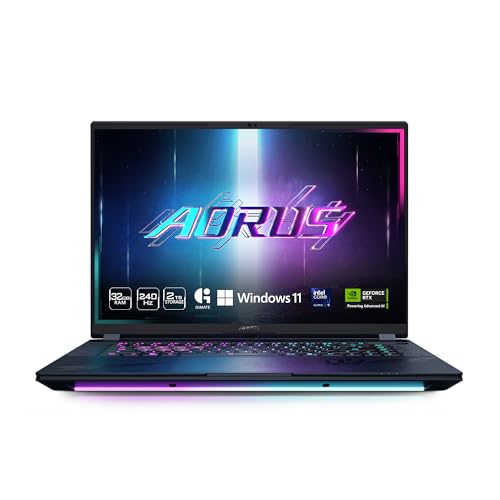
GIGABYTE AORUS Master 16 RTX 5090 Gaming Laptop
Best for: High-refresh 16-inch Blackwell gaming setups
- Graphics Card
- RTX 5090 (what this guide is about)
- Processor
- Intel Core Ultra 9 275HX
- Memory
- 32GB DDR5
- Storage Capacity
- 2TB SSD
- Screen Size
- 16"
- Refresh Rate
- 240Hz
View on Amazon: GIGABYTE AORUS Master 16 RTX 5090 Gaming Laptop
The GIGABYTE AORUS Master 16 pairs an Intel Core Ultra 9 275HX processor with an NVIDIA GeForce RTX 5090 Laptop GPU. You get 32GB of DDR5 memory, a 2TB solid-state drive, and a 16-inch display with a 240Hz refresh rate. It weighs 5.52 pounds and runs Windows 11 Home. This machine fits you if you want flagship Blackwell graphics performance and fast refresh rates in a portable 16-inch chassis.
Pros
- NVIDIA GeForce RTX 5090 Laptop GPU with DLSS 4 support
- Intel Core Ultra 9 275HX processor with integrated NPU
- 16-inch panel with a 240Hz refresh rate
- 2TB onboard storage paired with 32GB DDR5 RAM
Cons
- Ships with 32GB RAM rather than 64GB found in larger tier models
- Chassis thickness reaches 1.18 inches at 5.52 pounds
- Comes with Windows 11 Home rather than Pro
Good fit if
- You need an RTX 5090 GPU alongside a 240Hz display for competitive frame rates.
- You want 2TB of factory storage out of the box.
- You run AI-assisted tasks that leverage the Core Ultra 9 NPU.
Skip if
- You need 64GB of preinstalled memory for extreme workloads.
- You prefer an ultra-thin laptop lighter than 5.52 pounds.
Verdict: GIGABYTE AORUS Master 16 RTX 5090 delivers top-tier Blackwell graphics and a 240Hz display in a 16-inch footprint. It offers 2TB of storage and a strong Core Ultra 9 processor for high-end play.

Razer Blade 16 RTX 5090 OLED Gaming Laptop
Best for: portable high-refresh OLED gaming and AI workflows
- Graphics Card
- RTX 5090 (what this guide is about)
- Processor
- AMD Ryzen AI 9 HX 370
- Memory
- 32GB DDR5
- Storage Capacity
- 2TB
- Screen Size
- 16"
- Refresh Rate
- 240Hz
The Razer Blade 16 gives you an NVIDIA GeForce RTX 5090 GPU running up to 160W TGP inside an aluminum unibody that measures 0.59 inches thin. It pairs a 12-core AMD Ryzen AI 9 HX 370 processor with 32GB of 8000MHz LPDDR5X memory and a 2TB drive. This setup suits you if you need top-tier graphics performance and a 240Hz QHD+ OLED display in a portable 4.72-pound build.
Pros
- NVIDIA GeForce RTX 5090 GPU running up to 160W TGP
- 16-inch QHD+ 240Hz OLED screen with 2ms response time
- Thin 0.59-inch aluminum unibody chassis weighing 4.72 pounds
- AMD Ryzen AI 9 HX 370 CPU with 50 TOPS NPU
- Fast 32GB 8000MHz LPDDR5X memory and 2TB storage
Cons
- 160W GPU power limit sits lower than bulkier chassis designs
- System memory is fixed at 32GB on this configuration
Good fit if
- You want an RTX 5090 GPU inside a slim 0.59-inch profile.
- You prioritize a 240Hz QHD+ OLED panel for high frame rates and color precision.
- You need 2TB of built-in storage in a portable 4.72-pound build.
Skip if
- You need more than 32GB of system memory for your workload.
- You want maximum GPU wattage without thermal or chassis thickness constraints.
Verdict: Razer Blade 16 RTX 5090 Gaming Laptop packs flagship graphics and a fast 240Hz OLED display into a compact aluminum frame. It gives you top-tier hardware without the bulk typical of high-end desktop replacements.

GIGABYTE AORUS Master 18 RTX 5090 Gaming Laptop
Best for: desktop replacement setups and high-refresh gaming
- Graphics Card
- RTX 5090 (what this guide is about)
- Processor
- Intel Core Ultra 9 275HX
- Memory
- 64GB DDR5
- Storage Capacity
- 2TB SSD
- Screen Size
- 18"
- Refresh Rate
- 240Hz
View on Amazon: GIGABYTE AORUS Master 18 RTX 5090 Gaming Laptop
The GIGABYTE AORUS Master 18 is a large-format gaming laptop built around an NVIDIA GeForce RTX 5090 GPU and an Intel Core Ultra 9 275HX processor. You get 64GB of DDR5 memory, a 2TB drive, and an 18-inch 240Hz panel. This machine suits you if you prioritize maximum display area and high-end multitasking capacity over travel convenience, providing substantial internal hardware for demanding graphics workloads and high-refresh-rate gaming.
Pros
- NVIDIA GeForce RTX 5090 Laptop GPU with DLSS 4 support
- Intel Core Ultra 9 275HX processor with integrated NPU
- 64GB DDR5 memory paired with 2TB storage capacity
- Expansive 18-inch screen with 240Hz refresh rate
Cons
- Heavy 7.72-pound weight limits everyday portability
- Thick 1.22-inch chassis requires substantial desk space
- Comes installed with Windows 11 Home instead of Pro
Good fit if
- You want an expansive 18-inch 240Hz screen for desktop-style gaming.
- You need 64GB of DDR5 RAM for memory-intensive multitasking or rendering.
- You run heavy workloads that benefit from an Intel Core Ultra 9 275HX and RTX 5090.
Skip if
- You need a lightweight laptop for frequent commuting or travel.
- You prefer a compact 16-inch form factor with a slimmer profile.
Verdict: GIGABYTE AORUS Master 18 RTX 5090 Gaming Laptop delivers top-tier computing power with its Core Ultra 9 processor, 64GB RAM, and 18-inch 240Hz panel. Its 7.72-pound build makes it best suited for stationary desktop-replacement setups.
Specifications side by side
| Spec | ASUS ROG Strix Scar 18 RTX 5090 Gaming Laptop | Dell Alienware 18 Area-51 RTX 5090 Laptop | MSI Titan 18 HX 18" RTX 5090 Gaming Laptop | Lenovo Legion Pro 7i 16" RTX 5090 Laptop | ASUS ROG Zephyrus Duo 16 Dual-Screen RTX 5090 | ASUS ROG Strix SCAR 16 RTX 5090 Gaming Laptop | HP OMEN Max 16 RTX 5090 Gaming Laptop | Razer Blade 18 RTX 5090 Gaming Laptop | ASUS ROG Strix G18 18" RTX 5080 Laptop | Razer Blade 16 RTX 5090 32GB | MSI Stealth A16 AI+ 16" OLED RTX 5090 Laptop | MSI Stealth 18 HX 18" 4K Mini LED Laptop | GIGABYTE AORUS Master 16 RTX 5090 Gaming Laptop | Razer Blade 16 RTX 5090 OLED Gaming Laptop | GIGABYTE AORUS Master 18 RTX 5090 Gaming Laptop |
|---|---|---|---|---|---|---|---|---|---|---|---|---|---|---|---|
| Graphics Card | NVIDIA GeForce RTX 5090 | GeForce RTX 5090 | NVIDIA GeForce RTX 5090 | NVIDIA GeForce RTX 5090 24GB | NVIDIA GeForce RTX 5090 | NVIDIA GeForce RTX 5090 | RTX 5090 24GB GDDR7 | RTX 5090 Laptop GPU 24GB GDDR7 | NVIDIA GeForce RTX 5090 16GB GDDR7 | NVIDIA GeForce RTX 5090 24GB GDDR7 | NVIDIA GeForce RTX 5090 Laptop GPU | NVIDIA GeForce RTX 5090 | NVIDIA GeForce RTX 5090 | NVIDIA GeForce RTX 5090 | NVIDIA GeForce RTX 5090 |
| Processor | Intel Core Ultra 9 275HX | Intel Ultra 9 275HX | Intel Ultra 9-290HX | Intel Core Ultra 9 275HX | Intel Core Ultra 9 386H | Intel Core Ultra 9 275HX | Intel Core Ultra 9 290HX Plus | Intel Core Ultra 9 290HX | Intel Core Ultra 9 275HX | Intel Core Ultra 9 386H | AMD Ryzen AI 9 HX 370 | Intel Ultra 9-275HX | Intel Core Ultra 9 275HX | AMD Ryzen AI 9 HX 370 | Intel Core Ultra 9 275HX |
| Memory | 32GB DDR5 | 64GB DDR5 | 64GB DDR5 | 64GB RAM | 32GB LPDDR5X | 32GB DDR5 | 64GB DDR5 | 64GB DDR5-6400 | 128GB DDR5 | 32GB LPDDR5X 9600MHz | 64GB DDR5 | 64GB DDR5 | 32GB DDR5 | 32GB DDR5 | 64GB DDR5 |
| Storage Capacity | 2TB PCIe Gen 4 SSD | 2TB PCIe SSD | 4TB NVMe SSD | 2TB NVMe SSD | 1TB PCIe 4.0 SSD | 2TB PCIe Gen 4 SSD | 4TB SSD | 2TB | 8TB SSD | 2TB PCIe 4.0 SSD | 2TB NVMe SSD | 2TB NVMe SSD | 2TB SSD | 2TB | 2TB SSD |
| Screen Size | 18" | 18" | 18" | 16" | 16" | 16" | 16" | 18" | 18 | 16" | 16" | 18" | 16" | 16" | 18" |
| Refresh Rate | 240Hz | not specified | 240Hz | 240Hz | 120Hz | 240Hz | 240Hz | 240Hz / 440Hz | 240Hz | 240Hz | 240Hz | 120Hz | 240Hz | 240Hz | 240Hz |
| Display Resolution | 2.5K | 2.5K WQXGA | 4K UHD | WQXGA | 3K | 2.5K | WQXGA | 3840×2400 UHD+ | 2560x1600 | 2560×1600 QHD+ | QHD+ | UHD+ | 2560x1600 WQXGA | QHD+ | 2560x1600 WQXGA |
| Storage | not specified | 2TB SSD | not specified | 2TB SSD | 1TB SSD | not specified | not specified | 2TB SSD | not specified | 2TB SSD | 2TB SSD | 2TB SSD | 2TB SSD | not specified | 2TB SSD |
| Dimensions | 15.7 × 0.93 × 11.7 inches | 12.6 × 16.1 × 0.95 inches | 15.9 × 1.26 × 12.1 inches | 21.8 × 14 × 3.25 inches | 14 × 0.98 × 9.72 inches | 13.9 × 0.9 × 10.6 inches | 14 × 10.6 × 1.13 inches | 15.7 × 0.86 × 10.8 inches | 15.7 × 11.8 × 1.26 inches | 14 × 0.59 × 9.69 inches | 14 × 0.79 × 10.2 inches | 15.7 × 0.94 × 11.4 inches | 14.1 × 1.18 × 10 inches | 14 × 0.59 × 9.69 inches | 15.8 × 1.22 × 11.3 inches |
| Weight | 6.28 pounds | 9.56 pounds | 7.93 pounds | 10.8 pounds | 6.22 pounds | 6.28 pounds | 6.56 pounds | 7.06 pounds | 7.54 pounds | 4.72 pounds | 4.63 pounds | 6.39 pounds | 5.52 pounds | 4.72 pounds | 7.72 pounds |
| Size | 18" | 64GB DDR5 | 2TB SSD | not specified | 64GB | 2TB SSD | not specified | 16" | not specified | 18 Inch | ASUS ROG Strix G18 | not specified | not specified | not specified | 2 TB | 2 TB | 2 TB |
| Color | Black | Liquid Teal | Black | Black | Stellar Grey | Black | Black | Black | Eclipse Gray | Black | Black | Black | Dark Tide | Black | 5-degree Black |
| Model | G835LX-XS97 | AA18250 | TITAN18HXA21258 | 83F50019US | GX651AX-DB96 | G635LX-XS97 | TPN-I143 | not specified | G815LW-G18.U95080 | RZ09-05819EN4-R3U1 | StealthA16A3074 | STEALTH18A2035 | AORUS MASTER 16 BZHC6USE65SH | RZ09-05289EN4-R3U1 | AORUS MASTER 18 BZHC6USD45SH |
Is the RTX 5090 worth the upgrade?
The RTX 5090 delivers flagship graphics performance for visually intensive workloads. It powers 4K Mini LED and 240Hz OLED displays across these laptops. This GPU handles high-end gaming and multitasking with 64GB RAM configurations. It is ideal for stationary desktop replacements or portable creators needing top-tier throughput. You get massive visual workspace and detailed output. However, these systems are heavy. Many weigh over 6 pounds.
Worth it if
- You need flagship graphics for 4K gaming
- You create content on OLED panels
- You want 64GB RAM for multitasking
Skip it if
- You prioritize lightweight portability
- You only play esports titles
- You need a budget-friendly device
If you do not need portability, you can compare these hardware configurations with the best RTX 5070 gaming desktops.
How We Selected These Picks
We identified these laptops by scanning Amazon listings for the RTX 5090 graphics card in titles or feature lists. We only included one size variant per product family. All details come from published specifications, not physical testing.
We ordered the results by availability first, then by overall rating weighted by count, and finally by how many guide criteria the specs meet. You see 15 models that match the RTX 5090 requirement. Prices and stock status update daily on the page.
How to Choose the Right RTX 5090 Laptop
-
Prioritize Screen Size for Portability
Screen size directly impacts weight and desk footprint. 16-inch models like the Razer Blade 16 weigh around 4.72 pounds and fit in standard bags. 18-inch desktop replacements like the Dell Alienware 18 reach 9.56 pounds and require a dedicated desk. Choose 16 inches if you travel often. Select 18 inches if you want a stationary setup that replaces a desktop tower. Check the listed dimensions to ensure the chassis fits your workspace.
-
Check RAM for Multitasking Needs
Memory capacity determines how many applications run simultaneously. Many models offer 32GB RAM, which handles gaming and moderate multitasking well. The Dell Alienware 18 and MSI Titan 18 HX provide 64GB RAM for heavy workloads. If you edit video or run virtual machines, 64GB prevents bottlenecks. Verify the memory specification in the product data. Higher RAM ensures smoother performance when switching between games and creative software.
-
Evaluate Storage Capacity for Libraries
Modern games require significant disk space. The MSI Titan 18 HX includes a massive 4TB SSD for extensive game libraries. Most other models provide 2TB SSDs, which is sufficient for many users. The ASUS ROG Zephyrus Duo 16 offers 1TB SSD storage. If you install many titles, check the storage spec first. Expandable storage options vary by model, so verify if you can upgrade later. Adequate storage prevents constant management of installed files.
-
Match Refresh Rate to Display Type
Refresh rate affects motion clarity. High-end models like the ASUS ROG Strix Scar 18 feature 240Hz panels for ultra-smooth gameplay. The ASUS ROG Zephyrus Duo 16 offers 120Hz on its dual OLED screens. Higher refresh rates benefit competitive gaming. OLED panels provide better contrast, while Mini LED offers high brightness. Check the refresh rate alongside the display technology. Ensure the panel type matches your visual preferences for color accuracy and speed.
-
Consider Processor Power for CPU Tasks
The CPU handles game logic and background tasks. Most top picks use Intel Core Ultra 9 processors for maximum performance. The Lenovo Legion Pro 7i includes a 24-core variant for intense multitasking. If you stream or encode video, a powerful CPU is essential. Verify the processor model in the attributes. Strong CPUs prevent stuttering when the GPU is fully loaded. Match the processor tier to your non-gaming workload requirements.
-
Assess Weight for Travel Frequency
Weight determines how easily you carry the laptop. The MSI Stealth A16 AI+ weighs just 4.63 pounds, making it ideal for travel. Heavy models like the Lenovo Legion Pro 7i weigh 10.8 pounds and are best for desks. Check the weight specification before buying. A lighter chassis reduces strain during commutes. Heavier models often have better cooling but sacrifice portability. Decide if you need a mobile workstation or a stationary powerhouse.
Frequently asked questions
Which RTX 5090 laptop is the lightest?
The MSI Stealth A16 AI+ is the lightest option at 4.63 pounds. It features a thin 0.79-inch chassis and a 16-inch OLED display. This makes it ideal for users who prioritize portability without sacrificing the flagship RTX 5090 graphics performance for gaming on the go.
What is the maximum storage available in these laptops?
The MSI Titan 18 HX offers the maximum storage capacity with a 4TB SSD. This massive drive supports heavy multitasking and large game libraries. It pairs this storage with 64GB of DDR5 memory and a 4K 240Hz Mini LED panel for visually intensive workloads.
Does any RTX 5090 laptop have a dual-screen setup?
Yes, the ASUS ROG Zephyrus Duo 16 features dual 3K OLED panels. It includes a detachable keyboard to maximize screen real estate for multitasking. This model trades ultra-high refresh rates for secondary-screen utility, making it unique among the top picks for mobile workstation gaming.
Which RTX 5090 laptop has the highest refresh rate?
Several models, including the ASUS ROG Strix Scar 18 and the GIGABYTE AORUS Master 18, feature a 240Hz refresh rate. These displays support high-refresh gaming for smooth visuals. The MSI Titan 18 HX also offers a 240Hz Mini LED panel for competitive gaming scenarios.
Can I get 64GB of RAM in an RTX 5090 laptop?
Yes, multiple models come with 64GB of RAM. The Dell Alienware 18, MSI Titan 18 HX, and HP OMEN Max 16 all include this high memory capacity. This configuration supports demanding multitasking and heavy creative workflows alongside the powerful RTX 5090 graphics card.
Which RTX 5090 laptop is best for OLED gaming?
The Lenovo Legion Pro 7i 16-inch features an OLED screen for vibrant visuals. The ASUS ROG Zephyrus Duo 16 also uses dual 3K OLED panels. Additionally, the HP OMEN Max 16 provides a 240Hz OLED display for high-quality gaming and content creation.
Are there RTX 5090 laptops with Intel Core Ultra 9 processors?
Yes, several top picks use the Intel Core Ultra 9 processor. The ASUS ROG Strix Scar 18, Lenovo Legion Pro 7i, and HP OMEN Max 16 all feature this high-tier CPU. This processor pairs well with the RTX 5090 for heavy gaming and computing tasks.
What is the heaviest RTX 5090 laptop on the list?
The Lenovo Legion Pro 7i 16-inch is the heaviest at 10.8 pounds. Its substantial weight reflects its desktop-replacement design. It packs a 24-core Intel Ultra 9 processor and 64GB of memory into a 16-inch OLED chassis, prioritizing power over portability.