15 Best RTX 5080 Gaming Laptops, Compared
As an Amazon Associate we earn from qualifying purchases. Links on this page are affiliate links.
Finding the right RTX 5080 gaming laptop comes down to balancing computing performance against chassis size and display specs. We compared 15 models based strictly on the specifications published on their listings. The GIGABYTE A16 Pro 16" RTX 5080 Gaming Laptop takes the top spot because it packs 32GB of RAM and flagship graphics into a portable 5.07-pound chassis.
This guide helps you decide which display size, memory configuration, and form factor best match your desk space and gaming requirements.
Quick picks
The best fit for you
- You want a balanced and portable 16-inch gaming setup GIGABYTE A16 Pro 16" RTX 5080 Gaming Laptop It delivers an RTX 5080 and 32GB of RAM inside a 5.07-pound chassis.
- You need substantial system memory for creative multitasking workflows Razer Blade 16 RTX 5080 Gaming Laptop It provides 64GB of RAM alongside an RTX 5080 graphics card and 1TB SSD.
- You want a compact laptop with a smaller display ASUS ROG Zephyrus G14 14" RTX 5080 It features a 14-inch display, a 2TB SSD, and 32GB of RAM.
- You want an expansive screen for a desktop replacement Alienware Area-51 18-inch RTX 5080 Gaming Laptop Its 18.0-inch screen and Intel Core Ultra 9 processor fit dedicated desk environments.
Our 15 picks

GIGABYTE A16 Pro 16" RTX 5080 Gaming Laptop
Best for: portable high-performance 16-inch gaming
- Graphics Card
- RTX 5080
- Processor
- Intel Core Ultra 7 240H
- Memory
- 32GB LPDDR5x
- Screen Size
- 16"
- Dimensions
- 15.2 × 0.91 × 11.6 inches
- Weight
- 5.07 pounds
The GIGABYTE Gaming A16 PRO pairs an NVIDIA GeForce RTX 5080 graphics processor with an Intel Core Ultra 7 240H processor and 32GB of LPDDR5x memory. It features a 16-inch display, a 180-degree lay-flat hinge, and a 19.45mm slim chassis weighing 5.07 pounds. If you need top-tier graphics power inside a portable 16-inch format for demanding gaming and multimedia tasks, this setup suits you.
Pros
- NVIDIA GeForce RTX 5080 Laptop GPU with DLSS 4 support
- Intel Core Ultra 7 240H processor with 32GB LPDDR5x memory
- Slim 19.45mm chassis with a 180-degree lay-flat hinge
- Weighs 5.07 pounds for easier transport
Cons
- Display resolution and refresh rate are not specified in the listing data
- Exact internal storage drive capacity is not listed for this model configuration
Good fit if
- You want an RTX 5080 GPU paired with 32GB of high-speed system memory
- You need a slim 16-inch design measuring under 20mm thick
- You want a lay-flat hinge that opens to 180 degrees
Skip if
- You require verified display specifications such as resolution and refresh rate before purchasing
- You prefer a larger 18-inch desktop-replacement chassis
Verdict: GIGABYTE Gaming A16 PRO 16-Inch RTX 5080 Laptop delivers flagship graphics hardware and 32GB of RAM inside a portable 19.45mm chassis. It is a capable choice if you want top-tier processing power without the bulk of larger chassis formats.

Razer Blade 16 RTX 5080 Gaming Laptop
Best for: portable gaming and color-critical creative work
- Graphics Card
- RTX 5080
- Processor
- Intel Core Ultra 9 386H
- Memory
- 64GB LPDDR5X
- Storage Capacity
- 1TB PCIe 4.0 SSD
- Screen Size
- 16"
- Refresh Rate
- 240Hz
The Razer Blade 16 gives you an NVIDIA GeForce RTX 5080 GPU running at up to 165W TGP inside an aluminum chassis under 0.6 inches thick. It pairs that power with an Intel Core Ultra 9 386H processor, 64GB of fast LPDDR5X memory, and a 240Hz 2560×1600 OLED screen. You will appreciate this configuration if you want top-tier graphical output and high color accuracy in a portable form factor.
Pros
- NVIDIA GeForce RTX 5080 with 16GB GDDR7 up to 165W TGP
- 16-inch 2560×1600 240Hz OLED display with 0.2 ms response time
- 64GB LPDDR5X 9600MHz system memory
- Slim 14.9 mm CNC aluminum chassis weighing 4.72 pounds
- Thunderbolt 5, HDMI 2.1, full-size SD card slot, and Wi-Fi 7
Cons
- System memory is soldered and non-upgradeable
- Initial storage is limited to a single 1TB SSD
Good fit if
- You need a fast 240Hz OLED panel with 100% DCI-P3 color coverage.
- You want 64GB of high-speed memory preinstalled out of the box.
- You travel frequently and want a chassis under 15 mm thick.
Skip if
- You want the ability to upgrade your RAM in the future.
- You need more than 1TB of factory storage out of the box.
Verdict: Razer Blade 16 RTX 5080 OLED Gaming Laptop combines heavy-duty graphics and a vivid 240Hz OLED screen into a slim aluminum chassis. It offers top portable performance for users who do not require modular memory.

Alienware Area-51 18-inch RTX 5080 Gaming Laptop
Best for: stationary gaming and workstation desk setups
- Graphics Card
- RTX 5080
- Processor
- Intel Ultra 9 290HX
- Screen Size
- 18"
- Display Resolution
- WQXGA
- Dimensions
- 12.6 × 16.1 × 1.2 inches
- Weight
- 9.56 pounds
View on Amazon: Alienware Area-51 18-inch RTX 5080 Gaming Laptop
This machine equips you with an NVIDIA GeForce RTX 5080 laptop graphics processor alongside an Intel Core Ultra 9 290HX processor. Its 18.0-inch WQXGA display provides a broad viewing area, supported by a bottom-mounted Cryo-Chamber thermal setup. At 9.56 pounds, this large chassis suits you if you prioritize maximum hardware capability, large-format screen space, and dedicated desk performance over regular mobile use.
Pros
- NVIDIA GeForce RTX 5080 graphics paired with Intel Core Ultra 9 290HX processing
- Large 18.0-inch WQXGA screen
- Cryo-Chamber structure directs airflow to core components
- Includes 1 Year Onsite Service support
Cons
- Heavier build at 9.56 pounds
- Thick 1.2-inch profile requires significant space
Good fit if
- You want an expansive 18.0-inch WQXGA display for desktop-style use.
- You run heavy workloads requiring an Intel Core Ultra 9 processor and RTX 5080 GPU.
- You value included one-year onsite hardware service.
Skip if
- You need a lightweight machine for daily travel or commuting.
- You require a thin laptop profile under one inch.
Verdict: Alienware Area-51 18" RTX 5080 Gaming Laptop pairs flagship processing hardware with an expansive 18.0-inch display for stationary performance setups. Its 9.56-pound frame prioritizes screen size and component cooling over portability.

MSI Vector 16 RTX 5080 Gaming Laptop
Best for: high-refresh 16-inch gaming with 2TB storage
- Graphics Card
- RTX 5080
- Processor
- Intel Core Ultra 9-275HX
- Memory
- 32GB DDR5
- Storage Capacity
- 2TB NVMe SSD
- Screen Size
- 16"
- Refresh Rate
- 240Hz
The MSI Vector 16 HX AI brings high-end components to a 16-inch chassis. It pairs an NVIDIA GeForce RTX 5080 graphics processor with an Intel Core Ultra 9-275HX processor and 32GB of DDR5 memory. You also get a 2TB solid-state drive and a fast 240Hz QHD+ display. This machine fits you if you want top-tier gaming hardware and ample storage in a standard 16-inch form factor.
Pros
- NVIDIA GeForce RTX 5080 GPU with Intel Core Ultra 9-275HX CPU
- Fast 16-inch QHD+ 240Hz display panel
- Generous 2TB solid-state storage and 32GB DDR5 RAM
- Includes Wi-Fi 7 wireless network connectivity
Cons
- Carries a heavier weight of 5.95 pounds
- Thick profile measuring 1.12 inches
Good fit if
- You need a 240Hz QHD+ display for fast-paced gaming.
- You want 2TB of internal storage right out of the box.
- You require Intel Core Ultra 9 processing power paired with RTX 5080 graphics.
Skip if
- You want an ultra-light laptop under five pounds for travel.
- You prefer a slim chassis rather than a 1.12-inch profile.
Verdict: MSI Vector 16 HX AI RTX 5080 Laptop combines an Intel Core Ultra 9 processor with RTX 5080 graphics and a 240Hz screen. It provides fast display rates and large 2TB storage in a standard 16-inch footprint.

ASUS ROG Strix SCAR 18 RTX 5080
Best for: large-screen desktop replacement gaming
- Graphics Card
- RTX 5080
- Processor
- Intel Core Ultra 9 275HX
- Memory
- 32GB DDR5-5600
- Storage Capacity
- 2TB PCIe Gen 4 SSD
- Screen Size
- 18"
- Refresh Rate
- 240Hz
The ASUS ROG Strix SCAR 18 is an 18-inch desktop-replacement gaming laptop built around an NVIDIA GeForce RTX 5080 graphics chip and an Intel Core Ultra 9 275HX processor. You get a fast 2.5K 240Hz Mini LED panel with over 2,000 dimming zones, 32GB of DDR5 memory, and 2TB of solid-state storage. This machine fits you if you want expansive screen real estate and high computing power without moving your setup often.
Pros
- 18-inch 2.5K 240Hz Mini LED panel with 2,000+ dimming zones and 100% DCI-P3 color
- Intel Core Ultra 9 275HX processor with 32GB DDR5-5600MHz system memory
- 2TB PCIe Gen 4 SSD with read throughput up to 7,000MB/s
- Tool-free latch design allows direct access to memory, storage, and cooling fans
- Vapor chamber and liquid metal cooling system with three internal fans
Cons
- Heavy 6.28-pound chassis limits everyday travel convenience
- Large 15.71 by 11.73-inch footprint requires substantial desk space
Good fit if
- You want an expansive 18-inch Mini LED screen with a 240Hz refresh rate.
- You prefer tool-free slide-latch access for upgrading RAM and storage.
- You need 2TB of factory-installed NVMe storage for large gaming libraries.
Skip if
- You need a compact, lightweight machine to carry regularly in a backpack.
- You have a small workstation area unable to fit a 15.71-inch-wide chassis.
Verdict: ASUS ROG Strix SCAR 18 RTX 5080 pairs massive 18-inch Mini LED visuals with an Intel Core Ultra 9 275HX processor for dedicated desktop gaming. Its tool-free internal access makes component upgrades simple without extra equipment.

ASUS ROG Strix Scar 18 RTX 5080 Gaming Laptop
Best for: Large-screen 4K desktop replacement setups
- Graphics Card
- RTX 5080
- Processor
- Intel Core Ultra 9 290HX Plus
- Memory
- 32GB DDR5-6400MHz
- Storage Capacity
- 1TB PCIe Gen 4 SSD
- Screen Size
- 18”
- Refresh Rate
- 240Hz
View on Amazon: ASUS ROG Strix Scar 18 RTX 5080 Gaming Laptop
The ASUS ROG Strix Scar 18 pairs an NVIDIA GeForce RTX 5080 graphics processor with an Intel Core Ultra 9 290HX Plus processor. You get an 18-inch 4K Mini LED panel running at 240Hz with over 2,000 dimming zones. It features 32GB of DDR5 memory, dual Thunderbolt 5 ports, and tool-free internal access. This build suits you if you want desktop-grade screen space and high visual fidelity for gaming setups.
Pros
- 18-inch 4K Mini LED display with 240Hz refresh rate and 2,000+ dimming zones
- Dual Thunderbolt 5 connectivity ports
- Tool-free access latch for RAM, storage, and fan maintenance
- Fast 32GB DDR5-6400MHz memory
Cons
- Heavy chassis weight at 8.16 pounds
- Thick profile measuring 1.38 inches deep
- Base internal storage capacity capped at 1TB SSD
Good fit if
- You want an 18-inch 4K Mini LED display running at 240Hz.
- You need high-bandwidth peripheral connectivity through dual Thunderbolt 5 ports.
- You plan to upgrade or clean RAM, storage, and fans without tools.
Skip if
- You travel frequently and cannot manage an 8.16-pound machine.
- You require more than 1TB of internal storage out of the box.
Verdict: ASUS ROG Strix Scar 18 4K Mini LED Laptop delivers elite 4K visuals, robust cooling, and dual Thunderbolt 5 expansion in a heavy desktop-replacement chassis.
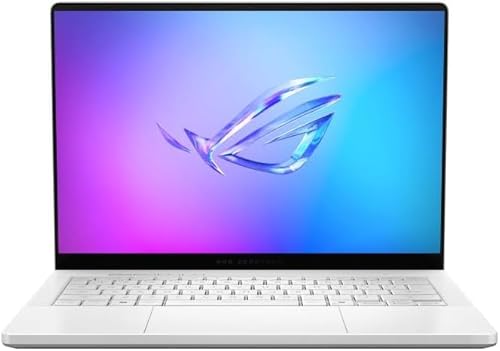
ASUS ROG Zephyrus G14 14" RTX 5080
Best for: portable high-performance 14-inch OLED gaming
- Graphics Card
- RTX 5080
- Processor
- AMD Ryzen AI 9 HX 370
- Memory
- 32GB LPDDR5X
- Storage Capacity
- 2TB PCIe 4.0 SSD
- Screen Size
- 14"
- Refresh Rate
- 120Hz
The ASUS ROG Zephyrus G14 pairs NVIDIA's GeForce RTX 5080 laptop graphics with a 12-core AMD Ryzen AI 9 HX 370 processor in a compact 14-inch chassis. You get a sharp 3K OLED panel with a 120Hz refresh rate, alongside 32GB of LPDDR5X memory and a 2TB PCIe 4.0 SSD. It suits you if you want flagship gaming performance and fast screen response times in a smaller footprint.
Pros
- 14-inch 3K OLED ROG Nebula display with 0.2ms response time and G-SYNC
- NVIDIA GeForce RTX 5080 graphics packed into a 0.63-inch thin chassis
- 12-core AMD Ryzen AI 9 HX 370 processor with 50 TOPS AI acceleration
- High-speed 32GB LPDDR5X memory running at up to 8000MHz
Cons
- 120Hz refresh rate is lower than the 240Hz panels found on larger alternatives
- Smaller 14-inch display offers less screen area than 16-inch or 18-inch options
Good fit if
- You want top-tier RTX 5080 graphics in a compact, portable 14-inch form factor.
- You prioritize 3K OLED image clarity and rapid 0.2ms pixel response times.
- You need 2TB of high-speed PCIe 4.0 SSD storage out of the box.
Skip if
- You require a 240Hz or higher refresh rate for competitive esports gaming.
- You want an expansive 16-inch or 18-inch screen for maximum desktop immersion.
Verdict: ASUS ROG Zephyrus G14 14" RTX 5080 packs elite GPU power and a vivid 3K OLED panel into a slim 0.63-inch aluminum chassis. It delivers high-end gaming and multitasking performance for anyone who values portability over massive screen size.

Lenovo Legion Pro 7i 16" OLED
Best for: high-refresh OLED gaming and demanding workflows
- Graphics Card
- RTX 5080
- Processor
- Intel Ultra 9 275HX
- Memory
- 32 GB DDR5-6400MT/s
- Storage Capacity
- 1 TB SSD
- Screen Size
- 16"
- Refresh Rate
- 240Hz
The Lenovo Legion Pro 7i Gen 10 pairs an Intel Ultra 9 275HX processor with an NVIDIA GeForce RTX 5080 operating at 175W TGP. Its 16-inch 240Hz WQXGA OLED screen brings HDR 1000 True Black contrast to high-frame-rate gaming. With 32GB of DDR5-6400 memory and a PCIe Gen5 SSD, this configuration suits you if you prioritize vibrant display technology and maximum graphics wattage over portable, lightweight hardware.
Pros
- 16-inch 240Hz WQXGA OLED panel with HDR 1000 True Black
- 175W maximum TGP for the GeForce RTX 5080 graphics card
- 1TB PCIe Gen5 high-performance solid-state drive
- Fast 32GB DDR5-6400 system memory
Cons
- Heavy chassis weight at 7 pounds
- Glossy glare screen surface rather than a matte finish
- Large 400W power adapter increases travel footprint
Good fit if
- You want a high-contrast 240Hz OLED display with 100% DCI-P3 color coverage.
- You want maximum graphics performance via a full 175W TGP rating.
- You need Gen5 SSD read and write speeds out of the box.
Skip if
- You need a lightweight laptop under 7 pounds for frequent transport.
- You work in bright lighting environments and require an anti-glare display.
Verdict: Lenovo Legion Pro 7i 16" OLED pairs full 175W RTX 5080 graphics with a fast 240Hz OLED panel for exceptional visual speed and contrast. It delivers desktop-grade components in a solid 7-pound chassis.
Lenovo Legion Pro 7i OLED RTX 5080
Best for: OLED visuals and high-end RTX 5080 gaming
- Graphics Card
- RTX 5080
- Processor
- Ultra 9
- Memory
- 32GB
- Storage Capacity
- 1TB PCIe SSD
- Dimensions
- 14.3 × 10.1 × 0.94 inches
- Weight
- 6 pounds
This Lenovo Legion Pro 7i laptop equips you with an NVIDIA GeForce RTX 5080 graphics card and an Intel Ultra 9 processor. You get an OLED display alongside 32GB of system memory and a 1TB PCIe SSD for your game installations. At 6 pounds and 0.94 inches thick, this black chassis suits you if you want high-tier graphics hardware paired with OLED visuals.
Pros
- NVIDIA GeForce RTX 5080 graphics
- Intel Ultra 9 processor
- OLED display panel
- 32GB memory with 1TB PCIe SSD
Cons
- Weighs 6 pounds
- Measures 0.94 inches thick
Good fit if
- You want an RTX 5080 GPU paired with an OLED display.
- You need an Intel Ultra 9 processor with 32GB of memory.
- You want 1TB of PCIe SSD storage ready out of the box.
Skip if
- You want a lightweight laptop under 6 pounds.
- You need more than 1TB of internal storage from the factory.
Verdict: Lenovo Legion Pro 7i OLED RTX 5080 delivers dedicated high-tier graphics alongside an Ultra 9 processor and OLED screen. Its 6-pound frame provides 32GB of memory and 1TB of solid-state storage.

ASUS ROG Strix G18 RTX 5080 Laptop
Best for: desk-bound gamers wanting an expansive 18-inch display
- Graphics Card
- RTX 5080
- Processor
- Intel Core Ultra 9 275HX
- Memory
- 64GB DDR5-5600
- Storage Capacity
- 2TB PCIe 4.0 NVMe SSD
- Screen Size
- 18"
- Refresh Rate
- 240Hz
The ASUS ROG Strix G18 is a desktop-replacement gaming laptop built around an 18-inch 2560 x 1600 240Hz display and a 175W GeForce RTX 5080 GPU. It pairs an Intel Core Ultra 9 275HX processor with 64GB of DDR5 memory and a 2TB SSD. This hardware handles demanding AAA games and heavy content creation, making it a capable choice if you prioritize a large screen and maximum thermal capacity over portable travel.
Pros
- 175W TGP GeForce RTX 5080 with 16GB GDDR7 VRAM
- 18-inch 2560 x 1600 Nebula Display with 240Hz refresh rate and 500 nits
- 64GB DDR5 RAM and 2TB SSD with dual upgrade slots
- Dual Thunderbolt 5 ports and Wi-Fi 7 connectivity
Cons
- Heavy 7.54-pound chassis limits mobility
- Thick 1.26-inch profile requires significant bag and desk space
- Keyboard backlighting is restricted to 4 zones rather than per-key lighting
Good fit if
- You want an expansive 18-inch 240Hz display for competitive and AAA gaming.
- You need 64GB of system memory and 2TB of storage out of the box.
- You plan to connect high-bandwidth peripherals using dual Thunderbolt 5 ports.
Skip if
- You need a lightweight laptop for frequent commuting or travel.
- You require individual per-key RGB backlighting customization.
Verdict: ASUS ROG Strix G18 18-Inch RTX 5080 Laptop delivers top-tier graphics power and an expansive 240Hz panel inside a hefty chassis built for fixed setups. It provides massive memory and swift connectivity at the direct expense of everyday portability.

Alienware Area-51 18-Inch RTX 5080 Laptop
Best for: stationary desktop replacement gaming
- Graphics Card
- RTX 5080
- Processor
- Intel Core Ultra 9 275HX
- Memory
- 32GB 2x16GB DDR5
- Storage Capacity
- 2TB SSD
- Screen Size
- 18.0"
- Refresh Rate
- 300Hz
This Alienware 18 Area-51 pairs an NVIDIA GeForce RTX 5080 graphics card with an Intel Core Ultra 9 275HX processor. You get an 18.0-inch WQXGA display running at a 300Hz refresh rate with a 3ms response time, alongside 2TB of solid-state storage. Built inside an elevated Cryo-Chamber chassis, it suits you if you need massive screen space and dedicated hardware acceleration for demanding workloads rather than portable convenience.
Pros
- 18.0-inch WQXGA panel with fast 300Hz refresh rate and 3ms response time
- Spacious 2TB SSD internal storage capacity
- Cryo-Chamber cooling design with Gorilla Glass panel and AlienFX fans
- Includes 1 Year Onsite Service hardware support
Cons
- Heavy 9.56-pound weight limits everyday portability
- Thick 1.2-inch chassis requires substantial desk space
Good fit if
- You want a large 18-inch 300Hz screen for stationary desktop-replacement gaming.
- You need 2TB of built-in solid-state storage out of the box.
Skip if
- You need a lightweight machine for frequent travel or carrying in a backpack.
- You have limited workspace to accommodate a 16.1 by 12.6-inch footprint.
Verdict: Alienware 18 Area-51 RTX 5080 Gaming Laptop delivers massive screen area and a 300Hz refresh rate for high-performance stationary use. Its 9.56-pound weight makes it best suited to replace a desktop workstation.

ASUS ROG Strix G16 RTX 5080 Gaming Laptop
Best for: High-refresh competitive 1440p gaming
- Graphics Card
- RTX 5080
- Processor
- Intel Core Ultra 9 Processor 275HX
- Memory
- 32GB DDR5
- Storage Capacity
- 1TB SSD
- Screen Size
- 16"
- Refresh Rate
- 240Hz
The ASUS ROG Strix G16 is a 16-inch gaming laptop built around an NVIDIA GeForce RTX 5080 GPU and an Intel Core Ultra 9 275HX processor. You get a 2.5K 240Hz ROG Nebula panel with a 3ms response time, along with 32GB of DDR5 memory and a 1TB PCIe 4.0 SSD. It suits you if you need competitive refresh rates and high-end processing in a portable 16-inch frame.
Pros
- NVIDIA GeForce RTX 5080 GPU paired with Intel Core Ultra 9 275HX processor
- 16-inch 2.5K display with 240Hz refresh rate and 3ms response time
- 32GB DDR5-5600MHz RAM and 1TB PCIe 4.0 SSD
- Cooling system with vapor chamber, three fans, and liquid metal
Cons
- 6.02-pound weight adds noticeable bulk during travel
- 1TB base storage capacity limits library size without expansion
Good fit if
- You prioritize high frame rates on a 240Hz 2.5K display.
- You need heavy-duty processing power from an Intel Core Ultra 9 CPU.
- You want advanced cooling hardware including a vapor chamber and liquid metal.
Skip if
- You want a lightweight machine under six pounds.
- You require more than 1TB of storage out of the box.
Verdict: ASUS ROG Strix G16 RTX 5080 Gaming Laptop pairs top-tier RTX 5080 graphics with a 240Hz 2.5K display and robust cooling. It delivers high-refresh performance for demanding games if you do not mind carrying a 6.02-pound chassis.
Lenovo Legion Pro 7i 16" OLED RTX 5080
Best for: high-refresh OLED gaming and memory-heavy creative tasks
- Graphics Card
- RTX 5080
- Processor
- Intel Ultra 9 275HX
- Memory
- 64GB DDR5
- Storage Capacity
- 2TB SSD
- Screen Size
- 16"
- Refresh Rate
- 240Hz
The Lenovo Legion Pro 7i is a 16-inch gaming laptop built with an Intel Core Ultra 9 275HX processor and an NVIDIA GeForce RTX 5080 graphics card at a 175W maximum graphics power. You get 64GB of DDR5 memory, two 1TB solid-state drives, and a 240Hz WQXGA OLED panel with DisplayHDR True Black 1000. It suits you if you need workstation-level memory and high refresh-rate visuals.
Pros
- 175W TGP NVIDIA GeForce RTX 5080 with 16GB GDDR7
- 240Hz WQXGA OLED display with DisplayHDR True Black 1000
- 64GB DDR5-6400MHz memory across two slots
- 2TB storage split across two 1TB PCIe Gen4 SSDs
- 5.0MP webcam equipped with an e-shutter
Cons
- Listed weight is heavy at 10.85 pounds
- Glossy screen finish reflects ambient glare
- Storage occupies both drive slots with two 1TB drives
Good fit if
- You need 64GB of fast DDR5 system memory out of the box.
- You want a 240Hz OLED screen with HDR support.
- You plan to run GPU workloads up to a 175W power limit.
Skip if
- You prefer an anti-glare, non-reflective display coating.
- You want a single unified drive partition instead of two 1TB drives.
Verdict: Lenovo Legion Pro 7i 16" OLED RTX 5080 Laptop pairs high-wattage graphics with generous memory and a vibrant OLED panel. It delivers balanced computing power and display clarity for heavy gaming and rendering.

Lenovo Legion 9i 18" RTX 5080 Gaming Laptop
Best for: high-resolution gaming and memory expansion
- Graphics Card
- RTX 5080
- Processor
- Intel Core Ultra 9 275HX
- Memory
- 32 GB DDR5
- Storage Capacity
- 1 TB SSD
- Screen Size
- 18"
- Refresh Rate
- 240Hz
This Lenovo Legion 9i pairs an NVIDIA GeForce RTX 5080 16GB GPU with a 24-core Intel Core Ultra 9 275HX processor. You get an 18-inch 3840 x 2400 display running at 240Hz with 520 nits of brightness. Storage includes a 1 TB PCIe Gen5 SSD, and the single 32 GB DDR5 module leaves three memory slots open. It suits you if you need workstation-grade expandability and ultra-high-resolution gaming on a massive desktop-replacement display.
Pros
- 18-inch WQUXGA (3840 x 2400) 240Hz display with 520 nits brightness
- NVIDIA GeForce RTX 5080 GPU with 16GB GDDR7 VRAM
- Fast PCIe Gen5 TLC solid-state drive
- Three open SODIMM slots for future memory expansion
Cons
- Heavy chassis weighing 7.7 pounds
- Ships with a single memory module in single-channel mode
- Glossy glare display surface
Good fit if
- You want an 18-inch 3840 x 2400 screen with a 240Hz refresh rate.
- You plan to upgrade memory later across three open SODIMM slots.
- You want high data transfer speeds from a PCIe Gen5 SSD.
Skip if
- You need a portable machine, as this laptop weighs 7.7 pounds.
- You prefer a matte, anti-glare display over a glossy screen.
Verdict: Lenovo Legion 9i 18-Inch RTX 5080 Laptop pairs top-tier processing power with a sharp 240Hz screen and uncommon memory expandability. Its 7.7-pound weight and glossy screen make it best suited for fixed desk setups.

MSI Raider A16 HX 16" Ryzen 9 RTX 5080
Best for: high-refresh gaming with generous onboard storage
- Graphics Card
- RTX 5080
- Processor
- AMD Ryzen 9-8940HX
- Memory
- 32GB DDR5
- Storage Capacity
- 2TB NVMe SSD
- Screen Size
- 16”
- Refresh Rate
- 240Hz
The MSI Raider A16 HX pairs an AMD Ryzen 9 8940HX processor with an NVIDIA GeForce RTX 5080 laptop graphics card and 32GB of DDR5 memory. You get a 16-inch QHD+ display running at 240Hz with full DCI-P3 coverage, along with a 2TB solid-state drive. It suits you if you want fast refresh rates, large storage, and simple maintenance via a quick-access panel.
Pros
- NVIDIA GeForce RTX 5080 GPU with 16GB GDDR7 VRAM
- 16-inch 240Hz QHD+ display with 100% DCI-P3 coverage
- 2TB NVMe SSD paired with 32GB DDR5 memory
- Quick Access Panel for memory and storage upgrades
- Wi-Fi 7 connectivity
Cons
- Chassis thickness measures 1.02 inches
- Weight is 5.4 pounds
Good fit if
- You need 2TB of storage capacity directly out of the box.
- You prioritize a 240Hz QHD+ screen with complete DCI-P3 color coverage.
- You want easy access to internal memory and drive slots.
Skip if
- You want a laptop chassis thinner than one inch.
- You prefer an ultralight machine weighing under five pounds.
Verdict: MSI Raider A16 HX 16" Ryzen 9 RTX 5080 balances top-tier graphical power, a responsive 240Hz panel, and 2TB of storage in a 16-inch format. It stands out for users who require easy component access and high color accuracy.
Specifications side by side
| Spec | GIGABYTE A16 Pro 16" RTX 5080 Gaming Laptop | Razer Blade 16 RTX 5080 Gaming Laptop | Alienware Area-51 18-inch RTX 5080 Gaming Laptop | MSI Vector 16 RTX 5080 Gaming Laptop | ASUS ROG Strix SCAR 18 RTX 5080 | ASUS ROG Strix Scar 18 RTX 5080 Gaming Laptop | ASUS ROG Zephyrus G14 14" RTX 5080 | Lenovo Legion Pro 7i 16" OLED | Lenovo Legion Pro 7i OLED RTX 5080 | ASUS ROG Strix G18 RTX 5080 Laptop | Alienware Area-51 18-Inch RTX 5080 Laptop | ASUS ROG Strix G16 RTX 5080 Gaming Laptop | Lenovo Legion Pro 7i 16" OLED RTX 5080 | Lenovo Legion 9i 18" RTX 5080 Gaming Laptop | MSI Raider A16 HX 16" Ryzen 9 RTX 5080 |
|---|---|---|---|---|---|---|---|---|---|---|---|---|---|---|---|
| Graphics Card | NVIDIA GeForce RTX 5080 | NVIDIA GeForce RTX 5080 | RTX 5080 | NVIDIA GeForce RTX 5080 | NVIDIA GeForce RTX 5080 | NVIDIA GeForce RTX 5080 Laptop GPU | NVIDIA GeForce RTX 5080 | NVIDIA GeForce RTX 5080 16GB GDDR7 | NVIDIA GeForce RTX 5080 | NVIDIA GeForce RTX 5080 | NVIDIA GeForce RTX 5080 | NVIDIA GeForce RTX 5080 | NVIDIA GeForce RTX 5080 16GB | NVIDIA GeForce RTX 5080 16GB GDDR7 | NVIDIA Geforce RTX 5080 |
| Processor | Intel Core Ultra 7 240H | Intel Core Ultra 9 386H | Intel Ultra 9 290HX | Intel Core Ultra 9-275HX | Intel Core Ultra 9 275HX | Intel Core Ultra 9 290HX Plus | AMD Ryzen AI 9 HX 370 | Intel Ultra 9 275HX | Ultra 9 | Intel Core Ultra 9 275HX | Intel Core Ultra 9 275HX | Intel Core Ultra 9 Processor 275HX | Intel Ultra 9 275HX | Intel Core Ultra 9 275HX | AMD Ryzen 9-8940HX |
| Memory | 32GB LPDDR5x | 64GB LPDDR5X | not specified | 32GB DDR5 | 32GB DDR5-5600 | 32GB DDR5-6400MHz | 32GB LPDDR5X | 32 GB DDR5-6400MT/s | 32GB | 64GB DDR5-5600 | 32GB 2x16GB DDR5 | 32GB DDR5 | 64GB DDR5 | 32 GB DDR5 | 32GB DDR5 |
| Storage Capacity | not specified | 1TB PCIe 4.0 SSD | not specified | 2TB NVMe SSD | 2TB PCIe Gen 4 SSD | 1TB PCIe Gen 4 SSD | 2TB PCIe 4.0 SSD | 1 TB SSD | 1TB PCIe SSD | 2TB PCIe 4.0 NVMe SSD | 2TB SSD | 1TB SSD | 2TB SSD | 1 TB SSD | 2TB NVMe SSD |
| Screen Size | 16" | 16" | 18" | 16" | 18" | 18” | 14" | 16" | not specified | 18" | 18.0" | 16" | 16" | 18" | 16” |
| Refresh Rate | not specified | 240Hz | not specified | 240Hz | 240Hz | 240Hz | 120Hz | 240Hz | not specified | 240Hz | 300Hz | 240Hz | 240Hz | 240Hz | 240Hz |
| Display Resolution | not specified | 2560×1600 | WQXGA | QHD+ | 2.5K | 4K | 3K | 2560 x 1600 | not specified | 2560 x 1600 | WQXGA | 2.5K | 2560x1600 WQXGA | 3840 x 2400 | QHD+ |
| Storage | not specified | 1TB SSD | not specified | 2TB SSD | not specified | not specified | 2TB SSD | not specified | not specified | not specified | 2TB SSD | 1TB SSD | not specified | not specified | 2TB SSD |
| Dimensions | 15.2 × 0.91 × 11.6 inches | 14 × 0.59 × 9.69 inches | 12.6 × 16.1 × 1.2 inches | 14.1 × 1.12 × 11.2 inches | 15.7 × 0.93 × 11.7 inches | 15.7 × 1.38 × 11.7 inches | 12.3 × 0.63 × 8.66 inches | 20 × 13 × 3 inches | 14.3 × 10.1 × 0.94 inches | 15.7 × 11.8 × 1.26 inches | 12.6 × 16.1 × 1.2 inches | 13.9 × 0.9 × 10.6 inches | 1.05 × 10.9 × 14.4 inches | 0.94 × 10.6 × 15.9 inches | 14.3 × 1.02 × 10.6 inches |
| Weight | 5.07 pounds | 4.72 pounds | 9.56 pounds | 5.95 pounds | 6.28 pounds | 8.16 pounds | 9 pounds | 7 pounds | 6 pounds | 7.54 pounds | 9.56 pounds | 6.02 pounds | 10.8 pounds | 7.7 pounds | 5.4 pounds |
| Color | Titanium Black | Black | Liquid Teal | Gray | Off Black | Off Black | Platinum White | Black | Black | Eclipse Gray | Liquid Teal | Eclipse Gray | Eclipse Black | Eclipse Black | Black |
| Model | GAMING A16 PRO DYHG5USCC4SH | RZ09-05818EN4-R3U1 | LAA18250-9694BLU-PUS | VECTOR16HXA2058 | G835LW-XS97 | G835LWG-DB96 | GA403W | Legion Pro 7i Gen 10 | Lenovo | G815LW-G18.U95080 | LAA18250 -9420BLU-PUS | 6cf3a541-d3ae-4645-b191-13068180d8c7 | 83F5006HUS | Ultra 9 275HX | RAIDERA16HXB8023 |
| Size | not specified | not specified | 18.0 WQXGA | 2.76 | 18" | not specified | 32GB RAM | 2TB PCIe SSD | 32GB | 1TB | 32GB | 1TB PCIe SSD | ASUS ROG Strix G18 | 18.0 WQXGA | not specified | Ultra 9_64GB DDR5_2TB SSD | not specified | not specified |
Is an RTX 5080 gaming laptop worth it?
An RTX 5080 graphics card supplies top-tier computing power across modern laptops. In these configurations, the GPU pairs with processors like the Intel Core Ultra 9 or Ryzen 9 to drive fast 240Hz and 300Hz displays. You get sufficient processing power to run demanding games and rendering workloads on high-resolution panels, including 3K OLED and UHD+ Mini LED screens. These systems pair the card with up to 175W GPU power and 32GB to 64GB of RAM to maintain stable performance.
Worth it if
- You run graphics-heavy games on high-resolution displays that feature 240Hz or 300Hz refresh rates.
- You require heavy rendering performance supported by up to 175W of GPU power and 32GB to 64GB of RAM.
Skip it if
- You only perform basic computing tasks that do not require dedicated flagship graphics processing.
- You prefer an ultra-light travel laptop rather than carrying a high-performance system that weighs between 4.7 and 10.85 pounds.
If you want stationary performance instead of mobile portability, an RTX 5060 gaming desktop offers an alternative hardware platform with different power limits.
How We Selected These Laptops
Laptops qualify for this guide when the listing states the RTX 5080 graphics card in the title or feature list. To help you compare options, we review published specifications such as processor, screen size, memory, storage capacity, and refresh rate. Only one variant per product family is included across the 15 picks.
The products appear with items in stock first, then by Amazon sales rank (better-selling products first). All details come directly from published manufacturer specifications, and laptops are not physically handled. Live availability and pricing update automatically on the page for 2026.
Choosing Your Next RTX 5080 Laptop
-
System Memory Allocation
Check the installed memory before purchasing. Most RTX 5080 laptops provide 32GB of system RAM, which handles contemporary games and background apps without bottlenecks. If your daily workflow includes video rendering, local machine learning models, or heavy multitasking, choose a configuration with 64GB of RAM. The Razer Blade 16 provides 64GB out of the box, saving you from immediate memory upgrades. Compare the memory capacity on the spec sheet to verify whether the included RAM satisfies your multitasking requirements.
-
Display Panel Type
Check the display panel technology on the spec sheet. Laptops with OLED panels, like the Lenovo Legion Pro 7i 16" OLED, offer deep black levels, high contrast, and rapid pixel response times that benefit darker game environments and media creation. Mini LED panels, on the other hand, provide higher sustained brightness levels suitable for brightly lit rooms. Decide which panel matches your environment. If you work primarily in dim lighting and favor deep contrast, choose OLED. If you use the laptop in daylight, prioritize Mini LED.
-
Target Refresh Rate
Inspect the refresh rate metric to ensure smooth motion during play. A 120Hz panel suits visual fidelity in cinematic single-player titles where extreme frame pacing is not vital. If you play competitive multiplayer games, aim for 240Hz or higher to decrease input lag and motion blur. For maximum visual fluidity, models like the Alienware Area-51 18-Inch RTX 5080 Laptop reach up to 300Hz. Check your primary game genres against the screen refresh rate specification to make sure you do not bottleneck the RTX 5080 graphics hardware.
-
Internal Storage Capacity
Examine the solid-state drive capacity before selecting a machine. Modern high-end games frequently require over 100GB of drive space each. A 1TB SSD fills quickly once you install several games along with system updates and personal files. Selecting a machine with a 2TB SSD, such as the MSI Vector 16 RTX 5080 Gaming Laptop, gives you ample space for a broad software library without deleting files. Compare the listed storage size against the size of your current game collection to decide whether 1TB or 2TB matches your installation habits.
-
Processor Platform Choice
Review the processor brand and tier in the specification listing. The laptops in this category feature high-end chips like the Intel Core Ultra 9 or the AMD Ryzen 9. Intel Core Ultra processors provide strong single-core clock speeds for gaming alongside modern AI processing architecture. AMD Ryzen 9 options, found on models like the MSI Raider A16 HX 16" Ryzen 9 RTX 5080, provide efficient multicore throughput for mixed productivity and heavy processing loads. Check which central processor aligns with your preferred balance of gaming and multitasking.
-
Chassis Profile Thickness
Check the physical thickness listed under dimensions. Thinner profiles like the 0.63-inch ASUS ROG Zephyrus G14 14" RTX 5080 slide easily into standard backpack compartments and minimize travel bulk. However, thicker chassis designs that reach 1.2 inches or more allocate extra physical volume to internal heat dissipation and component cooling. If you intend to take your machine on commutes, focus on sub-one-inch chassis measurements. If the system will remain on a desk most of the time, a thicker frame provides superior thermal headroom for demanding workloads.
Frequently asked questions
Which RTX 5080 gaming laptop has the smallest display?
The ASUS ROG Zephyrus G14 features the smallest screen among these RTX 5080 laptops, offering a 14-inch 3K OLED display. Its chassis measures 0.63 inches thick and includes 32GB of RAM, a 2TB SSD, and a 120Hz refresh rate. It suits you if you want flagship GPU capability in an ultra-compact footprint.
Can you buy an RTX 5080 gaming laptop with 64GB of RAM preinstalled?
Yes, models such as the Razer Blade 16 and Lenovo Legion Pro 7i arrive configured with 64GB of RAM. While 32GB is the standard baseline across most RTX 5080 systems, a 64GB setup gives you added headroom for memory-heavy creative applications, local datasets, and background tasks alongside your games.
What is the highest display refresh rate offered on an RTX 5080 laptop?
The Alienware Area-51 18-Inch reaches up to a 300Hz refresh rate on its 18.0-inch WQXGA screen. Most other fast displays in this guide, including the MSI Vector 16 and ASUS ROG Strix SCAR 18, top out at 240Hz. A higher refresh rate renders rapid on-screen movement more smoothly in competitive titles.
Do RTX 5080 gaming laptops use AMD or Intel processors?
You can find RTX 5080 configurations powered by either Intel Core Ultra 9 or AMD Ryzen 9 processors. Systems like the MSI Vector 16 and Alienware Area-51 run on Intel Core Ultra 9 chips, whereas options like the MSI Raider 18 and MSI Raider A16 HX utilize AMD Ryzen 9 processors.
What display panel technologies are available on RTX 5080 laptops?
RTX 5080 laptops primarily feature OLED or Mini LED panels. Laptops like the Razer Blade 16 and Lenovo Legion Pro 7i utilize OLED screens for high contrast and deep black levels. Alternatively, systems like the ASUS ROG Strix SCAR 18 and MSI Raider 18 use Mini LED displays for high brightness.
How much onboard SSD storage do RTX 5080 laptops include?
RTX 5080 gaming laptops generally include either a 1TB or 2TB solid-state drive. Configurations like the Razer Blade 16 and ASUS ROG Strix G16 feature a 1TB SSD. If your library needs more space immediately, options like the MSI Vector 16 and MSI Raider A16 HX provide a 2TB drive.
Are there RTX 5080 laptops that offer tool-free internal upgrades?
Yes, the ASUS ROG Strix SCAR 18 includes tool-free internal access directly in its chassis design. This feature allows you to open the enclosure to inspect or upgrade internal hardware components without requiring specialized tools. It makes ongoing maintenance and storage or memory expansion simpler over the lifespan of the laptop.