Best Alienware Gaming Laptops: 11 Models Compared
As an Amazon Associate we earn from qualifying purchases. Links on this page are affiliate links.
This guide compares 11 models of the best alienware gaming laptops to help you choose the right hardware. Alienware offers 15.6-inch, 16-inch, and 18-inch options in various colors and weights. The Alienware 15 RTX 4050 leads as the top pick for entry-level 1200p gaming due to its balanced Core 7 processor and 165Hz display. Our rankings rely strictly on the specifications published on each listing. We evaluate screen size, refresh rates, and chassis dimensions to find the right fit for your setup.
Our top pick: Alienware 15 RTX 4050 Intel Core 7 Gaming Laptop.
Quick picks
Our 11 picks

Alienware 15 RTX 4050 Intel Core 7 Gaming Laptop
Best for: entry-level 1200p Alienware gaming
- Graphics Card
- NVIDIA GeForce RTX 4050
- Processor
- Intel Core 7 240H
- Memory
- 16GB DDR5
- Storage Capacity
- 1TB SSD
- Screen Size
- 15.3"
- Refresh Rate
- 165Hz
View on Amazon: Alienware 15 RTX 4050 Intel Core 7 Gaming Laptop
This Alienware 15 laptop pairs an Intel Core 7 240H processor with an NVIDIA GeForce RTX 4050 graphics card. You get a 15.3-inch WUXGA 1920x1200 screen running at a 165Hz refresh rate with a 16:10 aspect ratio. The chassis weighs 4.85 pounds and measures 0.9 inches thick. This setup suits you if you need an entry-level Alienware gaming configuration for everyday play and high-refresh-rate 1200p visuals.
Pros
- 15.3-inch 1920x1200 WUXGA display with 165Hz refresh rate
- Intel Core 7 240H processor paired with RTX 4050 graphics
- Alienware Cryo-tech cooling with quick Stealth mode toggle
- Includes 1 year of Dell onsite service
Cons
- 1920x1200 resolution is lower than QHD+ or WQXGA alternatives
- RTX 4050 graphics card provides entry-tier graphical performance
Good fit if
- You want a 165Hz 16:10 display for fluid 1200p gaming.
- You need an Intel Core 7 240H processor with dedicated graphics.
- You value included one-year onsite hardware service.
Skip if
- You require graphics performance higher than an RTX 4050.
- You want a display resolution sharper than 1920x1200.
Verdict: Alienware 15 RTX 4050 Gaming Laptop delivers an entry-tier configuration featuring an Intel Core 7 240H processor and a 165Hz display. It is a focused option for solid 1200p gaming in a 4.85-pound chassis.

Alienware 16 Aurora RTX 4050 Gaming Laptop
Best for: everyday gaming on a crisp WQXGA display
- Graphics Card
- NVIDIA GeForce RTX 4050
- Processor
- Intel Core 7 240H
- Memory
- 16GB DDR5
- Storage Capacity
- 512GB SSD
- Screen Size
- 16"
- Refresh Rate
- 120Hz
This Alienware 16 Aurora laptop features an Intel Core 7 240H processor, an NVIDIA GeForce RTX 4050 graphics card, and 16GB of DDR5 memory. You get a 16-inch WQXGA display running at a 120Hz refresh rate with 300 nits brightness. At 0.6 inches thick and 5.49 pounds, it suits you if you want a sharp WQXGA screen and dedicated graphics in a design built without a rear thermal shelf.
Pros
- 16-inch WQXGA display with 120Hz refresh rate and 300 nits brightness
- Intel Core 7 240H processor with 45W CPU thermal design power
- Slim 0.6-inch profile with Cryo-Chamber cooling design
- 16GB DDR5 memory
Cons
- 512GB SSD baseline storage capacity
- 120Hz refresh rate is lower than faster gaming panels
Good fit if
- You want a high-resolution WQXGA panel with a 120Hz refresh rate.
- You need an Intel Core 7 240H processor paired with an RTX 4050 GPU.
- You prefer a laptop chassis under one inch thick without a rear thermal shelf.
Skip if
- You require more than 512GB of internal storage out of the box.
- You need display refresh rates higher than 120Hz.
Verdict: Alienware 16 Aurora Core 7 RTX 4050 Laptop balances a high-resolution WQXGA display and 16GB of DDR5 memory inside a slim 0.6-inch chassis. It delivers reliable processing performance without the bulk of an added rear thermal shelf.

Alienware 16X RTX 5060 Gaming Laptop
Best for: high-refresh gaming and mixed work environments
- Graphics Card
- NVIDIA GeForce RTX 5060
- Processor
- Intel Ultra 7 Plus
- Memory
- 16GB DDR5 RAM
- Storage Capacity
- 1TB SSD
- Screen Size
- 16"
- Refresh Rate
- 240Hz
The Alienware 16X is a 16-inch gaming laptop built for fast-paced play and everyday productivity. It combines an Intel Core Ultra HX processor with an NVIDIA GeForce RTX 5060 graphics card and a 1TB drive. You also get a 240Hz WQXGA display delivering 500 nits of brightness. This setup suits you if you need fluid visual output, modern hardware, and a dedicated quiet mode for work environments.
Pros
- 16-inch WQXGA screen with a 240Hz refresh rate and 500 nits brightness
- NVIDIA GeForce RTX 5060 graphics card
- Intel Core Ultra HX processor
- One-touch Stealth Mode switches lighting to white and enables Quiet Mode
Cons
- Weighs 5.86 pounds, which is heavy for daily travel
- Chassis thickness reaches 0.94 inches
Good fit if
- You want a 240Hz WQXGA panel with 500 nits brightness for smooth visuals.
- You need an RTX 5060 GPU and an Intel Core Ultra HX processor for modern games.
- You appreciate a quick key shortcut to silence fans and dim lighting in public.
Skip if
- You prioritize an ultraportable machine lighter than 5.86 pounds.
- You require higher-tier graphics like the RTX 5070 or RTX 5080.
Verdict: Alienware 16X RTX 5060 Gaming Laptop delivers balanced performance with its 240Hz WQXGA screen and Intel Core Ultra HX architecture. It gives you capable gaming hardware alongside practical features like Stealth Mode for quiet workspaces.

Alienware Area-51 18-inch RTX 5080 Gaming Laptop
Best for: desktop-replacement gaming with an 18-inch screen
- Graphics Card
- NVIDIA GeForce RTX 5080
- Processor
- Intel Ultra 9 290HX
- Memory
- 32GB DDR5
- Storage Capacity
- 2TB NVMe SSD
- Screen Size
- 18.0"
- Refresh Rate
- 300Hz
View on Amazon: Alienware Area-51 18-inch RTX 5080 Gaming Laptop
The Alienware Area-51 18 RTX 5080 Laptop is a desktop-replacement machine built for high-demand gaming. It features an 18-inch WQXGA display, an Intel Ultra 9 290HX processor, and an NVIDIA GeForce RTX 5080 graphics card. The bottom Cryo-Chamber focuses airflow to critical components. You also get 32 GB of memory and one year of onsite service. This setup suits you if you prioritize maximum screen space and processing power over portability.
Pros
- NVIDIA GeForce RTX 5080 graphics card
- Intel Core Ultra 9 290HX processor with integrated NPU
- Spacious 18.0-inch WQXGA resolution display
- Includes 1 year of Dell onsite service
Cons
- Heavy 9.56-pound weight limits mobile use
- Bulky 1.2-inch thick chassis requires substantial desk space
Good fit if
- You want an 18-inch WQXGA display for expansive screen space.
- You need heavy computing power from an Intel Ultra 9 290HX and RTX 5080 GPU.
- You plan to keep the laptop stationary at a desk.
Skip if
- You need a lightweight laptop that is easy to carry daily.
- You prefer a compact screen smaller than 18 inches.
Verdict: Alienware Area-51 18 RTX 5080 Laptop delivers massive processing power and an expansive 18-inch display for demanding gameplay. Its 9.56-pound footprint makes it best reserved for permanent desk setups.

Alienware Area-51 18-Inch RTX 5080 Laptop
Best for: high-refresh stationary gaming with extensive storage
- Graphics Card
- NVIDIA GeForce RTX 5080
- Processor
- Intel Core Ultra 9 275HX
- Memory
- 32GB 2x16GB DDR5
- Storage Capacity
- 2TB SSD
- Screen Size
- 18.0"
- Refresh Rate
- 300Hz
The Alienware 18 Area-51 is a large-format gaming laptop built for desktop-replacement use. You get an 18.0-inch WQXGA panel running at 300Hz, paired with an Intel Core Ultra 9 275HX processor and an NVIDIA GeForce RTX 5080 graphics card. With 32GB of DDR5 RAM and a 2TB SSD, it offers ample high-speed capacity for demanding game libraries. This system fits you if you want maximum display area and high-tier hardware in one place.
Pros
- 2TB SSD provides spacious internal storage for large game installs
- 18.0-inch WQXGA screen with a 300Hz refresh rate and 3ms response time
- Intel Core Ultra 9 275HX processor and NVIDIA GeForce RTX 5080 GPU
- Cryo-Chamber cooling design with clear Gorilla Glass panel
- Includes 1 Year Onsite Service from Dell
Cons
- Weighs 9.56 pounds, limiting portability
- Thick 1.2-inch chassis requires substantial desk space
Good fit if
- You want a 2TB SSD out of the box for extensive local game installations.
- You prefer an expansive 18.0-inch 300Hz display for stationary gaming.
- You need the computing power of an Intel Core Ultra 9 processor and RTX 5080 GPU.
Skip if
- You need a lightweight machine for frequent travel.
- You have limited desk space for an oversized 18-inch chassis.
Verdict: Alienware 18 Area-51 RTX 5080 Gaming Laptop delivers top-tier processing power, expansive storage, and a fast 300Hz 18-inch screen. It functions best as a stationary powerhouse rather than a travel-friendly notebook.

Alienware x15 R1 RTX 3070 Gaming Laptop
Best for: competitive gamers wanting a 360Hz display
- Graphics Card
- NVIDIA GeForce RTX 3070
- Processor
- Intel Core i7-11800H
- Memory
- 16GB DDR4
- Storage Capacity
- 1TB SSD
- Screen Size
- 15.6"
- Refresh Rate
- 360Hz
The Alienware x15 R1 is a 15.6-inch gaming laptop built for fast competitive play. You get an 11th Gen Intel Core i7-11800H processor paired with an NVIDIA GeForce RTX 3070 graphics card and a 360Hz 1ms FHD display. With 16GB of DDR4 memory and a 1TB PCIe NVMe SSD, this machine suits you if you want high refresh rates for fast-paced titles in a 0.62-inch slim profile.
Pros
- 360Hz FHD display with 1ms response time and NVIDIA G-SYNC
- NVIDIA GeForce RTX 3070 graphics card with 8GB GDDR6
- 1TB M.2 PCIe NVMe solid-state drive
- Slim 0.62-inch profile
Cons
- 16GB DDR4 memory is integrated
- Screen resolution is limited to 1920x1080 FHD
- Display does not support touch input
Good fit if
- You want a 360Hz refresh rate and 1ms response time for fast gameplay.
- You need 1TB of high-speed PCIe NVMe SSD storage.
- You prefer a thin laptop body measuring 0.62 inches.
Skip if
- You want a display resolution higher than 1080p.
- You require user-upgradeable memory instead of integrated RAM.
- You need a touchscreen interface.
Verdict: Alienware x15 R1 RTX 3070 Gaming Laptop delivers an exceptionally high 360Hz refresh rate and dedicated graphics power in a 0.62-inch chassis. It gives you 1TB of NVMe storage and 1ms response times, though system memory remains fixed at integrated 16GB.

Alienware M18 18-inch RTX 4070 Laptop
Best for: large-screen desktop replacement gaming setups
- Graphics Card
- NVIDIA GeForce RTX 4070
- Processor
- Intel Core i7-13700HX
- Memory
- 16 GB DDR5
- Storage Capacity
- 1 TB SSD
- Screen Size
- 18-inch
- Refresh Rate
- 165Hz
The Alienware M18 is a large-format gaming laptop built around an 18-inch QHD+ 165Hz display and an Intel Core i7-13700HX processor. Paired with an NVIDIA GeForce RTX 4070 graphics card, 16 GB of DDR5 memory, and a 1 TB SSD, it delivers high-resolution visuals with Dolby Vision support. This machine suits you if you want an expansive screen, a full numeric keypad, and desktop-grade hardware without setting up an external monitor.
Pros
- 18-inch QHD+ 165Hz display with Dolby Vision
- Intel Core i7-13700HX processor and NVIDIA GeForce RTX 4070 GPU
- 1 TB SSD storage with 16 GB DDR5 RAM
- Recessed keyboard with full NumPad and larger touchpad
Cons
- Substantial weight of 8.9 pounds limits mobility
- 165Hz refresh rate is lower than faster 240Hz or 300Hz options
Good fit if
- You want an expansive 18-inch 16:10 display for work and gaming.
- You need an integrated full number pad and a larger touchpad.
- You want an Intel Core i7-13700HX paired with an RTX 4070 GPU.
Skip if
- You need a lightweight laptop for frequent travel.
- You prefer panel refresh rates higher than 165Hz.
Verdict: Alienware M18 RTX 4070 Gaming Laptop combines an expansive 18-inch QHD+ panel with balanced RTX 4070 performance for desktop-level gaming. Its 8.9-pound weight makes it best suited for a permanent desk setup rather than daily travel.

Alienware 16-Inch RTX 4070 Laptop
Best for: High-refresh 1600p gaming with 32GB RAM
- Graphics Card
- GeForce RTX 4070 8GB GDDR6
- Processor
- Intel Ultra 7-155H
- Memory
- 32GB DDR5 SODIMM
- Storage Capacity
- 1TB PCIe NVMe SSD
- Screen Size
- 16.0"
- Refresh Rate
- 240Hz
This Alienware m16 R2 brings you a 16-inch WQXGA screen with a 240Hz refresh rate. Inside, you get an Intel Ultra 7-155H processor paired with an Nvidia GeForce RTX 4070 graphics card and 32GB of DDR5 memory. A 1TB PCIe NVMe SSD provides storage for your games. This setup suits you if you need fast frame rates, high display resolution, and ample memory for multitasking.
Pros
- Fast 240Hz refresh rate on a 2560x1600 WQXGA panel
- 32GB DDR5 RAM handles demanding multitasking
- Dedicated Nvidia GeForce RTX 4070 with 8GB GDDR6 memory
- Thunderbolt 4, HDMI 2.1, and built-in SD card reader
Cons
- Renewed unit covered by a 90-day warranty
- Factory seal opened for hardware upgrades
Good fit if
- You want a 240Hz WQXGA display paired with an RTX 4070 GPU.
- You need 32GB of DDR5 RAM right out of the box.
- You use wired peripherals via Thunderbolt 4, HDMI 2.1, and RJ-45 Ethernet.
Skip if
- You require a factory-sealed machine untouched by upgrades.
- You prefer a manufacturer warranty lasting longer than 90 days.
Verdict: Alienware m16 R2 RTX 4070 Gaming Laptop delivers a balanced mix of 240Hz WQXGA visuals, 32GB RAM, and dedicated RTX 4070 performance. It gives you solid gaming hardware if you are comfortable with an upgraded renewed unit.

Alienware X16 R2 RTX 4080 Laptop
Best for: high-frame-rate 1440p gaming in a slim build
- Graphics Card
- NVIDIA GeForce RTX 4080 12GB GDDR6
- Processor
- Intel Core Ultra 9-185H
- Memory
- 32GB LPDDR5X RAM
- Storage Capacity
- 1TB SSD
- Screen Size
- 16-inch
- Refresh Rate
- 240Hz
The Alienware X16 R2 pairs an Intel Core Ultra 9 185H processor with an NVIDIA GeForce RTX 4080 graphics card. You get a 16-inch QHD+ display running at 240Hz with 100% DCI-P3 coverage, alongside 32GB of LPDDR5X memory and a 1TB SSD. At 0.73 inches thick, it packs six internal speakers and an FHD IR webcam. It suits you if you want high-end graphics and fast refresh rates in a slim profile.
Pros
- NVIDIA GeForce RTX 4080 GPU with 12GB GDDR6 memory
- 16-inch QHD+ 240Hz display with 100% DCI-P3 color gamut
- Intel Core Ultra 9-185H processor with 16 cores
- Six-speaker audio setup with two tweeters and four woofers
Cons
- Integrated LPDDR5X memory cannot be upgraded later
- Carries a heavy 6-pound carry weight despite thin profile
Good fit if
- You need a fast 240Hz QHD+ screen for competitive frame rates.
- You want an RTX 4080 GPU inside a 0.73-inch slim chassis.
- You require full 100% DCI-P3 color coverage for visual tasks.
Skip if
- You want a lightweight machine under six pounds for daily travel.
- You require user-upgradeable SO-DIMM RAM slots.
Verdict: Alienware X16 R2 RTX 4080 Laptop pairs top-tier GPU performance with a fast 240Hz QHD+ display in a slim chassis. It gives you high-fidelity gaming power without needing an oversized 18-inch footprint.

Alienware 16 Aurora RTX 5060 Gaming Laptop
Best for: sharp 1600p gaming with generous memory
- Graphics Card
- NVIDIA GeForce RTX 5060
- Processor
- Intel Core 7 240H
- Memory
- 32 GB DDR5
- Storage Capacity
- 1 TB PCIe SSD
- Screen Size
- 16"
- Refresh Rate
- 120Hz
This Alienware 16 Aurora laptop pairs an Intel Core 7 240H processor with an NVIDIA GeForce RTX 5060 GPU and 32 GB of DDR5 RAM. Its 16-inch WQXGA screen gives you a sharp 2560 x 1600 resolution and a 120Hz refresh rate. With 1 TB of PCIe SSD storage, Wi-Fi 7, and multiple high-speed USB ports, it suits you if you want modern connectivity and ample memory for multitasking alongside everyday 1600p gaming.
Pros
- Generous 32 GB of DDR5 RAM
- Detailed 2560 x 1600 WQXGA panel with 100% sRGB coverage
- NVIDIA GeForce RTX 5060 GPU with 8 GB GDDR7 memory
- Next-generation Wi-Fi 7 MT7925 support
Cons
- Screen refresh rate tops out at 120Hz
- Maximum panel brightness is limited to 300 nits
Good fit if
- You need 32 GB of memory out of the box for demanding multitasking.
- You prefer a 16:10 2560 x 1600 screen over a standard 1080p display.
- You want Wi-Fi 7 support for high-speed wireless networks.
Skip if
- You prioritize high competitive frame rates above 120Hz.
- You frequently game in bright environments requiring more than 300 nits of brightness.
Verdict: Alienware 16 Aurora RTX 5060 Gaming Laptop delivers balanced everyday gaming hardware with 32 GB of RAM and a crisp 16-inch WQXGA panel. It gives you solid mid-range graphical power, though competitive players may want a faster refresh rate than 120Hz.
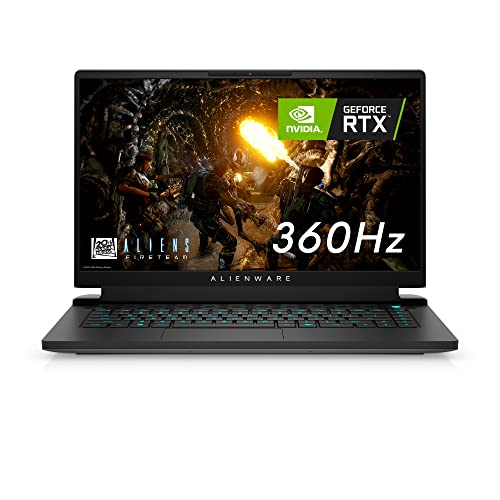
Alienware M15 R6 15.6-inch 360Hz Gaming Laptop
Best for: high-refresh competitive 1080p gaming
- Graphics Card
- NVIDIA GeForce RTX 3070
- Processor
- Intel Core i7-11800H
- Memory
- 32GB DDR4
- Storage Capacity
- 1TB SSD
- Screen Size
- 15.6-inch
- Refresh Rate
- 360Hz
View on Amazon: Alienware M15 R6 15.6-inch 360Hz Gaming Laptop
The Alienware M15 R6 is a 15.6-inch gaming laptop built for fast-paced play. It features an Intel Core i7-11800H processor paired with an NVIDIA GeForce RTX 3070 graphics card and 32GB of DDR4 memory. You get a 1080p display with a 360Hz refresh rate and a 1ms response time. This machine fits you if you prioritize ultra-high display refresh rates for competitive gaming over higher screen resolutions.
Pros
- 360Hz refresh rate display with 1ms response time and G-SYNC
- NVIDIA GeForce RTX 3070 discrete graphics card
- 32GB DDR4 memory upgradeable via two SO-DIMM slots
- 1TB solid-state drive storage
Cons
- Display limited to 1920 x 1080 resolution
- Chassis weighs 5.93 pounds
- Features an older 11th Gen Intel Core processor
Good fit if
- You play competitive esports titles where a 360Hz refresh rate provides an advantage.
- You want 32GB of system RAM out of the box with slots to upgrade later.
- You need a dedicated NVIDIA GeForce RTX 3070 GPU for graphics processing.
Skip if
- You want a QHD or 4K resolution screen for sharper visuals.
- You need a lightweight laptop under five pounds for easy travel.
- You require a newer generation Intel processor.
Verdict: Alienware M15 R6 15.6-inch 360Hz Gaming Laptop pairs an RTX 3070 GPU with a high-refresh 1080p screen for fast frame rates. It provides 32GB of expandable DDR4 memory and a 1TB SSD in a 5.93-pound package.
Specifications side by side
| Spec | Alienware 15 RTX 4050 Intel Core 7 Gaming Laptop | Alienware 16 Aurora RTX 4050 Gaming Laptop | Alienware 16X RTX 5060 Gaming Laptop | Alienware Area-51 18-inch RTX 5080 Gaming Laptop | Alienware Area-51 18-Inch RTX 5080 Laptop | Alienware x15 R1 RTX 3070 Gaming Laptop | Alienware M18 18-inch RTX 4070 Laptop | Alienware 16-Inch RTX 4070 Laptop | Alienware X16 R2 RTX 4080 Laptop | Alienware 16 Aurora RTX 5060 Gaming Laptop | Alienware M15 R6 15.6-inch 360Hz Gaming Laptop |
|---|---|---|---|---|---|---|---|---|---|---|---|
| Graphics Card | NVIDIA GeForce RTX 4050 | NVIDIA GeForce RTX 4050 | NVIDIA GeForce RTX 5060 | NVIDIA GeForce RTX 5080 | NVIDIA GeForce RTX 5080 | NVIDIA GeForce RTX 3070 | NVIDIA GeForce RTX 4070 | GeForce RTX 4070 8GB GDDR6 | NVIDIA GeForce RTX 4080 12GB GDDR6 | NVIDIA GeForce RTX 5060 | NVIDIA GeForce RTX 3070 |
| Processor | Intel Core 7 240H | Intel Core 7 240H | Intel Ultra 7 Plus | Intel Ultra 9 290HX | Intel Core Ultra 9 275HX | Intel Core i7-11800H | Intel Core i7-13700HX | Intel Ultra 7-155H | Intel Core Ultra 9-185H | Intel Core 7 240H | Intel Core i7-11800H |
| Memory | 16GB DDR5 | 16GB DDR5 | 16GB DDR5 RAM | 32GB DDR5 | 32GB 2x16GB DDR5 | 16GB DDR4 | 16 GB DDR5 | 32GB DDR5 SODIMM | 32GB LPDDR5X RAM | 32 GB DDR5 | 32GB DDR4 |
| Storage Capacity | 1TB SSD | 512GB SSD | 1TB SSD | 2TB NVMe SSD | 2TB SSD | 1TB SSD | 1 TB SSD | 1TB PCIe NVMe SSD | 1TB SSD | 1 TB PCIe SSD | 1TB SSD |
| Screen Size | 15.3" | 16" | 16" | 18.0" | 18.0" | 15.6" | 18-inch | 16.0" | 16-inch | 16" | 15.6-inch |
| Refresh Rate | 165Hz | 120Hz | 240Hz | 300Hz | 300Hz | 360Hz | 165Hz | 240Hz | 240Hz | 120Hz | 360Hz |
| Display Resolution | 1920x1200 WUXGA | WQXGA | WQXGA | WQXGA | WQXGA | 1920x1080 FHD | QHD+ | WQXGA (2560x1600) | QHD+ | 2560 x 1600 | 1920 x 1080 |
| Storage | 1TB SSD | 512GB SSD | 1TB SSD | 2TB SSD | 2TB SSD | 1TB SSD | 1TB SSD | 1TB SSD | 1TB SSD | 1TB SSD | 1TB SSD |
| Size | 16.0" Screen | 15.3" Screen | 1TB | 18.0 WQXGA | 18.0 WQXGA | 16GB RAM | 1TB SSD | 18.0 QHD+ | not specified | 16.0 QHD+ | 32 GB RAM | 1 TB SSD | 32GB DDR4 | 1TB SSD |
| Dimensions | 9.85 × 13.7 × 0.9 inches | 10.5 × 14.1 × 0.6 inches | 10.5 × 14.1 × 0.94 inches | 12.6 × 16.1 × 1.2 inches | 12.6 × 16.1 × 1.2 inches | 10.9 × 14.2 × 0.62 inches | 12.6 × 1.05 × 16.2 inches | not specified | 11.4 × 14.4 × 0.73 inches | 14.1 × 10.5 × 0.89 inches | 10.7 × 14 × 0.89 inches |
| Weight | 4.85 pounds | 5.49 pounds | 5.86 pounds | 9.56 pounds | 9.56 pounds | 5 pounds | 8.9 pounds | not specified | 6 pounds | 49.8 pounds | 5.93 pounds |
| Color | Black | Blue | Blue | Liquid Teal | Liquid Teal | White | Gray | Dark Metallic Moon | Lunar Silver | Blue | Black |
| Model | LDA15260-7847BLK-PUS | LAC16250-7649BLU-PUS | LAC16251-7649BLU-PUS | LAA18250-9694BLU-PUS | LAA18250 -9420BLU-PUS | AWX15R1-7972WHT-PUS | Dell alienware m18 r1 laptop | m16 R2 | AW16R2-9503SLV-PUS | Alienware 16 Aurora | AWM15R6-7287BLK-PUS |
Alienware Laptop Specs Compared
Alienware models vary by screen size and GPU power. The 16-inch Alienware 15 and Alienware 16 Aurora offer compact builds with RTX 4050 graphics for entry-level gaming. In contrast, the 18-inch Alienware Area-51 and M18 provide desktop-replacement performance with RTX 5080 and 4070 cards, suited for stationary setups. These larger units weigh nearly 10 pounds.
Memory and refresh rates also differ. The Alienware X16 R2 delivers high-frame-rate 1440p gaming with an RTX 4080 and 240Hz display. For storage-focused needs, the 18-inch Area-51 includes a 2TB SSD. The Alienware x15 R1 targets competitive players with a 360Hz screen. You should match the specific GPU and panel speed to your intended gaming genre.
Who Alienware Laptops Suit
Alienware offers distinct sizes for different needs. You can choose 15.6-inch models for portable 1080p gaming or 16-inch laptops for balanced 1440p performance. The 18-inch desktop replacements suit stationary setups with heavy GPUs. Colors range from black and white to blue and teal. You will find slim 0.6-inch chassis alongside thicker 1.2-inch units. No 13-inch or 21-inch options appear here. All listed models include dedicated graphics. You will not find integrated graphics or ultrabook-style thinness in this specific lineup.
To maintain lower operating temperatures during heavy workloads, you can compare the best laptop cooling pads for gaming.
Choosing Specs for Alienware Laptops
-
Match GPU to Resolution
Your graphics card determines which resolutions run smoothly. The Alienware 15 RTX 4050 suits entry-level 1200p gaming, offering solid performance without excessive power draw. For higher fidelity, the Alienware Area-51 RTX 5080 delivers desktop-class power for demanding titles. Choose an RTX 4070 or 5060 for balanced 1440p performance. Avoid pairing weak GPUs with large screens, as they will struggle to maintain high frame rates in modern games. Select the GPU first, then ensure your screen resolution matches its capabilities.
-
Prioritize High Refresh Rates
Refresh rate impacts motion clarity in fast-paced games. The Alienware x15 R1 features a 360Hz display, ideal for competitive shooters where split-second reactions matter. The Alienware 16X offers a 240Hz WQXGA screen for a balance of sharpness and speed. Standard 120Hz panels, found in the Alienware 16 Aurora, are sufficient for casual gaming but may feel less responsive during intense multiplayer sessions. If you play tactical shooters, prioritize 240Hz or higher. For story-driven games, 120Hz provides adequate smoothness without the premium cost.
-
Consider Screen Size and Weight
Screen size dictates portability and visual immersion. The 15.6-inch Alienware x15 R1 weighs five pounds, making it the most portable option for travel. The 16-inch models offer a middle ground, balancing screen real estate with manageable size. The 18-inch Area-51 and M18 weigh nearly ten pounds and are best for stationary desk setups. Do not choose an 18-inch laptop if you carry your device daily. The extra weight and bulk will hinder your mobility. Match your physical travel habits to the chassis size to ensure comfort.
-
Evaluate RAM for Multitasking
System memory affects how many applications run simultaneously. The Alienware 16 Aurora and 16 Aurora RTX 5060 include 32GB of RAM, allowing you to game while streaming or editing video without lag. Most other models, like the Alienware 15 RTX 4050, come with 16GB, which is standard for gaming. If you keep many browser tabs open or use creative software, 32GB is a significant advantage. Check the memory specifications before buying, as some models have fixed memory that cannot be upgraded later.
-
Check Storage Capacity
Modern games require substantial space for installation and updates. The Alienware Area-51 RTX 5080 (position 5) includes a 2TB SSD, providing ample room for large libraries. Most other models, such as the Alienware 16 Aurora, offer 512GB or 1TB. A 512GB drive fills up quickly with just a few AAA titles. If you plan to store numerous games, videos, or projects, prioritize models with 1TB or more. Verify the storage type is SSD for faster load times compared to older hard drives.
Frequently asked questions
Which Alienware laptop is best for portable 1080p gaming?
The Alienware 15 RTX 4050 is the top choice for entry-level 1200p gaming. It features a 165Hz display and weighs just 4.85 pounds. This makes it a focused option for solid performance in a lightweight chassis that is easy to carry.
What is the lightest Alienware gaming laptop available?
The Alienware 15 RTX 4050 is the lightest model at 4.85 pounds. It offers a 165Hz display and an Intel Core 7 processor. This compact build supports entry-level gaming while remaining portable for users who need to travel with their device.
Which Alienware model offers the highest refresh rate display?
The Alienware x15 R1 provides a 360Hz refresh rate for competitive gaming. It pairs this with an RTX 3070 GPU and 1ms response times. This setup delivers exceptionally high frame rates for fast-paced titles in a slim 0.62-inch chassis.
Which Alienware laptop has the most storage capacity?
The Alienware Area-51 18-Inch RTX 5080 includes a 2TB SSD. It combines this extensive storage with an Intel Core Ultra 9 processor and a 300Hz screen. This configuration functions best as a stationary powerhouse for users requiring vast game libraries.
Is there an Alienware laptop with 32GB of RAM?
Yes, the Alienware 16-Inch RTX 4070 and the M15 R6 both include 32GB of RAM. The 16-inch model offers 240Hz WQXGA visuals, while the M15 R6 features a 360Hz screen. These options provide ample memory for demanding multitasking and gaming.
Which Alienware laptop is best for stationary desktop replacement use?
The Alienware Area-51 18-inch RTX 5080 is ideal for permanent desk setups. Weighing 9.56 pounds, it delivers massive processing power and an expansive 18-inch display. Its heavy footprint makes it unsuitable for travel but perfect for high-end stationary gaming.
Does Alienware offer laptops with Stealth Mode for quiet work?
The Alienware 16X RTX 5060 includes Stealth Mode for quiet workspace environments. It features a 240Hz WQXGA screen and Intel Core Ultra HX architecture. This model balances capable gaming hardware with practical features for mixed work and play scenarios.