Best Gaming Laptops Under $7500 in 2026: 8 Picks Ranked by Specs
As an Amazon Associate we earn from qualifying purchases. Links on this page are affiliate links.
Finding the best gaming laptops under 7500 requires balancing flagship graphical power, display speed, and overall portability. We compared 8 models strictly using the specifications published on their official listings.
The Razer Blade 16 RTX 5090 Gaming Laptop leads the ranking because it packs an RTX 5090 GPU and a 240Hz OLED display into a chassis measuring 0.59 inches thick. Other featured machines provide expansive 18-inch panels or up to 128GB of memory. This guide helps you choose the best configuration of chassis dimensions, screen specifications, and processing hardware for your gaming needs.
Quick picks
The best fit for you
- You want portable high-refresh gaming in a slim chassis Razer Blade 16 RTX 5090 Gaming Laptop Its 4.72-pound aluminum chassis houses an RTX 5090 GPU and a 240Hz OLED display.
- You need macOS with massive unified memory capacity Apple MacBook Pro 16.2" M5 Max 40-Core GPU It provides 128GB of unified memory alongside an Apple M5 Max 40-core GPU.
- You want an expansive desktop replacement for gaming MSI Titan 18 HX 18" RTX 5090 Gaming Laptop Its 18-inch 240Hz mini LED display is powered by an RTX 5090 graphics card.
- You require maximum memory and storage for large workloads MSI Stealth A18 18" RTX 5080 Gaming Laptop It comes configured with 128GB RAM and an 8TB NVMe SSD.
Our 8 picks

Razer Blade 16 RTX 5090 Gaming Laptop
Best for: portable high-refresh OLED gaming
- Graphics Card
- NVIDIA GeForce RTX 5090
- Processor
- Intel Core Ultra 9 386H
- Memory
- 64GB LPDDR5X
- Storage Capacity
- 2TB SSD
- Screen Size
- 16"
- Refresh Rate
- 240Hz
This 16-inch gaming laptop pairs an Intel Core Ultra 9 386H processor with an NVIDIA GeForce RTX 5090 graphics card. You get a 240Hz QHD+ OLED display with a 0.2 ms response time, 64GB of fast LPDDR5X memory, and a 2TB SSD inside a chassis measuring 14.9 mm thick. It suits you if you need high frame rates and portability.
Pros
- NVIDIA GeForce RTX 5090 with 24GB GDDR7 and up to 165W TGP
- 16-inch 2560×1600 OLED panel with 240Hz refresh rate and 0.2 ms response
- 64GB of 9600MHz LPDDR5X memory and 2TB PCIe 4.0 SSD
- Thunderbolt 5, HDMI 2.1, SD card slot, and Wi-Fi 7 connectivity
Cons
- System memory is soldered and non-upgradeable
- Graphics power is capped at a 165W maximum TGP
Good fit if
- You want a fast 240Hz OLED screen with a 0.2 ms response time.
- You need a thin 14.9 mm aluminum build weighing under 4.8 pounds.
- You require connectivity features like Thunderbolt 5 and Wi-Fi 7.
Skip if
- You plan to expand your RAM beyond 64GB in the future.
- You prefer a larger 18-inch screen for desktop replacement use.
Verdict: Razer Blade 16 RTX 5090 Gaming Laptop delivers flagship graphics and a rapid 240Hz OLED display in a thin 14.9 mm aluminum chassis. It offers top-tier portable performance if you do not mind soldered, non-upgradeable memory.

Apple MacBook Pro 16.2" M5 Max 40-Core GPU
Best for: macOS users needing massive unified memory
- Storage
- 2TB SSD
- Dimensions
- 17.5 × 13 × 3.2 inches
- Weight
- 8.4 pounds
This Apple MacBook Pro gives you an 18-core CPU and a 40-core GPU paired with 128GB of unified memory and a 2TB SSD. Its 16.2-inch Liquid Retina XDR display reaches 1,600 nits peak brightness, and connectivity includes three Thunderbolt 5 ports. If you need massive unified memory and high-end display specs for macOS workloads, this setup suits you.
Pros
- 128GB unified memory and 2TB SSD storage
- 16.2-inch Liquid Retina XDR display with 1600 nits peak brightness
- Three Thunderbolt 5 ports with support for up to four external displays
- M5 Max chip with 18-core CPU and 40-core GPU
Cons
- Runs macOS rather than native Windows for PC gaming
- Listed package weight is 8.4 pounds
Good fit if
- You need 128GB of unified memory for large computing workloads.
- You want an integrated display that reaches up to 1600 nits peak brightness.
- You use macOS and want tight integration with Apple devices.
Skip if
- You require native Windows OS compatibility for your software library.
- You need a lightweight laptop configuration.
Verdict: Apple MacBook Pro 16.2" M5 Max 40-Core GPU provides exceptional hardware specs with 128GB of unified memory and Thunderbolt 5 connectivity. It delivers high-tier compute power for macOS users wanting top-spec silicon.

MSI Titan 18 HX 18" RTX 5090 Gaming Laptop
Best for: large-screen desktop replacement gaming and heavy workloads
- Graphics Card
- NVIDIA GeForce RTX 5090
- Processor
- Intel Ultra 9-290HX
- Memory
- 64GB DDR5
- Storage Capacity
- 4TB NVMe SSD
- Screen Size
- 18"
- Refresh Rate
- 240Hz
The MSI Titan 18 HX is an 18-inch desktop-replacement gaming laptop built for high-demand processing and simulation tasks. It combines an Intel Core Ultra 9-290HX processor with an NVIDIA GeForce RTX 5090 graphics card and 64GB of RAM. The machine features an 18-inch 4K UHD mini LED display running at a 240Hz refresh rate, along with Wi-Fi 7 connectivity. This setup suits you if you prioritize maximum screen space and top-tier computational hardware over portability.
Pros
- NVIDIA GeForce RTX 5090 graphics card
- 18-inch 4K UHD mini LED screen with 240Hz refresh rate
- Intel Core Ultra 9-290HX processor with 64GB RAM
- Wi-Fi 7 wireless network support
Cons
- Heavy chassis weighing 7.93 pounds
- Thick profile measuring 1.26 inches
Good fit if
- You need an 18-inch 4K mini LED display with a 240Hz refresh rate for visual clarity and speed.
- You run intensive simulations or games demanding an RTX 5090 and 64GB of memory.
Skip if
- You require a portable laptop lighter than 7.93 pounds for frequent travel.
- You prefer a slim device thinner than 1.26 inches.
Verdict: MSI Titan 18 HX 18" RTX 5090 Gaming Laptop brings workstation-class hardware together with a fast 4K mini LED screen. It serves as a dedicated desktop substitute where raw performance takes precedence over compact travel.

MSI Raider 18 HX RTX 5080 Laptop
Best for: desktop replacement with extreme storage and memory
- Graphics Card
- RTX 5080
- Processor
- Intel Core Ultra 9
- Screen Size
- 18"
- Dimensions
- 15.9 × 12.1 × 1.26 inches
- Weight
- 7.94 pounds
The MSI Raider 18 HX RTX 5080 Laptop is a desktop-replacement machine built around an 18-inch UHD+ 120Hz Mini LED panel and an Intel Core Ultra 9 285HX processor. It pairs an NVIDIA GeForce RTX 5080 graphics card with 96GB of DDR5 RAM and 10TB of NVMe storage across dual drives. This configuration suits you if you need massive local capacity, vast memory, and high-resolution screen space for demanding workloads.
Pros
- 10TB total NVMe storage with a PCIe 5.0 boot drive
- 96GB DDR5 5600MHz system memory
- 18-inch UHD+ Mini LED display with HDR 1000 and 100% DCI-P3
- Intel Core Ultra 9 285HX 24-core processor
Cons
- Heavy chassis weighing 7.94 pounds
- 120Hz refresh rate is lower than standard competitive panels
- Thick profile measuring 1.26 inches
Good fit if
- You need massive local storage with 10TB of NVMe SSD capacity.
- You run heavy workloads requiring 96GB of high-speed DDR5 memory.
- You want an 18-inch UHD+ Mini LED display with 100% DCI-P3 color.
Skip if
- You need a portable laptop weighing under 7 pounds.
- You want display refresh rates exceeding 120Hz for fast-paced gaming.
Verdict: MSI Raider 18 HX RTX 5080 Laptop delivers extraordinary storage and memory alongside an expansive 18-inch UHD+ Mini LED panel. It provides serious desktop-replacement computing capacity for power users.

Razer Blade 18 RTX 5090 Gaming Laptop
Best for: dual-mode competitive esports and high-resolution desktop replacement
- Graphics Card
- RTX 5090 Laptop GPU
- Processor
- Intel Core Ultra 9 290HX
- Memory
- 64GB DDR5-6400
- Storage Capacity
- 2TB
- Screen Size
- 18"
- Refresh Rate
- 240Hz / 440Hz
The Razer Blade 18 is a large-format gaming laptop built for desktop-class power. You get an Intel Core Ultra 9 290HX processor, an RTX 5090 graphics card with 24GB VRAM, and 64GB DDR5 RAM. Its standout feature is an 18-inch dual-mode display switching between UHD+ at 240Hz and FHD+ at 440Hz. It suits power users who need high refresh rates or high resolution alongside fast connectivity like Thunderbolt 5.
Pros
- Dual-mode 18-inch display switches between UHD+ 240Hz and FHD+ 440Hz
- RTX 5090 GPU with 24GB GDDR7 and up to 200W total graphics power
- Thunderbolt 5, Thunderbolt 4, HDMI 2.1, and 2.5Gb Ethernet connectivity
- Expandable memory up to 128GB and dual M.2 storage slots
Cons
- Heavy 7.06-pound chassis limits portability
- Large 18-inch footprint requires substantial desk and bag space
Good fit if
- You want to toggle between UHD+ 240Hz for visual detail and FHD+ 440Hz for competitive gaming.
- You need high-bandwidth connectivity including Thunderbolt 5 and 2.5Gb Ethernet.
- You plan to expand memory up to 128GB or utilize dual high-capacity SSD slots.
Skip if
- You need a lightweight machine designed for frequent travel.
- You prefer a compact 14-inch or 16-inch screen for smaller workspaces.
Verdict: Razer Blade 18 RTX 5090 Gaming Laptop delivers flagship desktop-replacement performance with its dual-mode display and top-tier GPU. It gives you expansive screen space and next-generation connectivity if you do not mind carrying a 7.06-pound chassis.
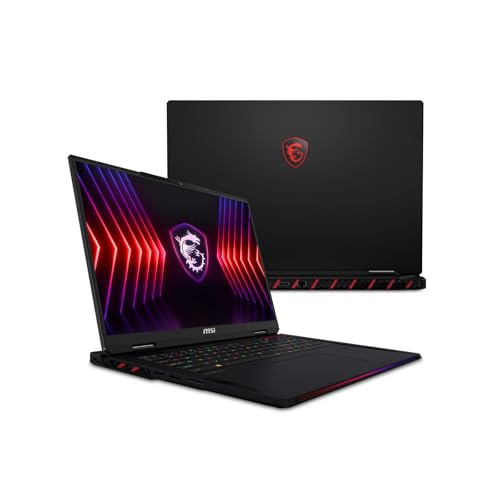
MSI Raider A18 18" RTX 5080 Gaming Laptop
Best for: Ryzen 9 computing with massive storage
- Graphics Card
- NVIDIA GeForce RTX 5080 16GB GDDR7
- Processor
- AMD Ryzen 9 9955HX3D
- Memory
- 96GB DDR5 5600MHz
- Storage Capacity
- 8TB (2x 4TB) PCIe NVMe SSD
- Screen Size
- 18"
- Refresh Rate
- 120Hz
This MSI Raider A18 HX configuration equips you with an AMD Ryzen 9 9955HX3D 16-core processor and an NVIDIA GeForce RTX 5080 GPU. You get an 18-inch UHD+ 120Hz Mini LED display, 96GB of DDR5 system memory, and 8TB of NVMe SSD storage across two drives. It suits you if you need substantial local capacity and high processing power in a desktop-replacement chassis.
Pros
- AMD Ryzen 9 9955HX3D processor with 16 cores and 128MB cache
- 96GB DDR5 5600MHz RAM and 8TB NVMe SSD storage
- 18-inch UHD+ Mini LED display with HDR 1000 support
- NVIDIA GeForce RTX 5080 GPU with 16GB GDDR7 VRAM
Cons
- 120Hz refresh rate is lower than 240Hz panels
- Chassis weighs 7.94 pounds
- Thickness measures 1.26 inches
Good fit if
- You want an AMD Ryzen 9 processor with 96GB of system memory.
- You need 8TB of factory-installed NVMe solid-state storage.
- You prefer an 18-inch UHD+ Mini LED panel for detailed visuals.
Skip if
- You require a display refresh rate higher than 120Hz.
- You need a lightweight laptop for frequent travel.
Verdict: MSI Raider A18 HX Ryzen 9 Gaming Laptop delivers top-tier AMD processing alongside 96GB of memory and 8TB of storage. It serves demanding workloads and gaming well if you do not mind carrying a 7.94-pound machine.

Lenovo Legion Pro 7i 16" Core i9 RTX 4090
Best for: high-refresh RTX 4090 gaming and heavy processing
- Graphics Card
- NVIDIA GeForce RTX 4090 16GB
- Processor
- Intel Core i9-14900HX
- Memory
- 32 GB DDR5-5600MHz
- Storage Capacity
- 2 TB SSD
- Screen Size
- 16"
- Refresh Rate
- 240Hz
This 16-inch gaming laptop pairs an Intel Core i9-14900HX processor with an NVIDIA GeForce RTX 4090 graphics card. You get a 240Hz WQXGA IPS display running at 2560 x 1600 with 500 nits brightness and 100% DCI-P3 coverage. It includes 32GB of DDR5 memory and 2TB of PCIe Gen4 storage across two drives. This setup suits you if you need top-tier graphics performance and high display refresh rates for gaming.
Pros
- NVIDIA GeForce RTX 4090 with 16GB GDDR6
- 240Hz WQXGA 2560 x 1600 display with 500 nits brightness
- 2TB PCIe Gen4 TLC SSD split across dual 1TB drives
- Intel Core i9-14900HX 24-core processor
Cons
- Weighs 5.78 pounds and measures 1.02 inches thick
- Display is non-touch
Good fit if
- You want an RTX 4090 GPU paired with a 240Hz 500-nit display.
- You need a 24-core Intel Core i9 processor for heavy multitasking.
- You require 2TB of high-speed PCIe Gen4 storage.
Skip if
- You want a lightweight laptop under five pounds.
- You need a touchscreen display.
Verdict: Lenovo Legion Pro 7i 16" Core i9 RTX 4090 pairs top-end mobile graphics with a 240Hz 500-nit panel. It delivers dedicated performance across demanding workloads without sacrificing screen speed or storage capacity.

MSI Stealth A18 18" RTX 5080 Gaming Laptop
Best for: maximum memory and storage capacity
- Graphics Card
- RTX 5080
- Screen Size
- 18"
- Refresh Rate
- 120Hz
- Dimensions
- 15.7 × 11.4 × 0.94 inches
- Weight
- 6.39 pounds
This configuration provides an AMD Ryzen AI 9 365 10-core processor paired with an NVIDIA GeForce RTX 5080 16GB GPU. You get 128GB of DDR5 memory and 8TB of NVMe SSD storage. The 18-inch UHD+ Mini LED display runs at 3840x2400 with a 120Hz refresh rate. It suits you if you need massive local capacity for heavy workloads and high-resolution gaming inside a 0.94-inch chassis.
Pros
- 128GB DDR5 5600MHz RAM
- 8TB PCIe NVMe SSD storage capacity
- 18" UHD+ Mini LED screen with HDR 1000 and 100% DCI-P3
- NVIDIA GeForce RTX 5080 16GB GDDR7 graphics
Cons
- 120Hz refresh rate limit
- Weighs 6.39 pounds
Good fit if
- You need 128GB RAM and 8TB storage out of the box.
- You prioritize a 3840x2400 Mini LED panel with 100% DCI-P3 coverage.
Skip if
- You prefer a refresh rate higher than 120Hz for fast-paced gaming.
- You want a lightweight chassis under six pounds.
Verdict: MSI Stealth A18 18" RTX 5080 Gaming Laptop pairs an 18-inch Mini LED panel with exceptional memory and storage capacity. It gives you 128GB RAM and 8TB SSD storage alongside an RTX 5080 GPU.
Specifications side by side
| Spec | Razer Blade 16 RTX 5090 Gaming Laptop | Apple MacBook Pro 16.2" M5 Max 40-Core GPU | MSI Titan 18 HX 18" RTX 5090 Gaming Laptop | MSI Raider 18 HX RTX 5080 Laptop | Razer Blade 18 RTX 5090 Gaming Laptop | MSI Raider A18 18" RTX 5080 Gaming Laptop | Lenovo Legion Pro 7i 16" Core i9 RTX 4090 | MSI Stealth A18 18" RTX 5080 Gaming Laptop |
|---|---|---|---|---|---|---|---|---|
| Graphics Card | NVIDIA GeForce RTX 5090 | not specified | NVIDIA GeForce RTX 5090 | not specified | RTX 5090 Laptop GPU | NVIDIA GeForce RTX 5080 16GB GDDR7 | NVIDIA GeForce RTX 4090 16GB | not specified |
| Processor | Intel Core Ultra 9 386H | not specified | Intel Ultra 9-290HX | not specified | Intel Core Ultra 9 290HX | AMD Ryzen 9 9955HX3D | Intel Core i9-14900HX | not specified |
| Memory | 64GB LPDDR5X | not specified | 64GB DDR5 | not specified | 64GB DDR5-6400 | 96GB DDR5 5600MHz | 32 GB DDR5-5600MHz | not specified |
| Storage Capacity | 2TB SSD | not specified | 4TB NVMe SSD | not specified | 2TB | 8TB (2x 4TB) PCIe NVMe SSD | 2 TB SSD | not specified |
| Screen Size | 16" | not specified | 18" | not specified | 18" | 18" | 16" | not specified |
| Refresh Rate | 240Hz | not specified | 240Hz | not specified | 240Hz / 440Hz | 120Hz | 240Hz | not specified |
| Display Resolution | 2560x1600 | not specified | 4K UHD | not specified | 3840x2400 / FHD+ | 3840x2400 | 2560 x 1600 | not specified |
| Storage | 2TB SSD | 2TB SSD | not specified | not specified | 2TB SSD | not specified | 2TB SSD | not specified |
| Size | not specified | 3.25 | not specified | 2TB Gen5 + 8TB Gen4 SSD | 18 Inch | 8TB (2x 4TB) NVMe SSD | 32GB RAM | 2TB SSD | 128GB RAM | 8TB NVMe SSD |
| Dimensions | 14 × 0.59 × 9.69 inches | 17.5 × 13 × 3.2 inches | 15.9 × 1.26 × 12.1 inches | 15.9 × 12.1 × 1.26 inches | 15.7 × 0.86 × 10.8 inches | 15.9 × 12.1 × 1.26 inches | 14.3 × 10.3 × 1.02 inches | 15.7 × 11.4 × 0.94 inches |
| Weight | 4.72 pounds | 8.4 pounds | 7.93 pounds | 7.94 pounds | 7.06 pounds | 7.94 pounds | 5.78 pounds | 6.39 pounds |
| Color | Black | Silver | Black | 96GB RAM | Black | 96GB RAM | Eclipse Black | 18" UHD+ | Ryzen AI 9 365 | RTX 5080 | 11 Pro |
| Model | RZ09-05819EN9-R3U1 | Z1MV0002N | TITAN18HXA21258 | MSI Raider 18 HX AI A2XWIG-014US | not specified | MSI Raider A18 HX A9WIG-082US | 83DE000AUS | Stealth A18 AI+ A3HWIG-028US |
Hardware Compromises To Expect Under $7500
Laptops Under $7500 deliver high-end hardware, but specific configurations still require compromise. You do not always receive maximum allocations across every component. Several machines cap system memory at 32GB RAM rather than 64GB, and one chassis features soldered memory that prevents expansion. Most selections supply a 2TB SSD instead of massive local capacity. Depending on the build you choose, graphics cards vary between an RTX 4090, RTX 5080, and RTX 5090, while display refresh rates can drop from 240Hz down to 120Hz.
- Memory configuration: Certain models cap at 32GB RAM or use non-upgradeable soldered memory.
- Storage capacity: Most builds feature a 2TB SSD rather than larger storage drives.
- Refresh rate limits: Select configurations top out at 120Hz rather than 240Hz.
- Graphics card variance: Hardware tiers range from an RTX 4090 to an RTX 5090.
When planning your overall workstation ergonomics alongside laptop hardware specs, you can also evaluate dimensions and materials for a gaming chair under 300.
How We Selected These Laptops
To build this guide of 8 laptops for 2026, we select listings that fall within the Under $7500 range. We evaluate each machine strictly by its published specifications and features rather than physical testing. You see only one representative configuration from each product family so you can compare distinct designs directly.
The guide presents products in stock first, then by Amazon sales rank (better-selling products first). Listings update daily to maintain fresh catalog data. Because products belong here only while qualifying for the Under $7500 category, models move in or out of this guide as listing conditions change.
How to Choose the Right Gaming Laptop
-
Target the Right Graphics Card
Look closely at the graphics processing unit to match your performance targets. The RTX 5090 provides the highest rendering tier for modern titles at maximum settings. An RTX 5080 or RTX 4090 still delivers exceptional power for complex game engines. If you run heavily modded titles or push ultra-high visual presets, the RTX 5090 offers maximum headroom. For standard high-end gaming, the Lenovo Legion Pro 7i uses an RTX 4090 to maintain strong frame rates across modern releases without needing the newer generation GPU architecture.
-
Prioritize Screen Refresh Rate
Screen refresh rate determines how many frames per second the panel displays. A 240Hz refresh rate suits fast-paced competitive esports by minimizing motion blur and tracking fast gameplay smoothly. Other configurations step down to 120Hz to prioritize raw visual resolution instead. If your primary library consists of multiplayer shooters and fast action titles, aim for a 240Hz panel. The MSI Titan 18 HX combines a 240Hz speed with an expansive screen, ensuring competitive inputs stay visually crisp during high-velocity gameplay moments.
-
Evaluate Panel Display Technology
Pay attention to the underlying panel technology when checking screen specifications. Mini LED panels use extensive local dimming zones to achieve high brightness levels, making them great for bright spaces and HDR content. OLED panels provide individual pixel illumination, resulting in true black levels and rich contrast. If you game in dark environments or prefer deep blacks, OLED is the ideal choice. The Razer Blade 16 features an OLED display that delivers rapid pixel response times and punchy contrast directly suited for immersive visuals.
-
Assess Internal Storage Capacity
Storage capacity dictates how many modern installations you can store without managing external drives. Modern game files frequently exceed one hundred gigabytes each. A 2TB solid-state drive holds a moderate game library alongside your everyday files and operating system. If you archive extensive collections locally or store massive creative project files, seek out multi-terabyte arrays. The MSI Raider 18 supplies an 8TB configuration using two 4TB Samsung 990 PRO drives, eliminating the need to uninstall older games when installing new releases.
-
Balance System Memory Needs
Check the system RAM capacity to ensure smooth multi-tasking and stable background operations. While 32GB RAM handles current game demands and general streaming easily, 64GB RAM offers higher headroom for heavy simulation titles and demanding creative applications. Having more memory prevents system bottlenecks when running intensive background software while gaming. If you use your machine as a complete workstation substitute for heavy video rendering alongside gaming, prioritize a 64GB configuration. The Razer Blade 18 includes 64GB RAM to handle heavy concurrent workloads smoothly.
Frequently asked questions
Which gaming laptop offers the highest storage capacity out of the box?
The MSI Raider 18 HX provides the highest storage configuration on this list with a combined 10TB total capacity. Its setup uses a 2TB Gen 5 solid-state drive alongside an 8TB Gen 4 drive. Alternative options like the MSI Raider A18 and MSI Stealth A18 also supply expansive storage setups with 8TB of high-speed internal solid-state space.
Which laptops include the top-tier RTX 5090 graphics card?
Three models in this guide feature the Nvidia GeForce RTX 5090 graphics processor. You can get this GPU in the Razer Blade 16, the MSI Titan 18 HX, and the Razer Blade 18. Each pairing delivers top-level processing for demanding visual workloads, accompanied by 64GB of system memory and high-refresh display options designed to handle fast graphical output.
What is the thinnest high-end gaming laptop available in this lineup?
The Razer Blade 16 is the thinnest machine listed, measuring just 0.59 inches thick. Despite its slim profile, it packs an RTX 5090 graphics processor, 64GB of memory, and a 2TB solid-state drive. If you prefer an 18-inch display in a slimmer format, the MSI Stealth A18 measures 0.94 inches thick while weighing 6.39 pounds.
Can you find a laptop with 128GB of memory for gaming and productivity?
Yes, both the Apple MacBook Pro 16.2 and the MSI Stealth A18 provide 128GB of memory. The MacBook Pro uses 128GB of unified memory connected to an Apple M5 Max chip with a 40-core GPU. The MSI Stealth A18 pairs its 128GB of RAM with an RTX 5080 GPU and an 18-inch Mini LED screen for intense computing.
What display refresh rates are available among these gaming laptops?
You will encounter refresh rates between 120Hz and 240Hz across these models. Displays with 240Hz panels include the Razer Blade 16, Lenovo Legion Pro 7i, and the MSI Titan 18 HX for smooth motion. Other systems, such as the MSI Raider A18 and MSI Stealth A18, use 120Hz panels paired with high-resolution 18-inch screens.
Which laptops feature AMD processors instead of Intel chips?
The MSI Raider A18 and the MSI Stealth A18 both use AMD processors. The Raider A18 runs on an AMD Ryzen 9 processor paired with an RTX 5080 graphics chip and 96GB of system memory. Meanwhile, the Stealth A18 features a Ryzen AI 9 365 processor alongside 128GB of RAM, an RTX 5080 GPU, and an 8TB storage drive.
What is the lightest 16-inch gaming laptop in this guide?
The Razer Blade 16 is the lightest 16-inch model here, weighing 4.72 pounds. In comparison, the Lenovo Legion Pro 7i weighs 5.78 pounds with its 16-inch display, RTX 4090 GPU, and Intel Core i9 processor. Both deliver portable form factors compared to the larger 18-inch machines, which frequently weigh between seven and eight pounds.