Best RTX 5060 Gaming Laptops: 15 Spec-Based Picks
As an Amazon Associate we earn from qualifying purchases. Links on this page are affiliate links.
The Acer Nitro V 16S 16-Inch RTX 5060 Gaming Laptop leads our list by pairing 32GB of RAM with a high-speed 180Hz display. Selecting the right machine requires evaluating how each manufacturer balances processing power, system memory, and chassis cooling around this graphics card.
We compared 15 models based strictly on the technical specifications published on their retail product listings. This guide helps you decide which display refresh rate, memory size, and storage capacity best match your daily gaming needs.
Quick picks
The best fit for you
- You want a balanced setup with 32GB RAM Acer Nitro V 16S 16-Inch RTX 5060 Gaming Laptop It pairs a 180Hz 16-inch display with 32GB DDR5 memory and an RTX 5060 GPU.
- You need the largest screen for desktop gaming ASUS ROG Strix 18 RTX 5060 Gaming Laptop Its 18-inch 240Hz Mini LED display offers an expansive viewing area for stationary setups.
- You need maximum memory for heavy multitasking Lenovo Legion 15.3-inch Ryzen 7 Gaming Laptop It comes configured with 64GB RAM, a 2TB SSD, and a 165Hz OLED panel.
- You want a fast 240Hz OLED gaming display Acer Predator Helios Neo 16S OLED Laptop It features a 240Hz OLED screen alongside a 24-core Intel Core Ultra 9 processor.
Our 15 picks

Acer Nitro V 16S 16-Inch RTX 5060 Gaming Laptop
Best for: High-refresh 1200p gaming with 32GB RAM
- Graphics Card
- RTX 5060
- Processor
- AMD Ryzen 7 260 Processor
- Memory
- 32GB DDR5
- Storage Capacity
- 1TB Gen 4 SSD
- Screen Size
- 16"
- Refresh Rate
- 180Hz
View on Amazon: Acer Nitro V 16S 16-Inch RTX 5060 Gaming Laptop
The Acer Nitro V 16S pairs an NVIDIA GeForce RTX 5060 GPU with an AMD Ryzen 7 260 processor. You get a 16-inch 1920 x 1200 display running at 180Hz with full 100% sRGB coverage. Inside, it carries 32GB of DDR5 memory and a 1TB PCIe Gen 4 SSD. This configuration suits you if you want high-refresh competitive 1200p gameplay, modern AI features, and plenty of memory right away.
Pros
- NVIDIA GeForce RTX 5060 GPU with DLSS 4 support
- 16-inch 180Hz WUXGA display with 100% sRGB coverage
- 32GB DDR5 5600MHz RAM pre-installed
- Extra open M.2 PCIe Gen 4 SSD slot for storage upgrades
Cons
- Maximum memory capped at 32GB across both slots
- Display resolution limited to 1920 x 1200 WUXGA
Good fit if
- You prioritize a fast 180Hz refresh rate and accurate 100% sRGB color over higher resolutions.
- You need 32GB of RAM pre-installed without buying extra memory modules.
- You want an open internal M.2 slot ready for secondary solid-state storage.
Skip if
- You want a QHD or 4K resolution screen for gaming.
- You plan to upgrade system memory beyond 32GB in the future.
Verdict: Acer Nitro V 16S RTX 5060 Gaming Laptop delivers balanced performance with its 180Hz display, 32GB DDR5 memory, and Blackwell-based graphics. It provides a solid complete setup for high frame-rate 1200p play without needing initial hardware upgrades.

Alienware 16 Aurora RTX 5060 Laptop
Best for: WQXGA gaming with onsite service support
- Graphics Card
- RTX 5060
- Processor
- Intel Core 7 240H
- Screen Size
- 16"
- Display Resolution
- WQXGA
- Dimensions
- 10.5 × 14.1 × 0.89 inches
- Weight
- 5.49 pounds
The Alienware 16 Aurora pairs NVIDIA RTX 5060 graphics with an Intel Core 7 240H processor. You get a 16-inch 16:10 WQXGA display delivering 300 nits of brightness for sharp visuals. Dell houses these components in a chassis featuring Cryo-Chamber cooling without a rear thermal shelf. This setup suits you if you need mid-tier gaming hardware, dedicated onsite service support, and a high-resolution 16:10 screen for everyday use.
Pros
- 16-inch 16:10 WQXGA resolution display
- Cryo-Chamber airflow cooling without a rear shelf extension
- Includes 1-year onsite service coverage
- Intel Core 7 240H processor paired with RTX 5060 graphics
Cons
- Display brightness reaches 300 nits
- Carries a relatively heavy 5.49-pound weight
Good fit if
- You want a high-resolution 16:10 WQXGA display for gaming.
- You value included 1-year onsite hardware service.
- You prefer a streamlined chassis without an extended rear cooling shelf.
Skip if
- You need a lightweight laptop under five pounds for daily travel.
- You require a display brighter than 300 nits for outdoor visibility.
Verdict: Alienware 16 Aurora RTX 5060 Laptop delivers sharp WQXGA visuals and Cryo-Chamber cooling in a streamlined chassis. It offers balanced RTX 5060 performance backed by onsite hardware support.

MSI Cyborg 15 15.6" RTX 5060 Laptop
Best for: portable everyday 1080p gaming
- Graphics Card
- RTX 5060
- Processor
- Intel Core 5-210H
- Memory
- 16GB DDR5
- Storage Capacity
- 512GB SSD
- Screen Size
- 15.6”
- Refresh Rate
- 144Hz
The MSI Cyborg 15 pairs an NVIDIA GeForce RTX 5060 graphics processor with an Intel Core 5-210H CPU and 16GB of DDR5 memory. You get a 15.6-inch Full HD screen running at 144Hz for fluid gameplay, packed into a chassis weighing 4.29 pounds. It includes a 512GB SSD for your storage needs alongside Wi-Fi 6E connectivity. This configuration suits you if you want modern GPU performance in a portable package.
Pros
- NVIDIA GeForce RTX 5060 graphics
- 15.6-inch Full HD 144Hz display
- Weighs 4.29 pounds for easier carrying
- Wi-Fi 6E, HDMI, RJ45, and USB-C connectivity
Cons
- 512GB SSD offers limited space for large game libraries
- Core 5-210H CPU offers fewer processing resources than Core 7 options
Good fit if
- You want an RTX 5060 graphics card paired with a 144Hz display.
- You need a portable gaming laptop that weighs under 4.5 pounds.
Skip if
- You need more than 512GB of factory storage for your games.
- You require a higher-tier processor like an Intel Core 7.
Verdict: MSI Cyborg 15 15.6" RTX 5060 Laptop provides current-generation graphics and a 144Hz screen in a lightweight chassis. It delivers capable 1080p gaming performance if you do not mind the smaller 512GB base drive.

GIGABYTE Gaming A16 RTX 5060 Laptop
Best for: slim 16-inch portable RTX 5060 gaming
- Graphics Card
- RTX 5060
- Processor
- Intel Core i7-13620H
- Screen Size
- 16"
- Dimensions
- 14.1 × 0.91 × 10.3 inches
- Weight
- 4.85 pounds
The GIGABYTE Gaming A16 is a 16-inch gaming laptop built with an Intel Core i7-13620H processor and an NVIDIA GeForce RTX 5060 graphics card. It features a 19.45-millimeter slim chassis weighing 4.85 pounds and includes a 180-degree lay-flat hinge. Preloaded with Windows 11 Home, it suits you if you want Blackwell-generation graphics and multi-core processing in a portable design for everyday gaming and content creation.
Pros
- NVIDIA GeForce RTX 5060 Laptop GPU with DLSS 4 support
- Intel Core i7-13620H processor for multitasking
- Slim 19.45 mm chassis with 180-degree hinge design
- Weighs 4.85 pounds for easier portability
Cons
- Screen resolution and refresh rate are not specified in product data
- System memory and storage capacity are omitted from base specs
- Features a 13th-generation Intel processor rather than newer generation chips
Good fit if
- You want an RTX 5060 laptop with a slim 19.45 mm chassis.
- You need a 180-degree lay-flat hinge for flexible viewing angles.
- You stream and run multimedia software on an Intel Core i7-13620H.
Skip if
- You require explicit panel specs like refresh rate and resolution before buying.
- You prefer the latest-generation Intel Core Ultra or AMD Ryzen processors.
Verdict: GIGABYTE Gaming A16 RTX 5060 Laptop combines Blackwell graphics with an Intel Core i7-13620H inside a 19.45 mm profile. Its 180-degree hinge and 4.85-pound weight provide solid versatility for gaming and work.

Lenovo Legion 15.3-inch Ryzen 7 Gaming Laptop
Best for: high-memory multitasking and OLED visual clarity
- Graphics Card
- RTX 5060
- Processor
- AMD Ryzen 7 250
- Memory
- 64GB DDR5 RAM
- Storage Capacity
- 2TB SSD
- Screen Size
- 15.3"
- Refresh Rate
- 165Hz
View on Amazon: Lenovo Legion 15.3-inch Ryzen 7 Gaming Laptop
The Lenovo Legion 5a brings together an AMD Ryzen 7 250 processor, an NVIDIA GeForce RTX 5060 GPU with an 115W TGP, and 64GB of DDR5 RAM. Its 15.3-inch 2560x1600 OLED panel runs at 165Hz with 100% DCI-P3 coverage. If you need massive system memory for intense multitasking alongside high-contrast OLED visuals, this build delivers high-end capacity directly from the factory.
Pros
- 64GB DDR5 system memory and 2TB PCIe SSD storage
- 15.3-inch WQXGA (2560x1600) 165Hz OLED display with 100% DCI-P3
- RTX 5060 graphics running up to 115W TGP with 8GB GDDR7
- Modern networking with Wi-Fi 7 and Bluetooth 5.4
Cons
- Keyboard lighting is limited to 1-zone RGB
- Display size of 15.3 inches is smaller than standard 16-inch models
Good fit if
- You need 64GB of RAM for heavy multitasking or creative applications.
- You want deep black levels and wide color coverage from an OLED display.
- You prefer a high-resolution 2560x1600 panel running at 165Hz.
Skip if
- You want per-key RGB backlighting customization instead of 1-zone lighting.
- You prefer a larger 17-inch or 18-inch desktop replacement screen.
Verdict: Lenovo Legion 5a 15.3" RTX 5060 Gaming Laptop pairs a sharp 165Hz OLED screen with a massive 64GB memory configuration for demanding creative and gaming workloads. It stands out on this list by offering maximum RAM out of the box.
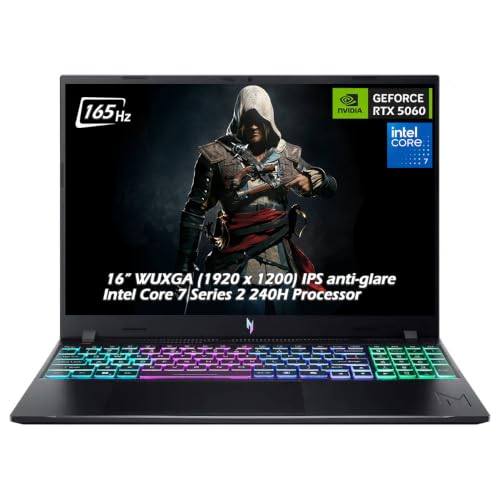
Acer Nitro V 16" RTX 5060 Gaming Laptop
Best for: high-memory 1200p gaming on a 165Hz screen
- Graphics Card
- RTX 5060
- Processor
- Intel Core 7 240H
- Memory
- 32GB DDR5
- Storage Capacity
- 2TB SSD
- Screen Size
- 16"
- Refresh Rate
- 165Hz
The Acer Nitro V 16 combines an Intel Core 7 240H 10-core processor with an NVIDIA GeForce RTX 5060 8GB GPU. You get a 16-inch WUXGA IPS panel operating at 165Hz with 400 nits brightness and a 3ms response time. With 32GB of DDR5 memory and physical ports including HDMI 2.1, this configuration suits you if you want high system memory for high-refresh 1200p gaming.
Pros
- 16-inch 165Hz WUXGA display with 400 nits brightness and 3ms response
- Intel Core 7 240H 10-core processor reaching up to 5.20 GHz boost
- 32GB of DDR5 system memory
- NVIDIA GeForce RTX 5060 GPU with 8GB GDDR7 memory
Cons
- Display resolution caps at 1920 x 1200 rather than QHD
- Includes Wi-Fi 6 instead of newer Wi-Fi 6E or Wi-Fi 7
Good fit if
- You want a 16-inch 165Hz panel with 400 nits brightness.
- You need 32GB of DDR5 system RAM out of the box.
- You prefer an Intel Core 7 10-core processor alongside an RTX 5060.
Skip if
- You need a screen resolution higher than 1920 x 1200.
- You require the Wi-Fi 6E or Wi-Fi 7 wireless standards.
Verdict: Acer Nitro V 16 RTX 5060 Gaming Laptop pairs a 10-core Intel Core 7 processor with 32GB of DDR5 RAM and a 400-nit 165Hz display for 1200p play. It delivers high memory capacity and modern port options in a 4.63-pound chassis.

MSI Katana 15 HX 15.6" QHD Gaming Laptop
Best for: 1440p gaming with wide color coverage
- Graphics Card
- RTX 5060
- Processor
- Intel Core i7-14650HX
- Memory
- 16GB DDR5
- Storage Capacity
- 1TB NVMe SSD
- Screen Size
- 15.6"
- Refresh Rate
- 165Hz
The MSI Katana 15 HX 15.6" QHD Gaming Laptop pairs an Intel Core i7-14650HX processor with an NVIDIA GeForce RTX 5060 GPU. You get a 15.6-inch QHD 165Hz display offering 100% DCI-P3 color coverage, 16GB of RAM, and 1TB of SSD storage. Dual fans and shared pipes manage heat during long sessions. It suits you if you prioritize higher display resolution and wide color gamut over a thinner build.
Pros
- 15.6-inch QHD 165Hz panel with 100% DCI-P3 color coverage
- Intel Core i7-14650HX processor and NVIDIA GeForce RTX 5060 graphics
- Cooler Boost 5 cooling system with dual fans and shared pipes
- 1TB solid-state drive for ample game installation storage
Cons
- Chassis thickness measures 0.99 inches
- Total weight is 5.29 pounds
Good fit if
- You want a sharp 1440p QHD screen with 100% DCI-P3 color coverage.
- You need an Intel Core i7-14650HX processor paired with an RTX 5060 GPU.
- You want 1TB of SSD storage out of the box.
Skip if
- You want a portable laptop lighter than 5.29 pounds.
- You need 32GB of RAM preinstalled instead of 16GB.
Verdict: MSI Katana 15 HX 15.6" QHD Gaming Laptop delivers sharp 1440p visuals and solid 14th Gen Intel HX performance for your setup. It provides a balanced RTX 5060 configuration with 1TB of storage, though the chassis carries noticeable heft.

Acer Predator Helios Neo 16S OLED Laptop
Best for: high-refresh OLED gaming and multi-core productivity
- Graphics Card
- RTX 5060
- Processor
- Intel Core Ultra 9 275HX
- Memory
- 16GB DDR5
- Storage Capacity
- 1TB NVMe SSD
- Screen Size
- 16 inch
- Refresh Rate
- 240 Hertz
This renewed Acer Predator Helios Neo 16S pairs an NVIDIA GeForce RTX 5060 graphics card with a 24-core Intel Core Ultra 9 275HX processor. You get a 16-inch 2560 by 1600 OLED panel running at 240Hz, along with 16GB of DDR5 memory and a 1TB NVMe SSD. It suits you if you want high-refresh OLED visuals and fast processing power for modern gaming and creative multitasking in a slim chassis.
Pros
- Intel Core Ultra 9 275HX processor with 24 cores and 32 threads
- 16-inch 2560 by 1600 OLED display with 240Hz refresh rate
- 100 percent DCI-P3 color gamut coverage
- Slim profile measuring under 19 millimeters thick
Cons
- Renewed hardware rather than a factory-sealed unit
- Configured with 16GB RAM rather than 32GB
- Total chassis weight is 5.07 pounds
Good fit if
- You want a 240Hz 2.5K OLED display with deep blacks and full DCI-P3 coverage.
- You need a 24-core Intel Core Ultra 9 processor for multitasking demands.
- You want a 1TB NVMe SSD paired with 16GB DDR5 memory out of the box.
Skip if
- You prefer buying brand-new retail laptops instead of renewed hardware.
- You require 32GB of system memory for your workflow.
- You want a lighter travel machine under five pounds.
Verdict: Acer Predator Helios Neo 16S OLED Laptop delivers high-end 240Hz OLED visuals alongside a 24-core Intel Core Ultra 9 processor and RTX 5060 graphics. It is a capable choice if you prioritize panel quality and processor speed with a 1TB SSD configuration.

ASUS ROG Strix 18 RTX 5060 Gaming Laptop
Best for: desktop replacement setups needing an expansive display
- Graphics Card
- RTX 5060
- Processor
- Intel Core Ultra 9 275HX
- Memory
- 32GB DDR5
- Storage Capacity
- 1TB PCIe Gen 4 SSD
- Screen Size
- 18"
- Refresh Rate
- 240Hz
This 18-inch gaming laptop pairs an Intel Core Ultra 9 275HX processor with an NVIDIA GeForce RTX 5060 running at 175W TGP. You get an 18-inch 2.5K 240Hz Mini LED display with 32GB of DDR5 memory and a 1TB SSD. Tool-free interior access lets you upgrade components quickly. It suits you if you want a large desktop replacement with high-end display hardware and peak graphics power delivery.
Pros
- GeForce RTX 5060 configured at a high 175W TGP
- 18-inch 2.5K 240Hz Mini LED panel with over 2,000 dimming zones
- Intel Core Ultra 9 275HX processor and 32GB DDR5-5600 memory
- Tool-free latch for accessing RAM, SSD slots, and cooling fans
Cons
- Heavy 6.28-pound total weight reduces travel convenience
- Large 18-inch dimensions require substantial desk and bag space
Good fit if
- You want an expansive 18-inch Mini LED screen with a 240Hz refresh rate.
- You prioritize maximum graphics wattage for the RTX 5060 GPU.
- You want easy, tool-free access to upgrade internal storage and memory.
Skip if
- You need a portable, lightweight machine for everyday commuting.
- You prefer a compact 15-inch or 16-inch laptop chassis.
Verdict: ASUS ROG Strix 18 RTX 5060 Gaming Laptop delivers maximum graphics wattage and an expansive 240Hz Mini LED display in a chassis built for desktop replacement use. It is a capable choice if you prioritize screen size and simple internal access over portability.

Lenovo LOQ 15.3" RTX 5060 Gaming Laptop
Best for: fast 165Hz gaming with balanced portability
- Graphics Card
- RTX 5060
- Processor
- Ryzen 7 250
- Memory
- 16GB
- Storage Capacity
- 1TB
- Screen Size
- 15.3"
- Refresh Rate
- 165Hz
This Lenovo LOQ is a gaming laptop built with an NVIDIA GeForce RTX 5060 graphics card and an AMD Ryzen 7 processor. You get a 15.3-inch WUXGA IPS display operating at a 165Hz refresh rate for fast-paced gameplay. At 4.62 pounds and 0.92 inches thick, it balances hardware capability with mid-range portability. It suits you if you want high-frame-rate gaming paired with AMD processing in a Luna Grey chassis.
Pros
- NVIDIA GeForce RTX 5060 graphics
- 15.3-inch WUXGA IPS display with 165Hz refresh rate
- AMD Ryzen 7 processor
- Weighs 4.62 pounds
Cons
- WUXGA resolution rather than 1440p or 2.5K
- Listing does not state exact SSD storage capacity
Good fit if
- You prioritize a 165Hz refresh rate on a 15.3-inch panel for fast gameplay.
- You want an RTX 5060 GPU and Ryzen 7 CPU in a build weighing under five pounds.
Skip if
- You require a native display resolution sharper than WUXGA.
- You want a larger 16-inch or 18-inch screen format.
Verdict: Lenovo LOQ 15.3" RTX 5060 Gaming Laptop delivers 165Hz visual performance powered by an RTX 5060 GPU and Ryzen 7 CPU in a 4.62-pound body. It provides balanced core gaming specifications without excessive weight.

Lenovo Legion 5 16" RTX 5060 Gaming Laptop
Best for: high-memory multitasking and fast-paced gaming
- Graphics Card
- RTX 5060
- Processor
- Intel Core Ultra 9 275HX
- Memory
- 64GB DDR5-5600
- Storage Capacity
- 1TB NVMe M.2 SSD
- Screen Size
- 16"
- Refresh Rate
- 240Hz
This Lenovo Legion 5 pairs an NVIDIA GeForce RTX 5060 8GB GDDR7 GPU with a 24-core Intel Core Ultra 9 275HX processor. You get 64GB of DDR5-5600 RAM and a 1TB PCIe SSD. The 16-inch IPS screen outputs a 2560 x 1600 resolution at 240Hz with 500 nits of brightness. This setup suits you if you run heavy multitasking alongside high-refresh-rate gaming.
Pros
- Intel Core Ultra 9 275HX processor with 24 cores
- 64GB DDR5-5600 RAM for intensive multitasking
- 16-inch WQXGA 240Hz display with 500-nit brightness
- Wi-Fi 7 and Bluetooth 5.4 support
Cons
- Heavy 8-pound chassis
- Thick 1.05-inch profile
Good fit if
- You need 64GB of memory for demanding workflows and background apps.
- You want a fast 240Hz display with 500 nits of brightness.
- You prioritize a high-core-count Intel Core Ultra 9 processor.
Skip if
- You want a lightweight machine under 8 pounds.
- You need a thin chassis under 1.05 inches thick.
Verdict: Lenovo Legion 5 16" RTX 5060 Laptop delivers substantial computing headroom with 64GB RAM and a 24-core Intel processor. Its 8-pound weight makes it better suited for desk use than frequent travel.

Dell Alienware 16 Aurora RTX 5060 Laptop
Best for: 120Hz WQXGA gaming and multitasking
- Graphics Card
- RTX 5060
- Processor
- Intel Core 7 240H
- Memory
- 32 GB DDR5
- Storage Capacity
- 1 TB PCIe SSD
- Screen Size
- 16"
- Refresh Rate
- 120Hz
The Dell Alienware 16 Aurora pairs an NVIDIA GeForce RTX 5060 GPU with a 16-inch WQXGA 120Hz display at 2560 x 1600 resolution. You get 32 GB of DDR5 memory, a 1 TB PCIe SSD, and an Intel Core 7 240H processor with 10 cores. This setup suits you if you want high-resolution 16:10 visuals, modern Wi-Fi 7 connectivity, and plenty of system RAM out of the box.
Pros
- 16-inch WQXGA (2560 x 1600) display with 100% sRGB coverage
- 32 GB DDR5 RAM and 1 TB PCIe SSD
- Intel Core 7 240H processor with 10 cores up to 5.20 GHz
- Wi-Fi 7 card, 1GbE Ethernet, and HDMI 2.1 direct GPU output
Cons
- 120Hz refresh rate is lower than typical 144Hz or 165Hz panels
- Screen brightness peaks at 300 nits
- Heavy 8-pound listed weight
Good fit if
- You want a sharp 2560 x 1600 resolution panel with full sRGB color.
- You need 32 GB of memory for heavy multitasking alongside gaming.
- You want modern Wi-Fi 7 and dedicated HDMI 2.1 output.
Skip if
- You prioritize high refresh rates above 120Hz for fast-paced shooters.
- You need a lightweight laptop for daily travel.
- You use your screen outdoors or under harsh lighting where 300 nits is too dim.
Verdict: Dell Alienware 16 Aurora RTX 5060 Laptop delivers a detailed 1600p panel paired with a generous 32 GB of memory. Its 120Hz refresh rate and 8-pound chassis prioritize resolution and capacity over portability and ultra-high frame rates.

ASUS ROG Strix 18 RTX 5060 Gaming Laptop
Best for: desktop replacement gaming on a large display
- Graphics Card
- RTX 5060
- Processor
- Intel Core Ultra 9 275HX
- Memory
- 32GB DDR5-5600MHz
- Storage Capacity
- 1TB PCIe Gen 4 SSD
- Screen Size
- 18"
- Refresh Rate
- 240Hz
The ASUS ROG Strix 18 gives you an 18-inch 2.5K 240Hz Mini LED display paired with an Intel Core Ultra 9 275HX processor and an NVIDIA GeForce RTX 5060 GPU. It includes 32GB of DDR5 memory and a 1TB PCIe 4.0 SSD. This machine suits you if you need an expansive screen and fast refresh rates on your primary gaming rig.
Pros
- 18-inch 2.5K 240Hz Mini LED display with 2,000+ dimming zones
- Intel Core Ultra 9 275HX processor and 32GB DDR5-5600 RAM
- Tool-free latch access for upgrading memory and SSD
- MUX Switch with Advanced Optimus support
Cons
- Heavy 6.28-pound chassis limits portability
- Large 18-inch footprint requires substantial desk space
Good fit if
- You want an 18-inch Mini LED screen with a 240Hz refresh rate.
- You need 32GB of RAM out of the box for demanding workloads.
- You want tool-free access to swap or expand SSD and memory.
Skip if
- You need a lightweight machine under six pounds for daily travel.
- You prefer a compact 15-inch or 16-inch form factor.
Verdict: ASUS ROG Strix 18 RTX 5060 Gaming Laptop pairs high-end CPU performance and a massive 240Hz Mini LED panel with an RTX 5060 GPU. It functions effectively as a large-screen desktop replacement.

ASUS ROG Strix G16 240Hz Gaming Laptop
Best for: competitive gamers wanting high refresh rates
- Graphics Card
- RTX 5060
- Processor
- Intel Core Ultra 9 Processor 275HX
- Memory
- 16GB DDR5-5600MHz
- Storage Capacity
- 1TB PCIe Gen 4 SSD
- Screen Size
- 16"
- Refresh Rate
- 240Hz
The ASUS ROG Strix G16 pairs an Intel Core Ultra 9 275HX processor with an NVIDIA GeForce RTX 5060 graphics card and 16GB of DDR5 RAM. Its 16-inch 2.5K display features a 240Hz refresh rate, a 3ms response time, and a 16:10 aspect ratio. You get 1TB of PCIe Gen 4 SSD storage and a triple-fan vapor chamber cooling setup. It suits you if you prioritize fast frame rates and heavy computing tasks.
Pros
- 16-inch 2.5K display with 240Hz refresh rate and 3ms response time
- Intel Core Ultra 9 275HX processor
- Vapor chamber cooling system with tri-fan technology and liquid metal
- 1TB PCIe Gen 4 SSD storage
Cons
- Carrying weight is 6.02 pounds
- Base configuration includes 16GB of RAM instead of 32GB
Good fit if
- You play fast-paced multiplayer games where a 240Hz refresh rate matters.
- You require high multi-core performance from an Intel Core Ultra 9 processor.
- You prefer a 16:10 aspect ratio for extra vertical screen room.
Skip if
- You want a lightweight machine for frequent travel.
- You need 32GB of memory out of the box.
Verdict: ASUS ROG Strix G16 240Hz Gaming Laptop delivers high CPU power and a fast 240Hz 2.5K display for competitive gaming. However, its 6.02-pound weight makes it best suited for a desk setup.

GIGABYTE Gaming A16 16" RTX 5060 Laptop
Best for: mid-range AMD gaming in a slim chassis
- Graphics Card
- RTX 5060
- Processor
- AMD Ryzen 7 260
- Memory
- 16GB
- Storage Capacity
- 1TB SSD
- Screen Size
- 16"
- Dimensions
- 14.1 × 0.9 × 10.3 inches
The Gigabyte Gaming A16 is a 16-inch laptop pairing an AMD Ryzen 7 260 processor with an NVIDIA GeForce RTX 5060 graphics card. You get 16GB of system memory and a 1TB solid-state drive for games and applications. The chassis measures 0.76 inches thick and includes a 180-degree lay-flat hinge. This setup suits you if you need a mid-tier gaming machine that balances portable dimensions with modern processing hardware.
Pros
- NVIDIA GeForce RTX 5060 Laptop GPU with DLSS 4 support
- AMD Ryzen 7 260 processor
- 1TB SSD storage capacity
- 180-degree lay-flat hinge design
- 0.76-inch slim profile at 4.85 pounds
Cons
- Display resolution and refresh rate are not specified
- Memory is limited to 16GB out of the box
Good fit if
- You want an RTX 5060 GPU paired with an AMD Ryzen 7 processor.
- You need 1TB of built-in solid-state storage for your game library.
- You prefer a 16-inch screen with a chassis that opens flat to 180 degrees.
Skip if
- You require 32GB of RAM immediately without upgrading.
- You need verified display specs like refresh rate or panel resolution before buying.
Verdict: Gigabyte Gaming A16 16-Inch RTX 5060 Laptop combines an AMD Ryzen 7 260 CPU with a 1TB SSD in a 0.76-inch chassis. It delivers standard mid-range gaming specs along with a flexible 180-degree hinge.
Specifications side by side
| Spec | Acer Nitro V 16S 16-Inch RTX 5060 Gaming Laptop | Alienware 16 Aurora RTX 5060 Laptop | MSI Cyborg 15 15.6" RTX 5060 Laptop | GIGABYTE Gaming A16 RTX 5060 Laptop | Lenovo Legion 15.3-inch Ryzen 7 Gaming Laptop | Acer Nitro V 16" RTX 5060 Gaming Laptop | MSI Katana 15 HX 15.6" QHD Gaming Laptop | Acer Predator Helios Neo 16S OLED Laptop | ASUS ROG Strix 18 RTX 5060 Gaming Laptop | Lenovo LOQ 15.3" RTX 5060 Gaming Laptop | Lenovo Legion 5 16" RTX 5060 Gaming Laptop | Dell Alienware 16 Aurora RTX 5060 Laptop | ASUS ROG Strix 18 RTX 5060 Gaming Laptop | ASUS ROG Strix G16 240Hz Gaming Laptop | GIGABYTE Gaming A16 16" RTX 5060 Laptop |
|---|---|---|---|---|---|---|---|---|---|---|---|---|---|---|---|
| Graphics Card | NVIDIA GeForce RTX 5060 Laptop GPU | NVIDIA RTX 5060 | NVIDIA GeForce RTX 5060 | NVIDIA GeForce RTX 5060 | GeForce RTX 5060 | NVIDIA GeForce RTX 5060 | NVIDIA GeForce RTX 5060 | GeForce RTX 5060 | NVIDIA GeForce RTX 5060 | NVIDIA GeForce RTX 5060 | NVIDIA GeForce RTX 5060 8GB GDDR7 | NVIDIA GeForce RTX 5060 | NVIDIA GeForce RTX 5060 | NVIDIA GeForce RTX 5060 Laptop GPU | NVIDIA GeForce RTX 5060 |
| Processor | AMD Ryzen 7 260 Processor | Intel Core 7 240H | Intel Core 5-210H | Intel Core i7-13620H | AMD Ryzen 7 250 | Intel Core 7 240H | Intel Core i7-14650HX | Intel Core Ultra 9 275HX | Intel Core Ultra 9 275HX | Ryzen 7 250 | Intel Core Ultra 9 275HX | Intel Core 7 240H | Intel Core Ultra 9 275HX | Intel Core Ultra 9 Processor 275HX | AMD Ryzen 7 260 |
| Memory | 32GB DDR5 | not specified | 16GB DDR5 | not specified | 64GB DDR5 RAM | 32GB DDR5 | 16GB DDR5 | 16GB DDR5 | 32GB DDR5 | 16GB | 64GB DDR5-5600 | 32 GB DDR5 | 32GB DDR5-5600MHz | 16GB DDR5-5600MHz | 16GB |
| Storage Capacity | 1TB Gen 4 SSD | not specified | 512GB SSD | not specified | 2TB SSD | 2TB SSD | 1TB NVMe SSD | 1TB NVMe SSD | 1TB PCIe Gen 4 SSD | 1TB | 1TB NVMe M.2 SSD | 1 TB PCIe SSD | 1TB PCIe Gen 4 SSD | 1TB PCIe Gen 4 SSD | 1TB SSD |
| Screen Size | 16" | 16" | 15.6” | 16" | 15.3" | 16" | 15.6" | 16 inch | 18" | 15.3" | 16" | 16" | 18" | 16" | 16" |
| Refresh Rate | 180Hz | not specified | 144Hz | not specified | 165Hz | 165Hz | 165Hz | 240 Hertz | 240Hz | 165Hz | 240Hz | 120Hz | 240Hz | 240Hz | not specified |
| Display Resolution | 1920 x 1200 | WQXGA | FHD | not specified | WQXGA (2560x1600) | 1920 x 1200 | QHD (1440p) | 2560 by 1600 | 2.5K | WUXGA | 2560 x 1600 | 2560 x 1600 | 2.5K | 2.5K | not specified |
| Storage | not specified | not specified | 512GB SSD | not specified | 2TB SSD | 2TB SSD | 1TB SSD | 1TB SSD | 1TB SSD | not specified | 1TB SSD | 1TB SSD | 1TB SSD | 1TB SSD | 1TB SSD |
| Size | 32GB 1TB | 16.0 WQXGA | Core 5-210H | not specified | 64GB RAM & 2TB SSD | 32GB+2TB | 1TB | 16GB RAM | 1TB SSD | 32GB DDR5 I 1TB SSD | not specified | not specified | 32GB RAM | 1TB SSD | not specified | 1.21" x 13.9" x 10.6" | 16GB | 1TB SSD |
| Dimensions | 14.1 × 0.79 × 10.4 inches | 10.5 × 14.1 × 0.89 inches | 14.2 × 0.91 × 9.66 inches | 14.1 × 0.91 × 10.3 inches | 14 × 10 × 0.8 inches | 0.78 × 10.2 × 14 inches | 14.1 × 0.99 × 10.3 inches | 14.1 × 10.9 × 0.79 inches | 15.7 × 0.93 × 11.7 inches | 10 × 13.6 × 0.92 inches | 14.4 × 1.05 × 10.6 inches | 21 × 13 × 3 inches | 15.7 × 0.93 × 11.7 inches | 13.9 × 0.9 × 10.6 inches | 14.1 × 0.9 × 10.3 inches |
| Weight | 4.63 pounds | 5.49 pounds | 4.29 pounds | 4.85 pounds | 7 pounds | 4.63 pounds | 5.29 pounds | 5.07 pounds | 6.28 pounds | 4.62 pounds | 8 pounds | 8 pounds | 6.28 pounds | 6.02 pounds | 4.85 pounds |
| Color | Black | Blue | Black | Black Steel | Black | Obsidian Black | Black | Black | Black | Luna Grey | Gray | Blue | Black | Eclipse Gray | Black |
| Model | ANV16S-41-R2AJ | LAC16250-7469BLU-PUS | CYBORG15B2295 | GAMING A16 CVHI3US894SH | Legion 5a 5060 | not specified | KAT15HXB14810 | PHN16S-71-91AW | G835LX-XS97 | 83TN0002US | Lenovo | Dell | G835LR-XS96 | G615LM-DS94 | GAMING A16 3VHK3US894SH |
Is an RTX 5060 laptop worth it?
An RTX 5060 graphics processor targets your gaming needs across 1080p, 1200p, and 1440p resolutions. In these builds, the GPU drives screens with refresh rates spanning 120Hz to 240Hz. You can find it paired with processors ranging from an Intel Core 5 up to an Intel Core Ultra 9 or Ryzen 9. The Blackwell-based hardware supports fast-paced action on standard, OLED, and Mini LED panels. You get solid rendering suited for high-refresh competitive titles and everyday play on screens up to 18 inches.
Worth it if
- You want to play games at 1080p, 1200p, or 1440p resolutions.
- You aim to utilize high refresh rates ranging from 120Hz to 240Hz.
Skip it if
- You do not need dedicated graphics hardware for high-refresh gaming.
- You plan to game at resolutions higher than the 1440p or WQXGA panels in this lineup.
If you prioritize higher component wattage over portability, consider how an RTX 5060 gaming desktop compares in sustained hardware performance.
How We Picked These Laptops
This guide selects 15 laptops featuring the RTX 5060 graphics card based on published Amazon listing details. Each model must state this GPU in its title or feature list. We do not test hardware physically. All details come directly from published specifications. To keep comparisons clear for you, only one variant per product family appears on the list.
Products are ordered with items in stock first, then by Amazon sales rank, placing better-selling products first. We also review published processor types, RAM capacity, and display refresh rates so you can evaluate performance trade-offs. Live availability updates daily.
How to Choose an RTX 5060 Laptop
-
Match Screen Refresh to Games
Your display refresh rate determines how fluid motion looks during fast action. Available panels on these laptops span from 120Hz up to 240Hz. If you play competitive first-person shooters, choose a 240Hz screen like the one on the ASUS ROG Strix G16 to track rapid movements cleanly. If you focus primarily on slower story campaigns or everyday tasks, a 144Hz or 165Hz display delivers smooth animations without requiring top-tier graphics throughput. Check the refresh specification carefully before deciding on your panel.
-
Choose Adequate System RAM
System memory dictates how many background processes you can run alongside your games. Models in this category offer 16GB, 32GB, or 64GB of RAM. A 16GB configuration handles most current game installations and basic web browsing without issue. If you run heavy creative applications, background streams, or demanding simulation titles, step up to a higher allotment. The Lenovo Legion 15.3-inch Ryzen 7 Gaming Laptop provides 64GB of RAM out of the box, eliminating the need to open the chassis for memory upgrades.
-
Plan Internal Storage Space
Modern game installations consume substantial disk capacity. SSD storage across these builds ranges from 512GB to 2TB. A 512GB drive, such as the one in the MSI Cyborg 15, accommodates your operating system and a few active titles, but requires frequent uninstallations. If you prefer keeping a broad library ready to launch without managing external drives, prioritize a 1TB or 2TB SSD configuration. Review your install habits and pick a factory storage volume that supports your immediate gaming needs.
-
Check Weight and Portability
Chassis dimensions directly dictate how easily you can travel with your machine. Weights on this list range from 4.1 pounds up to 11.2 pounds. A heavy machine like the 11.2-pound ASUS ROG Strix G18 works best as a stationary desktop replacement that stays anchored to a desk. If you commute daily, study on campus, or pack your laptop into a bag, target lighter builds under 5 pounds. Always compare width, thickness, and total weight against your travel requirements.
-
Evaluate Processor Core Power
Your central processor handles physics calculations, background utilities, and productivity workloads. These laptops feature Intel Core 5, Core 7, Core i7, and Core Ultra 9 chips, alongside AMD Ryzen 7 and Ryzen 9 processors. If you only run mainstream games, an Intel Core 7 or Ryzen 7 processor provides plenty of power. If you compile code, edit video, or run dense multi-threaded tasks, select a high-core chip like the 24-core Intel Core Ultra 9 found in the Acer Predator Helios Neo 16S.
-
Balance Screen Size and Resolution
Screen sizes in this selection vary from 15.1 inches to 18 inches, with display resolutions reaching up to WQXGA and 2.5K. A compact 15.3-inch or 15.6-inch panel keeps the footprint tight for standard backpacks while running 1080p smoothly. Stepping up to a 16-inch WQXGA screen, like on the Alienware 16 Aurora, increases pixel density and screen real estate for cleaner visual details. Choose your screen dimensions based on whether you prioritize expansive on-screen viewing space or easier portability.
Frequently asked questions
Which processors pair with RTX 5060 graphics cards?
You can find this graphics card paired with AMD Ryzen 7, Ryzen 9, Intel Core 5, Core 7, Core i7, and Core Ultra 9 processors. Models like the Acer Predator Helios Neo 16S utilize a 24-core Intel Core Ultra 9 chip. Meanwhile, laptops such as the ASUS ROG Strix G18 feature an AMD Ryzen 9 processor.
How much RAM do RTX 5060 gaming laptops have?
Available system memory on these machines ranges from 16GB up to 64GB of RAM. Mainstream models like the MSI Cyborg 15 and MSI Katana 15 HX provide 16GB. Mid-tier configurations offer 32GB of memory, while the Lenovo Legion 15.3-inch gaming laptop provides the maximum factory capacity with 64GB of RAM installed.
What SSD storage sizes come on RTX 5060 laptops?
Factory storage on these laptops ranges between 512GB and 2TB SSD capacities. The MSI Cyborg 15 comes standard with a 512GB solid-state drive. Most configurations, such as the ASUS ROG Strix G16 and MSI Katana 15 HX, supply a 1TB SSD. Larger configurations like the Acer Nitro V 16 and Lenovo Legion 5 provide 2TB drives.
Can you get an OLED screen on an RTX 5060 laptop?
Yes, several RTX 5060 laptops come equipped with OLED display panels. The Acer Predator Helios Neo 16S features a 240Hz OLED screen paired with its RTX 5060 GPU. In addition, the Lenovo Legion 15.3-inch and Lenovo Legion 5 15.1-inch laptops offer 165Hz OLED panels for users who prioritize deep contrast and visual fidelity.
What screen resolutions are available on RTX 5060 laptops?
These laptops feature screen resolutions ranging from 1080p and 1200p up to 1440p QHD and 1600p WQXGA. The MSI Katana 15 HX runs a 1440p panel, while the Alienware 16 Aurora models feature 16-inch WQXGA screens. Other configurations, such as the Acer Nitro V 16S, target 1200p resolution to balance sharp visuals with higher frame rates.
How heavy is an RTX 5060 gaming laptop?
Chassis weight ranges from 4.1 pounds up to 11.2 pounds depending on display size and cooling hardware. The Lenovo Legion 5 15.1-inch is the lightest at 4.1 pounds, followed by the MSI Cyborg 15 at 4.29 pounds. Larger machines weigh considerably more, with the 18-inch ASUS ROG Strix G18 reaching 11.2 pounds for stationary desk use.
Are 18-inch screen sizes available with RTX 5060 graphics?
Yes, you can find RTX 5060 laptops equipped with expansive 18-inch displays. The ASUS ROG Strix 18 includes an 18-inch 240Hz Mini LED panel for stationary desk setups. The ASUS ROG Strix G18 also provides an 18-inch 240Hz display, giving you substantial viewing area if you do not require a lightweight portable laptop.