Graphics Card in Gaming Laptops: What It Is and Is It Worth It?
As an Amazon Associate we earn from qualifying purchases. Links on this page are affiliate links.
Graphics Card Explained for You
A graphics card handles all visual rendering for your games and creative apps. It is a dedicated chip that works alongside your main processor. This separation ensures smooth performance without slowing down other tasks. You will find this component labeled in product listings as a GPU. The most common labels you will see are RTX 5050, RTX 5060, RTX 5070, RTX 5070 Ti, RTX 5080, RTX 5090, RTX 4050, RTX 4060, RTX 4070, and RTX 3050. These numbers indicate the specific model tier. Higher numbers generally mean better performance. The RTX 3050 is an entry-level option. It handles basic gaming and everyday tasks well. The RTX 4050 and RTX 4060 offer a step up in power. They are suitable for most modern games at medium to high settings. The RTX 4070 provides stronger performance for 1080p and 1440p gaming. Moving to the next generation, the RTX 5050 and RTX 5060 bring improved efficiency and ray tracing capabilities. The RTX 5070 and RTX 5070 Ti are powerful mid-range choices. They deliver high frame rates in demanding titles. The RTX 5080 and RTX 5090 represent the top tier. These cards are built for 4K gaming and heavy creative workloads. They feature more memory and faster cores. When you read graphics card explained guides, you will learn that VRAM is also critical. More video memory allows you to load higher resolution textures. This matters if you play games with detailed environments. You should match the card to your screen resolution. A weak card will struggle on a high-resolution display. A strong card ensures smooth visuals without stuttering. This spec directly impacts your gaming experience. It determines how fast images appear on your screen. It also affects how quickly video renders. Choosing the right tier depends on your specific needs. You do not always need the most expensive option. Balance your budget with the games you play most often.
Graphics Card Options Compared
RTX 5060
The RTX 5060 offers solid 1080p gaming and content creation capabilities. It fits users who value high refresh rates and ample RAM over higher screen resolutions. The Acer Nitro V 16S features this card paired with a Ryzen 7 processor and 32GB of RAM. This setup ensures smooth multitasking and gaming performance. You will find this option ideal for players who want reliable frame rates without the premium cost of higher-tier GPUs. It balances power and efficiency well for everyday gaming needs.
RTX 5070
The RTX 5070 delivers solid gaming performance with its powerful architecture. It is a good fit for players who value graphical fidelity and thermal management over high-speed motion clarity. The Alienware 16 Aurora RTX 5070 Laptop showcases this card with a Core 9 270H processor. This combination provides robust performance for demanding titles. You will benefit from improved visual quality in supported games. It is a strong choice for those seeking a balance between high-end performance and manageable heat output in a laptop chassis.
RTX 5070 Ti
The RTX 5070 Ti delivers top-tier performance for users who prioritize high frame rates and large memory capacity. It fits those who want a powerful 16-inch machine and do not mind a heavier build. The ASUS ROG Strix 16 RTX 5070 Ti Laptop includes an Intel Core Ultra 9 processor and 32GB of RAM. It features a 240Hz refresh rate display. This configuration is ideal for competitive gamers and heavy multitaskers. You will experience exceptional smoothness in fast-paced games. The trade-off is a heavier device due to the robust cooling system required.
RTX 4050
The RTX 4050 is an entry-level option for 1080p gaming. It handles modern titles at medium to high settings effectively. This card is suitable for budget-conscious gamers who want to play popular esports titles and older AAA games. It offers good performance per dollar. You will find it in many affordable gaming laptops. The trade-off is lower performance in the most demanding recent releases compared to higher-tier RTX 40 or 50 series cards. It is a practical choice for casual gamers who do not need maximum graphical settings.
RTX 5080
The GIGABYTE A16 PRO RTX 5080 is a powerful choice for creators and gamers who need top-tier performance in a relatively thin chassis. It fits users who value high memory capacity and a large 16-inch display over extreme portability. This card handles high-end gaming and content creation with ease. You will get excellent frame rates in demanding games. The trade-off is a higher price point and potentially higher power consumption. It is ideal for users who want near-flagship performance without the bulk of a massive gaming rig.
RTX 4060
The RTX 4060 delivers reliable 1080p gaming performance with efficient cooling. It fits players who value high frame rates and fast storage over higher resolution displays. The ASUS ROG Strix G16 RTX 4060 Gaming Laptop features an Intel Core i7 processor and 16GB of RAM. It includes a 165Hz refresh rate screen. This setup is ideal for smooth gameplay in competitive titles. You will find it to be a versatile option for both gaming and light content creation. It offers a sweet spot for performance and value in the mid-range segment.
Is a Dedicated GPU Worth It
Who needs it
You need a dedicated graphics card if you play modern games at high settings or create video content. The RTX 50 series offers significant performance jumps over previous generations. Cards like the RTX 5090 and 5080 handle demanding titles with ease. Even the mid-range RTX 5060 and 5070 provide smooth frame rates for 1080p and 1440p gaming. If you use creative apps like Blender or Premiere Pro, the dedicated cores speed up rendering. You should also choose a dedicated GPU if you want ray tracing for realistic lighting. Integrated graphics simply cannot match the power of these chips. Prioritize models with higher VRAM if you plan to keep your laptop for several years. This ensures you can run future software without slowdowns. Your workflow depends on this hardware separation.
Who can skip it
You can skip a dedicated graphics card if you only browse the web or use office software. Integrated graphics handle basic tasks like email, spreadsheets, and web streaming perfectly fine. You save battery life and keep the laptop lighter without the extra chip. If you play only retro games or simple indie titles, integrated options are sufficient. You also save money by avoiding expensive dedicated units. Instead, prioritize a good processor and plenty of RAM for general multitasking. Look for a bright display with accurate colors if you consume media. A fast SSD improves boot times and app loading. You do not need ray tracing or high refresh rates for casual use. Focus on portability and battery endurance. These features matter more for daily commuting and classroom use than gaming performance.
Gaming Laptop Specs Glossary
Graphics Card
A dedicated chip that handles visual rendering for games and creative apps. It works alongside the main processor to ensure smooth performance without slowing down other tasks.
Processor
The main chip that manages general computing tasks. It works in tandem with the graphics card to ensure your system runs smoothly during gaming and everyday use.
Memory
Short-term storage for active data, often called RAM. Higher amounts allow you to run more applications simultaneously without slowing down your laptop's overall performance speed.
Screen Size
The diagonal measurement of the display in inches. Larger screens provide more workspace for creative apps, while smaller sizes offer better portability for travel and commuting.
Storage
Where your operating system and files are saved. Solid-state drives load games and apps faster than traditional hard drives, reducing wait times for your tasks.
Refresh Rate
How many times per second the screen updates its image. Higher rates, like 144Hz, make motion appear smoother, which is crucial for fast-paced competitive gaming.
Use Case
The primary purpose for which you buy the laptop. Gaming laptops prioritize visual power, while everyday models focus on battery life and lightweight portability for daily tasks.
Quick picks
| # | Product | Best for | Price |
|---|---|---|---|
| 1 | Acer Nitro V 16S 16-Inch RTX 5060 Gaming Laptop | 1080p gaming and color-accurate content creation | Check price of Acer Nitro V 16S 16-Inch RTX 5060 Gaming Laptop on Amazon |
| 2 | Alienware 16 Aurora RTX 5070 Laptop | players valuing RTX 5070 power over speed | Check price of Alienware 16 Aurora RTX 5070 Laptop on Amazon |
| 3 | ASUS ROG Strix 16 RTX 5070 Ti Laptop | High-refresh-rate gaming and heavy multitasking | Check price of ASUS ROG Strix 16 RTX 5070 Ti Laptop on Amazon |
| 4 | GIGABYTE A16 Pro 16" RTX 5080 Gaming Laptop | high-end gaming and content creation | Check price of GIGABYTE A16 Pro 16" RTX 5080 Gaming Laptop on Amazon |
| 5 | ASUS ROG Strix G16 RTX 4060 Gaming Laptop | 1080p gaming with high refresh rates | Check price of ASUS ROG Strix G16 RTX 4060 Gaming Laptop on Amazon |
| 6 | Dell G16 16-Inch i9 RTX 4070 Laptop | High-refresh-rate gaming and heavy multitasking | Check price of Dell G16 16-Inch i9 RTX 4070 Laptop on Amazon |
Our 6 picks

Acer Nitro V 16S 16-Inch RTX 5060 Gaming Laptop
Best for: 1080p gaming and color-accurate content creation
- Graphics Card
- RTX 5060 (what this guide is about)
- Processor
- AMD Ryzen 7 260 Processor
- Memory
- 32GB DDR5
- Storage Capacity
- 1TB Gen 4 SSD
- Screen Size
- 16"
- Refresh Rate
- 180Hz
View on Amazon: Acer Nitro V 16S 16-Inch RTX 5060 Gaming Laptop Affiliate link
The Acer Nitro V 16S pairs an AMD Ryzen 7 260 processor with an NVIDIA GeForce RTX 5060 Laptop GPU. It features 32GB of DDR5 RAM and a 16-inch 180Hz display with 100% sRGB coverage. This configuration delivers strong AI performance and smooth visuals. It suits gamers who need high frame rates and accurate colors without excessive bulk.
Pros
- RTX 5060 GPU with Blackwell architecture for ray tracing
- 32GB DDR5 5600MHz memory for multitasking
- 16-inch 180Hz display with 100% sRGB color coverage
- 1TB PCIe Gen 4 SSD storage
Cons
- 1920 x 1200 resolution is lower than 2.5K options
- 4.63 pounds weight adds bulk for travel
- Maximum memory is capped at 32GB
Good fit if
- You want 100% sRGB color accuracy for content work
- You prioritize high refresh rates for smooth gameplay
- You need 32GB of RAM for heavy multitasking
Skip if
- You require 2.5K or higher display resolution
- You need a lightweight laptop under 4 pounds
- You want upgradable memory beyond 32GB
Verdict: Acer Nitro V 16S RTX 5060 offers solid 1080p gaming and content creation capabilities. It fits users who value high refresh rates and ample RAM over higher screen resolutions.

Alienware 16 Aurora RTX 5070 Laptop
Best for: players valuing RTX 5070 power over speed
- Graphics Card
- RTX 5070 (what this guide is about)
- Processor
- Intel Core 9 270H
- Memory
- 32GB DDR5 RAM
- Storage Capacity
- 1TB SSD
- Screen Size
- 16"
- Refresh Rate
- 120Hz
View on Amazon: Alienware 16 Aurora RTX 5070 Laptop Affiliate link
The Alienware 16 Aurora pairs an Intel Core 9 270H processor with an NVIDIA GeForce RTX 5070 graphics card. It features a 16-inch WQXGA display running at 120Hz and 300 nits of brightness. The system uses a Cryo-Chamber cooling structure to manage heat. This configuration suits players who want strong AI-powered graphics performance in a streamlined chassis without a rear thermal shelf.
Pros
- NVIDIA GeForce RTX 5070 graphics card for AI gaming
- Intel Core 9 270H processor with 45W TDP
- 16-inch WQXGA display with 120Hz refresh rate
- Cryo-Chamber cooling structure for core components
Cons
- 120Hz refresh rate is lower than the 240Hz found on other laptops in this list
- 300 nits display brightness is modest for bright environments
- 5.49-pound weight adds bulk to the 16-inch chassis
Good fit if
- You prioritize strong GPU performance from the RTX 5070 over high refresh rates
- You prefer a 16-inch screen with WQXGA resolution for detailed visuals
- You want a streamlined design without a rear thermal shelf
Skip if
- You need a display with a refresh rate higher than 120Hz
- You require a brighter screen than 300 nits for outdoor use
- You prefer a lighter laptop under 5 pounds
Verdict: Alienware 16 RTX 5070 delivers solid gaming performance with its RTX 5070 and Core 9 270H, making it a good fit for players who value graphical fidelity and thermal management over high-speed motion clarity.
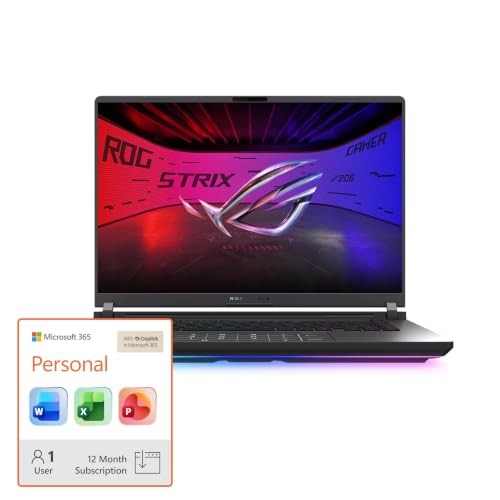
ASUS ROG Strix 16 RTX 5070 Ti Laptop
Best for: High-refresh-rate gaming and heavy multitasking
- Graphics Card
- RTX 5070 Ti (what this guide is about)
- Processor
- Intel Core Ultra 9 275HX
- Memory
- 32GB DDR5
- Storage Capacity
- 1TB SSD
- Screen Size
- 16
- Refresh Rate
- 240Hz
View on Amazon: ASUS ROG Strix 16 RTX 5070 Ti Laptop Affiliate link
This laptop pairs an Intel Core Ultra 9 275HX processor with an NVIDIA GeForce RTX 5070 Ti GPU. You get 32GB of DDR5 memory and a 1TB SSD. The 16-inch 2.5K display runs at 240Hz with a 3ms response time. Advanced cooling uses a vapor chamber and liquid metal. It suits users who need high frame rates and fast multitasking for demanding games.
Pros
- RTX 5070 Ti GPU with DLSS 4 support
- Intel Core Ultra 9 275HX processor
- 32GB DDR5-5600MHz memory
- 16-inch 2.5K 240Hz display
- 1TB PCIe Gen 4 SSD storage
Cons
- 10.6-inch height makes it bulkier than standard laptops
- Black finish shows fingerprints easily
- No mention of Thunderbolt or USB4 ports
Good fit if
- You want high refresh rate gaming on a 16-inch screen
- You need 32GB of RAM for heavy multitasking
- You prefer advanced cooling like vapor chambers
Skip if
- You need a thin and light device under 10 inches
- You are on a budget for entry-level specs
- You prefer AMD processors over Intel
Verdict: ASUS ROG Strix G16 RTX 5070 Ti delivers top-tier performance for users who prioritize high frame rates and large memory capacity. It fits those who want a powerful 16-inch machine and do not mind a heavier build.

GIGABYTE A16 Pro 16" RTX 5080 Gaming Laptop
Best for: high-end gaming and content creation
- Graphics Card
- RTX 5080 (what this guide is about)
- Processor
- Intel Core Ultra 7 240H
- Memory
- 32GB LPDDR5x
- Storage Capacity
- 1TB SSD
- Screen Size
- 16"
- Refresh Rate
- 165Hz
View on Amazon: GIGABYTE A16 Pro 16" RTX 5080 Gaming Laptop Affiliate link
The GIGABYTE Gaming A16 PRO pairs an NVIDIA GeForce RTX 5080 Laptop GPU with an Intel Core Ultra 7 240H processor and 32GB of LPDDR5x memory. This combination delivers high-end graphics fidelity and fast multimedia processing for gaming and creation. The 16-inch display fits into a slim 19.45mm chassis. It suits users who need powerful AI horsepower and a thin profile without sacrificing performance.
Pros
- NVIDIA GeForce RTX 5080 Laptop GPU for next-level graphics
- 32GB LPDDR5x memory for smooth multitasking
- Intel Core Ultra 7 240H processor
- 19.45mm slim chassis with 180-degree hinge
Cons
- Heavier build at 5.07 pounds
- No dedicated numeric keypad visible in specs
- 16-inch screen limits portability compared to 14-inch models
Good fit if
- You prioritize high-end RTX 5080 graphics performance
- You need 32GB of RAM for heavy multitasking
- You want a thin 16-inch gaming laptop
Skip if
- You prefer a lighter laptop under 4 pounds
- You need a 14-inch display for maximum portability
- You are on a tight budget for entry-level specs
Verdict: GIGABYTE A16 PRO RTX 5080 16" is a powerful choice for creators and gamers who need top-tier RTX 5080 performance in a relatively thin chassis. It fits users who value high memory capacity and a large 16-inch display over extreme portability.

ASUS ROG Strix G16 RTX 4060 Gaming Laptop
Best for: 1080p gaming with high refresh rates
- Graphics Card
- RTX 4060 (what this guide is about)
- Processor
- Intel Core i7-13650HX
- Memory
- 16GB DDR5
- Storage Capacity
- 1TB PCIe Gen4 SSD
- Refresh Rate
- 165Hz
- Display Resolution
- FHD
View on Amazon: ASUS ROG Strix G16 RTX 4060 Gaming Laptop Affiliate link
This ASUS ROG Strix G16 pairs an Intel Core i7-13650HX processor with an NVIDIA GeForce RTX 4060 GPU running at 140W TGP. It includes 16GB of DDR5-4800MHz memory and a 1TB PCIe Gen4 SSD. The 16-inch FHD display offers a 165Hz refresh rate and 100% sRGB coverage. It suits gamers who want solid 1080p performance with efficient cooling for longer sessions.
Pros
- RTX 4060 GPU with 140W Max TGP
- Intel Core i7-13650HX processor
- 16GB DDR5-4800MHz memory
- 1TB PCIe Gen4 SSD storage
- Liquid metal cooling on CPU
Cons
- FHD display resolution limits 1440p clarity
- 16GB memory may require upgrades for heavy multitasking
- 5.51 pounds weight adds bulk to transport
Good fit if
- You prioritize high refresh rates at 1080p
- You want strong sustained performance during long sessions
- You need fast storage for quick load times
Skip if
- You require 1440p or 4K display resolution
- You need more than 16GB of RAM for professional work
- You prefer a lighter laptop under 5 pounds
Verdict: ASUS ROG Strix G16 RTX 4060 delivers reliable 1080p gaming performance with efficient cooling. It fits players who value high frame rates and fast storage over higher resolution displays.

Dell G16 16-Inch i9 RTX 4070 Laptop
Best for: High-refresh-rate gaming and heavy multitasking
- Graphics Card
- RTX 4070 (what this guide is about)
- Processor
- Intel Core i9-13900HX
- Memory
- 16GB DDR5 RAM
- Storage Capacity
- 1TB SSD
- Screen Size
- 16-inch
- Refresh Rate
- 240Hz
View on Amazon: Dell G16 16-Inch i9 RTX 4070 Laptop Affiliate link
The Dell G16 pairs an Intel Core i9-13900HX with an NVIDIA GeForce RTX 4070 8GB. You get a 16-inch QHD+ display running at 240Hz with a 3ms response time. It includes 16GB of DDR5 RAM and a 1TB SSD. The Alienware-inspired thermal design uses a vapor chamber to manage heat. This setup suits you if you want high frame rates and fast loading times in demanding titles.
Pros
- Intel Core i9-13900HX processor for heavy multitasking
- NVIDIA GeForce RTX 4070 8GB GDDR6 graphics
- 16-inch QHD+ display with 240Hz refresh rate
- 1TB SSD storage capacity
Cons
- 16GB of RAM is lower than the 32GB found in some competitors
- 6.32-pound weight makes it less portable than lighter models
- 13th Generation Intel CPU is a previous generation architecture
Good fit if
- You prioritize high refresh rates for competitive gaming
- You need strong CPU performance alongside dedicated graphics
- You want a large 16-inch screen with QHD+ resolution
Skip if
- You require 32GB of RAM for professional workloads
- You prefer the latest 14th Generation Intel processors
- You need a lightweight laptop for frequent travel
Verdict: Dell G16 i9 RTX 4070 delivers high-end gaming performance through its i9 processor and RTX 4070 graphics. It fits you if you value a fast 240Hz display and robust thermal management for sustained gaming sessions.
Specifications side by side
| Spec | Acer Nitro V 16S 16-Inch RTX 5060 Gaming Laptop | Alienware 16 Aurora RTX 5070 Laptop | ASUS ROG Strix 16 RTX 5070 Ti Laptop | GIGABYTE A16 Pro 16" RTX 5080 Gaming Laptop | ASUS ROG Strix G16 RTX 4060 Gaming Laptop | Dell G16 16-Inch i9 RTX 4070 Laptop |
|---|---|---|---|---|---|---|
| Graphics Card | NVIDIA GeForce RTX 5060 Laptop GPU | NVIDIA GeForce RTX 5070 | NVIDIA GeForce RTX 5070 Ti | NVIDIA GeForce RTX 5080 | NVIDIA GeForce RTX 4060 | NVIDIA GeForce RTX 4070 8GB GDDR6 |
| Processor | AMD Ryzen 7 260 Processor | Intel Core 9 270H | Intel Core Ultra 9 275HX | Intel Core Ultra 7 240H | Intel Core i7-13650HX | Intel Core i9-13900HX |
| Memory | 32GB DDR5 | 32GB DDR5 RAM | 32GB DDR5 | 32GB LPDDR5x | 16GB DDR5 | 16GB DDR5 RAM |
| Storage Capacity | 1TB Gen 4 SSD | 1TB SSD | 1TB SSD | 1TB SSD | 1TB PCIe Gen4 SSD | 1TB SSD |
| Screen Size | 16" | 16" | 16 | 16" | not stated | 16-inch |
| Refresh Rate | 180Hz | 120Hz | 240Hz | 165Hz | 165Hz | 240Hz |
| Display Resolution | 1920 x 1200 | 2560x1600 | 2.5K | 2560x1600 | FHD | QHD+ |
| Storage | not stated | 1TB SSD | 1TB SSD | 1TB SSD | not stated | 1TB SSD |
| Dimensions | 14.1 × 0.79 × 10.4 inches | 10.5 × 14.1 × 0.6 inches | not stated | 15.2 × 0.91 × 11.6 inches | 13.9 × 0.89 × 10.4 inches | 11.4 × 14.1 × 0.98 inches |
| Weight | 4.63 pounds | 5.49 pounds | not stated | 5.07 pounds | 5.51 pounds | 6.32 pounds |
| Size | 32GB 1TB | 16 | not stated | not stated | 16GB DDR5 | 1TB SSD | 16.0 QHD 240Hz |
| Color | Black | Blue | Black | Titanium Black | Eclipse Gray | Metallic Nightshade with Black thermal shelf |
| Model | ANV16S-41-R2AJ | LAC16250-9346BLU-PUS | ROG Strix G16 | GAMING A16 PRO DYHG5USCC4SH | G614JV-AS74 | G7630-9926GRY-PUS |
Frequently asked questions
Which graphics card is best for 1080p gaming?
The RTX 5060 is a strong choice for 1080p gaming. The Acer Nitro V 16S uses this card to deliver solid performance at high settings. It pairs well with ample RAM and high refresh rates. This combination ensures smooth gameplay without needing higher screen resolutions. You get reliable frame rates for modern titles.
How much RAM do I need with an RTX 5070?
Most laptops with the RTX 5070 include 16GB or more of memory. The Alienware 16 Aurora features this GPU for graphical fidelity. You should ensure your system has sufficient RAM to match the card’s power. High memory capacity helps with heavy multitasking alongside gaming. Check the specific model’s specs for exact amounts.
What is the difference between RTX 5070 and RTX 5070 Ti?
The RTX 5070 Ti offers higher performance than the standard RTX 5070. The ASUS ROG Strix 16 uses the Ti variant for top-tier speed. It supports a 240Hz refresh rate for smoother motion. You get better frame rates and heavier multitasking capabilities. The Ti model suits users who prioritize maximum visual clarity and speed.
Is the RTX 4060 good for high refresh rate gaming?
Yes, the RTX 4060 handles high refresh rate gaming well. The ASUS ROG Strix G16 uses this card with a 165Hz display. It delivers reliable 1080p performance with efficient cooling. You get fast storage and stable frame rates. This setup fits players who value smooth motion over higher resolution details.
Can the RTX 5080 handle content creation?
The RTX 5080 is excellent for content creation. The GIGABYTE A16 Pro uses this card in a thin chassis. It provides top-tier performance for video editing and rendering. You get a large 16-inch display and high memory capacity. This machine fits creators who need power without extreme portability.
Which laptop has the fastest display refresh rate?
Several models feature 240Hz displays for ultra-smooth visuals. The ASUS ROG Strix 16 RTX 5070 Ti includes this rate. The Dell G16 with the RTX 4070 also offers a 240Hz screen. You get faster motion clarity for competitive gaming. These models suit users who prioritize high frame rates.