Looking Beyond the Msi Vector 17 Core i9? 6 Alternatives Worth a Look
As an Amazon Associate we earn from qualifying purchases. Links on this page are affiliate links.
The MSI Vector 17 HX Core i9 delivers raw processing power and a large, fast screen for desktop replacements. If you are considering msi vector 17 hx gaming laptop alternatives, you might want a different size, brand, or specific feature set. This laptop suits users who stay plugged in and need heavy multitasking capabilities with its 32GB RAM and 1TB SSD. However, you may prefer a more portable chassis or a different graphics configuration. You might also look for a Ryzen processor or a distinct color option. These alternatives were chosen because their specs overlap with the original, ensuring comparable performance for gaming and work. Each option offers unique trade-offs in weight, screen resolution, or refresh rate that better suit different use cases. You can find models that fit tighter budgets or prioritize color accuracy over sheer CPU power. The list includes options from Alienware, ASUS, and GIGABYTE, all featuring RTX 4070 graphics. This variety allows you to compare dimensions, memory, and display qualities side by side. You can select a machine that aligns with your specific portability needs or visual preferences. The following 6 picks cover these variations while maintaining high-end gaming standards.
Our top pick: MSI Vector 17 Core i9 RTX 4070 Laptop.
How Each Alternative Compares
MSI Katana A15 15.6" Ryzen 9 RTX 4070 Laptop
The MSI Katana A15 swaps the massive 17-inch QHD+ screen for a more portable 15.6-inch display with a 165Hz refresh rate. You get a Ryzen 9 processor instead of the Intel Core i9-14900HX, which offers strong multi-core performance in a slightly lighter 5.95-pound chassis. It retains the same 32GB RAM and 1TB SSD capacity as the Vector 17. This model suits users who want high-end Ryzen processing power without the bulk of a desktop replacement. If you prioritize mobility and a compact form factor over the largest possible screen, this alternative provides a balanced mix of speed and portability for gaming and multitasking.
Alienware 16-Inch RTX 4070 Laptop
The Alienware m16 R2 features a 16-inch display with a 240Hz refresh rate, matching the Vector 17’s speed but in a more compact chassis. It includes 32GB of RAM and a 1TB SSD, ensuring ample memory for heavy multitasking. The RTX 4070 graphics card delivers similar visual performance to the Vector 17. This laptop is designed for users who need high refresh rates and strong processing capabilities in a smaller footprint. It fits those who prioritize display quality and multitasking speed over the larger 17-inch screen size. The Alienware option offers a premium build with comparable specs, making it a strong choice for gamers who value portability alongside performance.
Alienware x16 R2 16-inch Gaming Laptop
The Alienware X16 R2 provides a 16-inch QHD+ display with a 240Hz refresh rate, offering high visual fidelity in a portable chassis. It includes a 1TB SSD and the RTX 4070 graphics card, matching the Vector 17’s storage and GPU capabilities. This model weighs 6 pounds, similar to the Vector 17, but features a different design aesthetic. It suits users who prioritize display quality and GPU performance for gaming and color-critical tasks. The X16 R2 delivers a balanced mix of processing power and visual clarity. If you prefer a 16-inch screen over the 17-inch format while maintaining high refresh rates and strong graphics, this alternative is a practical choice for both gaming and professional work.
ASUS ROG Strix G16 RTX 4070 Gaming Laptop
The ASUS ROG Strix G16 features a 16-inch QHD display with a 240Hz refresh rate, offering robust specs for gamers who prioritize screen size and processing power. It includes 32GB of RAM and a 1TB SSD, matching the Vector 17’s memory and storage capacity. The Intel Core i9 processor provides strong multi-core performance, similar to the Vector 17’s i9-14900HX. This laptop weighs 7 pounds, making it slightly heavier than the Vector 17. It suits users who want a 16-inch QHD display and strong multitasking capabilities. The Strix G16 is a solid choice for gamers who value high performance and a large screen, even if it means sacrificing some portability compared to smaller models.
ASUS ROG Strix Scar 15 RTX 3070 Ti
The ASUS ROG Strix Scar 15 features a 15.6-inch QHD display with a 240Hz refresh rate, offering high frame rates in a compact chassis. It includes 16GB of RAM and a 1TB SSD, which is less memory than the Vector 17’s 32GB. The Intel Core i9 processor provides strong processing power, comparable to the Vector 17. The RTX 3070 Ti graphics card delivers solid visual performance, though it is a previous-generation GPU compared to the RTX 4070. This model weighs 5.07 pounds, making it significantly lighter than the Vector 17. It suits gamers who prioritize high frame rates on a QHD screen and need strong processing power in a portable package. If you value weight savings over maximum RAM, this is a viable alternative.
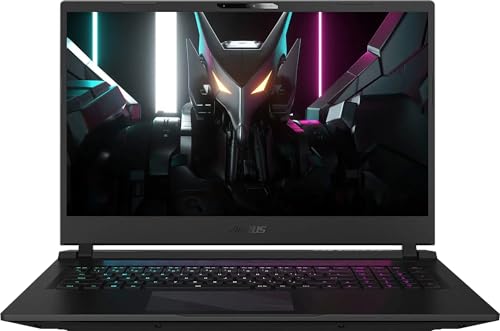
GIGABYTE Aorus 17 RTX 4070
The GIGABYTE Aorus 17 features a 17.3-inch display with a 240Hz refresh rate, offering a large screen similar to the Vector 17. It includes 16GB of RAM and a 1TB SSD, which is less memory than the Vector 17’s 32GB. The Intel Core i7-13700H processor provides strong processing power, though it is a different generation than the Vector 17’s i9-14900HX. The RTX 4070 graphics card matches the Vector 17’s GPU capabilities. This laptop weighs 6.22 pounds, making it slightly heavier than the Vector 17. It suits users who value a large, high-refresh display and strong processing power over portability. If you need a 17-inch screen with solid specs but are comfortable with less RAM, this alternative is worth considering.
Quick picks
Our 7 picks

MSI Vector 17 Core i9 RTX 4070 Laptop
Best for: desktop replacement gaming and workstations
- Graphics Card
- GeForce RTX 4070
- Processor
- Intel Core i9-14900HX
- Memory
- 32 GB
- Storage Capacity
- 1 TB SSD NVMe
- Screen Size
- 17"
- Refresh Rate
- 240 Hz
View on Amazon: MSI Vector 17 Core i9 RTX 4070 Laptop Affiliate link
The MSI Vector 17 HX offers a 17-inch QHD+ display with a 240Hz refresh rate for smooth visuals. It is powered by an Intel Core i9-14900HX processor and includes 32GB of RAM. This configuration supports demanding gaming and multitasking. The 1TB SSD provides ample storage for your library. It connects via Wi-Fi 7 and Bluetooth for modern wireless standards.
Pros
- Intel Core i9-14900HX 24-Core processor
- 17-inch QHD+ 240Hz display
- 32GB RAM and 1TB SSD storage
- Wi-Fi 7 connectivity
Cons
- 6-pound weight makes it less portable
- 0.64-inch thickness adds bulk
- GeForce RTX 4070 may limit max settings
Good fit if
- You prioritize screen size and speed
- You need high-end multitasking performance
- You want modern wireless connectivity
Skip if
- You carry your laptop daily
- You prefer a compact 15-inch form
- You need top-tier graphics for ray tracing
Verdict: MSI Vector 17 HX i9 Gaming Laptop suits desktop replacements that value raw CPU power and a large, fast screen. It fits users who stay plugged in and need heavy multitasking capabilities.

MSI Katana A15 15.6" Ryzen 9 RTX 4070 Laptop
Best for: Ryzen 9 performance with 32GB RAM
- Graphics Card
- GeForce RTX 4070
- Processor
- Ryzen 9-8945HS
- Memory
- 32GB DDR5
- Storage Capacity
- 1TB SSD
- Screen Size
- 15.6"
- Refresh Rate
- 165Hz
View on Amazon: MSI Katana A15 15.6" Ryzen 9 RTX 4070 Laptop Affiliate link
The MSI Katana A15 AI pairs a Ryzen 9-8945HS processor with an RTX 4070 GPU for strong gaming performance. Its 15.6-inch QHD display runs at 165Hz, offering sharper visuals than standard FHD panels. You get 32GB of DDR5 RAM and a 1TB SSD, which handles multitasking and large game libraries easily. The Cooler Boost 5 system helps maintain stability during long sessions.
Pros
- Ryzen 9-8945HS processor delivers high performance
- GeForce RTX 4070 graphics card for demanding games
- 15.6-inch QHD display with 165Hz refresh rate
- 32GB DDR5 RAM supports heavy multitasking
- 1TB SSD provides ample storage space
Cons
- 15.6-inch screen is smaller than the 16-inch or 17-inch competitors
- 165Hz refresh rate is lower than the 240Hz panels on other list items
- 5.95-pound weight adds bulk compared to thinner ultrabooks
Good fit if
- You want a Ryzen 9 CPU with an RTX 4070 GPU
- You prefer a 15.6-inch QHD display over larger screens
- You need 32GB of RAM for streaming or editing
Skip if
- You require a 16-inch or larger display
- You need a 240Hz refresh rate for competitive play
- You prioritize the lightest possible laptop under 5 pounds
Verdict: MSI Katana A15 Ryzen 9 Gaming Laptop fits gamers who value high-end Ryzen processing and 32GB of RAM in a compact 15.6-inch form factor.

Alienware 16-Inch RTX 4070 Laptop
Best for: High-refresh 16-inch gaming and multitasking
- Graphics Card
- GeForce RTX 4070 8GB GDDR6
- Processor
- Intel Ultra 7-155H
- Memory
- 32GB DDR5 SODIMM
- Storage Capacity
- 1TB PCIe NVMe SSD
- Screen Size
- 16.0"
- Refresh Rate
- 240Hz
View on Amazon: Alienware 16-Inch RTX 4070 Laptop Affiliate link
This renewed Alienware m16 R2 offers a 16-inch WQXGA display with a 240Hz refresh rate. It is powered by an Intel Ultra 7-155H processor and an NVIDIA GeForce RTX 4070 graphics card. You get 32GB of DDR5 RAM and 1TB of SSD storage. The laptop includes Thunderbolt 4 and Wi-Fi 6E connectivity. It suits users who want high-end specs in a slightly smaller form factor than the 17-inch Vector 17.
Pros
- 32GB DDR5 RAM for heavy multitasking
- 240Hz WQXGA (2560x1600) display
- Intel Ultra 7-155H 16-core processor
- 1TB PCIe NVMe SSD storage
- Thunderbolt 4 connectivity port
Cons
- Renewed condition with only a 90-day warranty
- 90 WHr battery may limit unplugged play
- Heavier build than 15-inch alternatives
Good fit if
- You need 32GB of RAM for streaming and gaming
- You prefer a 16-inch screen over 17-inch
- You want Thunderbolt 4 for fast docking
Skip if
- You require a full manufacturer warranty
- You need all-day battery life
- You want a brand-new unit
Verdict: Alienware m16 R2 16" RTX 4070 is a strong choice for gamers who need high refresh rates and ample RAM in a compact chassis. It fits those who prioritize display quality and multitasking speed over a new unit warranty.

Alienware x16 R2 16-inch Gaming Laptop
Best for: High-refresh gaming and color-critical tasks
- Graphics Card
- NVIDIA GeForce RTX 4070 8GB GDDR6
- Processor
- Intel Core Ultra 7-155H
- Memory
- 16GB LPDDR5X RAM
- Storage Capacity
- 1TB SSD
- Screen Size
- 16-inch
- Refresh Rate
- 240Hz
View on Amazon: Alienware x16 R2 16-inch Gaming Laptop Affiliate link
The Alienware X16 R2 pairs an Intel Core Ultra 7-155H processor with an NVIDIA GeForce RTX 4070 GPU. Its 16-inch QHD+ display runs at 240Hz with a 3ms response time. You get 16GB of LPDDR5X RAM and a 1TB SSD. This setup suits gamers who want high refresh rates and strong color accuracy for immersive visuals.
Pros
- Intel Core Ultra 7-155H with 16 cores
- 16-inch QHD+ display at 240Hz refresh rate
- NVIDIA GeForce RTX 4070 with 8GB GDDR6
- 100% DCI-P3 color gamut coverage
- 1TB SSD storage capacity
Cons
- 16GB RAM is not user-upgradeable
- 6-pound weight adds to portability bulk
- 1-year onsite service is limited duration
Good fit if
- You want a high refresh rate screen
- You need strong color accuracy for work
- You prefer premium build quality
Skip if
- You need more than 16GB of RAM
- You want a lighter laptop under 5 pounds
- You prefer a 15.6-inch screen size
Verdict: Alienware X16 R2 RTX 4070 delivers a balanced mix of processing power and visual fidelity. It fits users who prioritize display quality and GPU performance in a portable chassis.

ASUS ROG Strix G16 RTX 4070 Gaming Laptop
Best for: Gamers wanting high performance in a 16-inch chassis
- Graphics Card
- NVIDIA GeForce RTX 4070
- Processor
- Intel Core i9-13980HX
- Memory
- 32GB DDR5
- Storage Capacity
- 1TB PCIe SSD
- Screen Size
- 16"
- Refresh Rate
- 240Hz
View on Amazon: ASUS ROG Strix G16 RTX 4070 Gaming Laptop Affiliate link
The ASUS ROG Strix G16 pairs a 13th Gen Intel Core i9-13980HX processor with an NVIDIA GeForce RTX 4070 GPU. It features a 16-inch QHD 240Hz display and 32GB of DDR5 memory. This configuration supports high frame rates and smooth multitasking. The laptop includes 1TB of PCIe 4x4 storage for fast load times. You should consider this model if you want strong gaming performance in a 16-inch form factor.
Pros
- Intel Core i9-13980HX processor for high performance
- NVIDIA GeForce RTX 4070 GPU at 140W Max TGP
- 16-inch QHD 240Hz display with 100% DCI-P3 coverage
- 32GB DDR5-4800MHz memory for swift multitasking
- MUX Switch with Advanced Optimus for optimized performance
Cons
- Weighs 7 pounds, making it heavier than some competitors
- Lacks mention of Thunderbolt 4 support in the data
- No explicit mention of a backlit keyboard in the specs
Good fit if
- You need high refresh rate visuals for competitive gaming
- You want a powerful CPU for demanding workloads
- You prefer a 16-inch screen size over 17-inch models
Skip if
- You require a lightweight laptop for frequent travel
- You need Thunderbolt 4 connectivity for external docks
- You are looking for a 15.6-inch display size
Verdict: ASUS ROG Strix G16 i9 RTX 4070 offers robust specs for gamers who prioritize screen size and processing power over portability. It suits users who want a 16-inch QHD display and strong multitasking capabilities.

ASUS ROG Strix Scar 15 RTX 3070 Ti
Best for: competitive gaming on a QHD display
- Graphics Card
- NVIDIA GeForce RTX 3070 Ti
- Processor
- Intel Core i9 12900H
- Memory
- 16GB DDR5-4800
- Storage Capacity
- 1TB PCIe 4.0 SSD
- Screen Size
- 15.6"
- Refresh Rate
- 240Hz
View on Amazon: ASUS ROG Strix Scar 15 RTX 3070 Ti Affiliate link
The ASUS ROG Strix Scar 15 pairs a 12th Gen Intel Core i9-12900H processor with an NVIDIA GeForce RTX 3070 Ti GPU. It features a 15.6-inch QHD display with a 240Hz refresh rate and 100% DCI-P3 color coverage. You get 16GB of DDR5-4800 RAM and a 1TB PCIe 4.0 SSD. This setup delivers high frame rates and vivid visuals for competitive gaming and content creation.
Pros
- Intel Core i9-12900H processor with up to 5.0GHz clock speed
- RTX 3070 Ti GPU with 150W max TGP and ROG Boost
- 15.6-inch QHD IPS display with 240Hz refresh rate
- MUX Switch for direct GPU-to-display communication
- 1TB PCIe 4.0 SSD for fast load times
Cons
- 16GB RAM is lower than the 32GB or 64GB options available in other listings
- 15.6-inch screen is smaller than the 16-inch or 17-inch displays on competing models
- 5.07-pound weight is heavier than typical 15-inch ultrabooks
Good fit if
- You want a high refresh rate QHD display for competitive gaming
- You need a powerful CPU and GPU combo for streaming or rendering
- You prefer a compact 15.6-inch form factor over larger screens
Skip if
- You require more than 16GB of RAM without upgrading
- You prefer a larger 16-inch or 17-inch display
- You need a lighter laptop for frequent travel
Verdict: ASUS ROG Strix Scar 15 i9 RTX 3070 Ti suits gamers who prioritize high frame rates on a QHD screen and need strong processing power in a 15.6-inch chassis.
GIGABYTE Aorus 17 RTX 4070
Best for: Large-screen competitive gaming and multitasking
- Graphics Card
- NVIDIA GeForce RTX 4070 8GB GDDR6
- Processor
- Intel Core i7-13700H
- Memory
- 16GB DDR5
- Storage Capacity
- 1TB PCI-E NVMe SSD
- Screen Size
- 17.3"
- Refresh Rate
- 240Hz
View on Amazon: GIGABYTE Aorus 17 RTX 4070 Affiliate link
This 17.3-inch laptop pairs an Intel Core i7-13700H processor with an NVIDIA GeForce RTX 4070 GPU. You get a 240Hz QHD display and 16GB of DDR5 memory. The 1TB SSD provides ample storage for your games. It includes a 99 Whr battery and full-size RGB keyboard. This setup suits you if you want a large screen for competitive gaming.
Pros
- Intel Core i7-13700H with 14 cores
- NVIDIA GeForce RTX 4070 with 8GB GDDR6
- 240Hz refresh rate on 2560x1440 display
- 1TB PCI-E NVMe SSD storage
- 99 Whr battery capacity
Cons
- 6.22 pounds weight is heavy for portability
- 16GB RAM is standard, not top-tier
- 1080p camera is basic for the class
Good fit if
- You want a large 17.3-inch screen for immersive gaming
- You prioritize high refresh rates for competitive play
- You need strong CPU and GPU performance for multitasking
Skip if
- You need a lightweight laptop for frequent travel
- You require more than 16GB of RAM for heavy workloads
- You prefer a smaller 15 or 16-inch form factor
Verdict: GIGABYTE Aorus 17 i7-13700H RTX 4070 fits you if you value a large, high-refresh display and strong processing power over portability.
Specifications side by side
| Spec | MSI Vector 17 Core i9 RTX 4070 Laptop | MSI Katana A15 15.6" Ryzen 9 RTX 4070 Laptop | Alienware 16-Inch RTX 4070 Laptop | Alienware x16 R2 16-inch Gaming Laptop | ASUS ROG Strix G16 RTX 4070 Gaming Laptop | ASUS ROG Strix Scar 15 RTX 3070 Ti | GIGABYTE Aorus 17 RTX 4070 |
|---|---|---|---|---|---|---|---|
| Graphics Card | GeForce RTX 4070 | GeForce RTX 4070 | GeForce RTX 4070 8GB GDDR6 | NVIDIA GeForce RTX 4070 8GB GDDR6 | NVIDIA GeForce RTX 4070 | NVIDIA GeForce RTX 3070 Ti | NVIDIA GeForce RTX 4070 8GB GDDR6 |
| Processor | Intel Core i9-14900HX | Ryzen 9-8945HS | Intel Ultra 7-155H | Intel Core Ultra 7-155H | Intel Core i9-13980HX | Intel Core i9 12900H | Intel Core i7-13700H |
| Memory | 32 GB | 32GB DDR5 | 32GB DDR5 SODIMM | 16GB LPDDR5X RAM | 32GB DDR5 | 16GB DDR5-4800 | 16GB DDR5 |
| Storage Capacity | 1 TB SSD NVMe | 1TB SSD | 1TB PCIe NVMe SSD | 1TB SSD | 1TB PCIe SSD | 1TB PCIe 4.0 SSD | 1TB PCI-E NVMe SSD |
| Screen Size | 17" | 15.6" | 16.0" | 16-inch | 16" | 15.6" | 17.3" |
| Refresh Rate | 240 Hz | 165Hz | 240Hz | 240Hz | 240Hz | 240Hz | 240Hz |
| Display Resolution | 2560 x 1600 | QHD | WQXGA (2560x1600) | QHD+ | QHD | QHD | 2560 x 1440 |
| Storage | 1TB SSD | 1TB SSD | 1TB SSD | 1TB SSD | 1TB SSD | 1TB SSD | 1TB SSD |
| Dimensions | 12.4 × 8.83 × 0.64 inches | 14.1 × 1.11 × 14.7 inches | not stated | 11.4 × 14.4 × 0.73 inches | 13.9 × 0.89 × 10.4 inches | 13.9 × 0.89 × 10.2 inches | 15.7 × 11.1 × 0.89 inches |
| Weight | 6 pounds | 5.95 pounds | not stated | 6 pounds | 7 pounds | 5.07 pounds | 6.22 pounds |
| Color | Cosmos Gray | Black | Dark Metallic Moon | Lunar Silver | Eclipse Gray | Black | Black |
| Model | MSI Vector 17 | KATANAA15B8450 | m16 R2 | AW16R2-7988SLV-PUS | G614JI-XS96 | G533ZW-AS94Q | BSF-73US654SH |
| Size | not stated | not stated | not stated | 16.0 QHD+ | 32GB DDR5 | 1TB SSD |i9-13980HX | 16GB | 1TB SSD | Windows 11 Home |
Frequently asked questions
Which MSI laptop offers better portability than the Vector 17?
The MSI Katana A15 is a more portable option. It features a 15.6-inch screen and weighs 5.95 pounds. This is slightly lighter than the 6-pound Vector 17. The compact chassis makes it easier to carry for users who prioritize mobility over the large desktop replacement form factor.
Do these alternatives support high-refresh gaming?
Yes, most listed models support high-refresh rates. The Alienware m16 R2 and ASUS ROG Strix G16 both offer 240Hz displays. The MSI Katana A15 provides a 165Hz refresh rate. These high refresh rates ensure smoother visuals during fast-paced gaming sessions compared to standard 60Hz screens.
Which model includes 32GB of RAM for multitasking?
The Alienware m16 R2, ASUS ROG Strix G16, and MSI Katana A15 include 32GB of RAM. This amount of memory supports heavy multitasking and demanding workloads. It allows you to run multiple applications and games simultaneously without slowdowns, which is ideal for content creators and power users.
Are there options with Intel Core i7 processors?
The GIGABYTE Aorus 17 features an Intel Core i7 processor. It pairs this CPU with an RTX 4070 graphics card. This configuration suits users who want strong processing power for competitive gaming on a large 17.3-inch display without opting for the higher-end Core i9 chips found in other models.
Which laptop is best for color-critical tasks?
The Alienware X16 R2 is noted for visual fidelity. It delivers a balanced mix of processing power and display quality. This makes it suitable for users who prioritize color accuracy and GPU performance. The 16-inch QHD+ screen supports detailed work, making it a solid choice for creative professionals.
What is the smallest screen size available in this list?
The MSI Katana A15 and ASUS ROG Strix Scar 15 both feature 15.6-inch displays. These are the smallest screens among the alternatives. They offer a balance between visual space and portability. If you prefer a more compact chassis than the 17-inch Vector 17, these models are practical choices.
Does the Alienware m16 R2 have sufficient storage?
Yes, the Alienware m16 R2 includes 1TB of SSD storage. This provides ample space for your operating system, games, and large files. Combined with its 32GB of RAM, it ensures fast load times and smooth performance for demanding applications and extensive game libraries without needing immediate upgrades.