240Hz vs 144Hz Gaming Laptops: Which Should You Buy?
As an Amazon Associate we earn from qualifying purchases. Links on this page are affiliate links.
Choosing between a 240Hz vs 144Hz gaming laptop depends on your visual needs and budget. Both models feature NVIDIA RTX 50-series graphics and DDR5 memory for modern gaming. The main difference lies in display speed and raw performance tier. One offers a faster refresh rate and higher-end components, while the other prioritizes portability and value. You need to weigh frame smoothness against weight and cost to decide which fits your routine.
Key differences
| Aspect | ASUS ROG Strix G16 RTX 5070 Ti Gaming Laptop | MSI Cyborg 15 15.6" RTX 5060 Laptop |
|---|---|---|
| Refresh Rate | 240Hz | 144Hz |
| Graphics Card | NVIDIA GeForce RTX 5070 Ti | NVIDIA GeForce RTX 5060 |
| Processor | Intel Core Ultra 9 275HX | Intel Core 5-210H |
| Memory | 32GB DDR5 | 16GB DDR5 |
| Storage | 1TB SSD | 512GB SSD |
| Weight | 5.84 pounds | 4.29 pounds |
Which one should you choose?
Choose ASUS ROG Strix G16 RTX 5070 Ti Gaming Laptop if
- You want the smoothest possible motion in competitive shooters with a 240Hz panel.
- You need higher memory and storage for heavy multitasking or large game libraries.
- You prioritize maximum graphical fidelity and processing power over portability.
Choose MSI Cyborg 15 15.6" RTX 5060 Laptop if
- You prefer a lighter device that is easier to carry for travel or school.
- You play fast-paced games but find 144Hz sufficient for your skill level.
- You want solid RTX 50-series performance without the bulk of a high-end chassis.
Verdict: The ASUS ROG Strix G16 suits enthusiasts who demand top-tier specs and ultra-smooth visuals. The MSI Cyborg 15 is better for gamers who value mobility and a lighter form factor. Your choice depends on whether you prioritize raw power or ease of transport.
240Hz vs 144Hz Laptop Comparison
refresh rate
The ASUS ROG Strix G16 features a 240Hz display, while the MSI Cyborg 15 offers a 144Hz panel. A higher refresh rate means the screen updates more times per second. This results in smoother motion and reduced blur during fast-paced gaming. The 240Hz panel on the ASUS model provides a noticeable advantage for competitive titles where every millisecond counts. The 144Hz screen on the MSI is still fast and responsive, suitable for most gamers. If you prioritize maximum fluidity in shooting or racing games, the ASUS display delivers superior performance. The MSI remains a solid choice for general gaming enjoyment.
graphics card
Graphics processing power differs significantly between these two laptops. The ASUS ROG Strix G16 is equipped with the NVIDIA GeForce RTX 5070 Ti. The MSI Cyborg 15 uses the NVIDIA GeForce RTX 5060. The RTX 5070 Ti is a higher-tier GPU, offering greater raw performance and better frame rates in demanding games. It handles higher settings and more complex scenes with ease. The RTX 5060 is capable and efficient, but it sits below the Ti variant in the performance hierarchy. For users who want to push graphical fidelity or play at higher resolutions, the ASUS card is the stronger option. The MSI GPU is sufficient for 1080p gaming at high settings.
processor
The central processing units in these laptops target different performance levels. The ASUS ROG Strix G16 includes the Intel Core Ultra 9 Processor 275HX. This is a high-end chip designed for intense workloads and multitasking. The MSI Cyborg 15 features the Intel Core 5-210H. This processor is efficient and capable for everyday tasks and moderate gaming. The Core Ultra 9 provides more cores and higher clock speeds, which benefits CPU-intensive games and productivity apps. The Core 5-210H is adequate for most users but lacks the top-tier power of the ASUS processor. If you run simulations, stream, or play heavily CPU-bound games, the ASUS model has a clear advantage.
memory
System memory affects how many applications you can run simultaneously. The ASUS ROG Strix G16 comes with 32GB of DDR5-5600MHz RAM. The MSI Cyborg 15 is equipped with 16GB of DDR5 memory. Having double the RAM allows the ASUS laptop to handle heavy multitasking, large game libraries, and creative software without slowing down. The 16GB in the MSI is standard for gaming but may require closing background apps when running demanding titles. For users who keep many browser tabs open while gaming or edit video, the 32GB on the ASUS is more future-proof. The MSI memory is sufficient for typical gaming sessions.
storage
Storage capacity determines how many games and files you can keep on the device. The ASUS ROG Strix G16 includes a 1TB PCIe Gen 4 SSD. The MSI Cyborg 15 has a 512GB SSD. The larger drive on the ASUS allows you to install more high-resolution games and store larger files without managing space frequently. The 512GB drive on the MSI fills up faster with modern game files. While both use fast SSD technology, the double capacity of the ASUS model offers better long-term utility. Users who download many games will appreciate the extra space on the ASUS laptop. The MSI may require external storage or periodic cleanup for a large library.
portability
Weight and size impact how easy the laptop is to carry. The ASUS ROG Strix G16 weighs 5.84 pounds and measures 13.9 inches in length. The MSI Cyborg 15 weighs 4.29 pounds and measures 14.2 inches in length. The MSI model is significantly lighter, making it easier to transport in a backpack for school or travel. The ASUS is heavier due to its larger cooling system and build. If you move your laptop frequently, the MSI Cyborg 15 is more convenient. The ASUS is better suited for a stationary desk setup where weight is less of a concern. The MSI offers better mobility for on-the-go gaming.
Which 240Hz or 144Hz laptop fits you
Competitive esports players seeking maximum fluidity
The ASUS ROG Strix G16 features a 240Hz display for smoother motion in fast-paced titles. Its Intel Core Ultra 9 275HX processor and RTX 5070 Ti GPU deliver high frame rates. The 32GB DDR5 memory ensures seamless multitasking without bottlenecks during intense gaming sessions.
Students needing portability for class and gaming
The MSI Cyborg 15 weighs only 4.29 pounds and measures 0.87 inches thin. This lightweight design makes it easy to carry between home and school. It includes an RTX 5060 GPU and 16GB DDR5 memory, providing solid performance for gaming and daily productivity tasks on the go.
Budget-conscious gamers wanting modern RTX features
The MSI Cyborg 15 offers an RTX 5060 GPU with DLSS 4 support for improved visuals. It includes Wi-Fi 6E for stable connections and a 144Hz FHD display for fluid action. This configuration balances cost with essential modern gaming capabilities for everyday entertainment and competitive play.
Quick picks
| # | Product | Best for | Price |
|---|---|---|---|
| 1 | ASUS ROG Strix G16 RTX 5070 Ti Gaming Laptop | Competitive gamers needing 240Hz speed | Check price of ASUS ROG Strix G16 RTX 5070 Ti Gaming Laptop on Amazon |
| 2 | MSI Cyborg 15 15.6" RTX 5060 Laptop | portable 144Hz gaming | Check price of MSI Cyborg 15 15.6" RTX 5060 Laptop on Amazon |
The products compared

ASUS ROG Strix G16 RTX 5070 Ti Gaming Laptop
Best for: Competitive gamers needing 240Hz speed
- Refresh Rate
- 240Hz (what this guide is about)
- Graphics Card
- NVIDIA GeForce RTX 5070 Ti
- Processor
- Intel Core Ultra 9 Processor 275HX
- Memory
- 32GB DDR5
- Storage Capacity
- 1TB SSD
- Screen Size
- 16"
View on Amazon: ASUS ROG Strix G16 RTX 5070 Ti Gaming Laptop Affiliate link
This gaming laptop pairs a 16-inch 2.5K 240Hz display with an Intel Core Ultra 9 275HX processor and NVIDIA RTX 5070 Ti GPU. You get 32GB of DDR5 RAM and 1TB of storage. The vapor chamber cooling helps maintain performance. It suits players who want high refresh rates and strong multitasking power for competitive titles.
Pros
- 240Hz refresh rate on a 16-inch 2.5K screen
- Intel Core Ultra 9 275HX processor
- NVIDIA GeForce RTX 5070 Ti graphics
- 32GB DDR5-5600MHz memory
- End-to-end vapor chamber cooling system
Cons
- Heavier at 5.84 pounds compared to thinner alternatives
- Larger 16-inch screen may reduce portability
- Limited to Black color option
Good fit if
- You prioritize high refresh rates for competitive gaming
- You need strong multitasking capabilities with 32GB RAM
- You want advanced cooling for sustained performance
Skip if
- You prefer ultra-portable laptops under 5 pounds
- You are satisfied with 144Hz displays
- You need multiple color choices
Verdict: ASUS ROG Strix G16 16" 240Hz delivers top-tier specs for serious gamers who value speed and power over compact size. It is ideal for those who play fast-paced games and need robust cooling.
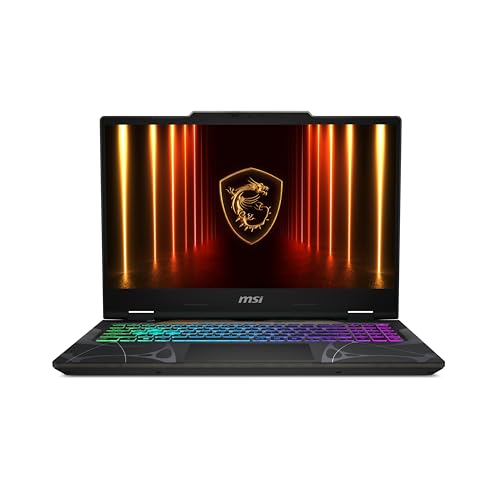
MSI Cyborg 15 15.6" RTX 5060 Laptop
Best for: portable 144Hz gaming
- Refresh Rate
- 144Hz (what this guide is about)
- Graphics Card
- NVIDIA GeForce RTX 5060
- Processor
- Intel Core 5-210H
- Memory
- 16GB DDR5
- Storage Capacity
- 512GB SSD
- Screen Size
- 15.6”
View on Amazon: MSI Cyborg 15 15.6" RTX 5060 Laptop Affiliate link
The MSI Cyborg 15 is a 15.6-inch gaming laptop with a 144Hz FHD display. It uses an Intel Core 5-210H processor and NVIDIA GeForce RTX 5060 graphics. The system includes 16GB DDR5 memory and a 512GB SSD. At 4.29 pounds, it offers a thin and light profile for mobility. This model suits gamers who need smooth motion in competitive titles without carrying a heavy machine.
Pros
- 144Hz refresh rate for fluid gameplay
- RTX 5060 graphics with ray tracing
- Lightweight 4.29-pound build for portability
- 16GB DDR5 memory for multitasking
Cons
- 144Hz refresh rate is lower than the 240Hz option
- 512GB SSD storage is smaller than 1TB variants
- FHD resolution is lower than 2.5K panels
Good fit if
- You prioritize a lighter laptop for travel
- You play competitive games at 144Hz
- You need RTX 5060 performance
Skip if
- You require a 240Hz display
- You need 2.5K resolution clarity
- You want 1TB of storage
Verdict: MSI Cyborg 15 RTX 5060 144Hz fits players who value portability and smooth 144Hz motion over higher refresh rates or resolutions.
Specifications side by side
| Spec | ASUS ROG Strix G16 RTX 5070 Ti Gaming Laptop | MSI Cyborg 15 15.6" RTX 5060 Laptop |
|---|---|---|
| Graphics Card | NVIDIA GeForce RTX 5070 Ti | NVIDIA GeForce RTX 5060 |
| Processor | Intel Core Ultra 9 Processor 275HX | Intel Core 5-210H |
| Memory | 32GB DDR5 | 16GB DDR5 |
| Storage Capacity | 1TB SSD | 512GB SSD |
| Screen Size | 16" | 15.6” |
| Refresh Rate | 240Hz | 144Hz |
| Display Resolution | 2.5K | FHD |
| Storage | 1TB SSD | 512GB SSD |
| Dimensions | 13.9 × 0.9 × 10.6 inches | 14.2 × 0.91 × 9.66 inches |
| Weight | 5.84 pounds | 4.29 pounds |
| Color | Black | Black |
| Model | G615LR-AS96 | CYBORG15B2295 |
| Size | not stated | Core 5-210H |
Frequently asked questions
Is 240Hz worth it over 144Hz for competitive gaming?
Yes, if you play fast-paced shooters. The ASUS ROG Strix G16 offers a 240Hz display for smoother motion. Its RTX 5070 Ti GPU supports high frame rates. This combination reduces blur and helps you react faster. It suits serious gamers who prioritize speed over compact size.
Which laptop is better for portability?
The MSI Cyborg 15 is lighter. It weighs 4.29 pounds and measures 14.2 inches long. The ASUS ROG Strix G16 is heavier at 5.84 pounds. It measures 13.9 inches long. If you carry your device often, the MSI model is easier to transport.
Does the 144Hz laptop have enough RAM for gaming?
The MSI Cyborg 15 includes 16GB of RAM. This amount handles most modern games well. It pairs with an RTX 5060 graphics card. For heavier multitasking, the ASUS ROG Strix G16 offers 32GB of RAM. You should choose based on your specific workload.
What storage capacity do these laptops provide?
The ASUS ROG Strix G16 comes with a 1TB SSD. The MSI Cyborg 15 includes a 512GB SSD. Both use solid-state drives for fast load times. If you install many large games, the 1TB option on the ASUS model provides more space.
Is the 16-inch screen better than 15.6 inches?
It depends on your preference. The ASUS ROG Strix G16 has a 16-inch display. The MSI Cyborg 15 features a 15.6-inch panel. Larger screens offer more viewing area. Smaller screens fit better in tight spaces. Choose the size that matches your desk setup.
Which model is best for esports titles?
The ASUS ROG Strix G16 targets competitive gamers. It features a 240Hz refresh rate for fluid motion. The RTX 5070 Ti GPU delivers high performance. This setup minimizes input lag. It is ideal for players who need maximum responsiveness in fast games.
Can the 144Hz laptop handle modern AAA games?
Yes, the MSI Cyborg 15 uses an RTX 5060 graphics card. It runs modern titles smoothly at 144Hz. The Core 5-210H processor supports efficient performance. It fits players who want portability without sacrificing too much visual quality.