240Hz or 120Hz Gaming Laptops? Compared by Specs
As an Amazon Associate we earn from qualifying purchases. Links on this page are affiliate links.
Choosing between a 240Hz vs 120Hz gaming laptop depends on your display needs. Both models offer 32GB of RAM and 1TB SSD storage for smooth multitasking and ample space. The main difference lies in the screen. One features a high-speed 240Hz panel for competitive gaming, while the other uses a 120Hz OLED display for richer colors and better battery efficiency. You should pick based on whether speed or image quality matters more to you.
Key differences
| Aspect | ASUS ROG Strix G16 RTX 5070 Ti Gaming Laptop | Dell XPS 14 3.2K OLED Touch Laptop |
|---|---|---|
| Refresh Rate | 240Hz | 48-120Hz |
| Graphics Card | NVIDIA GeForce RTX 5070 Ti | Intel Arc Graphics |
| Processor | Intel Core Ultra 9 Processor 275HX | Intel Core Ultra 7 255H |
| Screen Size | 16 inches | 14.5 inches |
| Display Resolution | 2.5K | 3.2K OLED |
| Weight | 5.84 pounds | 3.79 pounds |
Which one should you choose?
Choose ASUS ROG Strix G16 RTX 5070 Ti Gaming Laptop if
- You prioritize high frame rates for competitive shooters
- You need dedicated NVIDIA graphics for heavy gaming
- You prefer a larger 16-inch screen for immersion
Choose Dell XPS 14 3.2K OLED Touch Laptop if
- You want a lighter, more portable device
- You value color accuracy and contrast from OLED
- You seek better battery life for mobile use
Verdict: The ASUS ROG Strix G16 suits gamers who need raw performance and high refresh rates. The Dell XPS 14 is better for creators and travelers who prioritize portability and screen quality. Neither is universally better; choose based on your primary use case.
240Hz vs 120Hz Laptop Specs
refresh rate
The ASUS ROG Strix G16 features a fixed 240Hz refresh rate, which is ideal for competitive gaming where every millisecond counts. This high speed ensures smooth motion in fast-paced titles. In contrast, the Dell XPS 14 offers a variable refresh rate ranging from 48Hz to 120Hz. This flexibility helps improve battery life when viewing static images or web pages. While 240Hz provides superior motion clarity for gaming, the 120Hz panel on the Dell is sufficient for general use and offers better power efficiency. The ASUS is clearly better for pure gaming performance.
graphics card
Graphics performance differs significantly between these two machines. The ASUS ROG Strix G16 is equipped with an NVIDIA GeForce RTX 5070 Ti Laptop GPU, powered by the Blackwell architecture and featuring DLSS 4. This discrete graphics card handles demanding games and creative workloads with ease. The Dell XPS 14 relies on integrated Intel Arc Graphics. While adequate for light tasks and casual gaming, it lacks the raw power of a dedicated RTX card. For serious gaming or 3D rendering, the ASUS provides a substantial advantage in visual fidelity and frame rates.
processor
Both laptops use modern Intel Core Ultra processors, but with different tiers. The ASUS ROG Strix G16 includes the Intel Core Ultra 9 Processor 275HX, which is designed for maximum performance in demanding environments. The Dell XPS 14 uses the Intel Core Ultra 7 255H. While the Ultra 7 is powerful, the Ultra 9 HX series typically offers higher clock speeds and more cores for intensive multitasking and gaming. If you need the absolute fastest processing power for gaming and creation, the ASUS holds the edge here.
screen size
Screen real estate varies between the two models. The ASUS ROG Strix G16 features a 16-inch display, providing a larger canvas for gaming and multitasking. The Dell XPS 14 has a 14.5-inch screen. While the Dell's screen is slightly smaller, it still offers ample space for most tasks. The ASUS's larger 16-inch panel is generally preferred by gamers who want an immersive experience. The Dell's smaller size makes it more portable, but for pure visual immersion and workspace, the ASUS is superior.
weight
Portability is a key factor for many users. The Dell XPS 14 weighs only 3.79 pounds, making it significantly lighter and easier to carry around. The ASUS ROG Strix G16 weighs 5.84 pounds due to its larger chassis and cooling system. If you travel frequently or need a laptop that fits easily into a backpack without adding bulk, the Dell is the clear winner. The ASUS is heavier and better suited for stationary use or occasional transport.
Which laptop fits your needs?
Competitive FPS gamers
The ASUS ROG Strix G16 features a fixed 240Hz refresh rate, which is ideal for competitive gaming where every millisecond counts. This high speed ensures smooth motion in fast-paced titles. Combined with the RTX 5070 Ti GPU, it delivers the frame rates needed for high-level play.
Content creators and professionals
The Dell XPS 14 offers a 3.2K OLED display with a variable 120Hz refresh rate, which also improves battery life when viewing static images or web pages. Its lighter weight and sleek aluminum design make it portable. The Intel Core Ultra 7 processor handles creative apps efficiently.
Users wanting portability
Weighing just 3.79 pounds, the Dell XPS 14 is significantly lighter than the ASUS model. Its compact 14.5-inch size and thin chassis fit easily into bags. The 32GB RAM and 1TB SSD provide ample resources for daily tasks without adding bulk, making it a practical choice for travel.
Quick picks
| # | Product | Best for | Price |
|---|---|---|---|
| 1 | ASUS ROG Strix G16 RTX 5070 Ti Gaming Laptop | Competitive gaming with high frame rates | Check price of ASUS ROG Strix G16 RTX 5070 Ti Gaming Laptop on Amazon |
| 2 | Dell XPS 14 3.2K OLED Touch Laptop | high-resolution creative work and portability | Check price of Dell XPS 14 3.2K OLED Touch Laptop on Amazon |
The products compared

ASUS ROG Strix G16 RTX 5070 Ti Gaming Laptop
Best for: Competitive gaming with high frame rates
- Refresh Rate
- 240Hz (what this guide is about)
- Graphics Card
- NVIDIA GeForce RTX 5070 Ti
- Processor
- Intel Core Ultra 9 Processor 275HX
- Memory
- 32GB DDR5
- Storage Capacity
- 1TB SSD
- Screen Size
- 16"
View on Amazon: ASUS ROG Strix G16 RTX 5070 Ti Gaming Laptop Affiliate link
This ASUS ROG Strix G16 features a 16-inch 2.5K display with a 240Hz refresh rate, delivering smooth visuals for competitive gaming. It is powered by an Intel Core Ultra 9 Processor 275HX and an NVIDIA GeForce RTX 5070 Ti GPU. The system includes 32GB of DDR5 memory and a 1TB PCIe Gen 4 SSD. This configuration supports high-performance multitasking and fast load times, making it suitable for gamers who prioritize frame rates and visual clarity.
Pros
- 240Hz refresh rate on a 16-inch 2.5K display
- Intel Core Ultra 9 Processor 275HX for high performance
- NVIDIA GeForce RTX 5070 Ti with DLSS 4 support
- 32GB DDR5-5600MHz memory for seamless multitasking
- 1TB PCIe Gen 4 SSD storage capacity
Cons
- 5.84 pounds weight adds bulk for portability
- 0.9 inches thickness limits thin-profile portability
- No mention of Thunderbolt 5 connectivity in specs
Good fit if
- You want a 240Hz display for competitive gaming
- You need high-end CPU and GPU performance
- You require 32GB of RAM for multitasking
Skip if
- You prioritize a lightweight and thin laptop
- You prefer a 120Hz refresh rate display
- You need Thunderbolt 5 connectivity
Verdict: ASUS ROG Strix G16 16" 240Hz fits gamers who need high frame rates and powerful processing. It suits users who value a large, fast display and ample memory over portability.
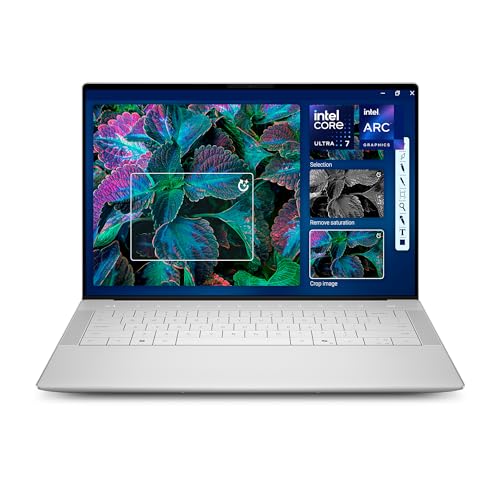
Dell XPS 14 3.2K OLED Touch Laptop
Best for: high-resolution creative work and portability
- Refresh Rate
- 120Hz (what this guide is about)
- Graphics Card
- Intel Arc Graphics
- Processor
- Intel Core Ultra 7 255H
- Memory
- 32GB
- Storage Capacity
- 1TB SSD
- Screen Size
- 14.5-inch
View on Amazon: Dell XPS 14 3.2K OLED Touch Laptop Affiliate link
The Dell XPS 14 features a 14.5-inch 3.2K OLED display with a variable refresh rate up to 120Hz. It uses an Intel Core Ultra 7 255H processor and 32GB of memory. The build is machined aluminum and weighs 3.79 pounds. This laptop suits you if you want high-resolution visuals for creative work. It is not ideal for high-frame-rate gaming compared to 240Hz models.
Pros
- 14.5-inch 3.2K OLED display
- Variable refresh rate up to 120Hz
- 32GB memory for multitasking
- Lightweight 3.79-pound aluminum build
Cons
- Max 120Hz refresh rate is lower than 240Hz competitors
- Intel Arc Graphics is not dedicated gaming hardware
- 14.5-inch screen is smaller than 16-inch options
Good fit if
- You prioritize high-resolution OLED visuals over speed
- You need 32GB RAM for creative applications
- You prefer a lightweight portable design
Skip if
- You require 240Hz for competitive gaming
- You need a dedicated graphics card
- You want a 16-inch display size
Verdict: Dell XPS 14 14.5-inch 120Hz Laptop is best for creators who value screen quality and portability over high refresh rates.
Specifications side by side
| Spec | ASUS ROG Strix G16 RTX 5070 Ti Gaming Laptop | Dell XPS 14 3.2K OLED Touch Laptop |
|---|---|---|
| Graphics Card | NVIDIA GeForce RTX 5070 Ti | Intel Arc Graphics |
| Processor | Intel Core Ultra 9 Processor 275HX | Intel Core Ultra 7 255H |
| Memory | 32GB DDR5 | 32GB |
| Storage Capacity | 1TB SSD | 1TB SSD |
| Screen Size | 16" | 14.5-inch |
| Refresh Rate | 240Hz | 48-120Hz |
| Display Resolution | 2.5K | 3.2K |
| Storage | 1TB SSD | 1TB SSD |
| Dimensions | 13.9 × 0.9 × 10.6 inches | 8.5 × 12.6 × 0.71 inches |
| Weight | 5.84 pounds | 3.79 pounds |
| Color | Black | Platinum |
| Model | G615LR-AS96 | LDA14250-7667SLV-PUS |
| Size | not stated | XPS14|32GB|1TB |
Frequently asked questions
Is a 240Hz screen better for competitive gaming?
Yes, a 240Hz refresh rate provides smoother motion in fast-paced titles. The ASUS ROG Strix G16 offers this high-speed display, which suits users who prioritize frame rates. It pairs with 32GB of RAM and a 1TB SSD to handle demanding tasks. This setup helps you react quickly in competitive scenarios without visual stutter.
Can I use a 120Hz laptop for creative work?
Absolutely. The Dell XPS 14 features a 120Hz OLED touch display, which is ideal for creators. It delivers high-resolution visuals and color accuracy. The 14.5-inch screen balances portability with quality. You get ample storage with a 1TB SSD, making it a practical choice for editing and design work on the go.
Which laptop is more portable?
The Dell XPS 14 is the more portable option. It weighs only 3.79 pounds and measures 0.71 inches in height. Its compact 14.5-inch display fits easily into bags. In contrast, the ASUS ROG Strix G16 weighs 5.84 pounds and has a larger 16-inch screen, making it better suited for stationary use.
Do both laptops have enough storage for games?
Yes, both models include a 1TB SSD. This storage capacity allows you to install multiple large games and applications. The ASUS ROG Strix G16 also includes 32GB of RAM for smooth multitasking. The Dell XPS 14 matches this storage size, ensuring you have plenty of space for your files and media library.
Is a 240Hz display necessary for casual gaming?
Not necessarily. A 120Hz panel, like the one on the Dell XPS 14, offers smooth performance for most casual titles. If you play slow-paced strategy or RPG games, the higher refresh rate may not provide a noticeable advantage. Choose based on whether you prioritize screen quality or maximum frame rates for competitive shooters.
What is the main difference between these two models?
The primary difference is the refresh rate and intended use. The ASUS ROG Strix G16 features a 240Hz screen for competitive gaming. The Dell XPS 14 offers a 120Hz OLED display for creative work. One focuses on speed and processing power, while the other emphasizes portability and visual fidelity for content creation.