165Hz vs 120Hz Gaming Laptops in 2026: Key Differences
As an Amazon Associate we earn from qualifying purchases. Links on this page are affiliate links.
You are deciding between a 165Hz vs 120Hz gaming laptop. Both machines offer fast, smooth visuals for gaming and daily tasks. The Lenovo LOQ targets gamers with a high refresh rate and dedicated graphics. The Dell XPS 14 focuses on creators with a high-resolution OLED screen and variable refresh rate. You need to weigh raw frame rates against image clarity and battery efficiency. This comparison breaks down the key spec differences to help you choose the right machine for your workflow.
Key differences
| Aspect | Lenovo LOQ 15.3" RTX 5060 Gaming Laptop | Dell XPS 14 3.2K OLED Touch Laptop |
|---|---|---|
| Refresh Rate | 165Hz | 48-120Hz variable |
| Graphics Card | NVIDIA GeForce RTX 5060 | Intel Arc Graphics |
| Processor | Ryzen 7 250 | Intel Core Ultra 7 255H |
| Display Resolution | WUXGA | 3.2K OLED |
| Memory | 16GB | 32GB |
| Weight | 4.62 pounds | 3.79 pounds |
Which one should you choose?
Choose Lenovo LOQ 15.3" RTX 5060 Gaming Laptop if
- You want the highest possible frame rates for competitive gaming
- You need a dedicated NVIDIA GPU for ray tracing or creative apps
- You prefer a larger 15.3-inch display for multitasking
Choose Dell XPS 14 3.2K OLED Touch Laptop if
- You prioritize image clarity and color accuracy for content creation
- You need more RAM for heavy multitasking or virtual machines
- You want a lighter, thinner laptop with better battery efficiency
Verdict: Choose the Lenovo LOQ if your priority is raw gaming performance and a higher refresh rate. Pick the Dell XPS 14 if you value screen resolution, portability, and creative workflows. Both laptops deliver smooth visuals, but they serve different primary use cases.
165Hz vs 120Hz Laptop Showdown
refresh rate
The Lenovo LOQ features a fixed 165Hz refresh rate. This high frequency reduces motion blur in fast-paced games. You get smoother frame delivery for competitive titles. The Dell XPS 14 offers a variable refresh rate up to 120Hz. This range adjusts from 48Hz to 120Hz. It balances smooth visuals with better battery life. Static content uses lower refresh rates to save power. Both options provide fluid motion. The LOQ prioritizes peak gaming performance. The XPS 14 prioritizes efficiency and versatility. You choose based on whether you need maximum speed or adaptive power management.
graphics card
The Lenovo LOQ includes an NVIDIA GeForce RTX 5060 graphics card. This dedicated GPU handles demanding 3D rendering and modern game engines. It provides significant power for gaming and creative workloads. The Dell XPS 14 uses Intel Arc Graphics. This is an integrated solution built into the processor. It handles light gaming and video editing well. It lacks the raw power of a dedicated card. For heavy gaming, the Lenovo offers superior graphical performance. The Dell is sufficient for casual use and productivity. You need the RTX 5060 for high settings in AAA titles.
processor
The Dell XPS 14 is powered by an Intel Core Ultra 7 255H processor. This chip includes dedicated AI engines for faster task handling. It is designed for efficient performance in creative applications. The Lenovo LOQ uses a Ryzen 7 250 processor. This is a capable CPU for general computing and gaming. The Intel chip generally offers higher multi-core performance. It is better for video editing and complex calculations. The Ryzen chip is optimized for gaming workloads. Both processors deliver strong daily performance. The Intel option is better for productivity-heavy workflows.
memory
The Dell XPS 14 comes with 32GB of memory. This large amount allows you to run many applications simultaneously. It handles large files and multitasking with ease. The Lenovo LOQ has 16GB of memory. This is standard for gaming laptops. It supports most games and everyday tasks well. However, it may limit heavy multitasking compared to the Dell. If you run virtual machines or large datasets, the Dell is better. For most gamers, 16GB is sufficient. The extra memory in the XPS 14 provides future-proofing for demanding software.
display resolution
The Dell XPS 14 features a 3.2K OLED display. This high resolution provides sharp text and detailed images. The OLED panel offers deep blacks and vibrant colors. It is ideal for photo and video editing. The Lenovo LOQ has a WUXGA display. This resolution is lower than 3.2K. It is sufficient for gaming but less sharp for creative work. The OLED screen on the Dell offers better contrast. You get richer visuals for media consumption. The Lenovo screen is optimized for gaming performance rather than color accuracy. Choose the Dell for visual fidelity.
Which Gaming Laptop Should You Choose
Competitive gamers needing high frame rates
The Lenovo LOQ delivers a fixed 165Hz refresh rate for smoother motion in fast-paced titles. Its dedicated NVIDIA GeForce RTX 5060 graphics card handles demanding games effectively. This setup prioritizes visual fluidity and processing power for serious gaming sessions.
Creators wanting sharp OLED visuals
The Dell XPS 14 features a 3.2K OLED display for exceptional color accuracy and contrast. Its variable refresh rate up to 120Hz balances smoothness with battery efficiency. The Intel Core Ultra 7 processor supports creative applications with dedicated AI engines.
Users prioritizing portability and build quality
Weighing only 3.79 pounds, the Dell XPS 14 is significantly lighter than the Lenovo LOQ. Its machined aluminum chassis offers a sleek, modern design. The 14.5-inch screen size fits easily into smaller bags, making it ideal for travel and mobile work.
Quick picks
| # | Product | Best for | Price |
|---|---|---|---|
| 1 | Lenovo LOQ 15.3" RTX 5060 Gaming Laptop | 165Hz gaming on a budget | Check price of Lenovo LOQ 15.3" RTX 5060 Gaming Laptop on Amazon |
| 2 | Dell XPS 14 3.2K OLED Touch Laptop | content creation and media consumption | Check price of Dell XPS 14 3.2K OLED Touch Laptop on Amazon |
The products compared

Lenovo LOQ 15.3" RTX 5060 Gaming Laptop
Best for: 165Hz gaming on a budget
- Refresh Rate
- 165Hz (what this guide is about)
- Graphics Card
- NVIDIA GeForce RTX 5060
- Processor
- Ryzen 7 250
- Memory
- 16GB
- Storage Capacity
- 1TB
- Screen Size
- 15.3"
View on Amazon: Lenovo LOQ 15.3" RTX 5060 Gaming Laptop Affiliate link
This Lenovo LOQ gaming laptop features a 15.3-inch WUXGA IPS display with a 165Hz refresh rate, ideal for smoother visuals compared to 120Hz screens. It pairs this with an NVIDIA GeForce RTX 5060 graphics card and a Ryzen 7 250 processor. The system includes 16GB of memory and 1TB of storage. It suits gamers seeking higher frame rates without the bulk of larger chassis options.
Pros
- 165Hz refresh rate for smoother motion
- NVIDIA GeForce RTX 5060 graphics
- 1TB storage capacity
- 16GB memory
Cons
- Heavier at 4.62 pounds
- Thicker at 0.92 inches
- WUXGA resolution is lower than 3.2K
Good fit if
- You want a 165Hz display for competitive gaming
- You need strong graphics performance for modern titles
- You prefer a balance of power and portability
Skip if
- You require a high-resolution OLED screen
- You need a lighter laptop for frequent travel
- You prioritize a thinner, more compact design
Verdict: Lenovo LOQ 15.3" 165Hz RTX 5060 delivers solid gaming performance with its 165Hz screen and RTX 5060 GPU. It is a practical pick for players who value higher refresh rates over premium display resolutions.
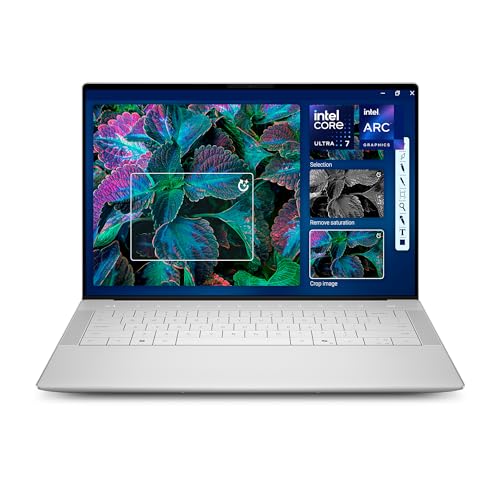
Dell XPS 14 3.2K OLED Touch Laptop
Best for: content creation and media consumption
- Refresh Rate
- 120Hz (what this guide is about)
- Graphics Card
- Intel Arc Graphics
- Processor
- Intel Core Ultra 7 255H
- Memory
- 32GB
- Storage Capacity
- 1TB SSD
- Screen Size
- 14.5-inch
View on Amazon: Dell XPS 14 3.2K OLED Touch Laptop Affiliate link
This Dell XPS 14 features a 14.5-inch 3.2K OLED display with a 48-120Hz variable refresh rate. It uses an Intel Core Ultra 7 255H processor and 32GB of memory. The integrated Intel Arc Graphics handles everyday tasks and light gaming. The 120Hz mode smooths motion for video and casual play. It suits users who prioritize screen quality and portability over high frame rates.
Pros
- 14.5-inch 3.2K OLED display
- 48-120Hz variable refresh rate
- Intel Core Ultra 7 255H processor
- 32GB memory for multitasking
Cons
- 120Hz refresh rate is lower than 165Hz competitors
- Integrated Intel Arc Graphics limits heavy gaming
- 14.5-inch screen is smaller than 15.3-inch models
Good fit if
- You want a high-resolution OLED screen
- You need 32GB of memory for creative work
- You prioritize battery efficiency over max frame rates
Skip if
- You require 165Hz or higher refresh rates
- You need dedicated NVIDIA graphics for heavy gaming
- You prefer a 15.3-inch or larger display
Verdict: Dell XPS 14 14.5-inch OLED is a premium ultrabook for creators who value display quality and efficiency. It fits users who do not need high-refresh gaming performance.
Specifications side by side
| Spec | Lenovo LOQ 15.3" RTX 5060 Gaming Laptop | Dell XPS 14 3.2K OLED Touch Laptop |
|---|---|---|
| Graphics Card | NVIDIA GeForce RTX 5060 | Intel Arc Graphics |
| Processor | Ryzen 7 250 | Intel Core Ultra 7 255H |
| Memory | 16GB | 32GB |
| Storage Capacity | 1TB | 1TB SSD |
| Screen Size | 15.3" | 14.5-inch |
| Refresh Rate | 165Hz | 48-120Hz |
| Display Resolution | WUXGA | 3.2K |
| Storage | not stated | 1TB SSD |
| Dimensions | 10 × 13.6 × 0.92 inches | 8.5 × 12.6 × 0.71 inches |
| Weight | 4.62 pounds | 3.79 pounds |
| Color | Luna Grey | Platinum |
| Model | 83TN0002US | LDA14250-7667SLV-PUS |
| Size | not stated | XPS14|32GB|1TB |
Frequently asked questions
Is 165Hz better than 120Hz for competitive gaming?
Yes, 165Hz provides smoother motion for fast-paced titles. The Lenovo LOQ uses a fixed 165Hz screen to reduce motion blur. This higher refresh rate delivers more frames per second. You get quicker visual updates during intense gameplay. The Dell XPS 14 tops out at 120Hz. It suits creators more than competitive players.
Do I need a dedicated GPU for 165Hz?
You generally need a dedicated graphics card to drive high frame rates. The Lenovo LOQ includes an RTX 5060 GPU. This card helps achieve the necessary frame rates for its 165Hz display. The Dell XPS 14 lacks this dedicated graphics solution. It focuses on OLED quality rather than high-refresh gaming performance. Check your GPU specs before buying.
Which laptop is better for content creation?
The Dell XPS 14 is the better choice for creators. It features a 3.2K OLED touch display with 120Hz refresh. This screen offers superior color accuracy and contrast. The Lenovo LOQ prioritizes gaming with a 165Hz panel. It uses an RTX 5060 and Ryzen 7 processor. Creatives will prefer the XPS 14’s visual fidelity over the LOQ’s speed.
How heavy are 165Hz vs 120Hz gaming laptops?
Weight varies by model and build materials. The Lenovo LOQ weighs 4.62 pounds. It measures 10 inches by 13.6 inches. The Dell XPS 14 is lighter at 3.79 pounds. It is also thinner and narrower. Portability matters if you travel often. The XPS 14 offers a more compact form factor for daily use.
Can 120Hz laptops handle modern games?
Yes, 120Hz laptops can handle modern games effectively. The Dell XPS 14 supports up to 120Hz refresh. It uses a 1TB SSD for fast loading. However, it lacks a dedicated gaming GPU. It fits users who do not need high-refresh performance. For demanding titles, a 165Hz laptop with a dedicated GPU is preferable.
What is the main difference between these two laptops?
The main difference is the display refresh rate and target audience. The Lenovo LOQ offers a 165Hz screen for gaming. It includes an RTX 5060 graphics card. The Dell XPS 14 offers a 120Hz OLED screen. It targets content creation and media consumption. Choose the LOQ for speed and the XPS 14 for visual quality.