What Is Refresh Rate? A Guide for Gaming Laptops Buyers (2026)
As an Amazon Associate we earn from qualifying purchases. Links on this page are affiliate links.
Understanding Refresh Rate for Laptops
Refresh rate explained is essential for any buyer looking at gaming or everyday laptops. This specification measures how many times per second the screen updates its image. You will see this number listed in hertz, or Hz. A higher number means the display changes more often.
The standard refresh rate for most screens is 60Hz. This means the image updates sixty times every second. Many budget laptops still use this baseline. However, modern gaming laptops offer significantly higher speeds. You will commonly encounter options like 144Hz, 165Hz, and 240Hz. These higher rates provide smoother motion.
When you move the cursor or play a fast-paced game, a higher refresh rate reduces blur. It makes animations look fluid rather than choppy. This is particularly important for competitive gaming. Fast movements require quick visual feedback. A 144Hz screen updates more than twice as fast as a 60Hz panel. The 165Hz and 240Hz options offer even greater clarity for rapid action.
You should check the product listing carefully. Sellers often label this spec prominently. Look for terms like "144Hz," "165Hz," or "240Hz" in the display section. Do not assume all laptops have the same rate. Some everyday models may stick to 60Hz or 120Hz. The 120Hz option is a middle ground, offering smoother performance than 60Hz but less than the gaming-focused tiers.
Why does this matter to you? If you play games, a higher refresh rate improves your experience. It helps you track moving targets more easily. For everyday tasks, the difference is less critical but still noticeable. Scrolling through web pages feels smoother on higher rates. Choose the spec that matches your usage needs. Prioritize 144Hz or higher for serious gaming. Stick to 60Hz or 120Hz for basic productivity work.
Refresh Rate Options Compared
120Hz
A 120Hz refresh rate updates the screen 120 times each second. This setting prioritizes image sharpness and color accuracy over motion smoothness. It suits single-player games where visual fidelity matters more than competitive frame rates. The Alienware 16 with a 120Hz WQXGA display offers high resolution but lower speed. You trade faster motion for clearer static images. This choice fits buyers who value detail in slower-paced titles. It is less ideal for fast shooters where every millisecond counts. The display remains responsive, but high-speed action may appear slightly less fluid than on higher refresh screens.
144Hz
A 144Hz refresh rate provides a noticeable jump in smoothness over 120Hz. It updates the screen 144 times per second. This balance of speed and clarity suits portable gaming. The MSI Cyborg 15 with a 144Hz display delivers capable 1080p gaming. It is a good option for travelers who value weight savings. You get smoother motion in action games without the premium cost of higher rates. It is a solid middle ground for everyday gamers. The trade-off is less extreme speed than 240Hz models. It remains a practical choice for most mainstream gaming needs.
165Hz
A 165Hz refresh rate offers high frame rates for smooth gameplay. It updates the screen 165 times each second. This spec fits players who value RAM capacity and display aspect ratio. The Acer Nitro V 16 with 165Hz and 32GB RAM provides a strong experience. It is ideal for 1080p gaming with solid performance. You get faster motion than 144Hz models without the bulk of top-tier GPUs. The ASUS ROG Strix G16 also offers 165Hz with upgradable internals. This option suits gamers who want smooth motion and easy maintenance. It balances speed with practical hardware choices.
240Hz
A 240Hz refresh rate delivers top-tier speed for competitive gaming. It updates the screen 240 times per second. This setting suits users who value high refresh rates and powerful graphics. The ASUS ROG Strix G16 RTX 5070 Ti offers 240Hz for speed and clarity. You get the smoothest motion available for fast-paced shooters. The trade-off is often a thicker, heavier chassis. It is less suitable for those prioritizing slim profiles. This option is best for dedicated gamers who need every frame. It provides maximum visual fluidity for competitive play. You pay for speed and power in this tier.
Is High Refresh Rate Worth It
Who needs it
You should prioritize higher refresh rates like 144Hz, 165Hz, or 240Hz if you play competitive multiplayer games. Titles such as first-person shooters or fast-paced battle royales rely on quick reactions. A 240Hz screen updates images more frequently than a 144Hz panel. This reduces motion blur and makes targets easier to track. The difference between 144Hz and 165Hz is noticeable in rapid movements. You will see smoother transitions when panning the camera. If your GPU can sustain high frame rates, the extra hertz translates directly to better visibility. This spec helps you react faster to enemies. It is essential for anyone who values competitive advantage over static image quality. The smoother motion helps you maintain focus during intense sequences.
Who can skip it
You can ignore high refresh rates if you primarily play story-driven single-player games. Titles like RPGs or adventure games do not require rapid screen updates. In these cases, 120Hz is sufficient for smooth performance. You should prioritize color accuracy and contrast instead. A panel with better color reproduction enhances the visual experience in cinematic scenes. Text clarity matters more for productivity tasks and web browsing. If you use your laptop for work or media consumption, sharpness is key. The difference between 120Hz and 144Hz is subtle in non-competitive contexts. You will not notice the extra smoothness during slow-paced gameplay. Focus on resolution and panel type for a better everyday experience. High refresh rates offer little benefit if you do not need competitive edge.
Refresh Rate Glossary
Hertz (Hz)
The unit measuring screen updates per second. Higher numbers indicate smoother motion. You see 60Hz, 144Hz, or 240Hz on spec sheets.
Frame Rate
How many images the graphics card sends to the screen each second. Your GPU must match the refresh rate for full benefit.
Motion Blur
Visual streaking during fast movement. Higher refresh rates reduce this effect, making fast-paced action clearer and easier to track.
Input Lag
The delay between your mouse click and the on-screen response. Higher refresh rates lower this delay, improving reaction time in games.
144Hz
A common standard for gaming laptops. It offers a noticeable smoothness jump from 60Hz without the high power draw of 240Hz panels.
240Hz
Top-tier speed for competitive shooters. It requires a powerful processor and graphics card to generate enough frames to fill the screen.
Quick picks
| # | Product | Best for | Price |
|---|---|---|---|
| 1 | Acer Nitro V 16 RTX 5050 Gaming Laptop | 16:10 display and high RAM capacity | Check price of Acer Nitro V 16 RTX 5050 Gaming Laptop on Amazon |
| 2 | ASUS ROG Strix G16 RTX 5070 Ti Gaming Laptop | high-refresh-rate gaming and creation | Check price of ASUS ROG Strix G16 RTX 5070 Ti Gaming Laptop on Amazon |
| 3 | MSI Cyborg 15 15.6" RTX 5060 Laptop | portable 1080p gaming on a budget | Check price of MSI Cyborg 15 15.6" RTX 5060 Laptop on Amazon |
| 4 | Alienware 16 Aurora RTX 4050 Gaming Laptop | Visual fidelity over speed | Check price of Alienware 16 Aurora RTX 4050 Gaming Laptop on Amazon |
| 5 | ASUS ROG Strix G16 165Hz RTX 5050 Gaming Laptop | 165Hz gaming with upgradable internals | Check price of ASUS ROG Strix G16 165Hz RTX 5050 Gaming Laptop on Amazon |
Our 5 picks
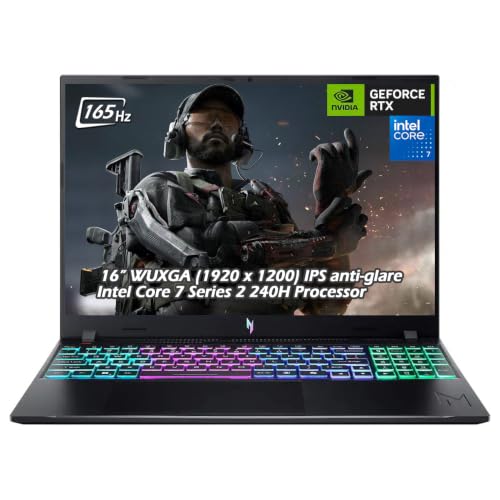
Acer Nitro V 16 RTX 5050 Gaming Laptop
Best for: 16:10 display and high RAM capacity
- Refresh Rate
- 165Hz (what this guide is about)
- Graphics Card
- NVIDIA GeForce RTX 5050 Laptop GPU
- Processor
- Intel Core 7 240H
- Memory
- 32GB DDR5
- Storage Capacity
- 1TB SSD
- Screen Size
- 16"
View on Amazon: Acer Nitro V 16 RTX 5050 Gaming Laptop Affiliate link
The Acer Nitro V features a 16-inch WUXGA display with a 165Hz refresh rate and 3ms response time. It pairs this screen with an Intel Core 7 240H processor and 32GB of DDR5 RAM. The NVIDIA GeForce RTX 5050 GPU handles modern gaming tasks. This configuration offers high memory capacity for multitasking. You get a solid 1TB SSD for storage. It suits players who want smooth visuals without extreme premium pricing.
Pros
- 16-inch WUXGA (1920 x 1200) IPS display
- 165Hz refresh rate with 3ms response time
- 32GB DDR5 RAM for heavy multitasking
- Intel Core 7 240H processor up to 5.20 GHz
- NVIDIA GeForce RTX 5050 with 8GB GDDR7
Cons
- RTX 5050 GPU is lower tier than RTX 5060 options
- 165Hz refresh rate is slower than 240Hz competitors
- 4.63 pounds weight is heavier than thin models
Good fit if
- You want a 16:10 aspect ratio for more vertical screen space
- You need 32GB of RAM for streaming and gaming simultaneously
- You prefer a 165Hz display for smooth competitive play
Skip if
- You require the fastest 240Hz refresh rate available
- You need the higher performance of an RTX 5060 GPU
- You prioritize a lightweight thin-and-light chassis under 4 pounds
Verdict: Acer Nitro V 16" 165Hz RTX 5050 delivers high memory and a fast 165Hz screen for solid 1080p gaming. It fits players who value RAM capacity and a 16:10 display over top-tier GPU speed or ultra-lightweight design.

ASUS ROG Strix G16 RTX 5070 Ti Gaming Laptop
Best for: high-refresh-rate gaming and creation
- Refresh Rate
- 240Hz (what this guide is about)
- Graphics Card
- NVIDIA GeForce RTX 5070 Ti
- Processor
- Intel Core Ultra 9 Processor 275HX
- Memory
- 32GB DDR5
- Storage Capacity
- 1TB SSD
- Screen Size
- 16"
View on Amazon: ASUS ROG Strix G16 RTX 5070 Ti Gaming Laptop Affiliate link
This 16-inch laptop pairs a 240Hz refresh rate with a 2.5K resolution and an RTX 5070 Ti GPU. The Intel Core Ultra 9 275HX processor and 32GB of DDR5 RAM handle demanding tasks. It includes a 1TB SSD and vapor chamber cooling. You get a high-end machine for competitive gaming and content creation. The 3ms response time ensures smooth visuals.
Pros
- 240Hz refresh rate on a 2.5K display
- NVIDIA GeForce RTX 5070 Ti graphics
- 32GB DDR5-5600MHz memory
- Intel Core Ultra 9 275HX processor
- Vapor chamber and liquid metal cooling
Cons
- Heavier at 5.84 pounds
- Thicker at 0.9 inches
- No mention of Thunderbolt support
Good fit if
- You need a 240Hz refresh rate
- You want 2.5K resolution
- You require 32GB of RAM
Skip if
- You prioritize portability
- You need a 144Hz display
- You want a lighter build
Verdict: ASUS ROG Strix G16 RTX 5070 Ti delivers top-tier specs for gamers who need speed and clarity. It suits users who value high refresh rates and powerful graphics over a slim profile.
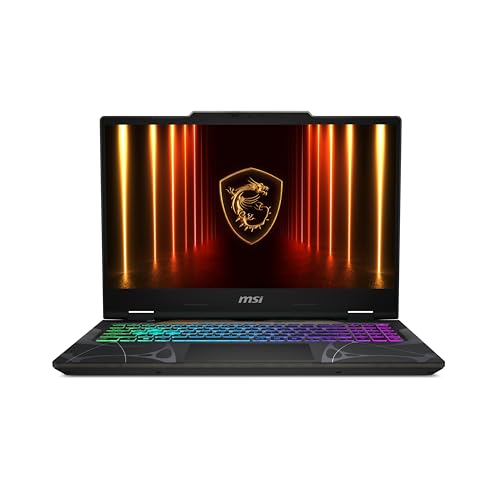
MSI Cyborg 15 15.6" RTX 5060 Laptop
Best for: portable 1080p gaming on a budget
- Refresh Rate
- 144Hz (what this guide is about)
- Graphics Card
- NVIDIA GeForce RTX 5060
- Processor
- Intel Core 5-210H
- Memory
- 16GB DDR5
- Storage Capacity
- 512GB SSD
- Screen Size
- 15.6”
View on Amazon: MSI Cyborg 15 15.6" RTX 5060 Laptop Affiliate link
The MSI Cyborg 15 pairs an Intel Core 5-210H processor with 16GB of DDR5 RAM and an NVIDIA GeForce RTX 5060 graphics card. Its 15.6-inch FHD display runs at 144Hz, offering smooth motion for fast-paced games. Weighing just 4.3 lbs, this thin laptop suits students or commuters who need portable gaming power without sacrificing essential performance for modern titles.
Pros
- NVIDIA GeForce RTX 5060 supports ray tracing and DLSS 4
- 144Hz refresh rate ensures fluid visual performance
- 16GB DDR5 memory handles multitasking efficiently
- Wi-Fi 6E provides stable low-lag connectivity
Cons
- 144Hz refresh rate is lower than the 240Hz option on this list
- 512GB SSD storage is smaller than the 1TB variation available
- FHD resolution is less sharp than the 2.5K panel on the ASUS ROG Strix G16
Good fit if
- You prioritize portability with a lightweight, thin chassis
- You want solid 1080p gaming performance with ray tracing
- You need reliable connectivity via Wi-Fi 6E
Skip if
- You require a high refresh rate above 144Hz
- You need maximum display sharpness with a 2.5K panel
- You prefer a larger 1TB storage capacity as standard
Verdict: MSI Cyborg 15 RTX 5060 delivers capable 1080p gaming for travelers who value weight savings over maximum screen resolution or top-tier refresh rates.

Alienware 16 Aurora RTX 4050 Gaming Laptop
Best for: Visual fidelity over speed
- Refresh Rate
- 120Hz (what this guide is about)
- Graphics Card
- NVIDIA GeForce RTX 4050
- Processor
- Intel Core 7 240H
- Memory
- 16GB DDR5
- Storage Capacity
- 512GB SSD
- Screen Size
- 16"
View on Amazon: Alienware 16 Aurora RTX 4050 Gaming Laptop Affiliate link
The Alienware 16 Aurora offers a 16-inch WQXGA display with a 120Hz refresh rate and 300 nits brightness. It pairs this screen with an Intel Core 7 240H processor and NVIDIA GeForce RTX 4050 graphics. The system includes 16GB of DDR5 memory and a 512GB SSD. This configuration suits gamers who prioritize image clarity and color depth over maximum frame rates.
Pros
- 16-inch WQXGA resolution for sharper visuals
- 120Hz refresh rate for smooth motion
- 300 nits display brightness
- Intel Core 7 240H processor
- NVIDIA GeForce RTX 4050 graphics
Cons
- 120Hz refresh rate is lower than the 165Hz, 240Hz, and 144Hz options on this list
- 512GB SSD storage is smaller than typical gaming capacities
- 5.49 pounds weight adds bulk for portability
Good fit if
- You value high-resolution WQXGA clarity over high refresh rates
- You play games where 120Hz is sufficient for smooth performance
- You want advanced thermal management with the Cryo-Chamber design
Skip if
- You require a 144Hz, 165Hz, or 240Hz display for competitive gaming
- You need more than 512GB of internal storage
- You prioritize lightweight portability under 5 pounds
Verdict: Alienware 16 120Hz WQXGA fits buyers who prefer the sharpness of WQXGA resolution over the speed of higher refresh rates. It is a solid choice for single-player games where visual fidelity matters more than competitive frame rates.
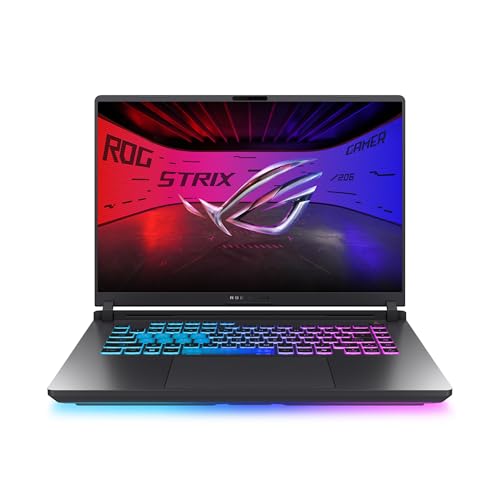
ASUS ROG Strix G16 165Hz RTX 5050 Gaming Laptop
Best for: 165Hz gaming with upgradable internals
- Refresh Rate
- 165Hz (what this guide is about)
- Graphics Card
- NVIDIA GeForce RTX 5050 Laptop GPU
- Processor
- Intel Core i5 Processor 14450HX
- Memory
- 16GB DDR5-5600MHz
- Storage Capacity
- 512GB PCIe Gen 4 SSD
- Screen Size
- 16”
View on Amazon: ASUS ROG Strix G16 165Hz RTX 5050 Gaming Laptop Affiliate link
This ASUS ROG Strix G16 features a 16-inch FHD+ display with a 165Hz refresh rate. It is powered by an Intel Core i5 14450HX processor and an NVIDIA GeForce RTX 5050 GPU. The system includes 16GB of DDR5 RAM and a 512GB PCIe Gen 4 SSD. The screen uses an AGLR film to reduce glare. This laptop suits players who want smooth visuals without the cost of higher refresh rates.
Pros
- 165Hz refresh rate for smooth motion
- RTX 5050 GPU with DLSS 4 support
- 16GB DDR5-5600MHz memory for multitasking
- MUX Switch boosts gaming performance by 5-10%
Cons
- 512GB storage capacity is smaller than many competitors
- FHD+ resolution is lower than the 2.5K displays on other list items
- Weight of 5.84 pounds is heavier than thin-and-light alternatives
Good fit if
- You prioritize a 165Hz screen over higher resolutions
- You want tool-free access for RAM and SSD upgrades
- You need a MUX Switch for better gaming performance
Skip if
- You require a 240Hz or higher refresh rate
- You need a 2.5K or higher resolution display
- You prefer a lighter laptop under 5 pounds
Verdict: ASUS ROG Strix G16 16-inch 165Hz delivers solid 165Hz gaming performance with a capable RTX 5050 and upgradable internals. It fits gamers who value smooth motion and easy maintenance over high resolution or portability.
Specifications side by side
| Spec | Acer Nitro V 16 RTX 5050 Gaming Laptop | ASUS ROG Strix G16 RTX 5070 Ti Gaming Laptop | MSI Cyborg 15 15.6" RTX 5060 Laptop | Alienware 16 Aurora RTX 4050 Gaming Laptop | ASUS ROG Strix G16 165Hz RTX 5050 Gaming Laptop |
|---|---|---|---|---|---|
| Graphics Card | NVIDIA GeForce RTX 5050 Laptop GPU | NVIDIA GeForce RTX 5070 Ti | NVIDIA GeForce RTX 5060 | NVIDIA GeForce RTX 4050 | NVIDIA GeForce RTX 5050 Laptop GPU |
| Processor | Intel Core 7 240H | Intel Core Ultra 9 Processor 275HX | Intel Core 5-210H | Intel Core 7 240H | Intel Core i5 Processor 14450HX |
| Memory | 32GB DDR5 | 32GB DDR5 | 16GB DDR5 | 16GB DDR5 | 16GB DDR5-5600MHz |
| Storage Capacity | 1TB SSD | 1TB SSD | 512GB SSD | 512GB SSD | 512GB PCIe Gen 4 SSD |
| Screen Size | 16" | 16" | 15.6” | 16" | 16” |
| Refresh Rate | 165Hz | 240Hz | 144Hz | 120Hz | 165Hz |
| Display Resolution | 1920 x 1200 | 2.5K | FHD | WQXGA | FHD+ |
| Storage | 1TB SSD | 1TB SSD | 512GB SSD | 512GB SSD | not stated |
| Dimensions | 0.78 × 10.2 × 14 inches | 13.9 × 0.9 × 10.6 inches | 14.2 × 0.91 × 9.66 inches | 10.5 × 14.1 × 0.6 inches | 13.9 × 1.21 × 1.55 inches |
| Weight | 4.63 pounds | 5.84 pounds | 4.29 pounds | 5.49 pounds | 5.84 pounds |
| Color | Obsidian Black | Black | Black | Blue | Eclipse Gray |
| Model | not stated | G615LR-AS96 | CYBORG15B2295 | LAC16250-7649BLU-PUS | G615JHR-DS53 |
| Size | not stated | not stated | Core 5-210H | 15.3" Screen | not stated |
Frequently asked questions
Does a higher refresh rate make gaming feel smoother?
Yes, a higher refresh rate updates the screen more times per second, which reduces motion blur and makes movement appear fluid. For example, the ASUS ROG Strix G16 with a 240Hz display offers top-tier clarity for fast-paced action. This speed helps you track targets more easily in competitive titles compared to slower 60Hz screens.
Can a laptop with 165Hz run games at that speed?
The screen can display up to 165 frames per second, but your graphics card must also generate enough frames to match. The Acer Nitro V 16 features an RTX 5050 and a 165Hz panel, providing a balanced setup for solid 1080p gaming. Ensure your GPU is powerful enough to sustain high frame rates at your chosen resolution.
Is 120Hz good for single-player games?
Yes, 120Hz is suitable for single-player titles where visual fidelity matters more than competitive speed. The Alienware 16 uses a 120Hz WQXGA display to prioritize sharpness and color accuracy. This setting delivers a crisp image for immersive storytelling, though it updates the screen less frequently than 144Hz or 240Hz options.
What is the difference between 144Hz and 165Hz?
The difference is 21 updates per second, which provides a marginal improvement in motion smoothness. Both rates are excellent for gaming, but 165Hz offers slightly faster screen updates. The MSI Cyborg 15 offers 144Hz for portable 1080p gaming, while the Acer Nitro V 16 provides 165Hz for those who want a bit more speed.
Does refresh rate affect battery life?
Higher refresh rates generally consume more power because the screen updates more frequently. A 240Hz display like the one in the ASUS ROG Strix G16 may drain the battery faster than a 120Hz screen. If you need longer unplugged time, consider a lower refresh rate or adjust settings to balance performance and endurance.
Is a 165Hz screen necessary for casual gaming?
It is not strictly necessary, but it provides a noticeably smoother experience than standard 60Hz screens. The ASUS ROG Strix G16 165Hz model offers upgradable internals and a capable RTX 5050, making it a solid choice for smooth motion. Casual players may appreciate the clarity, though competitive gamers benefit more from the extra speed.