Storage Explained: What It Means for Gaming Laptops
As an Amazon Associate we earn from qualifying purchases. Links on this page are affiliate links.
Storage Explained for Laptops
Storage is the space where your operating system, games, and files live. When you buy a gaming laptop, you are choosing how much room you have for these items. This spec is critical because large game files fill up space quickly. Modern listings label this capacity in gigabytes (GB) or terabytes (TB). Understanding these numbers helps you plan your digital library.
Most entry-level models come with 256GB SSDs. This is enough for the operating system and a few small applications. However, modern AAA games often exceed 100GB each. With 256GB, you might only install two or three large titles before the drive fills up. You will need to manage your files carefully or use external drives.
The 512GB SSD is a more practical starting point for gamers. It allows you to keep the system running smoothly while storing several major games. You can switch between titles without constantly deleting and reinstalling them. This size offers a good balance between cost and utility for most users.
For serious gamers, 1TB SSDs are becoming the standard. This capacity provides ample room for a substantial library. You can store high-resolution textures and large game files without immediate concern for space. It reduces the need for constant maintenance of your storage.
The 2TB SSD option is for power users. It is ideal if you download many games simultaneously or work with large media files. It ensures you rarely need to worry about running out of space. This capacity future-proofs your laptop for years to come. As games continue to grow in size, having extra storage prevents bottlenecks. When you review storage explained guides, focus on how this spec impacts your daily workflow. Choose the size that matches your actual usage habits.
Storage Options Compared
256GB SSD
This capacity offers limited room for large files. You can install the operating system and a few small applications, but space fills up fast with modern games. It suits users who rely on cloud storage or external drives for their media library. The Apple MacBook Neo 13-inch A18 Pro uses this size. It is a portable option for students who value battery life and can manage with less local data. You must be careful about what you install locally. If you download several AAA titles, you will need to delete older games to make room for new ones. This tier is best for light use only.
512GB SSD
This is a balanced choice for most users. It provides enough space for the operating system, daily productivity apps, and a moderate number of games. You can keep several large titles installed without immediately running out of room. The Apple MacBook Air 13-inch M5 features this storage level. It fits users who want a lightweight machine with enough space for everyday gaming and study. You get a good mix of portability and utility. This size avoids the bulk of larger drives while preventing the constant need to manage file space. It is a practical middle ground for students and casual gamers who do not have massive libraries.
1TB SSD
This capacity offers ample room for serious gaming. You can install many large games, high-resolution textures, and video editing software without constant management. It suits users who want to keep their entire library accessible. While no specific model in this list uses this exact size, it is the standard for dedicated gaming rigs. You gain the flexibility to download new releases without deleting old favorites. This size supports multitasking with large files. You avoid the bottleneck of external storage speeds. It is the ideal target for gamers who play multiple genres and want a seamless experience without worrying about storage warnings.
2TB SSD
This is the maximum local storage available in many high-end models. It suits professionals and hardcore gamers who need to store vast amounts of data locally. The Apple MacBook Pro 14 M5 Max includes this capacity. It is a powerful workstation for creators who need maximum local storage and AI processing speed. You can keep terabytes of games, 4K video projects, and system backups on one drive. You never need to worry about running out of space. This option is best for users who prioritize raw performance and large local storage over portability. You pay for the convenience of having everything instantly accessible without external hardware.
Is More Storage Worth the Cost
Who needs it
You should prioritize higher storage capacities if you plan to install multiple large titles simultaneously. Modern games often exceed 100GB, and having only 256GB or 512GB forces you to constantly delete and reinstall games to make room for new ones. This process is time-consuming and interrupts your gaming sessions. If you prefer a seamless library where you can switch between titles without managing space, the 1TB or 2TB SSDs are essential. These larger drives allow you to keep your operating system, essential applications, and your entire game collection on one fast drive. You avoid the bottleneck of loading data from slower external sources. For serious gamers who value convenience and immediate access to their library, investing in the larger storage options provides a significantly better user experience by removing the constant anxiety of running out of space.
Who can skip it
You can ignore the larger storage options if you primarily use cloud gaming services or stream most of your content. In this case, local storage only needs to hold the operating system and a few small utility apps. The 256GB SSD is sufficient for this lightweight usage. You should prioritize other specs like graphics performance or screen quality instead, as these impact visual fidelity more than storage size. Additionally, if you are comfortable using external USB drives or network-attached storage for your media and archives, the internal capacity matters less. Focus your budget on components that directly affect frame rates or display responsiveness. For casual users who play only one or two small games, the smallest drive is adequate. Do not pay extra for space you will not use in the near future.
Storage Glossary Terms
SSD
Solid State Drive. It uses flash memory with no moving parts. This design allows for faster data access speeds compared to traditional drives, helping games load quicker.
HDD
Hard Disk Drive. It stores data on spinning magnetic platters. This older technology is slower than SSDs but often offers more storage space for a lower price point.
NVMe
Non-Volatile Memory Express. It is a protocol that lets SSDs communicate directly with the CPU. This results in significantly higher transfer speeds than older SATA connections.
SATA
Serial Advanced Technology Attachment. It is a common interface for connecting storage devices. SATA SSDs are slower than NVMe drives but remain a reliable and affordable option for many laptops.
GB
Gigabyte. It is a unit of digital information storage. Most modern gaming laptops include at least 512GB or 1TB of space to hold the operating system and several large games.
Capacity
The total amount of data a drive can hold. You need sufficient capacity to install your favorite titles. Running out of space can slow down your system and prevent new installations.
Load Times
The duration it takes for a game to open and become playable. Faster storage drives reduce these times, allowing you to enter virtual worlds more quickly without long waiting periods.
Quick picks
| # | Product | Best for | Price |
|---|---|---|---|
| 1 | Apple MacBook Air 13-inch M5 | portable performance and balanced storage | Check price of Apple MacBook Air 13-inch M5 on Amazon |
| 2 | Apple MacBook Pro 14 M5 Max | Heavy storage and AI processing needs | Check price of Apple MacBook Pro 14 M5 Max on Amazon |
| 3 | Apple MacBook Neo 13-inch A18 Pro | portable student use and AI tasks | Check price of Apple MacBook Neo 13-inch A18 Pro on Amazon |
| 4 | Apple MacBook Air 15-inch M5 | Students needing balance of size and storage | Check price of Apple MacBook Air 15-inch M5 on Amazon |
| 5 | Apple 16.2" MacBook Pro M5 Max | High-end creative and AI workflows | Check price of Apple 16.2" MacBook Pro M5 Max on Amazon |
| 6 | Dell Latitude 14-Inch Core i5 Laptop | Business users needing strong multitasking performance | Check price of Dell Latitude 14-Inch Core i5 Laptop on Amazon |
Our 6 picks
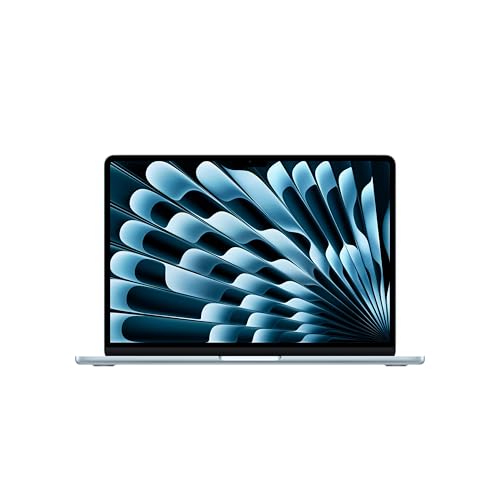
Apple MacBook Air 13-inch M5
Best for: portable performance and balanced storage
- Storage
- 512GB SSD (what this guide is about)
- Processor
- Apple M5
- Memory
- 16GB Unified Memory
- Storage Capacity
- 512GB SSD
- Screen Size
- 13.6-inch
- Dimensions
- 8.46 × 0.44 × 12 inches
View on Amazon: Apple MacBook Air 13-inch M5 Affiliate link
This 13.6-inch MacBook Air pairs an Apple M5 chip with 16GB of unified memory and 512GB of SSD storage. The M5 processor handles multitasking and AI tasks efficiently. The 512GB SSD provides ample space for games and files without the bulk of larger drives. Its 18-hour battery life supports all-day use. This configuration suits students and casual gamers who need portability and solid performance.
Pros
- 512GB SSD storage capacity
- 16GB Unified Memory for smooth multitasking
- Apple M5 chip with AI capabilities
- Up to 18 hours of battery life
- 13.6-inch Liquid Retina display
Cons
- 512GB SSD is smaller than the 1TB and 2TB options in this guide
- 13.6-inch screen is smaller than the 15-inch alternative
- Only two Thunderbolt 4 ports limit simultaneous connections
Good fit if
- You need a portable laptop for college or travel
- You want a balance of speed and storage capacity
- You prioritize battery life for all-day use
Skip if
- You require more than 512GB of internal storage
- You prefer a larger 15-inch display
- You need extensive port options without dongles
Verdict: Apple 2026 MacBook Air 13-inch M5 fits users who want a lightweight machine with enough storage for everyday gaming and study without carrying a heavy bag.

Apple MacBook Pro 14 M5 Max
Best for: Heavy storage and AI processing needs
- Storage
- 2TB SSD (what this guide is about)
- Graphics Card
- 32-core GPU
- Processor
- Apple M5 Max
- Memory
- 36GB Unified Memory
- Storage Capacity
- 2TB SSD
- Screen Size
- 14.2-inch
View on Amazon: Apple MacBook Pro 14 M5 Max Affiliate link
This MacBook Pro pairs an Apple M5 Max processor with 36GB of unified memory and a 2TB SSD. The 2TB storage capacity suits users who need ample space for large files without relying on external drives. The 14.2-inch Liquid Retina XDR display offers high brightness for clear visuals. This configuration delivers strong performance for demanding tasks while maintaining all-day battery life.
Pros
- 2TB SSD storage capacity for large datasets
- 36GB unified memory supports heavy multitasking
- 14.2-inch Liquid Retina XDR display with 1600 nits peak brightness
- Apple M5 Max chip with 32-core GPU for AI workloads
Cons
- Heavier at 3.59 pounds compared to lighter consumer models
- Thicker profile at 0.61 inches reduces portability
- Limited to Apple ecosystem integration for seamless device continuity
Good fit if
- You require 2TB of internal storage for professional media files
- You run intensive AI or creative applications on macOS
- You prioritize screen brightness and color accuracy for editing
Skip if
- You need a Windows-compatible operating system
- You prefer a lighter laptop under 3 pounds
- You are satisfied with 512GB or 1TB storage limits
Verdict: Apple M5 Max 14.2-inch 2TB SSD is a powerful workstation for creators who need maximum local storage and AI processing speed. It fits professionals who value the Liquid Retina XDR display and do not need Windows compatibility.

Apple MacBook Neo 13-inch A18 Pro
Best for: portable student use and AI tasks
- Storage
- 256GB SSD (what this guide is about)
- Processor
- A18 Pro
- Memory
- 8GB Unified Memory
- Storage Capacity
- 256GB SSD
- Screen Size
- 13-inch
- Dimensions
- 8.12 × 11.7 × 0.5 inches
View on Amazon: Apple MacBook Neo 13-inch A18 Pro Affiliate link
This 13-inch laptop features an A18 Pro chip and 8GB of unified memory. It includes a 256GB SSD for storage. The device weighs 2.71 pounds and offers up to 16 hours of battery life. It suits students or casual users who need portability and AI tools. The 256GB storage is the primary constraint for heavy media libraries.
Pros
- A18 Pro processor handles everyday tasks and AI features
- Up to 16 hours of battery life for all-day use
- Lightweight 2.71-pound aluminum design for portability
- 13-inch Liquid Retina display supports 1 billion colors
Cons
- 256GB SSD storage is limited for large game libraries
- 8GB unified memory may struggle with heavy multitasking
- Non-Max chip lacks the peak performance of Pro models
Good fit if
- You need a lightweight laptop for school or travel
- You prioritize battery life over raw processing power
- You rely on AI-assisted writing and organization tools
Skip if
- You require extensive local storage for large files
- You need high-end graphics for professional video editing
- You plan to run memory-intensive virtual machines
Verdict: Apple MacBook Neo 13-inch A18 Pro is a portable option for students who value battery life and AI features. It fits users who can manage with 256GB of storage and 8GB of memory.

Apple MacBook Air 15-inch M5
Best for: Students needing balance of size and storage
- Storage
- 512GB SSD (what this guide is about)
- Processor
- Apple M5
- Memory
- 16GB Unified Memory
- Storage Capacity
- 512GB SSD
- Screen Size
- 15.3-inch
- Dimensions
- 9.35 × 0.45 × 13.4 inches
View on Amazon: Apple MacBook Air 15-inch M5 Affiliate link
This MacBook Air pairs a 15.3-inch Liquid Retina display with an Apple M5 chip and 16GB of unified memory. It includes 512GB of SSD storage, which sits between the entry-level 256GB and the high-capacity 1TB options in this list. The design weighs 3.33 pounds and measures 0.45 inches thick. It suits students or creators who need a balance of portability and screen real estate without the bulk of larger laptops.
Pros
- 15.3-inch Liquid Retina display with 1 billion colors
- Apple M5 chip with unified memory for multitasking
- Up to 18 hours of battery life
- Two Thunderbolt 4 ports and MagSafe charging
Cons
- 512GB SSD offers less storage than the 1TB and 2TB options
- Only 16GB of unified memory limits heavy creative workflows
- No dedicated graphics card listed in specifications
Good fit if
- You want a larger 15-inch screen for multitasking
- You need all-day battery life for classes
- You prefer a lightweight laptop under 3.5 pounds
Skip if
- You require more than 512GB of local storage
- You need dedicated GPU power for 3D rendering
- You prefer a 13-inch display for maximum portability
Verdict: Apple 2026 MacBook Air 15-inch M5 provides a solid middle ground for users who need more screen space than the 13-inch model but do not require the maximum storage capacity. It fits students who carry their devices daily and need reliable performance for standard tasks.

Apple 16.2" MacBook Pro M5 Max
Best for: High-end creative and AI workflows
- Storage
- 2TB SSD (what this guide is about)
- Graphics Card
- 32-core GPU
- Processor
- Apple M5 Max
- Memory
- 36GB Unified Memory
- Storage Capacity
- 2TB SSD
- Screen Size
- 16.2-inch
View on Amazon: Apple 16.2" MacBook Pro M5 Max Affiliate link
This 16.2-inch MacBook Pro features an Apple M5 Max chip with a 32-core GPU and 36GB of unified memory. It includes 2TB of SSD storage, which is the highest capacity in this guide. The Liquid Retina XDR display offers high brightness for creative work. You get all-day battery life and advanced AI capabilities. This model suits professionals who need maximum processing power and large local storage for heavy workloads.
Pros
- 2TB SSD storage capacity
- Apple M5 Max chip with 32-core GPU
- 36GB unified memory
- 16.2-inch Liquid Retina XDR display
Cons
- Heavier at 4.74 pounds
- Higher price point for top-tier specs
- Limited to Apple ecosystem integration
Good fit if
- You need the largest available SSD storage
- You run demanding AI or creative workloads
- You require high-performance unified memory
Skip if
- You prefer Windows operating systems
- You need a lighter portable laptop
- You are on a tight budget
Verdict: Apple M5 Max 16.2-inch 2TB SSD delivers the highest storage and processing power in this list. It fits professionals who prioritize raw performance and large local storage over portability.

Dell Latitude 14-Inch Core i5 Laptop
Best for: Business users needing strong multitasking performance
- Storage
- 256GB SSD (what this guide is about)
- Processor
- Intel Quad-Core i5-1145G7
- Memory
- 16GB DDR4 RAM
- Storage Capacity
- 256GB SSD
- Screen Size
- 14"
- Display Resolution
- FHD
View on Amazon: Dell Latitude 14-Inch Core i5 Laptop Affiliate link
This Dell Latitude 5420 is a 14-inch business laptop designed for productivity. It features an Intel Core i5-1145G7 processor and 16GB of DDR4 RAM for smooth multitasking. Storage is provided by a 256GB SSD. The display is a 14-inch FHD screen. It weighs 3 pounds and measures 0.76 inches thick. This model suits users who need reliable performance for office tasks rather than heavy gaming.
Pros
- 16GB DDR4 RAM for efficient multitasking
- Intel Core i5-1145G7 quad-core processor
- 14-inch FHD display for clear visuals
- Lightweight 3-pound build for portability
Cons
- 256GB SSD offers limited storage space
- Not equipped with a dedicated graphics card
- 14-inch screen is smaller than gaming standards
Good fit if
- You need a reliable machine for business applications
- You prioritize RAM and CPU speed over storage
- You prefer a lightweight laptop for travel
Skip if
- You require large storage for games or media
- You need high-end graphics for gaming
- You want a larger 15-inch or bigger display
Verdict: Dell Latitude 5420 14" Business Laptop is a solid choice for professionals who value processing power and memory. It fits users who work with multiple apps and need a portable device for daily office tasks.
Specifications side by side
| Spec | Apple MacBook Air 13-inch M5 | Apple MacBook Pro 14 M5 Max | Apple MacBook Neo 13-inch A18 Pro | Apple MacBook Air 15-inch M5 | Apple 16.2" MacBook Pro M5 Max | Dell Latitude 14-Inch Core i5 Laptop |
|---|---|---|---|---|---|---|
| Graphics Card | not stated | 32-core GPU | not stated | not stated | 32-core GPU | not stated |
| Processor | Apple M5 | Apple M5 Max | A18 Pro | Apple M5 | Apple M5 Max | Intel Quad-Core i5-1145G7 |
| Memory | 16GB Unified Memory | 36GB Unified Memory | 8GB Unified Memory | 16GB Unified Memory | 36GB Unified Memory | 16GB DDR4 RAM |
| Storage Capacity | 512GB SSD | 2TB SSD | 256GB SSD | 512GB SSD | 2TB SSD | 256GB SSD |
| Screen Size | 13.6-inch | 14.2-inch | 13-inch | 15.3-inch | 16.2-inch | 14" |
| Display Resolution | not stated | not stated | not stated | not stated | not stated | FHD |
| Storage | 512GB SSD | 2TB SSD | 256GB SSD | 512GB SSD | 2TB SSD | 256GB SSD |
| Use | not stated | not stated | not stated | not stated | not stated | Business |
| Dimensions | 8.46 × 0.44 × 12 inches | 8.71 × 0.61 × 12.3 inches | 8.12 × 11.7 × 0.5 inches | 9.35 × 0.45 × 13.4 inches | 9.77 × 0.66 × 14 inches | 12.8 × 8.35 × 0.76 inches |
| Weight | 2.71 pounds | 3.59 pounds | 2.71 pounds | 3.33 pounds | 4.74 pounds | 3 pounds |
| Size | 16GB Unified Memory | 512GB SSD Storage | 36GB Memory | 2TB | 256GB | 16GB Unified Memory | 512GB SSD Storage | 36GB Unified Memory | 2TB SSD Storage | i5-1145G7-16-256-SV-Win11 |
| Color | Sky Blue | Silver | Silver | Midnight | Silver | Gray |
| Model | MDHH4LL/A | MGDQ4LL/A | MHFA4LL/A | MDVH4LL/A | MGE74LL/A | Latitude 5420 |
Frequently asked questions
Can I upgrade the storage on these laptops?
Most modern ultrabooks and thin laptops have soldered storage, meaning you cannot upgrade it later. The Apple MacBook models listed here use integrated SSDs that are not user-replaceable. You must choose the capacity you need at purchase. The Dell Latitude 14-inch may allow upgrades, but you should check the specific service manual for that model before buying.
Is 256GB enough for gaming?
256GB is rarely enough for serious gaming. Modern titles often exceed 100GB, leaving little room for the operating system and other files. The MacBook Neo with 256GB is best for students who manage storage carefully. If you plan to install multiple large games, you will need to delete titles frequently to make space for new ones.
What is the difference between 512GB and 1TB storage?
512GB offers a balanced amount of space for everyday tasks and a few games. The MacBook Air models with 512GB SSD provide this middle ground. 1TB doubles that capacity, allowing you to store more high-resolution media and larger game libraries without constant management. It is ideal for users who want to keep more files locally without relying on external drives.
Does more storage speed up my games?
Storage capacity does not directly affect game speed. Speed depends on the SSD type and interface, not the total gigabytes. However, having more free space can help maintain optimal SSD performance. A nearly full drive may slow down write speeds. Choose a larger capacity if you want to keep your drive less cluttered for better long-term performance.
Which laptop has the most storage capacity?
The MacBook Pro 14-inch M5 Max and the MacBook Pro 16.2-inch M5 Max both feature 2TB SSD storage. This is the highest capacity listed here. These models are designed for professionals who need maximum local storage for large files. If you need even more space, you would need to use external storage solutions, as these are the top configurations available.
Should I choose a 13-inch or 15-inch model for storage?
Screen size does not dictate storage capacity. Both the 13-inch and 15-inch MacBook Air models can come with 512GB SSD. The 15-inch model offers more screen real estate but weighs slightly more. Choose the size based on your portability needs and screen preference, not storage, as the storage options are identical across these specific configurations.