Processor Explained: What It Means for Gaming Laptops
As an Amazon Associate we earn from qualifying purchases. Links on this page are affiliate links.
Processor Explained for Gaming
The central processing unit is the brain of your laptop. It handles all calculations, from running your operating system to rendering complex game graphics. When you look at processor explained guides, you will see various tiers. These tiers indicate raw power and efficiency. Intel and AMD are the two main manufacturers. Their chips compete directly in the same market segments.
Intel offers several distinct series. The Core i5 is a solid mid-range choice. It handles everyday tasks and moderate gaming well. The Core i7 steps up performance for heavier workloads. The Core i9 sits at the top for extreme gaming and content creation. Intel also has the newer Core Ultra 9 series. This line focuses on high efficiency and integrated AI features. The Core 7 is another recent addition, bridging the gap between i5 and i7 levels.
AMD uses the Ryzen branding. The Ryzen 7 is a strong competitor to the Intel Core i7. It offers excellent multi-core performance for multitasking. The Ryzen 9 is AMD’s flagship option. It matches or exceeds the Intel Core i9 in many benchmarks. These chips are known for their high core counts and efficient architecture.
Why does this matter to you? A faster processor means smoother gameplay. It reduces stuttering in open-world titles. It also speeds up video editing and 3D rendering. For everyday use, a mid-range chip like the i5 or Ryzen 7 is sufficient. You only need the top-tier options if you stream, edit video, or play at high frame rates. Check the specific model number on listings. Higher numbers generally mean better performance. Ensure your laptop has adequate cooling to keep these powerful chips running safely.
Processor Tiers Compared
Intel Core Ultra 9
This processor represents the highest tier of performance available in current gaming laptops. It delivers elite processing power suitable for competitive gaming where every millisecond counts. The ASUS ROG Strix 16 with an Intel Core Ultra 9 exemplifies this class, offering fast frame rates and high-refresh displays. You will find this chip ideal if you demand the absolute fastest processor for serious gaming tasks. The trade-off is typically higher cost and heat output. It suits users who prioritize raw speed and modern architecture over budget constraints. This tier ensures your system handles demanding workloads without bottlenecking your graphics card.
Ryzen 9
Ryzen 9 processors are designed for high-performance gaming and heavy multitasking. They provide robust processing power that rivals top-tier Intel options. The MSI Vector 16 with a Ryzen 9 showcases this capability, supporting high-refresh-rate gaming and complex simulations. This chip is best for gamers who prioritize raw processing power and efficient multitasking. You should choose this if you run multiple applications alongside games or stream content. The trade-off often involves a larger chassis to manage thermal output. It is a strong choice for users who need a balance of gaming prowess and productivity without compromising on speed or responsiveness.
Intel Core i9
The Intel Core i9 remains a top-tier option for users demanding maximum CPU power. It pairs well with high-end graphics cards like the RTX 5070 in devices such as the MSI Katana 15 HX. This processor suits users who want top-tier CPU and GPU power for high-refresh-rate gaming. You will benefit from its strong single-core and multi-core performance in modern titles. The trade-off is significant weight and heat, as seen in its 4.96-pound chassis. It is ideal for desktop replacements where portability is secondary to performance. If you need a powerful machine for intensive gaming sessions, this tier delivers the necessary horsepower.
Intel Core 7
Intel Core 7 processors offer a balanced approach for gamers on a budget. They provide sufficient power for multitasking and solid gaming performance. The Acer Nitro V with an Intel Core 7 highlights this value proposition, offering 32GB RAM and a 165Hz display. This chip suits players who prioritize RAM capacity and screen speed over top-tier graphics power. You will find it adequate for most modern games at medium to high settings. The trade-off is lower peak performance compared to Core i9 or Ultra 9 models. It is a practical choice for those seeking a capable gaming machine without the premium price tag of flagship processors.
Intel Core i5
Intel Core i5 processors provide balanced performance for daily computing and light gaming. The Dell Latitude 14-inch with an i5 exemplifies this tier, focusing on portability and connectivity. This chip is ideal for users who value portability over cutting-edge processing power. You will find it suitable for multitasking, web browsing, and less demanding games. The trade-off is lower gaming performance compared to higher-tier chips. It suits students and professionals who need a responsive machine for daily tasks. While not designed for high-end gaming, it offers a reliable and efficient experience for general use and moderate productivity workloads.
Ryzen 7
Ryzen 7 processors are solid choices for everyday multitasking and portable productivity. The Dell Inspiron 15.6-inch with a Ryzen 7 highlights its strength in daily tasks. This chip suits users who prioritize multitasking and portability over raw gaming power. You will benefit from its efficient performance for students and professionals needing a responsive machine. The trade-off is limited gaming capability compared to dedicated gaming laptops with higher-tier CPUs. It is best for those who need a clear touchscreen and reliable performance for daily activities. This option provides a good balance of speed and battery life for non-gaming focused users.
Is It Worth The Upgrade?
Who needs it
You need the top-tier processors like the Intel Core Ultra 9 or Ryzen 9 if you play competitive esports titles or run demanding simulation games. These chips handle high frame rates and complex physics calculations without slowing down. If you stream your gameplay while playing, the extra cores help encode video without dropping frames. Professionals who render video or compile code on their laptops also benefit from this raw power. The Intel Core i9 and Ryzen 9 offer the most threads for heavy multitasking. You will notice smoother performance in open-world games with many on-screen effects. If you want the longest possible lifespan for your machine, starting with the highest spec ensures future-proofing. This level of processing power reduces bottlenecks in CPU-intensive scenes.
Who can skip it
You can skip the most expensive options if you primarily play casual games or older titles. The Intel Core i5 or Ryzen 7 provides more than enough power for most standard gaming experiences. These mid-range chips handle modern games well at medium to high settings. You save resources by choosing a lower spec if your main tasks involve web browsing, document editing, or video streaming. Prioritize a better display or more RAM instead of the fastest processor. The Intel Core 7 and i7 are solid middle grounds that balance cost and performance. You do not need elite processing power for games that rely more on graphics card strength. Focus on cooling efficiency and battery life if you move your laptop often. These specs deliver excellent value for everyday users who do not push their hardware to the limit.
Processor Glossary
CPU Cores
Individual processing units within the chip. More cores allow the laptop to handle multiple tasks, like gaming and streaming, simultaneously without slowing down.
Clock Speed
The speed at which the processor executes instructions, measured in gigahertz. Higher speeds generally mean faster performance for single-threaded tasks and games.
Thermal Design Power
The maximum heat output the cooling system must dissipate. A higher TDP indicates a more powerful chip that generates more heat during intense gaming sessions.
Integrated Graphics
Built-in video processing on the CPU chip. It handles basic display output and light gaming, reducing the need for a separate dedicated graphics card.
Cache Memory
High-speed storage located directly on the processor chip. It stores frequently accessed data to reduce latency and speed up processing for complex calculations.
Thread Count
The number of independent processing sequences the CPU can handle. Hyper-threading allows each core to manage two threads, improving multitasking efficiency and rendering speeds.
Socket Type
The physical interface connecting the processor to the motherboard. This determines compatibility with other components and whether the chip can be upgraded or replaced later.
Quick picks
| # | Product | Best for | Price |
|---|---|---|---|
| 1 | ASUS ROG Strix 16 RTX 5070 Ti Laptop | Competitive gaming with high frame rates | Check price of ASUS ROG Strix 16 RTX 5070 Ti Laptop on Amazon |
| 2 | Dell Inspiron 15.6-Inch Touchscreen Ryzen 7 Laptop | everyday multitasking and portable productivity | Check price of Dell Inspiron 15.6-Inch Touchscreen Ryzen 7 Laptop on Amazon |
| 3 | Dell Latitude 14-Inch Core i5 Laptop | portable daily computing and multitasking | Check price of Dell Latitude 14-Inch Core i5 Laptop on Amazon |
| 4 | MSI Vector 16 RTX 5070 Ti Ryzen 9 Laptop | high-performance gaming and multitasking | Check price of MSI Vector 16 RTX 5070 Ti Ryzen 9 Laptop on Amazon |
| 5 | Acer Nitro V 16 RTX 5050 Gaming Laptop | multitasking gamers on a budget | Check price of Acer Nitro V 16 RTX 5050 Gaming Laptop on Amazon |
| 6 | MSI Katana 15 HX 15.6" Gaming Laptop | high-performance gaming with Intel Core i9 | Check price of MSI Katana 15 HX 15.6" Gaming Laptop on Amazon |
Our 6 picks
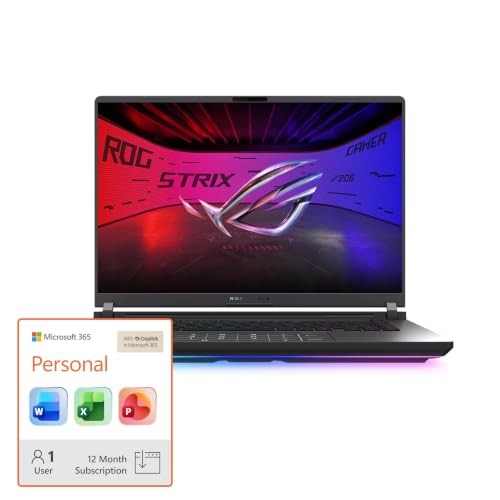
ASUS ROG Strix 16 RTX 5070 Ti Laptop
Best for: Competitive gaming with high frame rates
- Processor
- Intel Core Ultra 9 (what this guide is about)
- Graphics Card
- NVIDIA GeForce RTX 5070 Ti
- Memory
- 32GB DDR5
- Storage Capacity
- 1TB SSD
- Screen Size
- 16
- Refresh Rate
- 240Hz
View on Amazon: ASUS ROG Strix 16 RTX 5070 Ti Laptop Affiliate link
This laptop pairs an Intel Core Ultra 9 275HX processor with an NVIDIA GeForce RTX 5070 Ti GPU. It includes 32GB of DDR5 memory and a 1TB SSD. The 16-inch 2.5K display runs at 240Hz. You get high-end gaming performance and fast multitasking. It suits players who need top-tier speed and smooth visuals for demanding titles.
Pros
- Intel Core Ultra 9 275HX processor for high-speed computing
- NVIDIA GeForce RTX 5070 Ti GPU with DLSS 4
- 32GB DDR5-5600MHz memory for seamless multitasking
- 16-inch 2.5K display with 240Hz refresh rate
- 1TB PCIe Gen 4 SSD for large game libraries
Cons
- Heavier build due to advanced vapor chamber cooling
- Limited to Black color option
- No mention of Thunderbolt port support in data
Good fit if
- You play competitive games requiring high frame rates
- You need 32GB RAM for heavy multitasking
- You want a 240Hz display for smooth visuals
Skip if
- You prefer a 14-inch screen size
- You need more than 32GB of RAM
- You are on a tight budget for premium specs
Verdict: ASUS ROG Strix G16 Intel Core Ultra 9 delivers elite performance for serious gamers. It fits those who demand the fastest processor and high-refresh display for competitive play.

Dell Inspiron 15.6-Inch Touchscreen Ryzen 7 Laptop
Best for: everyday multitasking and portable productivity
- Processor
- Ryzen 7 (what this guide is about)
- Memory
- 16GB
- Storage Capacity
- 512GB PCIe SSD
- Screen Size
- 15.6"
- Display Resolution
- FHD
- Dimensions
- 14.2 × 0.78 × 9.25 inches
View on Amazon: Dell Inspiron 15.6-Inch Touchscreen Ryzen 7 Laptop Affiliate link
This Dell Inspiron 15.6-inch laptop pairs an AMD Ryzen 7 7730U processor with 16GB of RAM. The eight-core chip handles multitasking smoothly, while the 512GB PCIe SSD ensures fast storage access. You get a 15.6-inch FHD touchscreen with anti-glare coating for comfortable viewing. It weighs just under four pounds, making it a portable option for everyday computing and light gaming tasks.
Pros
- AMD Ryzen 7 7730U 8-core processor up to 4.5GHz
- 16GB RAM for smooth multitasking
- 512GB PCIe SSD for fast boot times
- 15.6-inch FHD touchscreen with anti-glare technology
Cons
- Ryzen 7 7730U is an older mobile chip, not a dedicated gaming GPU
- FHD resolution is lower than the 2.5K or QHD+ displays on other list items
- No dedicated graphics card listed in specifications
Good fit if
- You need a capable everyday laptop for work or study
- You want a touchscreen display for easier navigation
- You prioritize portability and a lightweight design under four pounds
Skip if
- You require high-end gaming performance with a dedicated GPU
- You need a high-refresh-rate display above 60Hz
- You prefer a 16-inch screen size for more workspace
Verdict: Dell Inspiron 15.6 Ryzen 7 Laptop is a solid choice for users who prioritize multitasking and portability over raw gaming power. It fits students and professionals who need a responsive machine with a clear touchscreen for daily tasks.

Dell Latitude 14-Inch Core i5 Laptop
Best for: portable daily computing and multitasking
- Processor
- Intel Core i5 (what this guide is about)
- Memory
- 16GB DDR4
- Storage Capacity
- 512GB PCIe SSD
- Screen Size
- 14"
- Display Resolution
- 1920 x 1080 FHD
- Dimensions
- 12.7 × 0.82 × 8.35 inches
View on Amazon: Dell Latitude 14-Inch Core i5 Laptop Affiliate link
This Dell Latitude 5420 features an 11th Gen Intel Core i5-1145G7 processor and 16GB of DDR4 RAM. It includes a 14-inch FHD display and a 512GB PCIe SSD. The device weighs 3.88 pounds and offers Thunderbolt 4 ports. It suits users needing reliable daily performance with solid multitasking capabilities for work or light tasks.
Pros
- 11th Gen Intel Core i5-1145G7 processor up to 4.40GHz
- 16GB DDR4 RAM for smooth multitasking
- 512GB PCIe SSD for fast storage access
- Thunderbolt 4 ports with DisplayPort and Power Delivery
Cons
- 14-inch screen limits workspace compared to 15.6-inch models
- Non-touch FHD display lacks interactive capability
- Older 11th Gen processor lags behind current 13th/14th Gen options
Good fit if
- You need a portable laptop under 4 pounds
- You require Thunderbolt 4 connectivity for peripherals
- You prioritize RAM and SSD over raw CPU speed
Skip if
- You need a touchscreen display
- You want the latest generation processor
- You require a screen larger than 14 inches
Verdict: Dell Latitude 5420 14" i5 Laptop provides balanced performance for users who value portability and connectivity over cutting-edge processing power.

MSI Vector 16 RTX 5070 Ti Ryzen 9 Laptop
Best for: high-performance gaming and multitasking
- Processor
- Ryzen 9 (what this guide is about)
- Graphics Card
- NVIDIA GeForce RTX 5070 Ti 12GB GDDR7
- Memory
- 32GB RAM
- Storage Capacity
- 1TB NVMe SSD
- Screen Size
- 16"
- Refresh Rate
- 240Hz
View on Amazon: MSI Vector 16 RTX 5070 Ti Ryzen 9 Laptop Affiliate link
This gaming laptop pairs an AMD Ryzen 9 8940HX processor with an NVIDIA RTX 5070 Ti GPU. The 16-inch QHD+ display runs at 240Hz, providing smooth visuals for fast-paced games. You get 32GB of RAM and a 1TB SSD for ample storage and multitasking. It is built for users who need high-end performance and a high refresh rate screen.
Pros
- AMD Ryzen 9 8940HX with 16 cores
- NVIDIA GeForce RTX 5070 Ti 12GB GDDR7
- 16-inch 2560x1600 240Hz display
- 32GB RAM and 1TB SSD
Cons
- Heavy at 5.95 pounds
- Thick at 1.12 inches
- Limited to two configuration options
Good fit if
- You want high-end CPU and GPU specs
- You prefer a 240Hz refresh rate
- You need 32GB of RAM
Skip if
- You prioritize portability
- You need more than 1TB storage
- You want a thinner chassis
Verdict: MSI Vector 16 HX Ryzen 9 suits gamers who prioritize raw processing power and a high-refresh-rate display over portability.
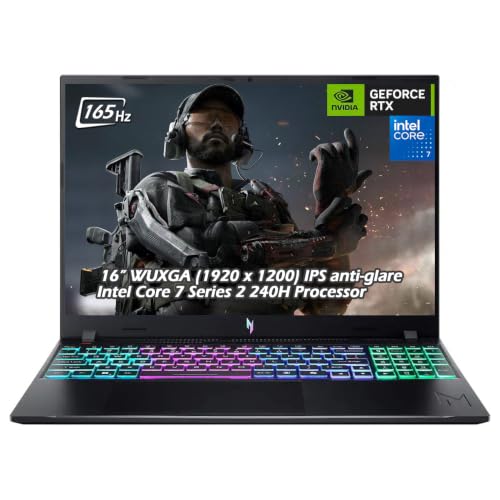
Acer Nitro V 16 RTX 5050 Gaming Laptop
Best for: multitasking gamers on a budget
- Processor
- Intel Core 7 (what this guide is about)
- Graphics Card
- NVIDIA GeForce RTX 5050 Laptop GPU
- Memory
- 32GB DDR5
- Storage Capacity
- 1TB SSD
- Screen Size
- 16"
- Refresh Rate
- 165Hz
View on Amazon: Acer Nitro V 16 RTX 5050 Gaming Laptop Affiliate link
This Acer Nitro V pairs an Intel Core 7 240H processor with an RTX 5050 GPU. You get 32GB of DDR5 RAM and a 1TB SSD. The 16-inch WUXGA display runs at 165Hz. It suits gamers who want solid multitasking and entry-level ray tracing. The high RAM count helps with modern game loads, while the CPU handles background tasks efficiently.
Pros
- Intel Core 7 240H deca-core processor
- 32GB DDR5 memory for multitasking
- 1TB PCIe NVMe SSD storage
- 165Hz WUXGA display with 165Hz refresh rate
Cons
- RTX 5050 GPU is entry-level for high settings
- Wi-Fi 6 lacks Wi-Fi 7 speeds
- 4.63 pounds is heavier than 15-inch models
Good fit if
- You need 32GB RAM for heavy multitasking
- You want a 16-inch 165Hz display
- You play esports titles at high refresh rates
Skip if
- You require RTX 5060 or better graphics
- You prioritize portability under 4 pounds
- You need Wi-Fi 7 connectivity
Verdict: Acer Nitro V Core 7 16" fits players who prioritize RAM and screen speed over top-tier graphics power.

MSI Katana 15 HX 15.6" Gaming Laptop
Best for: high-performance gaming with Intel Core i9
- Processor
- Intel Core i9 (what this guide is about)
- Graphics Card
- NVIDIA Geforce RTX 5070
- Memory
- 32GB DDR5
- Storage Capacity
- 1TB NVMe SSD
- Screen Size
- 15.6”
- Refresh Rate
- 165Hz
View on Amazon: MSI Katana 15 HX 15.6" Gaming Laptop Affiliate link
The MSI Katana 15 HX pairs an Intel Core i9-14900HX processor with an NVIDIA RTX 5070 graphics card. This combination delivers high frame rates in demanding titles. You get 32GB of DDR5 memory and a QHD+ 165Hz display for clear visuals. The 1TB NVMe SSD provides ample storage. It suits gamers who need raw processing power and strong graphics performance for competitive play.
Pros
- Intel Core i9-14900HX with 24 cores for fast load times
- NVIDIA GeForce RTX 5070 with ray tracing and DLSS 4
- 32GB DDR5 memory supports smooth multitasking
- QHD+ 165Hz display with 100% DCI-P3 color accuracy
Cons
- Weighs 4.96 pounds, making it heavier than lighter alternatives
- 15.6-inch screen limits portability compared to 14-inch models
- Only 4-zone RGB lighting instead of per-key customization
Good fit if
- You want high-end gaming performance with an Intel Core i9
- You need 32GB of RAM for heavy multitasking
- You prefer a QHD+ display with high color accuracy
Skip if
- You prioritize a lightweight laptop under 4 pounds
- You need a 14-inch screen for maximum portability
- You require per-key RGB keyboard customization
Verdict: MSI Katana 15 HX i9 RTX 5070 fits users who demand top-tier CPU and GPU power for high-refresh-rate gaming, provided you can carry its 4.96-pound weight.
Specifications side by side
| Spec | ASUS ROG Strix 16 RTX 5070 Ti Laptop | Dell Inspiron 15.6-Inch Touchscreen Ryzen 7 Laptop | Dell Latitude 14-Inch Core i5 Laptop | MSI Vector 16 RTX 5070 Ti Ryzen 9 Laptop | Acer Nitro V 16 RTX 5050 Gaming Laptop | MSI Katana 15 HX 15.6" Gaming Laptop |
|---|---|---|---|---|---|---|
| Graphics Card | NVIDIA GeForce RTX 5070 Ti | not stated | not stated | NVIDIA GeForce RTX 5070 Ti 12GB GDDR7 | NVIDIA GeForce RTX 5050 Laptop GPU | NVIDIA Geforce RTX 5070 |
| Processor | Intel Core Ultra 9 275HX | AMD Ryzen 7 7730U | Intel Core i5-1145G7 | AMD Ryzen 9 8940HX | Intel Core 7 240H | Intel Core i9-14900HX |
| Memory | 32GB DDR5 | 16GB | 16GB DDR4 | 32GB RAM | 32GB DDR5 | 32GB DDR5 |
| Storage Capacity | 1TB SSD | 512GB PCIe SSD | 512GB PCIe SSD | 1TB NVMe SSD | 1TB SSD | 1TB NVMe SSD |
| Screen Size | 16 | 15.6" | 14" | 16" | 16" | 15.6” |
| Refresh Rate | 240Hz | not stated | not stated | 240Hz | 165Hz | 165Hz |
| Display Resolution | 2.5K | FHD | 1920 x 1080 FHD | 2560x1600 | 1920 x 1200 | QHD+ |
| Storage | 1TB SSD | 512GB SSD | 512GB SSD | 1TB SSD | 1TB SSD | 1TB SSD |
| Size | not stated | 512GB | i5 11th Gen | 16GB | 512GB | 32 GB RAM | 1TB SSD | not stated | 1TB |
| Dimensions | not stated | 14.2 × 0.78 × 9.25 inches | 12.7 × 0.82 × 8.35 inches | 14.1 × 11.2 × 1.12 inches | 0.78 × 10.2 × 14 inches | 14.1 × 0.99 × 10.3 inches |
| Weight | not stated | 4 pounds | 3.88 pounds | 5.95 pounds | 4.63 pounds | 4.96 pounds |
| Color | Black | Black | Black | Black | Obsidian Black | Black |
| Model | ROG Strix G16 | not stated | Latitude 5420 | Vector | not stated | Katana15B14016 |
Frequently asked questions
Does a higher processor tier always mean better gaming performance?
Not necessarily. The best processor depends on your specific needs. For example, the Dell Inspiron 15.6 with a Ryzen 7 prioritizes multitasking and portability over raw power. It suits students who need a responsive machine for daily tasks. Meanwhile, the MSI Vector 16 with a Ryzen 9 focuses on high-performance gaming. You should match the chip to your primary use case.
What is the difference between Intel Core Ultra and Core i series?
Intel Core Ultra represents the latest architecture, offering elite performance for serious gamers. The ASUS ROG Strix 16 uses an Intel Core Ultra 9 for the fastest processing. In contrast, older or mid-range models use Core i5 or i7 chips. The Dell Latitude 14 uses an Intel Core i5 for balanced daily computing. Newer tiers generally provide better efficiency and speed.
How much RAM do I need for gaming with these processors?
High-end gaming laptops typically include 32GB of RAM to handle heavy loads. The ASUS ROG Strix 16 and MSI Vector 16 both feature 32GB RAM alongside their powerful processors. This allows for smooth multitasking and high frame rates. Mid-range options like the Dell Latitude 14 offer 16GB RAM, which is sufficient for portable daily computing. More RAM helps prevent slowdowns during intensive sessions.
Which processor is best for competitive gaming?
The Intel Core Ultra 9 and Ryzen 9 are ideal for competitive play. The ASUS ROG Strix 16 with an Intel Core Ultra 9 delivers elite performance for high frame rates. The MSI Vector 16 with a Ryzen 9 also suits gamers who prioritize raw power. These chips handle complex physics and fast-paced action without slowing down. They pair well with high-refresh-rate displays for the best experience.
Can a Ryzen 7 laptop handle everyday multitasking?
Yes, the Ryzen 7 is a solid choice for everyday multitasking. The Dell Inspiron 15.6 with a Ryzen 7 is designed for users who prioritize portability and productivity. It provides a responsive machine for daily tasks like browsing and office work. While it lacks the raw gaming power of top-tier chips, it balances performance with ease of use. It is a practical option for students and professionals.
Is the Intel Core i9 worth the extra weight and size?
The Intel Core i9 offers top-tier CPU power for demanding games. The MSI Katana 15 HX uses an i9 with an RTX 5070 for high-refresh-rate gaming. However, this performance comes with a heavier chassis weighing 4.96 pounds. You must be willing to carry the extra weight. If you need portability, a lighter model with a mid-range processor might be a better fit.
What role does the refresh rate play with these processors?
The processor helps maintain high frame rates, which the display then shows. High-refresh-rate screens like 240Hz benefit from powerful chips like the Intel Core Ultra 9 or Ryzen 9. The ASUS ROG Strix 16 and MSI Vector 16 both feature 240Hz displays. The Acer Nitro V 16 uses a 165Hz screen with an Intel Core 7. Faster processors ensure the display stays smooth during intense gaming.