PCONLINE 16" RTX 5080 Ryzen Review: Specs, Pros and Cons
As an Amazon Associate we earn from qualifying purchases. Links on this page are affiliate links.
This pconline 16 rtx 5080 ryzen review examines a 16-inch gaming laptop built for high-performance tasks. The device combines a Ryzen AI 9 HX 375 processor with an RTX 5080 16GB GDDR7 graphics card. This pairing targets users who need serious computing power for local AI workloads and intensive design projects. The system also includes 32GB of RAM and a 1TB SSD for fast multitasking and storage. You get a 240Hz WQXGA display to support smooth visuals during long work sessions. We analyze how these core specifications translate into practical daily use for professionals and gamers alike.
What stands out
- Ryzen AI 9 HX 375 processor with 55 TOPS NPU for local AI tasks
- RTX 5080 16GB GDDR7 GPU for high-end rendering and gaming
- 16-inch WQXGA IPS display with 240Hz refresh rate and 500-nit brightness
- 32GB DDR5 RAM and 1TB SSD for rapid multitasking and storage
- Tempest Cooling Pro system to maintain steady performance under heavy loads
Who it fits
Good fit for
This laptop suits creative professionals and enterprise users who run local AI models or handle large datasets. The Ryzen AI 9 HX 375 and RTX 5080 provide the raw power needed for design projects and video editing. Gamers who prefer high refresh rates will appreciate the 240Hz WQXGA screen. The 32GB of RAM ensures smooth multitasking between demanding applications. If you need a reliable machine for long-hour rendering sessions or high-load workflows, this setup delivers the necessary hardware foundation.
Who should skip it
You should look elsewhere if you prioritize portability above all else. At nearly six pounds, this device is not designed for frequent travel. It is also a poor choice if you require a budget-friendly option, as high-end specs like the RTX 5080 and Ryzen AI 9 come at a premium. Additionally, if you are sensitive to screen glare, note that while it has anti-glare features, the high brightness may still be intense in very bright environments. Users needing extensive legacy port support might find the modern port selection limiting.
Verdict: The PCONLINE 16 offers robust hardware for users who demand high-end AI and graphics performance. Its strong CPU and GPU combination make it a solid choice for intensive professional and gaming tasks.
Key specs explained
Ryzen AI 9 HX 375
This processor includes a dedicated neural processing unit for local artificial intelligence tasks. It handles enterprise data analysis and design projects efficiently. You benefit from smooth performance when running high-load workflows. This chip is ideal for users who need strong computational power for daily business and creative tasks without relying on cloud services.
RTX 5080 16GB GDDR7
This graphics card features 16 gigabytes of fast GDDR7 memory. It delivers the power needed for intensive gaming and rendering. You get high frame rates and smooth visuals in demanding titles. This GPU is suitable for gamers and creators who require robust graphical performance for modern software and high-resolution media editing.
32GB RAM
This amount of memory allows for seamless multitasking and instant app switching. You can run multiple heavy applications simultaneously without slowdowns. It handles large files and complex projects with ease. This capacity is essential for users who keep many browser tabs open while working with design tools or virtual machines.
16-inch WQXGA 240Hz
The display offers a high refresh rate of 240Hz for fluid motion. The WQXGA resolution provides sharp images for detailed work. You experience reduced eye strain with anti-glare and low-blue-light features. This screen is perfect for gamers seeking responsiveness and professionals who need accurate color reproduction for design work.
Design and Build Quality
According to the listing, the PCONLINE 16 laptop features a black finish and measures 14 inches in length, 10.6 inches in width, and 0.98 inches in height. The chassis weighs 5.99 pounds. This profile suggests a substantial device that prioritizes internal component space over ultra-portability. You should expect a solid footprint on your desk or lap. The height indicates adequate ventilation channels, which aligns with the advertised Tempest Cooling Pro system. This design choice helps suppress thermal throttling during long rendering sessions or intensive gaming.
The layout includes a comprehensive port selection to support various peripherals. You get two USB-A 10Gbps ports for lag-free gaming mice and keyboards. Dual USB-C ports offer low-latency connections for high-speed data transfer or display output. An HDMI 2.1 port ensures tear-free visuals when connecting to external monitors. An RJ-45 Ethernet jack provides stable wired networking, while the headphone/mic combo jack supports clear voice communication. The AC smart pin ensures full power delivery to the CPU and GPU, preventing performance drops.
This configuration suits users who need a stationary or semi-mobile workstation. The robust build supports heavy workloads like enterprise data analysis or local AI tasks. The 16-inch WQXGA IPS display with 240Hz refresh rate sits within this sturdy frame. You benefit from a reliable platform that balances performance hardware with necessary connectivity options for both gaming and professional productivity.
Setup and Everyday Use
The device ships with Windows 11 Home preinstalled. This operating system provides baseline security and business-ready features. You do not need to perform a complex initial configuration. The system is ready for immediate use upon first boot. The integrated ThinkShield security layer adds multi-layer protection for your device, identity, and data privacy. This setup ensures a secure environment from the start.
Daily operation relies on the 32GB of DDR5 RAM and the 1TB SSD. The large memory capacity allows smooth multitasking and instant app switching. You can handle large files without significant lag. The storage drive provides rapid loading times for games and software. This combination keeps your workflow efficient during long sessions. The Tempest Cooling Pro system manages thermal output under continuous heavy loads. It suppresses thermal throttling to maintain steady CPU and GPU performance. This feature helps lessen hardware aging and ensures dependable long-term operation.
Connectivity is robust for everyday needs. You have access to two USB-A ports at 10Gbps for peripherals. Dual USB-C ports offer ultra-low input latency. An HDMI 2.1 port supports tear-free visuals on external monitors. An RJ-45 Ethernet port provides a stable online connection. The AC smart pin ensures full power delivery to the CPU and RTX 5080. This prevents performance drops during peak usage. The headphone and mic combo jack supports clear voice communication. The 16-inch WQXGA IPS display with a 240Hz refresh rate delivers smooth visuals. Its 100% sRGB gamut and anti-glare coating reduce eye strain during document review or design work. The 500-nits brightness ensures visibility in various lighting conditions.
Practical Ownership Considerations
Owning this PCONLINE 16 requires attention to power and connectivity. The AC smart pin ensures full power delivery to the CPU and RTX 5080, but you must use the included adapter to avoid throttling. Its 14-inch width and 5.99-pound weight make it portable, yet substantial. You will need a sturdy desk surface to accommodate its 16-inch WQXGA display, which benefits from the 240Hz refresh rate for smooth visuals. Check your workspace for adequate ventilation, as the Tempest Cooling Pro system needs airflow to suppress thermal throttling during long rendering sessions. This laptop fits alongside other high-performance options in our 1 guide for users prioritizing local AI tasks and enterprise data analysis. Unlike smaller everyday laptops, this machine demands a dedicated setup for optimal performance. Ensure your peripherals connect via the dual USB-C or HDMI 2.1 ports for low-latency input. Regularly clean the cooling vents to maintain hardware reliability and extend the device's operational lifespan.
Check before you buy
- Verify your power outlet supports the AC smart pin adapter.
- Ensure your desk has enough space for the 14-inch chassis.
- Check that your workspace allows airflow for the cooling system.
- Confirm your peripherals fit the USB-C or HDMI 2.1 ports.
The product at a glance
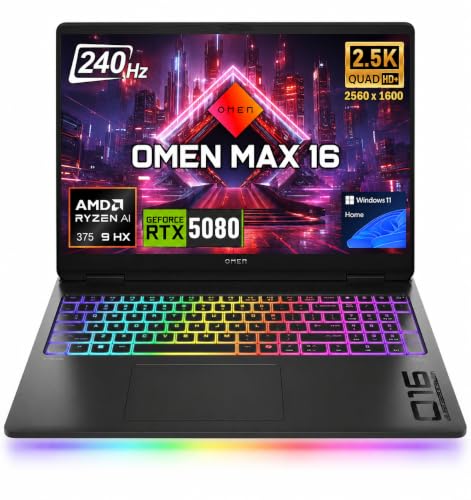
PCONLINE 16" RTX 5080 Ryzen AI 9 Laptop
Best for: Local AI tasks and heavy rendering workflows
- Graphics Card
- RTX 5080 16GB GDDR7
- Processor
- Ryzen AI 9 HX 375
- Memory
- 32GB DDR5
- Storage Capacity
- 1TB SSD
- Screen Size
- 16"
- Refresh Rate
- 240Hz
View on Amazon: PCONLINE 16" RTX 5080 Ryzen AI 9 Laptop Affiliate link
This 16-inch gaming laptop pairs a Ryzen AI 9 HX 375 processor with an RTX 5080 GPU featuring 16GB of GDDR7 memory. You get a 240Hz WQXGA IPS display and 32GB of RAM for heavy multitasking. The system includes a 1TB SSD and Tempest Cooling Pro to manage heat during long sessions. It suits users needing high performance for local AI tasks and enterprise data analysis.
Pros
- Ryzen AI 9 HX 375 with 55 TOPS NPU for local AI workloads
- RTX 5080 16GB GDDR7 graphics for high-end rendering and gaming
- 16-inch 240Hz WQXGA display with 100% sRGB color gamut
- 32GB RAM and 1TB SSD for fast multitasking and storage
Cons
- Heavy at 5.99 pounds and thick at 0.98 inches
- No mention of a backlit keyboard for low-light typing
- No mention of Thunderbolt 4 support on the USB-C ports
Good fit if
- You need strong local AI processing power for design or data projects
- You want a high refresh rate display for smooth visual performance
- You require robust ports including HDMI 2.1 and RJ-45 Ethernet
Skip if
- You prioritize a lightweight and portable build for daily commuting
- You need Thunderbolt 4 connectivity for high-speed external drives
- You prefer a laptop with a backlit keyboard for dark environments
Verdict: PCONLINE HP Max 16" Ryzen AI 9 HX 375 delivers desktop-class performance for users focused on heavy local AI tasks and intensive rendering. It is ideal for professionals who value raw computational power and a high-quality display over portability.
Specifications side by side
| Spec | PCONLINE 16" RTX 5080 Ryzen AI 9 Laptop |
|---|---|
| Graphics Card | RTX 5080 16GB GDDR7 |
| Processor | Ryzen AI 9 HX 375 |
| Memory | 32GB DDR5 |
| Storage Capacity | 1TB SSD |
| Screen Size | 16" |
| Refresh Rate | 240Hz |
| Display Resolution | 2560 * 1600 |
| Storage | 1TB SSD |
| Size | 32GB RAM | 1TB SSD |
| Dimensions | 14 × 10.6 × 0.98 inches |
| Weight | 5.99 pounds |
| Color | Black |
| Model | TPN-I144 |
Frequently asked questions
Is the PCONLINE 16 suitable for heavy local AI tasks?
Yes, this laptop is built for intensive local artificial intelligence workflows. It features the Ryzen AI 9 HX 375 processor, which includes a dedicated neural processing unit. This hardware allows you to run complex AI models and enterprise data analysis efficiently without relying on cloud services.
What graphics card does the PCONLINE 16 use?
The device is equipped with an RTX 5080 graphics card. This GPU utilizes 16GB of GDDR7 memory to handle high-resolution rendering and demanding gaming scenarios. The combination of this powerful graphics unit with the Ryzen AI 9 processor ensures desktop-class performance for creative professionals.
How much RAM and storage does the top model include?
The listed configuration provides 32GB of RAM and a 1TB SSD. This memory amount supports smooth multitasking and large file handling, while the solid-state drive offers ample space for your operating system, applications, and game libraries. These specs are ideal for users managing heavy rendering workflows.
What is the display refresh rate on this laptop?
The screen features a 240Hz refresh rate. This high rate ensures that fast-moving content, such as competitive gaming or rapid video editing timelines, appears smooth and clear. Combined with the 16-inch display size, it provides a responsive visual experience for users who prioritize high frame rates.
How heavy is the PCONLINE 16 laptop?
The chassis weighs 5.99 pounds. This substantial weight reflects the robust internal components required for the Ryzen AI 9 HX 375 and RTX 5080. While it is portable enough for travel, its weight suggests it is designed more for stationary use where raw computational power is prioritized over light mobility.
What operating system comes preinstalled on this device?
The laptop ships with Windows 11 Home. This operating system provides baseline security features and business-ready tools right out of the box. You do not need to perform complex initial configuration steps, allowing you to begin your local AI tasks or rendering projects immediately after the first boot.