Msi vs EXCaliberPC Gaming Laptops: Which Brand Fits You?
As an Amazon Associate we earn from qualifying purchases. Links on this page are affiliate links.
When comparing msi vs EXCaliberPC gaming laptop options, you face two distinct paths. Both brands offer modern hardware built for gaming, but they target different user needs. The MSI Cyborg 15 focuses on portability and mainstream performance, while the EXCaliberPC configuration delivers desktop-class power in a larger chassis. This guide breaks down the key specification differences to help you decide which machine fits your workflow.
Key differences
| Aspect | MSI Cyborg 15 15.6" RTX 5060 Laptop | MSI Raider 18-Inch RTX 5080 Gaming Laptop |
|---|---|---|
| Graphics Card | RTX 5060 | RTX 5080 16GB GDDR7 |
| Processor | Intel Core 5-210H | AMD Ryzen 9 9955HX3D |
| Memory | 16GB DDR5 | 32GB DDR5 5600MHz |
| Screen Size | 15.6 inches | 18 inches |
| Storage | 512GB SSD | 2TB PCIe NVMe SSD |
| Weight | 4.29 pounds | 7.94 pounds |
Which one should you choose?
Choose MSI Cyborg 15 15.6" RTX 5060 Laptop if
- You prioritize a lightweight laptop that fits easily into a backpack for school or travel.
- You want a smaller 15.6-inch display that offers a high 144Hz refresh rate for competitive gaming.
- You need a machine that balances everyday productivity tasks with solid entry-level gaming performance.
Choose MSI Raider 18-Inch RTX 5080 Gaming Laptop if
- You require maximum graphical power for high-resolution gaming and content creation workflows.
- You prefer a larger 18-inch UHD+ Mini LED display with HDR support for immersive visuals.
- You need extensive storage and memory to handle large files and multitasking without compromise.
Verdict: The MSI Cyborg 15 is the better choice if you value portability and a compact form factor for daily mobility. The EXCaliberPC configuration suits users who prioritize raw processing power, a massive screen, and extensive memory for demanding tasks. Your decision should hinge on whether you need to carry your laptop frequently or keep it stationary at a desk.
Specs and Build Comparison
graphics card
The MSI Cyborg 15 features an NVIDIA GeForce RTX 5060, which supports ray tracing and DLSS 4 for smoother gameplay in modern titles. This GPU is designed to deliver solid performance for 1080p gaming. In contrast, the EXCaliberPC configuration includes the NVIDIA GeForce RTX 5080 with 16GB of GDDR7 memory. The RTX 5080 offers significantly higher raw power and bandwidth, making it better suited for high-resolution gaming and demanding creative workloads. If you need maximum graphical fidelity, the 5080 is the clear choice.
processor
Processing power differs greatly between these two options. The MSI Cyborg 15 uses an Intel Core 5-210H processor paired with 16GB of DDR5 memory. This setup handles everyday tasks, multitasking, and integrated AI workflows efficiently. The EXCaliberPC laptop is equipped with an AMD Ryzen 9 9955HX3D, featuring 16 cores and a massive 128MB Smart Cache. This high-end chip is built for extreme performance, offering much greater computational strength for heavy gaming or professional applications. The Ryzen 9 provides a substantial advantage in raw processing capability.
screen size
Display dimensions are a major differentiator. The MSI Cyborg 15 has a 15.6-inch FHD panel with a 144Hz refresh rate. This size is standard for portable gaming laptops, offering a balance between screen real estate and mobility. The EXCaliberPC model features a much larger 18-inch UHD+ Mini LED display. This screen offers a resolution of 3840x2400 and supports 120Hz refresh rates with HDR 1000. The larger screen provides more immersive visuals and higher detail, though it requires a stationary setup rather than on-the-go use.
memory
System memory affects how many applications you can run simultaneously. The MSI Cyborg 15 comes with 16GB of DDR5 RAM, which is sufficient for most gamers and general users. It allows for smooth multitasking alongside gaming. The EXCaliberPC configuration includes 32GB of DDR5 RAM running at 5600MHz. This double the amount of memory ensures that even resource-intensive games and background applications run without bottlenecks. For users who stream or edit video while gaming, the 32GB option offers a distinct advantage.
storage
Storage capacity determines how many games and files you can keep locally. The MSI Cyborg 15 is equipped with a 512GB SSD. This is a decent starting point but may fill up quickly with modern game files. The EXCaliberPC laptop includes a 2TB PCIe NVMe SSD. This provides four times the storage space, allowing you to install a larger library of games and applications without worrying about running out of room. The larger capacity is a practical benefit for power users who want to keep everything on the drive.
portability
Physical dimensions and weight are critical for mobility. The MSI Cyborg 15 is designed for portability, measuring 0.87 inches thick and weighing just 4.3 pounds. It is easy to carry between home, class, or work. The EXCaliberPC configuration is significantly larger and heavier, measuring 1.26 inches thick and weighing 7.94 pounds. This bulk is necessary to house the powerful components and larger screen, but it makes the laptop less suitable for frequent travel. If you need a lightweight machine, the Cyborg 15 is the better option.
Which Gaming Laptop Fits Your Needs
Students needing portable daily drivers
The MSI Cyborg 15 weighs 4.29 pounds and measures 0.87 inches thin. This makes it easy to carry between classes and work. The Intel Core 5-210H processor and 16GB DDR5 memory handle multitasking and AI workflows efficiently. You get a lightweight machine that fits in small bags without sacrificing essential gaming performance.
Users wanting high-resolution visuals
The EXCaliberPC model features an 18-inch UHD+ Mini LED display with 3840x2400 resolution. It covers 100% of the DCI-P3 color gamut and supports HDR 1000. This screen delivers sharp, vibrant images with excellent contrast. If you prioritize visual fidelity and immersive color accuracy for creative work or high-end gaming, this display is superior.
Gamers seeking maximum graphical power
This configuration includes the NVIDIA GeForce RTX 5080 with 16GB GDDR7 memory and the AMD Ryzen 9 9955HX3D processor. The 16-core CPU and advanced GPU handle demanding titles and complex rendering tasks. The 32GB DDR5 RAM ensures smooth performance during heavy multitasking. You get desktop-class power for intensive gaming and professional applications.
The products compared
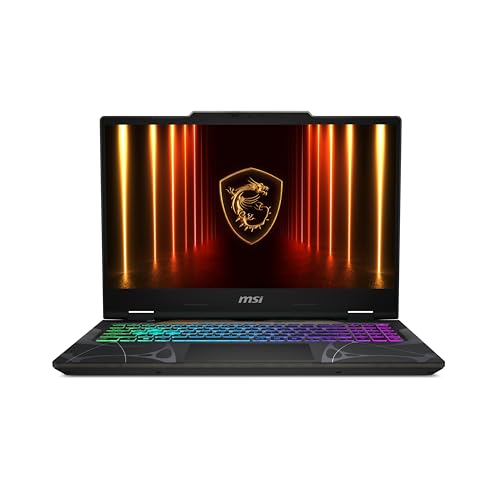
MSI Cyborg 15 15.6" RTX 5060 Laptop
Best for: portable 1080p gaming and student use
- Graphics Card
- NVIDIA GeForce RTX 5060
- Processor
- Intel Core 5-210H
- Memory
- 16GB DDR5
- Storage Capacity
- 512GB SSD
- Screen Size
- 15.6”
- Refresh Rate
- 144Hz
View on Amazon: MSI Cyborg 15 15.6" RTX 5060 Laptop Affiliate link
The MSI Cyborg 15 is a 15.6-inch gaming laptop weighing 4.3 pounds. It uses an Intel Core 5-210H processor and 16GB of DDR5 memory. The NVIDIA GeForce RTX 5060 graphics card supports ray tracing. A 144Hz FHD display ensures smooth visuals. This thin and light model suits students or commuters who need portable power for modern titles and multitasking.
Pros
- Lightweight 4.3 lb chassis for easy transport
- RTX 5060 with DLSS 4 for high FPS
- 144Hz FHD IPS-level display for fluid motion
- 16GB DDR5 RAM for smooth multitasking
- Wi-Fi 6E for stable low-lag connections
Cons
- 512GB SSD storage may fill quickly
- No mention of dedicated number pad
- FHD resolution limits sharpness on 15.6 inch screen
Good fit if
- You need a lightweight laptop for school or work
- You play competitive titles requiring high refresh rates
- You want ray tracing performance in a thin chassis
Skip if
- You require 1TB of storage for large libraries
- You need a 4K display for creative work
- You prioritize maximum battery life over portability
Verdict: MSI Cyborg 15 RTX 5060 delivers solid 1080p gaming performance in a portable frame. It fits mobile gamers who value the RTX 5060 and 144Hz screen over high-end storage or display resolution.
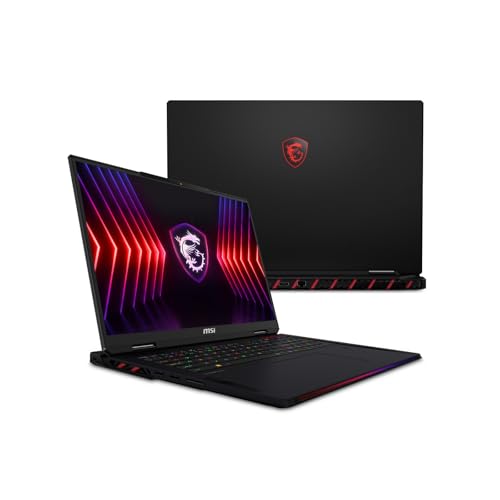
MSI Raider 18-Inch RTX 5080 Gaming Laptop
Best for: high-resolution gaming and content creation
- Graphics Card
- NVIDIA GeForce RTX 5080 16GB GDDR7
- Processor
- AMD Ryzen 9 9955HX3D
- Memory
- 32GB DDR5 5600MHz
- Storage Capacity
- 2TB PCIe NVMe SSD
- Screen Size
- 18"
- Refresh Rate
- 120Hz
View on Amazon: MSI Raider 18-Inch RTX 5080 Gaming Laptop Affiliate link
This 18-inch laptop pairs an AMD Ryzen 9 9955HX3D processor with an NVIDIA RTX 5080 graphics card. It features a 3840x2400 Mini LED display with 120Hz refresh rate and 32GB of DDR5 RAM. The 2TB NVMe SSD provides ample storage. It suits users who need high-resolution visuals and powerful gaming performance in a large chassis.
Pros
- 18-inch UHD+ Mini LED display with 100% DCI-P3 color
- NVIDIA GeForce RTX 5080 16GB GDDR7 graphics
- AMD Ryzen 9 9955HX3D 16-core processor
- 32GB DDR5 RAM and 2TB NVMe SSD
Cons
- Heavy 7.94-pound build limits portability
- Thick 1.26-inch profile adds bulk
- Standard 1-year warranty for a premium price point
Good fit if
- You prioritize high-resolution visuals over portability
- You need top-tier graphics for 4K gaming
- You want a large 18-inch screen for immersion
Skip if
- You need a lightweight laptop for travel
- You prefer a 1080p display for higher refresh rates
- You require a smaller 15-inch form factor
Verdict: EXCaliberPC MSI Raider A18 RTX 5080 delivers desktop-class performance in an 18-inch chassis. It fits gamers who value resolution and color accuracy more than mobility.
Specifications side by side
| Spec | MSI Cyborg 15 15.6" RTX 5060 Laptop | MSI Raider 18-Inch RTX 5080 Gaming Laptop |
|---|---|---|
| Graphics Card | NVIDIA GeForce RTX 5060 | NVIDIA GeForce RTX 5080 16GB GDDR7 |
| Processor | Intel Core 5-210H | AMD Ryzen 9 9955HX3D |
| Memory | 16GB DDR5 | 32GB DDR5 5600MHz |
| Storage Capacity | 512GB SSD | 2TB PCIe NVMe SSD |
| Screen Size | 15.6” | 18" |
| Refresh Rate | 144Hz | 120Hz |
| Display Resolution | FHD | 3840x2400 |
| Storage | 512GB SSD | 2TB SSD |
| Dimensions | 14.2 × 0.91 × 9.66 inches | 15.9 × 12.1 × 1.26 inches |
| Weight | 4.29 pounds | 7.94 pounds |
| Size | Core 5-210H | 2TB NVMe SSD |
| Color | Black | 32GB RAM |
| Model | CYBORG15B2295 | MSI Raider A18 HX A9WIG-082US |
Frequently asked questions
Is the MSI Cyborg 15 good for students?
Yes, the MSI Cyborg 15 is ideal for students. It weighs 4.29 pounds and measures 14.2 inches long. This portable frame fits easily in backpacks. The 16GB RAM and Core 5-210H processor handle multitasking for schoolwork. You also get a 144Hz screen for smooth gaming during breaks.
Which laptop has more storage space?
The EXCaliberPC configuration offers significantly more storage. It includes a 2TB SSD, whereas the MSI Cyborg 15 has a 512GB SSD. If you store many large games or video files, the larger drive on the 18-inch model prevents you from running out of space quickly.
Can I use the EXCaliberPC laptop for travel?
It is not designed for frequent travel. The EXCaliberPC model weighs 7.94 pounds and is 1.26 inches thick. This heavy, bulky chassis is built for stationary use. You should choose the lighter MSI Cyborg 15 if you need to carry your laptop to different locations daily.
Does the MSI Cyborg 15 have a high refresh rate?
Yes, it features a 144Hz refresh rate. This ensures smoother motion in fast-paced games compared to standard 60Hz screens. The RTX 5060 graphics card helps maintain high frame rates to take full advantage of this display speed for competitive gaming sessions.
Which model is better for content creation?
The EXCaliberPC configuration is better for content creation. It pairs an RTX 5080 GPU with a Ryzen 9 processor and 32GB of RAM. This powerful combination handles heavy rendering and editing tasks. The 18-inch screen also provides more workspace for detailed visual projects.
What is the screen size difference between these laptops?
There is a significant size difference. The MSI Cyborg 15 has a 15.6-inch display, which is standard for portable devices. The EXCaliberPC model features an 18-inch screen. This larger panel offers more visual real estate but requires a dedicated desk space rather than a lap.