What Is Memory? A Guide for Gaming Laptops Buyers (2026)
As an Amazon Associate we earn from qualifying purchases. Links on this page are affiliate links.
Memory Explained for Buyers
Random access memory is the short-term workspace of your laptop. It holds data that the processor needs immediate access to. When you switch between apps or load a game, the system moves information from the slower storage drive into this fast memory. This process keeps your device responsive and prevents stuttering. Without enough memory, your computer must constantly shuffle data back and forth, which slows everything down.
You will see memory listed in gigabytes, or GB, on product pages. The most common configurations for gaming laptops are 8GB, 16GB, 32GB, and 64GB. These numbers represent the total amount of data the system can hold in active use at one time. Think of it as the size of your desk. A small desk holds only a few documents. A large desk allows you to spread out many projects simultaneously.
For everyday tasks like web browsing and document editing, 8GB is often sufficient. However, modern gaming demands more. 16GB has become the standard baseline for gaming laptops. This amount allows you to play current titles while keeping other apps open in the background. If you plan to stream your gameplay or run heavy creative software, 32GB provides a comfortable buffer. It ensures your system does not choke under heavy loads.
64GB is reserved for extreme workstations or users running virtual machines. It is rarely necessary for standard gaming. Understanding memory explained helps you avoid bottlenecks. Check the specifications carefully. Some laptops allow you to upgrade the RAM later, while others have it soldered to the motherboard. Knowing the capacity helps you choose a machine that will remain smooth for years. More memory means better multitasking and fewer crashes when resources are tight.
Memory Configurations Compared
8GB RAM
Eight gigabytes of RAM is the baseline for modern computing. It handles basic web browsing, email, and document editing smoothly. However, it struggles with heavy multitasking. If you open many browser tabs while running other apps, the system may slow down. This configuration is rarely suitable for gaming or creative work. You might find older or budget models with this spec, but it limits future-proofing. For most users, especially those buying a gaming laptop, 8GB is insufficient. It forces the system to use slower storage as temporary memory, reducing performance. We recommend avoiding this tier unless your needs are extremely light.
16GB RAM
Sixteen gigabytes is the standard for most laptops today. It supports comfortable multitasking and entry-level gaming. You can run several applications simultaneously without significant lag. The Dell Inspiron 15.6 with Ryzen 7 and 16GB RAM suits students and professionals needing a balanced machine for daily tasks. It is not for gamers requiring extensive memory. This amount allows you to play many modern games at medium settings. It also handles photo editing and casual video projects well. While adequate for many, power users may find it limiting. It is a practical choice for general use and light creative work.
32GB RAM
Thirty-two gigabytes provides ample headroom for demanding tasks. It supports heavy multitasking and professional creative workflows. The Apple MacBook Pro 16 with M1 Pro and 32GB RAM delivers strong performance for creative professionals. It is ideal for those who value battery life and display quality. The MSI Katana 15 with Intel Core i9 and 32GB RAM fits gamers who prioritize high-end CPU performance alongside ample memory. This level handles complex video editing, 3D rendering, and high-end gaming smoothly. It ensures background tasks do not impact your primary application. If you run virtual machines or large datasets, 32GB is a smart investment.
64GB RAM
Sixty-four gigabytes is for extreme performance needs. It supports heavy multitasking and high-end gaming without slowdowns. The ASUS ROG Strix G16 with Ryzen 9 and 64GB RAM delivers top-tier performance for users who prioritize maximum RAM. The Apple MacBook Pro 16 with M1 Max and 64GB RAM delivers serious power for creative professionals. This configuration is ideal for users running intensive applications simultaneously. It is necessary for professional video editing, 3D modeling, and scientific computing. Most gamers do not need this much memory, but it future-proofs the system. It allows you to keep dozens of apps open without performance loss. Choose this only if your work demands it.
Who Needs More RAM
Who needs it
You should prioritize higher memory configurations if your workflow involves demanding tasks. Eight gigabytes is insufficient for serious work. Sixteen gigabytes is the practical minimum for gaming and moderate multitasking. It allows you to run a game while keeping chat apps or browsers open without significant slowdowns. If you stream, edit videos, or run virtual machines, thirty-two gigabytes provides the necessary headroom. This capacity ensures smooth performance when switching between heavy applications. For professional creators using complex software suites or developers compiling large codebases, sixty-four gigabytes eliminates bottlenecks. This amount prevents the system from relying on slower storage as temporary memory. It keeps your workflow fluid and responsive under heavy loads. Choose higher RAM if you keep many programs active simultaneously or require stable performance during intensive sessions. Lower capacities will force the system to swap data, causing lag and reduced efficiency.
Who can skip it
You can ignore high memory specs if your usage is limited to basic tasks. Eight gigabytes handles web browsing, email, and document editing without issue. If you only use your laptop for school assignments or light media consumption, more RAM offers no benefit. Spending on extra memory here yields diminishing returns. Instead, prioritize a faster processor or a better display for your experience. A quicker CPU improves overall responsiveness more noticeably than additional RAM for light users. Also, consider storage speed for faster boot times and game loading. Focus your budget on components that directly impact your daily activities. High RAM only matters when you push the system hard. For casual users, it is an unnecessary expense. Keep your configuration simple and allocate resources to areas that enhance your primary activities, such as graphics performance or screen quality, rather than excess memory capacity.
Memory Terms Explained
RAM
Random access memory acts as the laptop's short-term workspace. It stores data the processor needs instantly, allowing smooth app switching and faster game loading times.
8GB RAM
This is the baseline configuration for modern laptops. It handles basic browsing and documents well but may struggle with heavy multitasking or demanding gaming sessions.
16GB RAM
This is the practical minimum for gaming and moderate multitasking. It allows you to run a game while keeping chat apps and browsers open in the background.
Multitasking
Running multiple applications simultaneously. Higher memory capacity prevents slowdowns when you switch between a game, web browser, and communication tools at the same time.
Processor
The central processing unit that executes instructions. It relies on fast memory access to perform tasks efficiently, making the amount of RAM critical for performance.
Storage Drive
The long-term storage for your files and games. Memory pulls data from this slower drive into RAM for immediate use by the processor.
Baseline
The minimum standard required for modern computing. Eight gigabytes of RAM is considered the baseline, though it may not suffice for more demanding workflows or gaming.
Quick picks
| # | Product | Best for | Price |
|---|---|---|---|
| 1 | Dell Inspiron 15.6-Inch Touchscreen Ryzen 7 Laptop | Everyday multitasking and portability | Check price of Dell Inspiron 15.6-Inch Touchscreen Ryzen 7 Laptop on Amazon |
| 2 | Apple MacBook Pro 16 M1 Pro 32GB RAM | Heavy multitasking and professional creative workflows | Check price of Apple MacBook Pro 16 M1 Pro 32GB RAM on Amazon |
| 3 | ASUS ROG Strix G16 RTX 5070 Ryzen 9 | Heavy multitasking and high-end gaming | Check price of ASUS ROG Strix G16 RTX 5070 Ryzen 9 on Amazon |
| 4 | Dell Latitude 14-Inch Intel Core i7 Laptop | Users needing 16GB RAM in a portable 14-inch form factor | Check price of Dell Latitude 14-Inch Intel Core i7 Laptop on Amazon |
| 5 | MSI Katana 15 HX 15.6" Gaming Laptop | High-end gaming with 32GB RAM | Check price of MSI Katana 15 HX 15.6" Gaming Laptop on Amazon |
| 6 | Apple MacBook Pro 16-Inch M1 Max 64GB | Heavy multitasking and creative workloads | Check price of Apple MacBook Pro 16-Inch M1 Max 64GB on Amazon |
Our 6 picks

Dell Inspiron 15.6-Inch Touchscreen Ryzen 7 Laptop
Best for: Everyday multitasking and portability
- Memory
- 16GB RAM (what this guide is about)
- Processor
- AMD Ryzen 7 7730U
- Storage Capacity
- 512GB PCIe SSD
- Screen Size
- 15.6"
- Display Resolution
- FHD
- Dimensions
- 14.2 × 0.78 × 9.25 inches
View on Amazon: Dell Inspiron 15.6-Inch Touchscreen Ryzen 7 Laptop Affiliate link
This Dell Inspiron features a 15.6-inch FHD touchscreen and 16GB of RAM paired with an AMD Ryzen 7 7730U processor. The 512GB PCIe SSD ensures fast boot times and quick file access. Weighing just under four pounds, it offers a portable design for work or school. The 16GB memory handles multitasking smoothly, making it suitable for everyday tasks and moderate gaming.
Pros
- 16GB RAM for smooth multitasking
- 15.6-inch FHD touchscreen display
- 512GB PCIe SSD for fast storage
- Lightweight design under four pounds
Cons
- 16GB RAM limits heavy multitasking
- Non-gaming GPU restricts high-end games
- FHD resolution lacks high pixel density
Good fit if
- You need a portable laptop for school
- You want a touchscreen for ease of use
- You require 16GB RAM for general tasks
Skip if
- You play demanding AAA games
- You need 32GB RAM for heavy workloads
- You prefer a 4K display resolution
Verdict: Dell Inspiron 15.6 Ryzen 7 16GB suits students and professionals needing a balanced, portable machine for daily tasks. It is not for gamers or users requiring extensive memory.

Apple MacBook Pro 16 M1 Pro 32GB RAM
Best for: Heavy multitasking and professional creative workflows
- Memory
- 32GB RAM (what this guide is about)
- Graphics Card
- 16-core GPU
- Processor
- Apple M1 Pro
- Storage Capacity
- 512GB SSD
- Screen Size
- 16.2-inch
- Refresh Rate
- 120Hz
View on Amazon: Apple MacBook Pro 16 M1 Pro 32GB RAM Affiliate link
This 16-inch MacBook Pro features the Apple M1 Pro chip and 32GB of unified RAM. It includes a 16.2-inch Liquid Retina XDR display with a 120Hz refresh rate. The 512GB SSD offers fast storage. This configuration supports heavy multitasking and professional workflows. It suits users who need high memory capacity and a large, high-resolution screen for demanding tasks.
Pros
- 32GB unified RAM for smooth heavy multitasking
- 16.2-inch Liquid Retina XDR display with 120Hz refresh rate
- Apple M1 Pro chip with 10-core CPU
- Up to 21 hours of battery life
Cons
- 512GB SSD is smaller than the 1TB option on the list
- Renewed condition may vary in cosmetic appearance
- 16-core GPU is less powerful than the M1 Max's 32-core option
Good fit if
- You need 32GB of RAM for professional workflows
- You prefer a large 16-inch display with high resolution
- You prioritize long battery life for mobile use
Skip if
- You require the maximum 64GB RAM capacity
- You need a larger 1TB SSD storage option
- You want a new condition device instead of renewed
Verdict: Apple 16-inch M1 Pro 32GB RAM delivers strong performance for creative professionals who need ample memory and a high-quality screen. It is ideal for those who value battery life and display quality over maximum storage or GPU power.
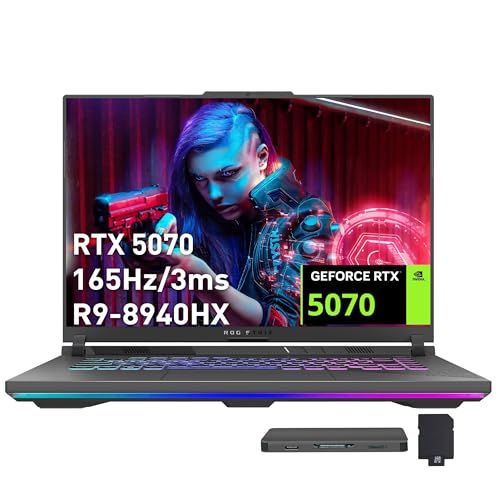
ASUS ROG Strix G16 RTX 5070 Ryzen 9
Best for: Heavy multitasking and high-end gaming
- Memory
- 64GB RAM (what this guide is about)
- Graphics Card
- NVIDIA GeForce RTX 5070 8GB GDDR7
- Processor
- AMD Ryzen 9 8940HX
- Storage Capacity
- 2TB PCIe SSD
- Screen Size
- 16"
- Refresh Rate
- 165Hz
View on Amazon: ASUS ROG Strix G16 RTX 5070 Ryzen 9 Affiliate link
The ASUS ROG Strix G16 is a 16-inch gaming laptop with a 165Hz FHD+ display. It uses an AMD Ryzen 9 8940HX processor and NVIDIA GeForce RTX 5070 graphics. The system includes 64GB DDR5 RAM and a 2TB PCIe SSD. This configuration supports heavy multitasking and large game libraries. It suits users who need high memory capacity and strong processing power for demanding tasks.
Pros
- 64GB DDR5 RAM for extensive multitasking
- 2TB PCIe SSD for massive storage
- NVIDIA GeForce RTX 5070 8GB graphics
- AMD Ryzen 9 8940HX processor
- 165Hz refresh rate display
Cons
- Weight is 10 pounds, making it bulky
- No mention of Thunderbolt 4 support
- FHD+ resolution is lower than QHD+
Good fit if
- You need 64GB RAM for heavy workloads
- You want high-end RTX 5070 graphics
- You require 2TB of fast storage
Skip if
- You prefer a lighter, portable laptop
- You need a QHD+ or higher resolution
- You are on a strict budget
Verdict: ASUS ROG Strix G16 64GB RAM delivers top-tier performance for users who prioritize maximum RAM and storage capacity. It is ideal for gamers and creators who run intensive applications simultaneously without slowdowns.

Dell Latitude 14-Inch Intel Core i7 Laptop
Best for: Users needing 16GB RAM in a portable 14-inch form factor
- Memory
- 16GB RAM (what this guide is about)
- Processor
- Intel Core i7-1185G7
- Screen Size
- 14"
- Display Resolution
- 1920x1080
- Dimensions
- 13.6 × 12 × 4.13 inches
- Weight
- 3 pounds
View on Amazon: Dell Latitude 14-Inch Intel Core i7 Laptop Affiliate link
The Dell Latitude 5420 pairs an 11th Gen Intel Core i7-1185G7 processor with 16GB of DDR4 RAM. This configuration supports multitasking and moderate gaming workloads. The 14-inch FHD display provides clear visuals for everyday tasks. You get 512GB of NVMe storage for fast file access. This laptop suits users who need reliable performance and portability without excessive bulk.
Pros
- 16GB DDR4 RAM handles multiple applications smoothly
- Intel Core i7-1185G7 delivers strong processing power
- 512GB NVMe SSD ensures rapid boot times
- 14-inch FHD screen offers crisp 1920x1080 resolution
Cons
- 14-inch screen limits workspace compared to 16-inch models
- 11th Gen Intel processor is older than current Ultra 5 chips
- Certified refurbished condition may show cosmetic wear
Good fit if
- You need 16GB of RAM for smooth multitasking
- You prefer a lightweight 14-inch portable form factor
- You want Thunderbolt 4 connectivity for modern peripherals
Skip if
- You require 32GB or more RAM for heavy workloads
- You need the latest generation Intel Ultra processors
- You prefer a 16-inch display for larger screens
Verdict: Dell Latitude 5420 i7 14" Laptop is a solid mid-range option for users who prioritize 16GB RAM and portable 14-inch design over cutting-edge processor generations.

MSI Katana 15 HX 15.6" Gaming Laptop
Best for: High-end gaming with 32GB RAM
- Memory
- 32GB RAM (what this guide is about)
- Graphics Card
- NVIDIA Geforce RTX 5070
- Processor
- Intel Core i9-14900HX
- Storage Capacity
- 1TB NVMe SSD
- Screen Size
- 15.6”
- Refresh Rate
- 165Hz
View on Amazon: MSI Katana 15 HX 15.6" Gaming Laptop Affiliate link
This MSI Katana 15 HX pairs a 15.6-inch QHD+ display with 32GB of DDR5 RAM. The Intel Core i9-14900HX processor and NVIDIA GeForce RTX 5070 graphics handle demanding games at high frame rates. You get a 165Hz refresh rate for smooth visuals and a 1TB NVMe SSD for storage. It suits players who want strong multitasking capabilities and high-resolution gaming.
Pros
- 32GB DDR5 RAM for heavy multitasking
- Intel Core i9-14900HX 24-core processor
- NVIDIA GeForce RTX 5070 with ray tracing
- 15.6-inch QHD+ 165Hz display
Cons
- 4.96-pound weight adds bulk to your bag
- 0.99-inch thickness increases carry size
- 4-zone RGB keyboard limits lighting customization
Good fit if
- You need 32GB of RAM for streaming
- You want QHD+ resolution for clarity
- You play competitive games at 165Hz
Skip if
- You prefer a lightweight ultrabook
- You only need 16GB of RAM
- You want a 14-inch screen size
Verdict: MSI Katana 15 HX i9 RTX 5070 delivers desktop-class power in a 15.6-inch chassis. It fits gamers who prioritize high-end CPU and GPU performance alongside ample memory for background tasks.

Apple MacBook Pro 16-Inch M1 Max 64GB
Best for: Heavy multitasking and creative workloads
- Memory
- 64GB RAM (what this guide is about)
- Processor
- Apple M1 Max
- Storage Capacity
- 1TB SSD
- Screen Size
- 16-Inch
- Dimensions
- 10 × 1 × 1 inches
- Weight
- 5.9 pounds
View on Amazon: Apple MacBook Pro 16-Inch M1 Max 64GB Affiliate link
This 16-inch MacBook Pro features an Apple M1 Max processor and 64GB of RAM. It includes 1TB of SSD storage and weighs 5.9 pounds. The large screen and high memory capacity support demanding workflows. You get quick access to applications and documents. This configuration suits users who need substantial resources for heavy multitasking or creative projects.
Pros
- 64GB RAM for extensive multitasking
- Apple M1 Max processor for high performance
- 1TB SSD provides ample storage space
- 16-inch display for immersive viewing
Cons
- Weighs 5.9 pounds, making it less portable
- Renewed condition may vary in cosmetic wear
- Limited to Space Gray or Silver color options
Good fit if
- You need 64GB RAM for heavy workloads
- You prefer a large 16-inch screen
- You require fast SSD storage capacity
Skip if
- You prioritize lightweight portability under 5 pounds
- You need a new device with full warranty
- You prefer Windows compatibility for specific software
Verdict: Apple M1 Max 16-inch 64GB RAM delivers serious power for creative professionals. It fits users who prioritize memory and screen size over weight and new condition.
Specifications side by side
| Spec | Dell Inspiron 15.6-Inch Touchscreen Ryzen 7 Laptop | Apple MacBook Pro 16 M1 Pro 32GB RAM | ASUS ROG Strix G16 RTX 5070 Ryzen 9 | Dell Latitude 14-Inch Intel Core i7 Laptop | MSI Katana 15 HX 15.6" Gaming Laptop | Apple MacBook Pro 16-Inch M1 Max 64GB |
|---|---|---|---|---|---|---|
| Graphics Card | not stated | 16-core GPU | NVIDIA GeForce RTX 5070 8GB GDDR7 | not stated | NVIDIA Geforce RTX 5070 | not stated |
| Processor | AMD Ryzen 7 7730U | Apple M1 Pro | AMD Ryzen 9 8940HX | Intel Core i7-1185G7 | Intel Core i9-14900HX | Apple M1 Max |
| Memory | 16GB | 32GB | 64GB DDR5 | 16GB DDR4 | 32GB DDR5 | 64GB RAM |
| Storage Capacity | 512GB PCIe SSD | 512GB SSD | 2TB PCIe SSD | not stated | 1TB NVMe SSD | 1TB SSD |
| Screen Size | 15.6" | 16.2-inch | 16" | 14" | 15.6” | 16-Inch |
| Refresh Rate | not stated | 120Hz | 165Hz | not stated | 165Hz | not stated |
| Display Resolution | FHD | 3456 × 2234 | FHD+ | 1920x1080 | QHD+ | not stated |
| Storage | 512GB SSD | 512GB SSD | 2TB SSD | not stated | 1TB SSD | 1TB SSD |
| Size | 512GB | 32GB RAM, 512GB SSD Storage | 64GB | 2TB SSD | i7-1185G7-16-512-Win11 | 1TB | 1TB |
| Dimensions | 14.2 × 0.78 × 9.25 inches | 16 × 12 × 0.95 inches | 19 × 13.5 × 4.5 inches | 13.6 × 12 × 4.13 inches | 14.1 × 0.99 × 10.3 inches | 10 × 1 × 1 inches |
| Weight | 4 pounds | 1.6 kilograms | 10 pounds | 3 pounds | 4.96 pounds | 5.9 pounds |
| Color | Black | Space Gray | Gray | Black | Black | Space Gray |
| Model | not stated | MK183LL/A | ASUS ROG Strix | Dell 5420 i7 Laptop | Katana15B14016 | MK1A3LL/A |
Frequently asked questions
Does 16GB RAM handle gaming well?
Yes, 16GB is the practical minimum for gaming. It lets you run a game while keeping chat apps open. The Dell Inspiron 15.6 with 16GB RAM suits daily tasks but is not for gamers. The Dell Latitude 14-inch also offers 16GB in a portable form factor for users who prioritize memory size over new processors.
Is 32GB RAM necessary for gaming?
It depends on your setup. The MSI Katana 15 HX uses 32GB RAM alongside an Intel Core i9 and RTX 5070. This configuration fits gamers who want desktop-class power. It provides ample memory for background tasks while maintaining high-end CPU and GPU performance for demanding titles.
What is the best memory for creative work?
Creative professionals often need 32GB or more. The Apple MacBook Pro 16 M1 Pro with 32GB RAM delivers strong performance for heavy multitasking. It is ideal for those who value battery life and display quality. The Apple MacBook Pro 16 M1 Max with 64GB RAM offers serious power for intensive creative workloads.
Can 64GB RAM help with multitasking?
Yes, 64GB handles intensive applications simultaneously without slowdowns. The ASUS ROG Strix G16 features 64GB RAM and a Ryzen 9 processor. It is ideal for gamers and creators who prioritize maximum RAM. This configuration ensures smooth performance even when running multiple heavy programs at once.
How does RAM affect laptop weight?
Higher memory configurations can impact portability. The Apple MacBook Pro 16 M1 Max with 64GB RAM weighs 5.9 pounds. The ASUS ROG Strix G16 with 64GB RAM weighs 10 pounds. In contrast, the Dell Latitude 14-inch with 16GB RAM weighs only 3 pounds, offering a lighter option for mobile users.
Is 8GB RAM enough for modern use?
Eight gigabytes is the baseline for modern computing. It handles basic web browsing and document editing smoothly. However, it struggles with heavy multitasking. Opening many browser tabs while running other apps may cause the system to slow. It is generally insufficient for serious work or gaming.
Which laptop has the most RAM?
The ASUS ROG Strix G16 and Apple MacBook Pro 16 M1 Max both feature 64GB RAM. The ASUS model pairs this with a 2TB SSD and RTX 5070 graphics. The Apple model includes a 1TB SSD. These configurations provide top-tier performance for users requiring extensive memory capacity.