Lenovo ThinkPad X1 Carbon 14-inch Review: Who It Fits and Who Should Skip It
As an Amazon Associate we earn from qualifying purchases. Links on this page are affiliate links.
This lenovo thinkpad x1 carbon 14 inch review focuses on a business-class machine built for productivity. It pairs an Intel Core Ultra 7 258V processor with 32GB of fast LPDDR5X memory. The result is a system designed for smooth multitasking and efficient performance. You get a high-resolution OLED display that handles color accurately. The 1TB SSD provides ample space for your files. This combination of power and portability makes it a strong candidate for professionals who need reliability. It is not a gaming rig, but a tool for serious work.
What stands out
- 14-inch 2.8K OLED display with 120Hz refresh rate and 500-nit brightness
- Intel Core Ultra 7 258V processor with up to 4.8GHz turbo speed
- 32GB LPDDR5X-8533 memory for efficient multitasking
- 1TB PCIe 4.0 NVMe SSD for fast storage access
- Windows 11 Pro with fingerprint reader for secure access
Who it fits
Good fit for
This laptop suits business travelers and remote workers who value portability and screen quality. The 2.17-pound weight and thin chassis make it easy to carry. Professionals who edit photos or videos will appreciate the 100% DCI-P3 color gamut and Dolby Vision support. Users who need strong performance for spreadsheets, code, or multiple browser tabs will benefit from the 32GB RAM. The fingerprint reader adds a layer of security for sensitive corporate data.
Who should skip it
Gamers should look elsewhere, as this model lacks a dedicated graphics card. It is not designed for heavy 3D rendering or high-FPS gaming. If you need to play modern titles, this CPU and integrated graphics will struggle. Additionally, users who require extensive port variety might find the compact design limiting. The integrated memory cannot be upgraded later. Those on a tight budget may find this premium build too expensive compared to consumer models.
Verdict: The Lenovo ThinkPad X1 Carbon Gen 13 Aura Edition is a premium ultrabook for professionals. Its strong CPU and excellent OLED screen make it a top choice for productivity.
Key specs explained
Intel Core Ultra 7 258V
This processor features eight cores and boosts up to 4.8GHz. It combines performance and low-power cores for efficient multitasking. You benefit from smooth operation during heavy workloads like video editing or running multiple applications. Compared to standard laptops, this chip offers better energy efficiency while maintaining high speed for daily tasks.
32GB LPDDR5X-8533
This high-speed memory allows you to switch between many apps without lag. The 8533MHz speed ensures rapid data access for demanding workflows. You gain more flexibility to keep dozens of browser tabs and large files open simultaneously. This capacity exceeds typical gaming laptops, making it ideal for professionals who need robust multitasking capabilities.
1TB SSD
This storage size provides ample space for your operating system, applications, and large files. The PCIe 4.0 NVMe interface ensures fast boot times and quick file transfers. You can store extensive media libraries or large datasets without worrying about running out of space. It offers significantly more capacity than base models, reducing the need for external drives.
14" 2.8K OLED
This display offers high resolution and deep blacks with 100% DCI-P3 color coverage. The OLED panel delivers vivid images suitable for photo editing or media consumption. You experience sharp text and accurate colors for professional work. Compared to standard LCD screens, this panel provides superior contrast and visual clarity for creative tasks.
120Hz VRR
This refresh rate ensures smoother motion on the screen compared to standard 60Hz panels. Variable Refresh Rate technology syncs the display with the graphics output to reduce tearing. You benefit from a more fluid experience when scrolling or watching high-motion content. This feature enhances visual comfort during extended use, making it superior for everyday productivity.
Build Quality And Physical Design
According to the listing, this laptop measures 12.3 inches in length, 8.45 inches in width, and 0.67 inches in height. It weighs 2.17 pounds. These dimensions indicate a compact form factor that fits easily into most backpacks and laptop sleeves. The low profile allows it to sit comfortably on small desks or cramped airplane trays. You can carry it for long periods without significant strain on your shoulders or back. The weight distribution appears balanced for a device of this class.
The chassis is finished in black, a color choice that helps mask minor scuffs and fingerprints during daily use. This practical finish suits a professional environment where the device will be handled frequently. The 14-inch screen size provides ample visual space without making the unit bulky. You get a portable machine that does not sacrifice too much screen real estate for the sake of mobility. The build suggests durability suitable for travel.
The design prioritizes function over flashy aesthetics. The slim height and moderate weight make it ideal for commuters and remote workers. You can move it between home, office, and coffee shops with ease. The materials are not specified beyond the color, but the compact footprint is clear. This portability is a key feature for users who need a reliable tool that travels well. It is not a stationary desktop replacement, but a true mobile companion.
Setup And Everyday Use
You start with Windows 11 Pro already installed. This business-grade operating system provides a familiar interface for productivity tasks. You also get a backlit keyboard, which helps you type in low-light environments. A fingerprint reader is included for secure login. This feature allows you to access your account quickly without typing a complex password every time. The device supports WiFi and Bluetooth, enabling you to connect to networks and wireless peripherals. You can pair headsets, mice, or keyboards without needing extra dongles. The 14-inch OLED display offers a 2.8K resolution and a 120Hz refresh rate. This combination ensures sharp text and smooth motion. The 100% DCI-P3 color gamut makes it suitable for creative work. The anti-glare and anti-smudge coatings help maintain visibility in bright offices. Under the hood, 32GB of LPDDR5X memory supports heavy multitasking. You can run many applications simultaneously without slowdowns. The 1TB SSD provides ample space for files and programs. It uses PCIe 4.0 technology for fast data access. This means your system boots quickly and files load in seconds. The Intel Core Ultra 7 258V processor handles demanding tasks efficiently. Its hybrid architecture balances performance and power. You get consistent performance during long work sessions. The laptop’s compact size and light weight make it easy to carry. You can move between meetings or coffee shops without strain. This setup is ideal for professionals who need reliability and speed.
Before You Buy This Laptop
This Lenovo ThinkPad X1 Carbon Gen 13 Aura Edition is a premium business machine. It is not a gaming laptop. You will not find discrete graphics here. If you play modern titles, skip this model. Look for a dedicated GPU instead. The OLED screen is vibrant. You may need a matte screen protector to reduce fingerprints. The 14-inch size fits most bags. However, check your docking station compatibility. This device uses specific ports. Verify your peripherals match the available connections. Upkeep is simple. The anti-glare coating resists smudges. Clean it with a microfiber cloth. The 32GB of memory handles heavy multitasking. You do not need to upgrade RAM. Storage is fixed. Plan your file management carefully. This laptop suits professionals who value portability and screen quality. It fits alongside other everyday productivity machines. It does not replace a workstation for creative rendering or gaming. Choose this if you prioritize battery life and build quality over raw graphical power.
Check before you buy
- Verify docking station port compatibility
- Confirm no discrete GPU needed
- Check bag size for 14-inch fit
- Plan file management for 1TB storage
The product at a glance
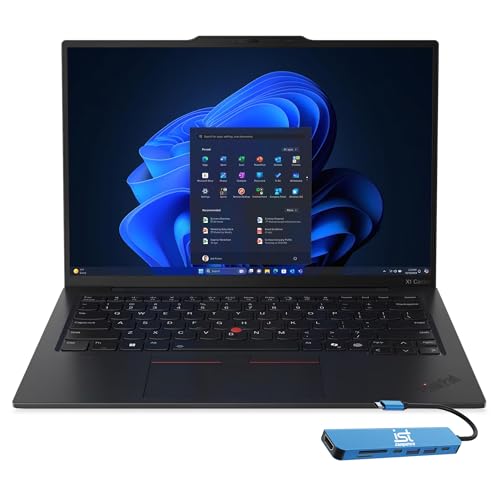
Lenovo ThinkPad X1 Carbon 14-inch OLED
Best for: portable productivity and media viewing
- Graphics Card
- Intel Arc 140V
- Processor
- Intel Core Ultra 7 258V
- Memory
- 32GB LPDDR5X-8533
- Storage Capacity
- 1TB SSD
- Screen Size
- 14"
- Refresh Rate
- 120Hz
View on Amazon: Lenovo ThinkPad X1 Carbon 14-inch OLED Affiliate link
This 14-inch laptop features an Intel Core Ultra 7 258V processor with up to 4.8GHz turbo speed. It includes 32GB of LPDDR5X-8533 memory and a 1TB PCIe 4.0 SSD. The display is a 2.8K OLED panel with 120Hz refresh rate and 500-nit brightness. Weighing 2.17 pounds, it offers a portable form factor for users needing strong performance and high-quality visuals in a compact chassis.
Pros
- Intel Core Ultra 7 258V processor with 4.8GHz max turbo
- 14-inch 2.8K OLED display with 120Hz refresh rate
- 32GB LPDDR5X-8533 memory for fast multitasking
- 1TB PCIe 4.0 NVMe SSD for ample storage
- Lightweight 2.17-pound design for portability
Cons
- 0.67-inch thickness may feel bulky for some ultrabooks
- MoP memory is soldered and not user-upgradable
- 1-year warranty is shorter than many competitors
Good fit if
- You need a high-resolution OLED screen for media consumption
- You require 32GB of RAM for heavy multitasking
- You want a lightweight laptop with strong processing power
Skip if
- You need to upgrade RAM after purchase
- You prefer a thinner chassis under 0.6 inches
- You want a longer standard warranty period
Verdict: Lenovo ThinkPad X1 Carbon 14-inch suits professionals who prioritize display quality and memory capacity over upgradeability. It fits users who value portability and processing speed for demanding tasks.
Specifications side by side
| Spec | Lenovo ThinkPad X1 Carbon 14-inch OLED |
|---|---|
| Graphics Card | Intel Arc 140V |
| Processor | Intel Core Ultra 7 258V |
| Memory | 32GB LPDDR5X-8533 |
| Storage Capacity | 1TB SSD |
| Screen Size | 14" |
| Refresh Rate | 120Hz |
| Display Resolution | 2880x1800 2.8K |
| Storage | 1TB SSD |
| Dimensions | 12.3 × 8.45 × 0.67 inches |
| Weight | 2.17 pounds |
| Size | 1TB SSD |
| Color | Black |
| Model | Lenovo |
Frequently asked questions
Is the Lenovo ThinkPad X1 Carbon 14-inch good for media consumption?
Yes, it suits users who prioritize display quality. This model features a 14-inch OLED screen, which delivers vibrant colors and deep blacks. The high-resolution panel makes it ideal for watching movies or viewing photos. You get a visually immersive experience that enhances everyday media tasks.
Does this laptop have enough storage for large files?
It includes a 1TB SSD, providing ample space for documents and media. This capacity allows you to store numerous applications and large files without needing external drives. The solid-state drive ensures fast load times for your operating system and frequently used programs. You can keep your workflow uninterrupted.
How portable is the Lenovo ThinkPad X1 Carbon 14-inch?
It is highly portable, weighing just 2.17 pounds. The compact dimensions of 12.3 inches by 8.45 inches allow it to fit easily into most backpacks. Its slim profile, measuring 0.67 inches thick, makes it convenient to carry for daily commutes or business travel. You can move it with minimal effort.
Can I upgrade the memory or storage on this device?
No, this model is not designed for upgradeability. The listing indicates it suits professionals who prioritize performance over expandable components. The 32GB of LPDDR5X memory is likely soldered to the motherboard. You should purchase the configuration you need at the time of buying, as post-purchase upgrades are not supported.
Is this laptop suitable for heavy multitasking?
Yes, it is built for smooth multitasking. The Intel Core Ultra 7 258V processor offers eight cores and boosts up to 4.8GHz. Combined with 32GB of fast memory, it handles demanding tasks efficiently. You can run multiple applications simultaneously without significant slowdowns, making it ideal for professional workflows.
Does the ThinkPad X1 Carbon 14-inch include a fingerprint reader?
Yes, it includes a fingerprint reader for secure login. This feature adds a layer of security to your Windows 11 Pro system. You can quickly access your device using biometric data instead of typing a password. It provides a convenient and secure way to protect your personal and professional information.