6 Best Alternatives to the GIGABYTE AORUS 17X RTX 4080 Gaming Laptop (2026)
As an Amazon Associate we earn from qualifying purchases. Links on this page are affiliate links.
The Gigabyte Aorus 17x 17 3 16 9 alternatives list helps you find similar machines if this specific model does not fit your needs. This laptop features a 17.3-inch QHD display with a 240Hz refresh rate and an Intel Core i9-13980HX processor paired with an RTX 4080 GPU. It delivers strong performance for high frame rates and color fidelity. However, you might prefer a different size, brand, or graphics card tier.
We selected these alternatives because their specifications overlap with the original product. The list includes options with varying screen sizes, such as 16-inch models, and different GPU choices like the RTX 4070 or RTX 5070. Some entries offer more memory or storage capacity, while others focus on portability. You can compare these 6 choices to find the right balance of power, display quality, and physical dimensions for your specific gaming or content creation tasks.
Our top pick: GIGABYTE AORUS 17X RTX 4080 Gaming Laptop.
How alternatives compare to Aorus 17X
Dell Alienware 16X RTX 5070
The Dell Alienware 16X replaces the 17.3-inch display with a 16-inch panel, reducing the footprint for easier transport. It swaps the i9-13980HX for the newer Intel Core Ultra 9, offering modern architecture and efficiency improvements. The RTX 5070 GPU provides current-generation graphics performance, though it differs from the RTX 4080 in specific power targets. You retain the 240Hz refresh rate and 1TB SSD storage. This model suits users who prioritize a compact 16-inch chassis and the latest CPU generation over the larger screen and established i9-13980HX found in the Aorus 17X.
ASUS ROG Strix Scar 15 RTX 3070 Ti
The ASUS ROG Strix Scar 15 shrinks the screen size to 15.6 inches while keeping the 16:9 aspect ratio and 240Hz refresh rate. It uses an Intel Core i9 processor and 16GB of RAM, similar to the Aorus 17X. The key difference is the RTX 3070 Ti graphics card, which is an older generation compared to the RTX 4080. This laptop weighs 5.07 pounds, making it lighter than the 6.17-pound Aorus. It is ideal for gamers who want a fast QHD display in a smaller, more portable frame and do not need the raw power of the RTX 4080.
GIGABYTE Aorus 17 RTX 4070
The GIGABYTE Aorus 17 RTX 4070 keeps the 17.3-inch QHD 240Hz display and similar dimensions to the Aorus 17X. It pairs the screen with an Intel Core i7 processor instead of the i9-13980HX. The RTX 4070 GPU offers strong 1440p performance but has less power than the RTX 4080. You still get 16GB of RAM and a 1TB SSD. This model is a budget-friendly alternative for desktop replacement users who value the large screen and high refresh rate but do not require the top-tier CPU and GPU specs of the original Aorus 17X.
GIGABYTE Aorus 17.3" 240Hz WQHD
This GIGABYTE Aorus 17.3-inch model is nearly identical in form factor to the Aorus 17X, featuring the same 17.3-inch QHD 240Hz display. It uses an Intel Core i7 processor and an RTX 4070 GPU, which are lower-tier components than the i9-13980HX and RTX 4080. The weight is 6.19 pounds, very close to the original. It includes 16GB of RAM and a 1TB SSD. This option is best for users who want the large 16:9 screen and numeric keypad but prefer a more affordable configuration with slightly reduced processing and graphics power.
Razer Blade 16 RTX 4070 Gaming Laptop
The Razer Blade 16 moves to a 16-inch QHD+ display, changing the aspect ratio from 16:9 to 16:10 for more vertical space. It features an Intel Core i9 processor and an RTX 4070 GPU, paired with 16GB of RAM and a 1TB SSD. The 240Hz refresh rate is maintained. At 5.4 pounds, it is significantly lighter and more compact than the 6.17-pound Aorus 17X. This laptop is ideal for users who prioritize a premium, portable design and a taller screen format over the larger 17.3-inch display and higher-end RTX 4080 graphics of the original.
HP OMEN 17.3" RTX 4090 Core i9 Laptop
The HP OMEN 17.3-inch matches the Aorus 17X screen size and 240Hz refresh rate but upgrades the internal components. It includes an Intel Core i9-13900HX processor and an RTX 4090 GPU, which offers higher performance than the RTX 4080. You get 32GB of RAM and a 2TB SSD, doubling the memory and storage capacity. The weight is 6.1 pounds, similar to the Aorus. This model is designed for users who need maximum desktop-class performance, more RAM, and larger storage without sacrificing the large display size and high refresh rate of the original.
Quick picks
Our 7 picks

GIGABYTE AORUS 17X RTX 4080 Gaming Laptop
Best for: high-performance gaming and content creation
- Graphics Card
- NVIDIA GeForce RTX 4080 Laptop GPU
- Processor
- Intel Core i9-13980HX
- Memory
- 16GB DDR5
- Storage Capacity
- 1TB SSD
- Screen Size
- 17.3"
- Refresh Rate
- 240Hz
View on Amazon: GIGABYTE AORUS 17X RTX 4080 Gaming Laptop Affiliate link
This GIGABYTE AORUS 17X features a 17.3-inch QHD display with a 240Hz refresh rate and 100% DCI-P3 color coverage. It is powered by an Intel Core i9-13980HX processor and an NVIDIA GeForce RTX 4080 GPU with 12GB GDDR6 memory. You get 16GB of DDR5 RAM and a 1TB SSD. This setup suits users who need high-end graphics performance and a large, vibrant screen for gaming or content creation.
Pros
- NVIDIA GeForce RTX 4080 Laptop GPU with 12GB GDDR6
- 17.3-inch QHD 2560x1440 display with 240Hz refresh rate
- Intel Core i9-13980HX processor up to 5.6 GHz
- 100% DCI-P3 color gamut for accurate visuals
- 1TB Gen4 M.2 SSD for fast storage
Cons
- 16GB RAM is not expandable in this specific configuration
- Heavy at 6.17 pounds for portable use
- Thick at 0.86 inches, limiting slip-in bag compatibility
Good fit if
- You prioritize high refresh rates and color accuracy for gaming
- You need top-tier CPU and GPU performance for heavy tasks
- You prefer a large 17.3-inch screen for immersion
Skip if
- You need more than 16GB of RAM for multitasking
- You require a lightweight laptop for frequent travel
- You want a thinner device under 0.8 inches
Verdict: GIGABYTE AORUS 17X RTX 4080 delivers desktop-class performance with its i9-13980HX and RTX 4080. It is ideal for gamers who value high frame rates and color fidelity on a large display.

Dell Alienware 16X RTX 5070
Best for: Users needing high core count CPU power
- Graphics Card
- NVIDIA GeForce RTX 5070 8GB GDDR7
- Processor
- Intel 24-core Ultra 9 275HX
- Memory
- 16GB RAM
- Storage Capacity
- 1TB SSD
- Screen Size
- 16"
- Refresh Rate
- 240Hz
View on Amazon: Dell Alienware 16X RTX 5070 Affiliate link
This 16-inch gaming laptop pairs an Intel 24-core Ultra 9 275HX processor with an NVIDIA GeForce RTX 5070 graphics card. You get a 240Hz WQXGA display with 100% DCI-P3 color coverage and G-SYNC support. The system includes 16GB of RAM and a 1TB SSD. It is designed for high-end gaming and intensive creative workloads that demand strong multi-core performance and modern connectivity.
Pros
- Intel 24-core Ultra 9 275HX processor with up to 5.4GHz boost
- NVIDIA GeForce RTX 5070 8GB GDDR7 graphics
- 16-inch WQXGA 240Hz display with 100% DCI-P3 and G-SYNC
- Thunderbolt 4 and Wi-Fi 7 connectivity
Cons
- 16GB RAM is lower than the 32GB or 64GB options available
- 5.66-pound weight is heavier than many 15-inch competitors
- Single-zone RGB keyboard limits lighting customization
Good fit if
- You need a 24-core CPU for heavy rendering or multitasking
- You want a 16-inch screen with high color accuracy
- You prefer Thunderbolt 4 and Wi-Fi 7 for fast connectivity
Skip if
- You require more than 16GB of RAM without upgrading
- You prioritize a lighter laptop under 5 pounds
- You want multi-zone per-key RGB lighting
Verdict: Dell Alienware 16X Ultra 9 RTX 5070 delivers flagship CPU power and modern graphics in a 16-inch chassis. It fits users who need raw processing strength and high-quality visuals for gaming or professional tasks.

ASUS ROG Strix Scar 15 RTX 3070 Ti
Best for: 16:9 gamers wanting high refresh rates
- Graphics Card
- NVIDIA GeForce RTX 3070 Ti
- Processor
- Intel Core i9 12900H
- Memory
- 16GB DDR5-4800
- Storage Capacity
- 1TB PCIe 4.0 SSD
- Screen Size
- 15.6"
- Refresh Rate
- 240Hz
View on Amazon: ASUS ROG Strix Scar 15 RTX 3070 Ti Affiliate link
The ASUS ROG Strix Scar 15 pairs a 12th Gen Intel Core i9-12900H processor with an NVIDIA GeForce RTX 3070 Ti GPU. You get a 15.6-inch QHD display running at 240Hz with 100% DCI-P3 color coverage. It includes 16GB of DDR5 RAM and a 1TB PCIe 4.0 SSD. This model suits gamers who want high frame rates in a 16:9 format without the bulk of a 17-inch chassis.
Pros
- 12th Gen Intel Core i9-12900H processor with up to 5.0GHz clock speed
- NVIDIA GeForce RTX 3070 Ti GPU with 150W max TGP
- 15.6-inch QHD IPS display with 240Hz refresh rate and 100% DCI-P3 coverage
- MUX Switch for direct GPU-to-display communication
Cons
- 15.6-inch screen is smaller than the 17.3-inch alternatives on this list
- RTX 3070 Ti is a previous-generation GPU compared to the RTX 4080 in the reference model
- 5.07-pound weight adds bulk compared to lighter 16-inch options
Good fit if
- You prefer a 16:9 aspect ratio for gaming and media
- You want a high refresh rate QHD display with wide color gamut
- You need strong CPU performance for streaming or multitasking
Skip if
- You require the latest RTX 40-series graphics cards
- You want a larger 17-inch screen for immersive gameplay
- You prioritize portability over raw processing power
Verdict: The ASUS ROG Strix Scar 15 RTX 3070 Ti delivers high-end performance in a compact 15.6-inch frame. It fits users who value a fast 240Hz QHD display and strong CPU specs but prefer a smaller footprint than the 17-inch competitors.
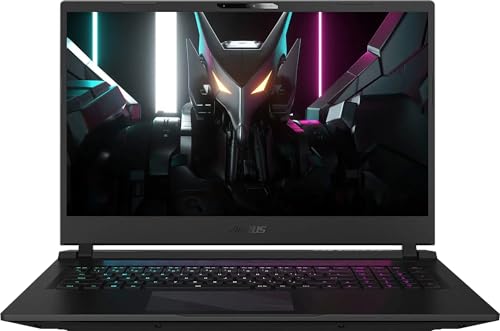
GIGABYTE Aorus 17 RTX 4070
Best for: desktop replacement gaming with large screens
- Graphics Card
- NVIDIA GeForce RTX 4070 8GB GDDR6
- Processor
- Intel Core i7-13700H
- Memory
- 16GB DDR5
- Storage Capacity
- 1TB PCI-E NVMe SSD
- Screen Size
- 17.3"
- Refresh Rate
- 240Hz
View on Amazon: GIGABYTE Aorus 17 RTX 4070 Affiliate link
This 17.3-inch laptop pairs an Intel Core i7-13700H processor with an NVIDIA GeForce RTX 4070 GPU. It features a 240Hz QHD display and 16GB of DDR5 RAM. The 1TB SSD provides ample storage for games. You get Thunderbolt 4 connectivity and a large 99 Whr battery. It suits players who want high refresh rates and strong performance in a standard 16:9 format.
Pros
- 17.3-inch 240Hz QHD display with 100% sRGB coverage
- Intel Core i7-13700H 14-core processor
- NVIDIA GeForce RTX 4070 8GB graphics
- 16GB DDR5 RAM and 1TB NVMe SSD
- Thunderbolt 4 port for high-speed data transfer
Cons
- Heavier at 6.22 pounds compared to 16-inch rivals
- 16GB RAM is standard, not the maximum available
- 1080p webcam is lower resolution than 4K options
Good fit if
- You want a large 17.3-inch screen for immersive gaming
- You need Thunderbolt 4 for fast external storage
- You prefer a 16:9 aspect ratio for compatibility
Skip if
- You prioritize portability and want a lighter laptop
- You need a 16:10 screen for more vertical space
- You require 32GB of RAM pre-installed
Verdict: GIGABYTE Aorus 17 RTX 4070 Gaming Laptop delivers strong 1440p gaming performance with a high-refresh display and robust connectivity, making it ideal for desktop replacement users who value screen real estate.
GIGABYTE Aorus 17.3" 240Hz WQHD
Best for: Users wanting a 16:9 screen and numpad
- Graphics Card
- NVIDIA GeForce RTX 4070
- Processor
- Intel Core i7-13700H
- Memory
- 16GB DDR5
- Storage Capacity
- 1TB SSD
- Screen Size
- 17.3"
- Refresh Rate
- 240Hz
View on Amazon: GIGABYTE Aorus 17.3" 240Hz WQHD Affiliate link
This GIGABYTE laptop pairs a 13th Gen Intel Core i7-13700H processor with an NVIDIA GeForce RTX 4070 graphics card. You get a 17.3-inch WQHD display with a 240Hz refresh rate and 100% sRGB color coverage. The system includes 16GB of DDR5 RAM and a 1TB SSD. It also features a full-size keyboard with a numpad and a large 99Whr battery. This configuration suits users who need strong performance in a standard 16:9 format.
Pros
- 17.3-inch WQHD display with 240Hz refresh rate
- Intel Core i7-13700H 14-core processor
- NVIDIA GeForce RTX 4070 with 8GB GDDR6
- 16GB DDR5 RAM and 1TB SSD storage
- 99Whr battery for extended unplugged use
Cons
- RTX 4070 is less powerful than the RTX 4080 in the reference model
- 16GB RAM may limit heavy multitasking compared to 32GB options
- 6.19 lbs weight is heavier than 16-inch competitors
Good fit if
- You prefer a traditional 16:9 aspect ratio for the screen
- You need a numeric keypad for data entry or gaming
- You want high color accuracy with 100% sRGB coverage
Skip if
- You require the maximum RTX 4080 graphics performance
- You prefer a lighter 16-inch portable form factor
- You need 32GB or more of RAM for professional workloads
Verdict: GIGABYTE Aorus 17.3" RTX 4070 offers a balanced mix of processing power and display quality for users who prioritize a larger 16:9 screen and numeric keypad. It serves gamers and creators who need reliable performance without the bulk of top-tier RTX 4080 models.

Razer Blade 16 RTX 4070 Gaming Laptop
Best for: Compact 16-inch high refresh gaming
- Graphics Card
- NVIDIA GeForce RTX 4070
- Processor
- 13th Gen Intel Core i9 13950HX
- Memory
- 16GB
- Storage Capacity
- 1TB SSD
- Screen Size
- 16"
- Refresh Rate
- 240Hz
View on Amazon: Razer Blade 16 RTX 4070 Gaming Laptop Affiliate link
The Razer Blade 16 packs a 16-inch QHD+ 240Hz display into a chassis sized like a 15-inch laptop. It uses a 13th Gen Intel Core i9-13950HX processor and an NVIDIA GeForce RTX 4070 GPU with up to 140W TGP. You get 16GB of RAM and a 1TB SSD. The CNC-milled aluminum body keeps the weight at 5.4 pounds. This setup suits those who want high-end specs in a compact form.
Pros
- 16-inch QHD+ 240Hz display with G-SYNC support
- 13th Gen Intel Core i9-13950HX processor
- NVIDIA GeForce RTX 4070 with up to 140W TGP
- Compact 15-inch class chassis dimensions
Cons
- 16GB RAM limits heavy multitasking
- No Thunderbolt 4 port listed in specs
- Heavier than 15-inch alternatives
Good fit if
- You need a 16-inch screen in a small body
- You want high refresh rate gaming
- You prefer a metal chassis
Skip if
- You require more than 16GB of RAM
- You want a 17-inch display
- You need Thunderbolt 4 connectivity
Verdict: Razer Blade 16 RTX 4070 fits users who want a powerful 16-inch QHD+ 240Hz screen in a compact, portable chassis. It is ideal for gamers who prioritize screen real estate without carrying a bulky 17-inch laptop.

HP OMEN 17.3" RTX 4090 Core i9 Laptop
Best for: desktop replacement gaming and heavy workloads
- Graphics Card
- GeForce RTX 4090
- Processor
- i9-13900HX
- Memory
- 32GB DDR5 RAM
- Storage Capacity
- 2TB PCIe NVMe M.2 SSD
- Screen Size
- 17.3"
- Refresh Rate
- 240Hz
View on Amazon: HP OMEN 17.3" RTX 4090 Core i9 Laptop Affiliate link
This HP OMEN laptop pairs a 17.3-inch QHD 240Hz display with an Intel Core i9-13900HX processor and an NVIDIA GeForce RTX 4090 GPU. It includes 32GB of DDR5 RAM and a 2TB SSD for fast performance. The 17.3-inch screen offers a large canvas for gaming and productivity. You get a robust setup for high-end tasks, though the 6.1-pound weight and 1.06-inch thickness require a sturdy surface.
Pros
- Intel Core i9-13900HX with 24 cores
- NVIDIA GeForce RTX 4090 graphics
- 32GB DDR5 RAM for multitasking
- 2TB PCIe NVMe SSD storage
- 17.3-inch QHD 240Hz IPS display
Cons
- 6.1-pound weight makes it heavy
- 1.06-inch thickness limits portability
- 300-nits brightness is modest for bright rooms
Good fit if
- You need top-tier RTX 4090 performance
- You want a large 17.3-inch screen
- You prioritize 32GB RAM and 2TB storage
Skip if
- You need a lightweight portable laptop
- You prefer a 16:10 aspect ratio screen
- You want a high-brightness display over 500 nits
Verdict: HP OMEN i9-13900HX RTX 4090 17.3" delivers desktop-class power for gamers who prioritize raw performance and a large display over portability.
Specifications side by side
| Spec | GIGABYTE AORUS 17X RTX 4080 Gaming Laptop | Dell Alienware 16X RTX 5070 | ASUS ROG Strix Scar 15 RTX 3070 Ti | GIGABYTE Aorus 17 RTX 4070 | GIGABYTE Aorus 17.3" 240Hz WQHD | Razer Blade 16 RTX 4070 Gaming Laptop | HP OMEN 17.3" RTX 4090 Core i9 Laptop |
|---|---|---|---|---|---|---|---|
| Graphics Card | NVIDIA GeForce RTX 4080 Laptop GPU | NVIDIA GeForce RTX 5070 8GB GDDR7 | NVIDIA GeForce RTX 3070 Ti | NVIDIA GeForce RTX 4070 8GB GDDR6 | NVIDIA GeForce RTX 4070 | NVIDIA GeForce RTX 4070 | GeForce RTX 4090 |
| Processor | Intel Core i9-13980HX | Intel 24-core Ultra 9 275HX | Intel Core i9 12900H | Intel Core i7-13700H | Intel Core i7-13700H | 13th Gen Intel Core i9 13950HX | i9-13900HX |
| Memory | 16GB DDR5 | 16GB RAM | 16GB DDR5-4800 | 16GB DDR5 | 16GB DDR5 | 16GB | 32GB DDR5 RAM |
| Storage Capacity | 1TB SSD | 1TB SSD | 1TB PCIe 4.0 SSD | 1TB PCI-E NVMe SSD | 1TB SSD | 1TB SSD | 2TB PCIe NVMe M.2 SSD |
| Screen Size | 17.3" | 16" | 15.6" | 17.3" | 17.3" | 16" | 17.3" |
| Refresh Rate | 240Hz | 240Hz | 240Hz | 240Hz | 240Hz | 240Hz | 240Hz |
| Display Resolution | 2560x1440 QHD | 2560x1600 | QHD | 2560 x 1440 | 2560 x 1440 | QHD+ | 2560 x 1440 |
| Storage | 1TB SSD | 1TB SSD | 1TB SSD | 1TB SSD | 1TB SSD | 1TB SSD | 2TB SSD |
| Size | not stated | 16GB RAM | 1TB SSD | 16GB | 1TB SSD | Windows 11 Home | 16GB \ 1TB | not stated | 32GB RAM | 2TB SSD |
| Dimensions | 15.6 × 11.5 × 0.86 inches | 10.5 × 14.1 × 0.92 inches | 13.9 × 0.89 × 10.2 inches | 15.7 × 11.1 × 0.89 inches | 15.7 × 11.1 × 0.87 inches | 14 × 9.61 × 0.87 inches | 15.6 × 10.3 × 1.06 inches |
| Weight | 6.17 pounds | 5.66 pounds | 5.07 pounds | 6.22 pounds | 6.19 pounds | 5.4 pounds | 6.1 pounds |
| Color | Black | Black | Black | Black | Black | Classic Black | Black |
| Model | AXF-D4US694SH | not stated | G533ZW-AS94Q | BSF-73US654SH | BSF-73US654SH | RZ09-0483SEH3-R3U1 | TPN-Q266 |
For a related comparison, read gigabyte z890i aorus ultra ultra alternatives.
Frequently asked questions
Which alternative offers the best CPU performance for heavy workloads?
The Dell Alienware 16X RTX 5070 is the top choice for users needing high core count CPU power. It features an Intel Core Ultra 9 processor paired with an RTX 5070 graphics card. This combination delivers flagship processing strength and modern graphics in a 16-inch chassis, making it ideal for professional tasks that demand raw computational ability.
What is the lightest option in this lineup?
The ASUS ROG Strix Scar 15 RTX 3070 Ti is the lightest laptop on this list. It weighs just 5.07 pounds, making it easier to carry than heavier 17-inch competitors. Despite its compact frame, it still provides high-end performance with an Intel Core i9 processor and a fast 240Hz QHD display for smooth gaming.
Can I get a laptop with 32GB of RAM from this list?
Yes, the HP OMEN 17.3" RTX 4090 Core i9 Laptop comes with 32GB of RAM. This configuration supports desktop replacement gaming and heavy workloads that require significant memory. It pairs this large memory capacity with an Intel Core i9-13900HX processor and an RTX 4090 GPU for maximum performance on a large 17.3-inch display.
Which model provides the most storage space?
The HP OMEN 17.3" RTX 4090 Core i9 Laptop offers the most storage with a 2TB SSD. This provides ample space for large game libraries and media files. It combines this storage capacity with an Intel Core i9 processor and an RTX 4090 graphics card, ensuring fast load times and high performance for demanding applications.
Is there a compact 16-inch alternative with high refresh rates?
The Razer Blade 16 RTX 4070 Gaming Laptop is a compact 16-inch option featuring a 240Hz QHD+ screen. It balances power and portability in a sleek chassis. The laptop includes an Intel Core i9 processor and 16GB of RAM, making it suitable for gamers who want high refresh rates without the bulk of a 17-inch device.
Which laptops feature a 17.3-inch display with a numpad?
The GIGABYTE Aorus 17 RTX 4070 and the GIGABYTE Aorus 17.3" 240Hz WQHD models both feature 17.3-inch displays. These larger screens are ideal for desktop replacement users who value screen real estate and a numeric keypad. Both options provide strong 1440p gaming performance with high-refresh rates and robust connectivity for extended sessions.
Does any alternative use the latest RTX 50 series graphics?
The Dell Alienware 16X RTX 5070 is the only alternative in this list that uses an RTX 50 series graphics card. It pairs the RTX 5070 with an Intel Core Ultra 9 processor to deliver modern graphics performance. This setup is designed for users who need high-quality visuals and processing strength for gaming or professional creative tasks.