Dell XPS 13.3" Core i5 Review: Specs, Pros and Cons
As an Amazon Associate we earn from qualifying purchases. Links on this page are affiliate links.
This dell xps 13 laptop review covers the XPS 13.3" Core i5 model. It combines an Intel Core i5-8265U processor with 8GB of RAM for everyday tasks. The system uses a 13.3-inch FHD display and a 256GB SSD for storage. These specs define a compact machine built for portability. The chassis is milled from a single block of aluminum, offering durability. The palm rest uses carbon fiber and woven glass fiber to keep weight down. This design supports a 2.71-pound frame that fits easily into bags. You get a reliable tool for work and study without bulk.
What stands out
- 13.3-inch FHD display for clear visuals
- Intel Core i5-8265U processor with four cores
- 256GB SSD for fast storage access
- 8GB RAM for smooth multitasking
- Single-block aluminum chassis with carbon fiber palm rest
Who it fits
Good fit for
You should consider this laptop if you need a portable device for office work, web browsing, and media consumption. The four-core i5 processor handles multiple browser tabs and documents well. The 13.3-inch screen offers enough space for productivity without being too large. The lightweight design at 2.71 pounds makes it ideal for students or professionals who commute daily. The durable aluminum build ensures it withstands daily transport. If you prioritize battery life and portability over raw gaming power, this setup fits your needs.
Who should skip it
You should look at another option if you require heavy gaming or video editing capabilities. The Intel UHD 620 graphics card is integrated and not suited for demanding 3D titles. The 8GB of RAM may limit performance when running many heavy applications simultaneously. The 256GB SSD provides limited storage space for large media libraries. Users who need dedicated graphics or expandable storage will find this machine too restrictive for their workflow. It is not designed for content creation or high-performance computing tasks.
Verdict: The Dell XPS 13 delivers a solid balance of performance and portability for general users. Its compact design and efficient processor make it a practical choice for daily computing.
Key specs explained for this Dell
Intel Core i5-8265U
This is an eighth-generation processor with four cores. More cores allow you to run multiple applications simultaneously without significant slowdowns. You will notice smoother performance when switching between tabs or using productivity tools. It suits everyday computing needs rather than heavy gaming. Compare this to dual-core chips, which may struggle with multitasking loads.
8GB RAM
Random access memory determines how many programs can stay open at once. Eight gigabytes handles standard web browsing, office documents, and video streaming comfortably. If you open many browser tabs or run background updates, the system manages them efficiently. This amount is sufficient for most users. Heavy multitaskers might want more, but eight gigabytes covers general daily use.
256GB SSD
Solid state drives offer faster boot times and quicker file access than traditional hard drives. Two hundred fifty-six gigabytes provides adequate space for your operating system, essential apps, and personal files. You may need to manage storage carefully if you store large media libraries locally. This speed enhances overall responsiveness. It is ideal for users who prioritize quick startup times over massive local storage capacity.
Intel UHD 620
This integrated graphics processor handles display output and light visual tasks. It supports video playback and basic photo editing without needing a dedicated graphics card. It is not designed for modern 3D gaming or intensive video rendering. You will get smooth performance for office work and media consumption. Gamers should look for dedicated GPUs, but this chip is adequate for standard everyday visual requirements.
13.3" FHD Display
A thirteen-point-three-inch screen offers a portable form factor suitable for travel. Full HD resolution ensures sharp text and clear images for reading and media. The compact size fits easily into bags and on small desks. You get a balance between visibility and portability. This size is ideal for users who need a secondary laptop or a highly mobile primary device for commuting and remote work.
Dell XPS 13 Design and Build Quality
The chassis is cut from a single block of aluminum, which provides durability that exceeds machines pieced together. The palm rest combines carbon fiber and woven glass fiber for maximum strength with minimal weight. This construction keeps the device light while maintaining structural integrity during daily use. The finish is silver, and the overall aesthetic is clean and professional.
According to the listing, the dimensions are 11.9 inches in width, 7.8 inches in length, and 0.5 inches in height. It weighs 2.71 pounds. These measurements confirm its classification as a compact 13-inch laptop. The slim profile makes it easy to slip into a bag or carry for extended periods. You can use it on small desks or crowded coffee shop tables without taking up excessive space.
The listing notes an ultra-tiny camera integrated into the top bezel. This engineering choice allows for narrower borders around the display. The packaging uses recycled materials, including ocean plastics, reflecting an environmentally conscious approach. The device is Energy Star certified. These build choices prioritize portability and longevity, making it suitable for students and professionals who move between locations frequently.
Setup and daily workflow use
Setting up this laptop begins with unpacking a device that weighs 2.71 pounds. Its dimensions are 11.9 inches wide and 0.5 inches thick. The compact form factor allows you to place it on most desks without taking up excessive space. The aluminum chassis and fiber palm rest provide a stable surface for typing. You do not need to worry about the palm rest wearing down quickly, as the woven glass fiber adds durability.
Daily use relies on the Intel Core i5-8265U processor and 8GB of RAM. This combination handles standard operating system tasks and background applications efficiently. You can run web browsers, office suites, and communication tools simultaneously. The four cores in the processor help manage these workloads without significant lag. The 256GB SSD ensures that the operating system boots quickly and applications launch in seconds. This storage type offers faster data access than traditional hard drives.
The 13.3-inch FHD display provides a clear view for reading documents and viewing media. The small camera bezel allows for a larger screen relative to the chassis size. This design maximizes your viewing area. The system is Energy Star certified, which suggests it manages power consumption responsibly during idle times. You can expect reliable performance for productivity work, web browsing, and media consumption. The lightweight design makes it easy to move between rooms or carry in a bag.
What You Need To Know
You should verify that your software meets the Intel UHD 620 graphics requirements. This integrated chip handles basic video playback and light editing well, but it is not designed for modern 3D gaming or heavy rendering tasks. If you plan to edit large video files or play demanding titles, you may need a machine with dedicated graphics. The 256GB SSD fills up quickly if you store many games or high-resolution media files. You might need an external drive for additional storage. The 8GB of RAM is sufficient for web browsing and office work, but you should close unused tabs to maintain speed. Keep the aluminum chassis clean with a microfiber cloth. This laptop fits well alongside other everyday options in our 1 guide, offering portability over raw power. It is ideal for students and professionals who prioritize screen real estate and battery life over gaming performance. Ensure your workflow matches these capabilities before purchasing.
Check before you buy
- Check if your games support integrated Intel UHD 620 graphics.
- Verify if 256GB SSD storage meets your file saving needs.
- Confirm that 8GB RAM is enough for your multitasking habits.
- Ensure your software is compatible with the 13.3-inch FHD display.
The product at a glance
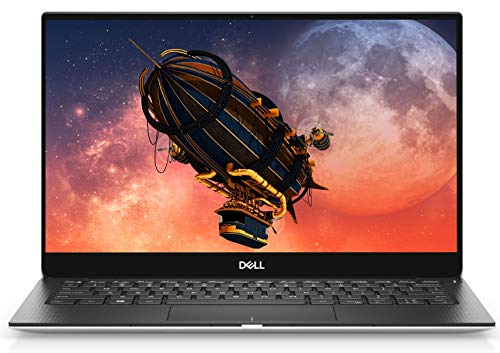
Dell XPS 13.3" Core i5 Laptop
Best for: portable everyday computing and travel
- Graphics Card
- Intel UHD 620
- Processor
- Intel Core I5-8265U
- Memory
- 8GB RAM
- Storage Capacity
- 256GB SSD
- Screen Size
- 13.3"
- Display Resolution
- FHD
View on Amazon: Dell XPS 13.3" Core i5 Laptop Affiliate link
The Dell XPS 13 is a 13.3-inch laptop built from a single block of aluminum with a carbon fiber palm rest. It uses an Intel Core i5-8265U processor with 4 cores and 8GB of RAM. Storage is a 256GB SSD with Intel UHD 620 graphics. The chassis measures 0.5 inches thick and weighs 2.71 pounds. This compact design suits users who need portability and solid multitasking performance for everyday tasks.
Pros
- Intel Core i5-8265U processor offers 4 cores for improved multitasking
- Single-block aluminum chassis provides durability and a slim 0.5-inch profile
- Carbon fiber palm rest keeps weight low at 2.71 pounds
- 256GB SSD storage ensures fast boot and load times
Cons
- 8GB RAM limits heavy multitasking and large application usage
- 256GB SSD storage fills quickly with large files or games
- Intel UHD 620 graphics lack power for modern 3D gaming
Good fit if
- You need a lightweight laptop for commuting or travel
- You primarily use web browsers, office apps, and media players
- You prefer a durable aluminum build over plastic bodies
Skip if
- You require dedicated graphics for gaming or video editing
- You need more than 8GB of RAM for professional workloads
- You store large media libraries locally without external drives
Verdict: Dell XPS 13 13.3" Core i5 is a durable, lightweight ultrabook for students and professionals who prioritize portability and build quality over raw power or gaming capability.
Specifications side by side
| Spec | Dell XPS 13.3" Core i5 Laptop |
|---|---|
| Graphics Card | Intel UHD 620 |
| Processor | Intel Core I5-8265U |
| Memory | 8GB RAM |
| Storage Capacity | 256GB SSD |
| Screen Size | 13.3" |
| Display Resolution | FHD |
| Storage | 256GB SSD |
| Dimensions | 7.8 × 11.9 × 0.5 inches |
| Weight | 2.71 pounds |
| Size | 13-13.99 inches |
| Color | Silver |
| Model | XPS9380-5953SLV-PUS |
Frequently asked questions
Is the Dell XPS 13.3 Core i5 good for students?
Yes, it is ideal for students who need portability. The 2.71-pound weight and 0.5-inch thickness make it easy to carry between classes. The Intel Core i5 and 8GB RAM handle typical schoolwork, web browsing, and document editing without issue. It prioritizes build quality and mobility over heavy processing power.
Can this laptop handle video editing tasks?
It handles light editing but not heavy workloads. The Intel UHD 620 integrated graphics are sufficient for basic video playback and minor adjustments. However, the system lacks the dedicated GPU power needed for complex 3D rendering or large file processing. For professional video work, a more powerful machine is required.
How portable is the Dell XPS 13 Core i5?
It is highly portable due to its compact design. The device measures 11.9 inches wide and 0.5 inches thick. Weighing only 2.71 pounds, it fits easily into most bags. This form factor allows you to use it on small desks or while traveling without taking up excessive space.
What is the storage capacity of this model?
This model includes a 256GB SSD. Solid-state drives provide faster boot times and application loading compared to traditional hard drives. While 256GB is adequate for operating system files and essential apps, you may need external storage for large media libraries or extensive project files.
Is the aluminum chassis durable?
Yes, the chassis is quite durable. It is cut from a single block of aluminum, which offers strength that exceeds pieced-together designs. The palm rest uses carbon fiber and woven glass fiber for additional strength with minimal weight. This construction ensures the laptop withstands daily wear and tear.
Does the Intel Core i5 processor support multitasking?
Yes, it supports multitasking effectively. The eighth-generation processor features four cores, allowing you to run multiple applications simultaneously. You will notice smoother performance when switching between tabs or using productivity tools. It is well-suited for everyday computing tasks that require moderate processing power.