10 Best ASUS RTX 5080 Gaming Laptops, Compared
As an Amazon Associate we earn from qualifying purchases. Links on this page are affiliate links.
Finding the best ASUS RTX 5080 gaming laptops requires comparing how these machines handle high-end graphics and processing power. We analyzed 10 models based strictly on the specifications published on their listings. The ASUS ROG Strix G16 RTX 5080 Gaming Laptop leads the list because it pairs a 240Hz refresh rate with a chassis designed for easy hardware upgrades. This combination offers responsive visuals and dependable serviceability for high-frame-rate gaming. Our guide helps you decide which laptop fits your needs, whether you prioritize a large desktop replacement screen or a compact portable unit.
Quick picks
The best fit for you
- You want the best overall gaming laptop ASUS ROG Strix G16 RTX 5080 Gaming Laptop It features a 240Hz display and easy tool-free internal access for maintenance.
- You need the most compact model available ASUS ROG Zephyrus G14 RTX 5080 Laptop It weighs just 3.4 pounds with a 14-inch OLED screen for portability.
- You require maximum system memory for tasks ASUS ROG Strix G18 18" RTX 5080 Gaming Laptop It includes 64GB of RAM to handle heavy multitasking and gaming.
- You want high-resolution stationary gaming ASUS ROG Strix Scar 18 RTX 5080 Gaming Laptop It offers a 4K 240Hz Mini LED display for desktop replacement use.
Our 10 picks

ASUS ROG Strix G16 RTX 5080 Gaming Laptop
Best for: High-refresh 2.5K gaming and easy hardware upgrades
- Graphics Card
- RTX 5080 (what this guide is about)
- Processor
- Intel Core Ultra 9 290HX Plus
- Memory
- 32GB DDR5
- Storage Capacity
- 1TB PCIe Gen4 SSD
- Screen Size
- 16
- Refresh Rate
- 240Hz
View on Amazon: ASUS ROG Strix G16 RTX 5080 Gaming Laptop Affiliate link
The ASUS ROG Strix G16 pairs an NVIDIA GeForce RTX 5080 GPU with an Intel Core Ultra 9 processor to drive demanding games on a 16-inch 2.5K display running at 240Hz. It includes 32GB of DDR5 memory, a 1TB PCIe Gen 4 SSD, and an internal vapor chamber with tri-fan cooling. This setup fits you if you want high-tier graphics hardware with tool-free access for future memory and storage maintenance.
Pros
- NVIDIA GeForce RTX 5080 Laptop GPU with MUX switch and Advanced Optimus
- 16-inch 2.5K 240Hz ROG Nebula HDR display with anti-glare film
- Tool-free sliding latch access for RAM, SSD, and fans
- Tri-fan cooling system with end-to-end vapor chamber and liquid metal
Cons
- 1TB base storage capacity fills quickly with modern game installations
- Pre-installed with Windows 11 Home rather than Windows 11 Pro
Good fit if
- You want an RTX 5080 graphics card paired with a 240Hz 2.5K display.
- You plan to service or upgrade RAM and storage without using screwdrivers.
- You need a MUX switch with Advanced Optimus for automated display routing.
Skip if
- You require more than 1TB of storage right out of the box.
- You prefer a larger 18-inch screen for a permanent desktop setup.
Verdict: ASUS ROG Strix G16 16-Inch RTX 5080 delivers flagship graphics horsepower and a responsive 240Hz display inside a chassis built for simple maintenance. Its tool-free internal access makes it a dependable, serviceable choice for high-frame-rate gaming.

ASUS ROG Strix SCAR 18 RTX 5080
Best for: large-screen desktop replacement gaming setups
- Graphics Card
- RTX 5080 (what this guide is about)
- Processor
- Intel Core Ultra 9 275HX
- Memory
- 32GB DDR5-5600
- Storage Capacity
- 2TB PCIe Gen 4 SSD
- Screen Size
- 18"
- Refresh Rate
- 240Hz
View on Amazon: ASUS ROG Strix SCAR 18 RTX 5080 Affiliate link
This 18-inch gaming laptop pairs an Intel Core Ultra 9 275HX processor with an NVIDIA GeForce RTX 5080 graphics card. You get an 18-inch 2.5K Mini LED display running at 240Hz, 32GB of DDR5 memory, and a 2TB PCIe Gen 4 solid-state drive. It suits you if you want desktop-grade gaming output on a large display and do not mind carrying a 6.28-pound chassis.
Pros
- 2.5K Mini LED display with 2,000+ dimming zones and 240Hz refresh rate
- Tool-free access latch for servicing memory, storage, and fans
- Fast 2TB PCIe Gen 4 SSD with 32GB of DDR5-5600 RAM
- Cooling system with end-to-end vapor chamber, three fans, and liquid metal
Cons
- Heavy 6.28-pound weight limits everyday portability
- Native screen resolution is 2.5K rather than 4K
Good fit if
- You want a large 18-inch Mini LED screen with high refresh rates.
- You prefer upgrading storage and RAM without using tools.
- You need 2TB of high-speed internal storage immediately.
Skip if
- You need a lightweight laptop for frequent commuting.
- You want a native 4K resolution panel.
Verdict: ASUS ROG Strix SCAR 18 RTX 5080 Laptop delivers top-tier graphics processing and expansive Mini LED visuals in a large format. It serves as a capable desktop replacement when portability is not your primary concern.

ASUS ROG Strix G16 RTX 5080 Gaming Laptop
Best for: RTX 5080 gaming with a 1TB SSD
- Graphics Card
- RTX 5080 (what this guide is about)
- Processor
- Intel Core Ultra 9 Processor 275HX
- Memory
- 32GB DDR5
- Storage Capacity
- 1TB SSD
- Screen Size
- 16"
- Refresh Rate
- 240Hz
View on Amazon: ASUS ROG Strix G16 RTX 5080 Gaming Laptop Affiliate link
The ASUS ROG Strix G16 RTX 5080 Gaming Laptop gives you high-end hardware in a standard 16-inch chassis. It pairs the NVIDIA GeForce RTX 5080 graphics processor with an Intel Core Ultra 9 275HX CPU and 32GB of DDR5 memory. You get a 16-inch 2.5K display running at 240Hz with a 3ms response time. This machine suits you if you want top-tier gaming performance and fast 1TB storage without carrying an 18-inch frame.
Pros
- NVIDIA GeForce RTX 5080 GPU and Intel Core Ultra 9 275HX processor
- 16-inch 2.5K display with 240Hz refresh rate and 3ms response time
- 32GB DDR5-5600MHz RAM and 1TB PCIe Gen 4 SSD
- Vapor chamber cooling with tri-fan system and liquid metal
Cons
- Weighs 6.02 pounds, making it heavy for frequent travel
- 1TB storage capacity provides limited room for large game libraries
Good fit if
- You want an RTX 5080 GPU paired with a fast 240Hz 2.5K display.
- You need 32GB of DDR5 system memory for demanding applications.
- You prefer a 16-inch footprint instead of bulkier 18-inch designs.
Skip if
- You require more than 1TB of internal SSD storage out of the box.
- You need a lightweight laptop under six pounds for daily commuting.
Verdict: ASUS ROG Strix G16 RTX 5080 Gaming Laptop delivers enthusiast-grade performance with its Intel Ultra 9 CPU, RTX 5080 graphics, and swift 240Hz screen. It provides balanced 16-inch dimensions while retaining robust cooling and 32GB of system memory.

ASUS ROG Strix Scar 18 RTX 5080 Gaming Laptop
Best for: Stationary high-resolution gaming and heavy multitasking
- Graphics Card
- RTX 5080 (what this guide is about)
- Processor
- Intel Core Ultra 9 290HX Plus
- Memory
- 32GB DDR5-6400MHz
- Storage Capacity
- 1TB PCIe Gen 4 SSD
- Screen Size
- 18”
- Refresh Rate
- 240Hz
View on Amazon: ASUS ROG Strix Scar 18 RTX 5080 Gaming Laptop Affiliate link
The ASUS ROG Strix SCAR 18 pairs an NVIDIA GeForce RTX 5080 GPU with an Intel Core Ultra 9 290HX Plus processor. You get an 18-inch 4K Mini LED display running at 240Hz with over 2,000 dimming zones. It includes 32GB of DDR5-6400 memory and dual Thunderbolt 5 ports. This desktop-replacement setup suits you if you prioritize maximum screen size, high visual fidelity, and high peripheral bandwidth at a fixed desk.
Pros
- 18-inch 4K 240Hz Mini LED panel with over 2,000 dimming zones
- Dual Thunderbolt 5 ports for high-bandwidth connectivity
- Tool-free latch design for memory, storage, and fan maintenance
- Fast 32GB DDR5-6400MHz system memory
Cons
- Heavy chassis weighing 8.16 pounds
- 1TB base storage capacity for a large desktop replacement
- Thick 1.38-inch profile limits bag compatibility
Good fit if
- You want a large 18-inch 4K Mini LED panel with a 240Hz refresh rate.
- You need dual Thunderbolt 5 ports for fast peripheral connections.
- You prefer tool-less access to swap memory, storage, and cooling fans.
Skip if
- You need a lightweight machine for frequent travel or mobile use.
- You require more than 1TB of factory storage out of the box.
Verdict: ASUS ROG Strix SCAR 18 RTX 5080 Gaming Laptop delivers desktop-grade computing with its 18-inch 4K 240Hz Mini LED display and dual Thunderbolt 5 ports. Its substantial 8.16-pound weight makes it best suited for stationary setups.
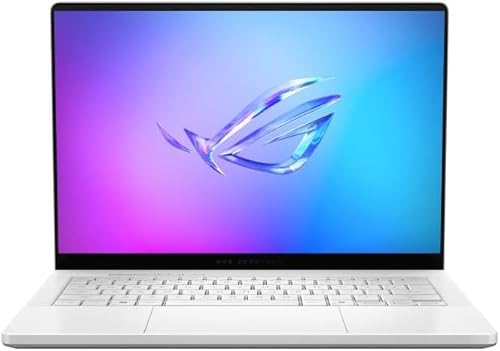
ASUS ROG Zephyrus G14 14" RTX 5080
Best for: compact high-resolution OLED gaming and multitasking
- Graphics Card
- RTX 5080 (what this guide is about)
- Processor
- AMD Ryzen AI 9 HX 370
- Memory
- 32GB LPDDR5X
- Storage Capacity
- 2TB PCIe 4.0 SSD
- Screen Size
- 14"
- Refresh Rate
- 120Hz
View on Amazon: ASUS ROG Zephyrus G14 14" RTX 5080 Affiliate link
This laptop pairs an NVIDIA GeForce RTX 5080 graphics card with an AMD Ryzen AI 9 HX 370 processor in a compact 14-inch chassis. You get a 3K OLED ROG Nebula display running at 120Hz, alongside 32GB of LPDDR5X memory and 2TB of PCIe 4.0 SSD storage. It suits you if you want flagship gaming specs and fast storage in a smaller, aluminum build.
Pros
- NVIDIA GeForce RTX 5080 GPU with DLSS 4 support
- 3K OLED display with 0.2ms response time and G-SYNC
- AMD Ryzen AI 9 HX 370 processor with 12 cores and 24 threads
- 32GB of high-speed 8000MHz LPDDR5X RAM
- 2TB PCIe 4.0 SSD for internal storage
Cons
- 120Hz display refresh rate is lower than the 240Hz panels on larger ROG laptops
- 14-inch screen provides less display area than 16-inch and 18-inch alternatives
Good fit if
- You need a compact 14-inch form factor with high-end RTX 5080 graphical power.
- You prioritize display quality with a 3K OLED panel and 0.2ms response time.
- You run memory-intensive software requiring 32GB of LPDDR5X RAM and 2TB SSD space.
Skip if
- You want a competitive gaming display with refresh rates above 120Hz.
- You prefer a larger 16-inch or 18-inch screen for your setup.
Verdict: ASUS ROG Zephyrus G14 14" RTX 5080 Laptop delivers top-tier RTX 5080 graphics and a 3K OLED screen in a portable 14-inch chassis. It gives you 32GB of LPDDR5X memory and 2TB of storage for demanding tasks.

ASUS ROG Zephyrus G14 RTX 5080 Laptop
Best for: Portable 14-inch gaming with OLED visuals
- Graphics Card
- RTX 5080 (what this guide is about)
- Processor
- AMD Ryzen AI 9 HX 370
- Memory
- 32GB LPDDR5X
- Storage Capacity
- 2TB PCIe NVMe SSD
- Screen Size
- 14.0"
- Refresh Rate
- 120Hz
View on Amazon: ASUS ROG Zephyrus G14 RTX 5080 Laptop Affiliate link
This 14-inch laptop pairs an AMD Ryzen AI 9 HX 370 processor with an RTX 5080 GPU. It features 32GB of LPDDR5X memory and a 2TB SSD. The 2.8K OLED display runs at 120Hz. You get a compact chassis that weighs 3.4 pounds. It suits those who need portable power for gaming and creative work without carrying a heavy machine.
Pros
- RTX 5080 with 16GB GDDR7 graphics memory
- 32GB LPDDR5X onboard RAM for multitasking
- 2.8K OLED display with 120Hz refresh rate
- 2TB PCIe NVMe SSD for ample storage
Cons
- 120Hz refresh rate is lower than the 240Hz panels on other list models
- 14-inch screen is smaller than the 16-inch and 18-inch options available
- 3.4-pound weight is heavier than typical 14-inch ultrabooks
Good fit if
- You prioritize high-end graphics in a portable 14-inch form factor
- You need 32GB of RAM for heavy multitasking
- You want a high-resolution OLED display for content creation
Skip if
- You require a 16-inch or 18-inch screen for more workspace
- You need a 240Hz refresh rate for competitive esports
- You prefer a lighter laptop under 3 pounds
Verdict: ASUS ROG Zephyrus G14 RTX 5080 fits users who want top-tier RTX 5080 performance in a compact 14-inch body. You get strong specs in a portable chassis, though you trade screen size and refresh rate for that mobility.

ASUS ROG Strix G18 RTX 5080 18" Gaming Laptop
Best for: stationary gamers needing large screens and high storage
- Graphics Card
- RTX 5080 (what this guide is about)
- Processor
- Intel Core Ultra 9 275HX
- Memory
- 32GB DDR5
- Storage Capacity
- 4TB SSD
- Screen Size
- 18"
- Refresh Rate
- 240Hz
View on Amazon: ASUS ROG Strix G18 RTX 5080 18" Gaming Laptop Affiliate link
This 18-inch gaming laptop pairs an RTX 5080 GPU with 16GB GDDR7 memory and a Core Ultra 9 processor. You get a 240Hz 2.5K display and 32GB of DDR5 RAM. The 4TB SSD offers ample storage for large libraries. Its 7.54-pound weight and 1.26-inch thickness make it a substantial desktop replacement. It suits players who prioritize raw performance and screen real estate over portability.
Pros
- RTX 5080 with 16GB GDDR7 memory and up to 175W TGP
- 18-inch 2.5K display with 240Hz refresh rate and 100% DCI-P3 color
- Intel Core Ultra 9 275HX processor with 32GB DDR5 RAM
- 4TB PCIe 4.0 NVMe SSD for fast loading and storage
- Dual Thunderbolt 5 ports and Wi-Fi 7 connectivity
Cons
- 7.54-pound weight makes it heavy for frequent travel
- 1.26-inch thickness results in a bulkier chassis than thinner models
- 18-inch screen size limits use on small desks
Good fit if
- You want a large 18-inch screen for immersive gaming
- You need high storage capacity for extensive game libraries
- You prioritize maximum performance over laptop portability
Skip if
- You need a lightweight laptop for daily commuting
- You prefer a compact 14-inch or 16-inch form factor
- You require a thinner profile for easy bag transport
Verdict: ASUS ROG Strix G18 RTX 5080 18" Gaming Laptop delivers desktop-class power for stationary gaming setups. It fits players who value large displays and massive storage more than mobility.

ASUS ROG Zephyrus G14 14" RTX 5080 Laptop
Best for: portable high-performance OLED gaming
- Graphics Card
- RTX 5080 (what this guide is about)
- Processor
- AMD Ryzen AI 9 HX 370
- Memory
- 32GB LPDDR5X
- Storage Capacity
- 2TB PCIe NVMe SSD
- Screen Size
- 14.0"
- Refresh Rate
- 120Hz
View on Amazon: ASUS ROG Zephyrus G14 14" RTX 5080 Laptop Affiliate link
This portable 14-inch gaming laptop pairs an NVIDIA GeForce RTX 5080 16GB GPU with an AMD Ryzen AI 9 HX 370 processor. You get a sharp 2.8K OLED display operating at 120Hz, alongside 32GB of LPDDR5X memory and 2TB of solid-state storage. Weighing 3.4 pounds, it suits you if you need top-tier graphics hardware inside a compact build for gaming on the move.
Pros
- Lightweight 3.4-pound chassis measuring 0.9 inches thin
- High-resolution 2.8K (2880x1800) 120Hz OLED screen
- GeForce RTX 5080 with 16GB GDDR7 dedicated memory
- Large 2TB PCIe NVMe SSD storage capacity
Cons
- 32GB system memory is onboard and cannot be expanded
- 120Hz refresh rate is lower than 240Hz alternatives
- Micro SD card reader rather than a full-size slot
Good fit if
- You want RTX 5080 graphics in a compact 3.4-pound build.
- You prioritize a high-contrast 2.8K OLED display.
- You need 2TB of internal solid-state storage out of the box.
Skip if
- You need refresh rates above 120Hz for fast-paced esports.
- You want user-upgradable memory slots beyond 32GB.
- You prefer a larger 16-inch or 18-inch screen size.
Verdict: ASUS ROG Zephyrus G14 14" RTX 5080 OLED Laptop packs high-end RTX 5080 graphics into a slim, 3.4-pound frame with a vivid 2.8K OLED screen. It delivers substantial processing power and storage if portability is your main priority.

ASUS ROG Zephyrus G14 RTX 5080 Gaming Laptop
Best for: portable high-end gaming and content creation
- Graphics Card
- RTX 5080 (what this guide is about)
- Processor
- AMD Ryzen AI 9 HX 370
- Memory
- 32GB OnBoard RAM
- Storage Capacity
- 2TB PCIe NVMe SSD
- Screen Size
- 14.0"
- Refresh Rate
- 120Hz
View on Amazon: ASUS ROG Zephyrus G14 RTX 5080 Gaming Laptop Affiliate link
This 14-inch laptop pairs an AMD Ryzen AI 9 HX 370 processor with an NVIDIA GeForce RTX 5080 GPU. You get 32GB of onboard RAM and 2TB of storage. The 2.8K OLED display runs at 120Hz. It weighs 3.4 pounds. This setup suits you if you want portable power for gaming and creative work without carrying a heavy brick.
Pros
- GeForce RTX 5080 16GB GDDR7 graphics
- 32GB onboard RAM for multitasking
- 2TB PCIe NVMe SSD storage
- 14-inch 2.8K OLED 120Hz display
Cons
- 120Hz refresh rate is lower than the 240Hz panels on other list models
- 14-inch screen is smaller than the 16-inch and 18-inch options available
- 3.4-pound weight is higher than typical ultrabooks
Good fit if
- You prioritize a compact 14-inch form factor
- You need high-end RTX 5080 performance in a portable chassis
- You want a high-resolution OLED display for media
Skip if
- You require a 240Hz or higher refresh rate
- You prefer a larger 16-inch or 18-inch screen
- You need maximum battery life without the 200W PSU
Verdict: ASUS ROG Zephyrus G14 RTX 5080 delivers desktop-class graphics in a compact 14-inch body. It fits you best if you value portability and screen quality over maximum refresh rates or larger displays.

ASUS ROG Strix G18 18" RTX 5080 Gaming Laptop
Best for: Users needing 64GB RAM and large storage
- Graphics Card
- RTX 5080 (what this guide is about)
- Processor
- Intel Ultra 9 275HX
- Memory
- 64GB DDR5
- Storage Capacity
- 4TB SSD
- Screen Size
- 18"
- Refresh Rate
- 240Hz
View on Amazon: ASUS ROG Strix G18 18" RTX 5080 Gaming Laptop Affiliate link
This 18-inch laptop pairs an Intel Ultra 9 275H processor with an NVIDIA GeForce RTX 5080 GPU. It stands out with 64GB of DDR5 RAM and up to 8TB of PCIe Gen 4 storage. The 2.5K 240Hz display offers professional color accuracy. It suits users needing high memory capacity for heavy multitasking and large game libraries on a large screen.
Pros
- 64GB DDR5 RAM for extensive multitasking
- Up to 8TB PCIe Gen 4 SSD storage
- 18-inch 2.5K 240Hz Nebula display
- Intel Ultra 9 275H processor
Cons
- Heavier build at 7.54 pounds
- Thicker profile at 0.93 inches
- Lower 240Hz refresh rate than 4K variants
Good fit if
- You need maximum RAM for professional workflows
- You prefer a large 18-inch screen
- You want extensive onboard storage capacity
Skip if
- You prioritize portability and light weight
- You need a 4K resolution display
- You want a thinner, more compact chassis
Verdict: ASUS ROG Strix G18 64GB RAM fits users who prioritize raw memory and storage capacity over portability. It is ideal for stationary setups requiring high-end specs.
Specifications side by side
| Spec | ASUS ROG Strix G16 RTX 5080 Gaming Laptop | ASUS ROG Strix SCAR 18 RTX 5080 | ASUS ROG Strix G16 RTX 5080 Gaming Laptop | ASUS ROG Strix Scar 18 RTX 5080 Gaming Laptop | ASUS ROG Zephyrus G14 14" RTX 5080 | ASUS ROG Zephyrus G14 RTX 5080 Laptop | ASUS ROG Strix G18 RTX 5080 18" Gaming Laptop | ASUS ROG Zephyrus G14 14" RTX 5080 Laptop | ASUS ROG Zephyrus G14 RTX 5080 Gaming Laptop | ASUS ROG Strix G18 18" RTX 5080 Gaming Laptop |
|---|---|---|---|---|---|---|---|---|---|---|
| Graphics Card | NVIDIA GeForce RTX 5080 | NVIDIA GeForce RTX 5080 | NVIDIA GeForce RTX 5080 | NVIDIA GeForce RTX 5080 Laptop GPU | NVIDIA GeForce RTX 5080 | GeForce RTX 5080 16GB GDDR7 | NVIDIA GeForce RTX 5080 | GeForce RTX 5080 16GB GDDR7 | GeForce RTX 5080 16GB GDDR7 | NVIDIA GeForce RTX 5080 |
| Processor | Intel Core Ultra 9 290HX Plus | Intel Core Ultra 9 275HX | Intel Core Ultra 9 Processor 275HX | Intel Core Ultra 9 290HX Plus | AMD Ryzen AI 9 HX 370 | AMD Ryzen AI 9 HX 370 | Intel Core Ultra 9 275HX | AMD Ryzen AI 9 HX 370 | AMD Ryzen AI 9 HX 370 | Intel Ultra 9 275HX |
| Memory | 32GB DDR5 | 32GB DDR5-5600 | 32GB DDR5 | 32GB DDR5-6400MHz | 32GB LPDDR5X | 32GB LPDDR5X | 32GB DDR5 | 32GB LPDDR5X | 32GB OnBoard RAM | 64GB DDR5 |
| Storage Capacity | 1TB PCIe Gen4 SSD | 2TB PCIe Gen 4 SSD | 1TB SSD | 1TB PCIe Gen 4 SSD | 2TB PCIe 4.0 SSD | 2TB PCIe NVMe SSD | 4TB SSD | 2TB PCIe NVMe SSD | 2TB PCIe NVMe SSD | 4TB SSD |
| Screen Size | 16 | 18" | 16" | 18” | 14" | 14.0" | 18" | 14.0" | 14.0" | 18" |
| Refresh Rate | 240Hz | 240Hz | 240Hz | 240Hz | 120Hz | 120Hz | 240Hz | 120Hz | 120Hz | 240Hz |
| Display Resolution | 2.5K | 2.5K | 2.5K | 4K | 3K | 2880 × 1800 | 2560 × 1600 | 2880x1800 | 2.8K (2880x1800) | 2.5K |
| Storage | not stated | not stated | 1TB SSD | not stated | 2TB SSD | 2TB SSD | not stated | 2TB SSD | 2TB SSD | not stated |
| Dimensions | 13.9 × 0.9 × 10.6 inches | 15.7 × 0.93 × 11.7 inches | 13.9 × 0.9 × 10.6 inches | 15.7 × 1.38 × 11.7 inches | 12.3 × 0.63 × 8.66 inches | 12.3 × 8.7 × 0.9 inches | 15.7 × 11.8 × 1.26 inches | 12.3 × 8.7 × 0.9 inches | 12.3 × 8.7 × 0.9 inches | 15.7 × 11.8 × 0.93 inches |
| Weight | 3.89 pounds | 6.28 pounds | 6.02 pounds | 8.16 pounds | 9 pounds | 3.4 pounds | 7.54 pounds | 3.4 pounds | 3.4 pounds | 7.54 pounds |
| Color | Eclipse Gray | Off Black | Eclipse Gray | Off Black | Platinum White | Platinum White | Gray | Platinum White | Platinum White | Eclipse Gray |
| Model | G615LW-AB96 | G835LW-XS97 | 6cf3a541-d3ae-4645-b191-13068180d8c7 | G835LWG-DB96 | GA403W | G14 | G815LW-G18.U95080 | QQ2-01024 | GA403WW-G14.R95080 | ASUS ROG Strix G18 |
| Size | not stated | 18" | not stated | not stated | 32GB RAM | 2TB PCIe SSD | 32GB RAM|2TB SSD | 18 inch | 32GB RAM|2TB SSD | not stated | not stated |
You can evaluate asus tuf gaming geforce rtx alternatives to compare different graphics power limits and cooling configurations.
How to choose the right one
-
Check RAM capacity
Memory determines how many applications run simultaneously. Most models offer 32GB, which handles modern games and background tasks well. If you edit video or run virtual machines, look for 64GB options. The ASUS ROG Strix G18 provides 64GB for heavy multitasking. Higher memory prevents stuttering when switching between games and browsers. Verify the total before buying, as some configurations cap at 32GB. More RAM ensures smoother performance over time.
-
Evaluate screen refresh rate
Refresh rate affects motion clarity in fast-paced games. A 240Hz panel updates the image twice as often as a 120Hz screen. The ASUS ROG Strix G16 and SCAR 18 both feature 240Hz displays for smoother visuals. Lower rates like 120Hz still look good but may feel less responsive. Match the rate to your genre. Competitive shooters benefit from higher numbers. Single-player titles care less about speed. Check the spec sheet for this number.
-
Consider storage size
Storage holds your games and operating system. Base models often include 1TB drives, which fill up quickly with large titles. The ASUS ROG Strix G16 RTX 5080 Gaming Laptop includes a 1TB SSD. Other models offer 2TB for extensive libraries. Larger storage reduces the need to uninstall games frequently. Check if the drive is PCIe NVMe for faster load times. Ensure you have enough space for future releases without constant management.
-
Assess portability needs
Weight impacts how easy the laptop is to carry. Thinner 14-inch models weigh under four pounds. The Zephyrus G14 OLED version weighs just 3.4 pounds. Larger 18-inch models exceed seven pounds and suit desk use. The Strix G18 weighs 7.54 pounds. Choose a lighter chassis if you travel often. Heavier models offer better cooling and more ports. Decide if you need a mobile setup or a stationary desktop replacement.
-
Review processor specs
The CPU handles game logic and system tasks. High-end models use Intel Core Ultra 9 processors. This chip supports the RTX 5080 graphics card efficiently. Ensure the processor matches your performance needs. Faster CPUs reduce bottlenecks in CPU-intensive games. Check the model number in the listing. The Core Ultra 9 appears in several top picks. It provides the processing power required for high frame rates alongside strong graphics.
Frequently asked questions
Which ASUS RTX 5080 laptop is best for portable gaming?
The ASUS ROG Zephyrus G14 is the most portable choice. It weighs just 3.4 pounds and features a 14-inch OLED screen. This compact chassis fits easily into bags for travel. It includes 32GB of RAM and a 2TB SSD for storage. You get high-end graphics in a lightweight frame without sacrificing too much performance.
What is the difference between 14-inch and 18-inch models?
The main difference is screen size and weight. The 14-inch models weigh under four pounds and prioritize portability. The 18-inch options are heavier, often exceeding seven pounds, but offer larger displays. They also support more system memory, with some reaching 64GB. Choose 14-inch for movement and 18-inch for stationary desktop replacement use.
Do these laptops come with 64GB of RAM?
Only specific 18-inch models offer 64GB of RAM. The ASUS ROG Strix G18 is configured with 64GB for heavy multitasking. Most other models, including the 14-inch and standard 16-inch versions, come with 32GB. If you need maximum memory for video editing or virtual machines, you must select the specific 64GB variant.
Which model has the best screen for gaming?
The ASUS ROG Strix SCAR 18 offers a 4K 240Hz Mini LED display. This provides exceptional resolution and refresh rate for stationary gaming. The 14-inch Zephyrus models use 3K or 2.8K OLED screens for vivid colors. The standard Strix G16 models feature 2.5K 240Hz panels. Your choice depends on whether you prioritize resolution or mobility.
Is the ASUS ROG Strix G16 easy to upgrade?
Yes, the ASUS ROG Strix G16 is designed for easy maintenance. It features tool-free internal access for hardware upgrades. This makes it simple to adjust components or check cooling systems. It combines flagship graphics with a serviceable chassis. You can maintain or upgrade the system without needing specialized tools or technical expertise.
Which laptop is best for heavy multitasking?
The ASUS ROG Strix G18 with 64GB RAM is ideal for heavy multitasking. It provides substantial memory for running multiple applications simultaneously. The 18-inch screen also offers more workspace. Other models like the Zephyrus G14 have 32GB, which is sufficient for most users. Select the 64GB G18 if you run virtual machines or edit video professionally.