Best ASUS Gaming Laptops Under $4000: 13 Spec-Based Picks
As an Amazon Associate we earn from qualifying purchases. Links on this page are affiliate links.
Finding the best ASUS gaming laptops under $4000 requires careful spec comparison. We evaluated 13 models based on published listings. Our top pick is the ASUS ROG Strix 18 RTX 5060 Gaming Laptop. It leads because it includes 64GB RAM and 4TB storage. This configuration suits users needing maximum memory and capacity. Each selection prioritizes specific hardware attributes like screen size and graphics power. Use this guide to decide which specs match your gaming needs.
Quick picks
The best fit for you
- You need the most RAM and storage available ASUS ROG Strix 18 RTX 5060 Gaming Laptop This 18-inch model includes 64GB RAM and 4TB SSD for maximum capacity.
- You want a compact 14-inch OLED laptop ASUS ROG Zephyrus G14 RTX 5080 Laptop It offers a lightweight 3.4-pound body with an RTX 5080 and OLED screen.
- You prioritize portability without sacrificing high-end specs ASUS ROG Zephyrus G16 RTX 4090 OLED Laptop The 16-inch Zephyrus G16 weighs 4.3 pounds and features an RTX 4090.
- You prefer a 16-inch screen with 2.5K resolution ASUS ROG Strix G16 RTX 5080 Gaming Laptop This model provides a 240Hz 2.5K display with an Intel Core Ultra 9.
Our 13 picks

ASUS ROG Strix 18 RTX 5060 Gaming Laptop
Best for: users needing maximum RAM and storage
- Graphics Card
- NVIDIA GeForce RTX 5060 8GB
- Processor
- Intel 24-core Ultra 9 275HX
- Memory
- 64GB DDR5
- Storage Capacity
- 4TB SSD
- Screen Size
- 18"
- Refresh Rate
- 240Hz
View on Amazon: ASUS ROG Strix 18 RTX 5060 Gaming Laptop Affiliate link
This 18-inch gaming laptop pairs a 24-core Intel Ultra 9 275HX processor with 64GB of DDR5 memory and a 4TB SSD. It features an NVIDIA GeForce RTX 5060 GPU and an 18-inch 2.5K 240Hz display. The large chassis supports extensive connectivity and immersive visuals. It suits users who need high-end multitasking power and massive storage for demanding applications and professional content creation.
Pros
- 24-core Intel Ultra 9 275HX processor
- 64GB DDR5 memory capacity
- 4TB SSD storage
- 18-inch 2.5K 240Hz display
- Thunderbolt 4 and Wi-Fi 7 support
Cons
- RTX 5060 GPU has less power than the RTX 5070 Ti found in other models
- 7.05-pound weight is heavier than the 14-inch Zephyrus options
- 1.26-inch thickness is bulkier than the Zephyrus G16
Good fit if
- You need 64GB of RAM for heavy multitasking
- You want a large 18-inch 240Hz display
- You require 4TB of fast SSD storage
Skip if
- You prefer a lightweight 14-inch portable laptop
- You need the highest-tier RTX 5070 Ti graphics
- You prioritize a thin and light chassis design
Verdict: ASUS ROG Strix G18 18" Gaming Laptop delivers desktop-class performance with 64GB RAM and 4TB storage. It fits users who prioritize raw processing power and screen real estate over portability.

ASUS ROG Strix G16 RTX 5080 Gaming Laptop
Best for: 16-inch high-refresh gaming and content creation
- Graphics Card
- NVIDIA GeForce RTX 5080
- Processor
- Intel Core Ultra 9 290HX Plus
- Memory
- 32GB DDR5
- Storage Capacity
- 1TB PCIe Gen4 SSD
- Screen Size
- 16
- Refresh Rate
- 240Hz
View on Amazon: ASUS ROG Strix G16 RTX 5080 Gaming Laptop Affiliate link
This 16-inch laptop pairs an Intel Core Ultra 9 processor with an NVIDIA GeForce RTX 5080 GPU. You get 32GB of DDR5 memory and a 1TB PCIe Gen 4 SSD. The 2.5K display runs at 240Hz with HDR support. It suits gamers who want high frame rates and strong multitasking power in a standard 16-inch chassis.
Pros
- NVIDIA GeForce RTX 5080 graphics with DLSS 4
- Intel Core Ultra 9 processor
- 32GB DDR5-5600MHz memory
- 1TB PCIe Gen 4 SSD storage
- 16-inch 2.5K 240Hz display with Dolby Vision HDR
Cons
- 1TB storage is smaller than the 2TB drives found in some competitors
- 32GB RAM is less than the 64GB available on other high-end models
- 3.89-pound weight makes it heavier than 14-inch ultrabooks
Good fit if
- You need high refresh rate gaming on a 16-inch screen
- You want tool-free access to upgrade RAM and SSD
- You prefer a 16:10 aspect ratio for more vertical space
Skip if
- You need more than 32GB of system memory
- You require a 14-inch portable form factor
- You want a larger 2TB storage drive included
Verdict: ASUS ROG Strix G16 RTX 5080 delivers top-tier gaming performance for users who prioritize the 16-inch 2.5K 240Hz display and robust CPU power over maximum portability or massive storage capacity.

ASUS ROG Strix SCAR 18 RTX 5080
Best for: desktop replacement gaming
- Graphics Card
- NVIDIA GeForce RTX 5080
- Processor
- Intel Core Ultra 9 275HX
- Memory
- 32GB DDR5-5600
- Storage Capacity
- 2TB PCIe Gen 4 SSD
- Screen Size
- 18"
- Refresh Rate
- 240Hz
View on Amazon: ASUS ROG Strix SCAR 18 RTX 5080 Affiliate link
The ASUS ROG Strix SCAR 18 pairs an Intel Core Ultra 9 275HX processor with an NVIDIA GeForce RTX 5080 GPU. It features an 18-inch 2.5K display with a 240Hz refresh rate and Mini LED technology. You get 32GB of DDR5 memory and 2TB of storage. This setup delivers high performance for demanding games and multitasking tasks.
Pros
- Intel Core Ultra 9 275HX processor
- NVIDIA GeForce RTX 5080 GPU
- 18-inch 2.5K 240Hz Mini LED display
- 32GB DDR5-5600MHz memory
- 2TB PCIe Gen 4 SSD
Cons
- Heavy 6.28-pound build
- Thick 1.17-inch profile
- No mention of Thunderbolt support
Good fit if
- You want maximum screen real estate for gaming
- You need top-tier graphics performance
- You require fast multitasking with 32GB RAM
Skip if
- You prioritize portability and light weight
- You prefer smaller 14-inch or 16-inch laptops
- You need a thinner device for travel
Verdict: ASUS ROG Strix SCAR 18 RTX 5080 is a powerful desktop replacement for gamers who value large displays and raw processing power over portability.

ASUS ROG Strix G16 RTX 5080 Gaming Laptop
Best for: High-performance 16-inch gaming with 32GB RAM
- Graphics Card
- NVIDIA GeForce RTX 5080
- Processor
- Intel Core Ultra 9 Processor 275HX
- Memory
- 32GB DDR5
- Storage Capacity
- 1TB SSD
- Screen Size
- 16"
- Refresh Rate
- 240Hz
View on Amazon: ASUS ROG Strix G16 RTX 5080 Gaming Laptop Affiliate link
The ASUS ROG Strix G16 (2025) pairs an Intel Core Ultra 9 275HX processor with an NVIDIA GeForce RTX 5080 GPU. It features a 16-inch 2.5K display with a 240Hz refresh rate and 32GB of DDR5 memory. Storage is provided by a 1TB PCIe Gen 4 SSD. This configuration suits gamers who need high frame rates and fast load times in a portable 16-inch chassis.
Pros
- NVIDIA GeForce RTX 5080 Laptop GPU with DLSS 4 support
- Intel Core Ultra 9 Processor 275HX for high-end multitasking
- 16-inch 2.5K ROG Nebula display with 240Hz refresh rate
- 32GB DDR5-5600MHz memory for seamless performance
- 1TB PCIe Gen 4 SSD with up to 7,000MB/s throughput
Cons
- 1TB storage is smaller than the 2TB options available on other Strix G18 models
- 6.02-pound weight is heavier than the 14-inch Zephyrus G14 alternatives
- 16-inch screen is less portable than the 14-inch OLED Zephyrus variants
Good fit if
- You want RTX 5080 performance in a 16-inch form factor
- You prioritize a high refresh rate 2.5K display for competitive gaming
- You need 32GB of RAM for heavy multitasking alongside gaming
Skip if
- You prefer a lighter laptop under 5 pounds
- You require more than 1TB of internal storage
- You want a 14-inch OLED display for media consumption
Verdict: ASUS ROG Strix G16 RTX 5080 delivers top-tier 16-inch gaming performance with its RTX 5080 and Ultra 9 275HX combo. It is the ideal choice for players who want high-end specs without moving to an 18-inch desktop replacement.

ASUS ROG Strix G18 18" RTX 5070 Gaming Laptop
Best for: Users needing high-end specs and large storage
- Graphics Card
- NVIDIA GeForce RTX 5070 8GB GDDR7
- Processor
- Intel 24-core Ultra 9 275HX
- Memory
- 64GB RAM
- Storage Capacity
- 4TB SSD
- Screen Size
- 18"
- Refresh Rate
- 240Hz
View on Amazon: ASUS ROG Strix G18 18" RTX 5070 Gaming Laptop Affiliate link
This 18-inch gaming laptop pairs an 18-inch 2.5K 240Hz display with an NVIDIA GeForce RTX 5070 graphics card. You get 64GB of RAM and a 4TB SSD for heavy workloads. The Intel Ultra 9 275HX processor handles demanding tasks. It includes Wi-Fi 7 and Thunderbolt 4. This setup suits players who want high refresh rates and large storage without compromise.
Pros
- 18-inch 2.5K display with 240Hz refresh rate
- NVIDIA GeForce RTX 5070 with 8GB GDDR7
- 64GB RAM and 4TB SSD storage
- Intel 24-core Ultra 9 275HX processor
Cons
- Heavy 7.05-pound build limits portability
- Thick 1.26-inch chassis is bulky
- 8GB VRAM is lower than the 12GB on the RTX 5070 Ti model
Good fit if
- You need maximum screen real estate for immersive gaming
- You require large storage for extensive game libraries
- You want high-end specs in a desktop replacement
Skip if
- You prioritize lightweight portability for travel
- You need more than 8GB of VRAM for specific workloads
- You prefer a compact 14-inch form factor
Verdict: ASUS ROG Strix G18 RTX 5070 delivers desktop-class performance in a large chassis. It fits users who value raw power and screen size over mobility.

ASUS ROG Strix G16 RTX 5070 Ti Gaming Laptop
Best for: 16-inch gaming with RTX 5070 Ti power
- Graphics Card
- NVIDIA GeForce RTX 5070 Ti
- Processor
- AMD Ryzen 9 9955HX3D
- Memory
- 32GB DDR5-5600
- Storage Capacity
- 1TB PCIe Gen 4 SSD
- Screen Size
- 16"
- Refresh Rate
- 240Hz
View on Amazon: ASUS ROG Strix G16 RTX 5070 Ti Gaming Laptop Affiliate link
This ASUS ROG Strix G16 features an AMD Ryzen 9 9955HX3D processor and an NVIDIA GeForce RTX 5070 Ti GPU. It includes 32GB of DDR5-5600MHz RAM and a 1TB PCIe Gen 4 SSD. The 16-inch ROG Nebula display offers a 240Hz refresh rate and 3ms response time. It weighs 5.51 pounds and measures 0.89 inches thick. This laptop suits gamers who want high performance in a 16-inch form factor.
Pros
- AMD Ryzen 9 9955HX3D processor
- NVIDIA GeForce RTX 5070 Ti GPU
- 32GB DDR5-5600MHz RAM
- 240Hz ROG Nebula display
Cons
- 1TB SSD storage is smaller than the 2TB drives found in several other options on this list
- 16-inch screen size is smaller than the 18-inch displays available on other models in this guide
Good fit if
- You want a 16-inch laptop with high-end gaming specs
- You prefer AMD processors for multitasking and gaming
- You need 32GB of RAM for heavy workloads
Skip if
- You require an 18-inch display for maximum immersion
- You need more than 1TB of internal storage
- You prefer Intel processors over AMD
Verdict: ASUS ROG Strix G16 16" RTX 5070 Ti is a strong choice for gamers who want powerful RTX 5070 Ti performance in a 16-inch chassis. It fits users who prioritize a balance between screen size and high-end specs.

ASUS ROG Strix G18 18-Inch RTX 5060 Laptop
Best for: high RAM and massive storage needs
- Graphics Card
- NVIDIA GeForce RTX 5060 8GB GDDR7
- Processor
- Intel Core Ultra 9 275HX
- Memory
- 64GB DDR5
- Storage Capacity
- 4TB PCIe SSD
- Screen Size
- 18"
- Refresh Rate
- 240Hz
View on Amazon: ASUS ROG Strix G18 18-Inch RTX 5060 Laptop Affiliate link
This 18-inch ASUS ROG Strix G18 features an Intel Core Ultra 9 275HX processor and 64GB of DDR5 RAM. It pairs these with an NVIDIA GeForce RTX 5060 graphics card and a 4TB PCIe SSD. The 2.5K 240Hz display delivers smooth visuals. You get Wi-Fi 7 and Windows 11 Pro. This configuration suits users who need high memory and massive storage for demanding games and multitasking.
Pros
- 64GB DDR5 RAM for heavy multitasking
- 4TB PCIe SSD for extensive storage
- Intel Core Ultra 9 275HX processor
- 18-inch 2.5K 240Hz ROG Nebula display
Cons
- RTX 5060 is lower tier than RTX 5070 Ti models on this list
- Includes only 1-year warranty on upgraded RAM and SSD
- 13-pound weight makes it less portable than 14-inch rivals
Good fit if
- You require 64GB of RAM for professional workflows
- You need 4TB of fast storage for large libraries
- You prefer a large 18-inch screen for immersive gaming
Skip if
- You prioritize the highest possible graphics performance over memory
- You need a lightweight laptop for frequent travel
- You want the full manufacturer warranty on all components
Verdict: ASUS ROG Strix G18 RTX 5060 fits users who prioritize massive 64GB memory and 4TB storage over top-tier graphics cards. It is ideal for multitaskers who value screen real estate and storage capacity above all else.

ASUS ROG Zephyrus G14 RTX 5080 Laptop
Best for: portable high-end OLED gaming
- Graphics Card
- GeForce RTX 5080 16GB GDDR7
- Processor
- AMD Ryzen AI 9 HX 370
- Memory
- 32GB
- Storage Capacity
- 2TB PCIe NVMe SSD
- Screen Size
- 14.0"
- Refresh Rate
- 120Hz
View on Amazon: ASUS ROG Zephyrus G14 RTX 5080 Laptop Affiliate link
This 14-inch laptop pairs a 2.8K OLED display with a 120Hz refresh rate for sharp, smooth visuals. It uses an AMD Ryzen AI 9 HX 370 processor and an RTX 5080 GPU with 16GB of VRAM. The 32GB of RAM and 2TB SSD support heavy multitasking. Its compact 3.4-pound chassis makes it suitable for portable gaming or content creation on the go.
Pros
- 14.0-inch OLED screen with 2880x1800 resolution
- GeForce RTX 5080 with 16GB GDDR7 memory
- AMD Ryzen AI 9 HX 370 12-core processor
- 32GB RAM and 2TB PCIe NVMe SSD
- Compact 3.4-pound Platinum White chassis
Cons
- 120Hz refresh rate is lower than 240Hz models
- 14-inch screen is smaller than 16 or 18-inch options
- 73 WHr battery is smaller than larger chassis batteries
Good fit if
- You want a high-resolution OLED display for media
- You need a lightweight laptop for travel
- You prioritize portability over maximum screen size
Skip if
- You require a 240Hz or higher refresh rate
- You need a screen larger than 14 inches
- You prefer a Windows 11 Pro installation
Verdict: ASUS ROG Zephyrus G14 OLED 14" Laptop offers a compact, high-performance build for mobile gamers. It fits users who value screen quality and portability over large displays and ultra-high refresh rates.

ASUS ROG Strix G18 RTX 5080 18" Laptop
Best for: high-end desktop replacement gaming
- Graphics Card
- NVIDIA GeForce RTX 5080
- Processor
- Intel Core Ultra 9 275HX
- Memory
- 32GB DDR5
- Storage Capacity
- 2TB SSD
- Screen Size
- 18"
- Refresh Rate
- 240Hz
View on Amazon: ASUS ROG Strix G18 RTX 5080 18" Laptop Affiliate link
This 18-inch gaming laptop pairs an Intel Core Ultra 9 275HX with an RTX 5080 GPU and 32GB of DDR5 RAM. The 2.5K 240Hz Nebula display offers vivid color and fast refresh rates. It includes 2TB of storage and robust cooling. You get a powerful desktop replacement built for high-end gaming and heavy multitasking.
Pros
- RTX 5080 GPU with 16GB GDDR7 memory
- Intel Core Ultra 9 275HX up to 5.4GHz
- 18-inch 2.5K 240Hz Nebula display
- 32GB DDR5-5600 RAM and 2TB SSD
Cons
- 7.54-pound weight makes it less portable
- 1.26-inch thickness adds bulk to the chassis
Good fit if
- You want maximum graphical power for AAA titles
- You need a large 18-inch screen for immersion
- You require fast rendering for creative work
Skip if
- You prioritize a lightweight and portable design
- You need a smaller 14-inch or 16-inch form factor
- You prefer a thinner profile under 1.2 inches
Verdict: ASUS ROG Strix G18 RTX 5080 18" Laptop delivers top-tier performance for users who prioritize raw power and screen real estate over portability. It is ideal for stationary gaming setups or desktop replacements.

ASUS ROG Strix G18 RTX 5070 Ti Gaming Laptop
Best for: High-end gaming and heavy multitasking
- Graphics Card
- NVIDIA GeForce RTX 5070 Ti
- Processor
- Intel Core Ultra 9 275HX
- Memory
- 64GB DDR5
- Storage Capacity
- 2TB PCIe 4.0 NVMe M.2 SSD
- Screen Size
- 18"
- Refresh Rate
- 240Hz
View on Amazon: ASUS ROG Strix G18 RTX 5070 Ti Gaming Laptop Affiliate link
The ASUS ROG Strix G18 pairs an Intel Core Ultra 9 275HX processor with an NVIDIA GeForce RTX 5070 Ti 12GB GPU. It features 64GB of DDR5 RAM and a 2TB SSD. The 18-inch 2.5K display runs at 240Hz. This configuration handles heavy multitasking and high-end gaming. It suits users who need maximum performance and large storage capacity in a desktop-replacement form factor.
Pros
- Intel Core Ultra 9 275HX processor with 24 cores
- NVIDIA GeForce RTX 5070 Ti with 12GB GDDR7 memory
- 64GB DDR5 RAM and 2TB PCIe 4.0 NVMe SSD
- 18-inch 2.5K display with 240Hz refresh rate
- Thunderbolt 5 ports and Wi-Fi 7 connectivity
Cons
- Heavy build at 6.61 pounds
- Large 18-inch screen limits portability
- High power consumption due to top-tier components
Good fit if
- You need maximum RAM and storage for heavy workloads
- You prefer a large 18-inch display for immersive gaming
- You want the latest connectivity standards like Thunderbolt 5
Skip if
- You prioritize a lightweight and portable laptop
- You only need basic gaming performance
- You prefer a smaller 14-inch or 16-inch form factor
Verdict: ASUS ROG Strix G18 RTX 5070 Ti delivers desktop-class power for users who prioritize performance over portability. It is ideal for gamers and creators who need extensive RAM and storage.

ASUS ROG Zephyrus G16 RTX 4090 OLED Laptop
Best for: Portable high-end gaming and creative work
- Graphics Card
- NVIDIA GeForce RTX 4090
- Processor
- Intel Core Ultra 9 185H
- Memory
- 32 GB LPDDR5X RAM
- Storage Capacity
- 2 TB PCle SSD
- Screen Size
- 16"
- Refresh Rate
- 240Hz
View on Amazon: ASUS ROG Zephyrus G16 RTX 4090 OLED Laptop Affiliate link
The ASUS ROG Zephyrus G16 pairs an Intel Core Ultra 9 185H processor with an NVIDIA GeForce RTX 4090 GPU. Its 16-inch QHD OLED display delivers a 240Hz refresh rate for smooth visuals. You get 32 GB of LPDDR5X RAM and 2 TB of storage. This setup handles high-end gaming and creative tasks. The aluminum chassis keeps the build durable while remaining portable.
Pros
- NVIDIA GeForce RTX 4090 GPU with 115W TGP
- 16-inch QHD (2560x1600) OLED display with 240Hz refresh rate
- Intel Core Ultra 9 185H processor with dedicated NPU cores
- 32 GB LPDDR5X RAM and 2 TB PCIe SSD
- Thunderbolt 4 and Wi-Fi 6E connectivity
Cons
- RTX 4090 TGP is lower than the 140W found on some competitors
- Uses LPDDR5X RAM which cannot be upgraded later
- Weighs 4.3 pounds, making it heavier than 14-inch models
Good fit if
- You need top-tier graphics performance in a portable form factor
- You want a high-refresh OLED screen for gaming
- You require fast storage and ample memory for creative work
Skip if
- You prefer a larger 18-inch display for desktop replacement
- You need upgradeable RAM for future expansion
- You want the absolute highest GPU power limit available
Verdict: ASUS ROG Zephyrus G16 RTX 4090 offers a balanced mix of portability and high-end specs. It fits creators and gamers who value a premium OLED screen and strong AI processing capabilities without carrying a bulkier machine.
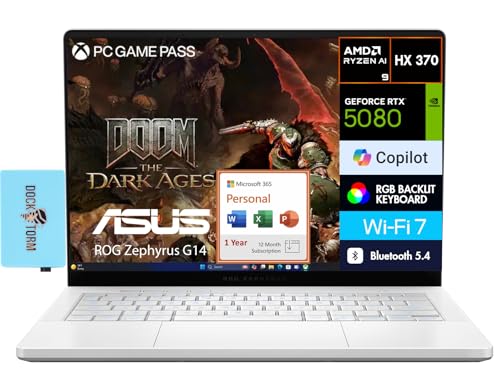
ASUS ROG Zephyrus G14 14" RTX 5080 Laptop
Best for: Portable high-performance gaming on OLED
- Graphics Card
- GeForce RTX 5080 16GB GDDR7
- Processor
- AMD Ryzen AI 9 HX 370
- Memory
- 32GB LPDDR5X
- Storage Capacity
- 2TB PCIe NVMe SSD
- Screen Size
- 14.0"
- Refresh Rate
- 120Hz
View on Amazon: ASUS ROG Zephyrus G14 14" RTX 5080 Laptop Affiliate link
The ASUS Zephyrus G14 packs an AMD Ryzen AI 9 HX 370 processor and an RTX 5080 GPU into a 14-inch frame. You get a 2.8K OLED display with 120Hz refresh rate and 32GB of LPDDR5X memory. This configuration suits those who need high-end gaming performance in a portable, lightweight chassis. The 2TB SSD provides ample space for large libraries.
Pros
- RTX 5080 16GB GDDR7 graphics
- 14.0-inch 2.8K OLED 120Hz display
- 32GB LPDDR5X on-board memory
- 2TB PCIe NVMe SSD storage
- Lightweight 3.4-pound design
Cons
- 120Hz refresh rate is lower than 240Hz competitors
- 14-inch screen is smaller than 16 or 18-inch options
- 73 WHr battery limits unplugged gaming time
Good fit if
- You prioritize portability and screen quality over maximum size
- You want high-end GPU performance in a compact chassis
- You need ample RAM and storage for multitasking
Skip if
- You require a 16:10 2.5K display with 240Hz refresh
- You prefer larger 16 or 18-inch screens for immersion
- You need a dedicated power brick for travel
Verdict: ASUS Zephyrus G14 RTX 5080 delivers desktop-class graphics in a portable 14-inch body. It fits users who value OLED clarity and raw power in a lightweight form factor.

ASUS ROG Zephyrus G14 RTX 5080 Gaming Laptop
Best for: portable high-end OLED gaming
- Graphics Card
- GeForce RTX 5080 16GB GDDR7
- Processor
- AMD Ryzen AI 9 HX 370
- Memory
- 32GB OnBoard RAM
- Storage Capacity
- 2TB PCIe NVMe SSD
- Screen Size
- 14.0"
- Refresh Rate
- 120Hz
View on Amazon: ASUS ROG Zephyrus G14 RTX 5080 Gaming Laptop Affiliate link
The ASUS ROG Zephyrus G14 pairs a 14.0-inch 2.8K OLED display with a 120Hz refresh rate. It uses a Ryzen AI 9 HX 370 processor and an RTX 5080 GPU with 16GB of VRAM. You get 32GB of onboard RAM and 2TB of storage. This compact laptop suits you if you want high-end graphics in a portable form factor.
Pros
- 14.0-inch 2.8K (2880x1800) OLED display
- GeForce RTX 5080 with 16GB GDDR7 VRAM
- Ryzen AI 9 HX 370 processor
- 32GB onboard RAM
- 2TB PCIe NVMe SSD storage
Cons
- 32GB of onboard RAM cannot be upgraded
- 120Hz refresh rate is lower than many competitors
- 14-inch screen is smaller than standard 16-inch options
Good fit if
- You prioritize portability without sacrificing GPU power
- You want a high-resolution OLED screen for media
- You need strong multitasking with 32GB of RAM
Skip if
- You need a larger 16-inch or 18-inch display
- You require a higher 240Hz refresh rate for competitive gaming
- You prefer a traditional laptop with upgradable RAM slots
Verdict: ASUS ROG Zephyrus G14 RTX 5080 delivers desktop-class RTX 5080 performance in a highly portable 14-inch chassis. It is the right choice for you if you value screen quality and raw power over maximum screen size or ultra-high refresh rates.
Specifications side by side
| Spec | ASUS ROG Strix 18 RTX 5060 Gaming Laptop | ASUS ROG Strix G16 RTX 5080 Gaming Laptop | ASUS ROG Strix SCAR 18 RTX 5080 | ASUS ROG Strix G16 RTX 5080 Gaming Laptop | ASUS ROG Strix G18 18" RTX 5070 Gaming Laptop | ASUS ROG Strix G16 RTX 5070 Ti Gaming Laptop | ASUS ROG Strix G18 18-Inch RTX 5060 Laptop | ASUS ROG Zephyrus G14 RTX 5080 Laptop | ASUS ROG Strix G18 RTX 5080 18" Laptop | ASUS ROG Strix G18 RTX 5070 Ti Gaming Laptop | ASUS ROG Zephyrus G16 RTX 4090 OLED Laptop | ASUS ROG Zephyrus G14 14" RTX 5080 Laptop | ASUS ROG Zephyrus G14 RTX 5080 Gaming Laptop |
|---|---|---|---|---|---|---|---|---|---|---|---|---|---|
| Graphics Card | NVIDIA GeForce RTX 5060 8GB | NVIDIA GeForce RTX 5080 | NVIDIA GeForce RTX 5080 | NVIDIA GeForce RTX 5080 | NVIDIA GeForce RTX 5070 8GB GDDR7 | NVIDIA GeForce RTX 5070 Ti | NVIDIA GeForce RTX 5060 8GB GDDR7 | GeForce RTX 5080 16GB GDDR7 | NVIDIA GeForce RTX 5080 | NVIDIA GeForce RTX 5070 Ti | NVIDIA GeForce RTX 4090 | GeForce RTX 5080 16GB GDDR7 | GeForce RTX 5080 16GB GDDR7 |
| Processor | Intel 24-core Ultra 9 275HX | Intel Core Ultra 9 290HX Plus | Intel Core Ultra 9 275HX | Intel Core Ultra 9 Processor 275HX | Intel 24-core Ultra 9 275HX | AMD Ryzen 9 9955HX3D | Intel Core Ultra 9 275HX | AMD Ryzen AI 9 HX 370 | Intel Core Ultra 9 275HX | Intel Core Ultra 9 275HX | Intel Core Ultra 9 185H | AMD Ryzen AI 9 HX 370 | AMD Ryzen AI 9 HX 370 |
| Memory | 64GB DDR5 | 32GB DDR5 | 32GB DDR5-5600 | 32GB DDR5 | 64GB RAM | 32GB DDR5-5600 | 64GB DDR5 | 32GB | 32GB DDR5 | 64GB DDR5 | 32 GB LPDDR5X RAM | 32GB LPDDR5X | 32GB OnBoard RAM |
| Storage Capacity | 4TB SSD | 1TB PCIe Gen4 SSD | 2TB PCIe Gen 4 SSD | 1TB SSD | 4TB SSD | 1TB PCIe Gen 4 SSD | 4TB PCIe SSD | 2TB PCIe NVMe SSD | 2TB SSD | 2TB PCIe 4.0 NVMe M.2 SSD | 2 TB PCle SSD | 2TB PCIe NVMe SSD | 2TB PCIe NVMe SSD |
| Screen Size | 18" | 16 | 18" | 16" | 18" | 16" | 18" | 14.0" | 18" | 18" | 16" | 14.0" | 14.0" |
| Refresh Rate | 240Hz | 240Hz | 240Hz | 240Hz | 240Hz | 240Hz | 240Hz | 120Hz | 240Hz | 240Hz | 240Hz | 120Hz | 120Hz |
| Display Resolution | 2.5K (2560x1600) | 2.5K | 2.5K | 2.5K | 2560x1600 | 2.5K | 2.5K | 2880 x 1800 | 2560 × 1600 | 2560 x 1600 WQXGA | 2560x1600 | 2880x1800 | 2.8K (2880x1800) |
| Storage | not stated | not stated | not stated | 1TB SSD | not stated | not stated | not stated | 2TB SSD | not stated | 2TB SSD | not stated | 2TB SSD | 2TB SSD |
| Dimensions | 11.7 × 15.7 × 1.26 inches | 13.9 × 0.9 × 10.6 inches | 15.7 × 0.93 × 11.7 inches | 13.9 × 0.9 × 10.6 inches | 11.7 × 15.7 × 1.26 inches | 13.9 × 0.89 × 10.4 inches | 19 × 14 × 4 inches | 12.3 × 8.7 × 0.9 inches | 15.7 × 11.8 × 1.26 inches | 11.7 × 15.7 × 1.26 inches | 14 × 9.72 × 0.59 inches | 12.3 × 8.7 × 0.9 inches | 12.3 × 8.7 × 0.9 inches |
| Weight | 7.05 pounds | 3.89 pounds | 6.28 pounds | 6.02 pounds | 7.05 pounds | 5.51 pounds | 13 pounds | 3.4 pounds | 7.54 pounds | 6.61 pounds | 4.3 pounds | 3.4 pounds | 3.4 pounds |
| Size | 64GB DDR5 I 4TB SSD | not stated | 18" | not stated | 64GB RAM | 4TB SSD | not stated | 64GB DDR5 | 4TB SSD | 32GB RAM|2TB SSD | 18 inch | not stated | 32 GB RAM | 2 TB SSD | 32GB RAM|2TB SSD | not stated |
| Color | Black | Eclipse Gray | Off Black | Eclipse Gray | Black | Eclipse Gray | Gray | Platinum White | Gray | Eclipse Gray | Gray | Platinum White | Platinum White |
| Model | G815 | G615LW-AB96 | G835LW-XS97 | G615LW-AS96 | ASUS ROG Strix G18 G815 | G614FR-DS96 | ASUS ROG Strix G18 | G14 | G815LW-G18.U95080 | G815LR-IS97 | ASUS ROG Zephyrus - G16 | QQ2-01024 | GA403WW-G14.R95080 |
If portability is not essential, you can compare components with the best gaming desktops under 4000.
How to Choose the Right ASUS Laptop
-
Check the Graphics Card
Your graphics card determines gaming performance. The RTX 5080 offers top-tier speed for demanding titles. The RTX 5070 Ti provides strong performance for most games. The RTX 5060 suits casual play. You should match the GPU to your target resolution. The ASUS ROG Strix G18 RTX 5080 delivers desktop-class power. It is ideal for users who prioritize maximum frame rates. Check the specific model number to ensure you get the chip you need for your workload.
-
Select the Screen Size
Screen size affects both viewing experience and portability. A 14-inch display, like the Zephyrus G14, is compact and lightweight. It weighs only 3.4 pounds. This fits users who value mobility. A 16-inch screen, such as the Strix G16, offers a balance. It weighs around 3.9 pounds. An 18-inch model, like the Strix G18, provides maximum screen real estate. These weigh over 7 pounds. Choose based on how often you move your laptop. Larger screens are better for stationary setups.
-
Evaluate Memory Capacity
RAM handles multitasking and heavy applications. Most models offer 32GB, which is standard for gaming. Some configurations provide 64GB for extreme multitasking. The Strix G16 with 64GB RAM suits users who run many apps simultaneously. The Zephyrus G14 also offers 32GB in a compact body. You should check the memory size before buying. More RAM helps with video editing and virtual machines. Ensure your chosen model has enough memory for your specific tasks. Avoid models with less than 16GB for modern gaming.
-
Consider Storage Space
Storage holds your games and files. SSDs provide fast load times. Many models include 1TB or 2TB drives. The Strix G18 can support up to 4TB of storage. This is ideal for users with large game libraries. The Zephyrus G14 includes a 2TB SSD in some versions. You should verify the storage capacity. Larger drives reduce the need for external storage. Check if the model allows future upgrades. Sufficient storage ensures you do not run out of space quickly. Plan for future content additions when selecting your drive size.
-
Review Refresh Rate
Refresh rate impacts visual smoothness. Higher rates reduce motion blur. The Strix G16 offers a 240Hz display for fast-paced games. The Zephyrus G14 has a 120Hz OLED screen. This offers great color accuracy for creators. You should match the rate to your needs. Competitive gamers benefit from 240Hz. Casual users may prefer 120Hz. Check the specs for your chosen model. A higher refresh rate requires a stronger GPU to drive. Ensure your graphics card can handle the display speed. This balance ensures smooth performance without bottlenecks.
-
Assess Portability Needs
Weight determines how easy it is to carry. The Zephyrus G14 weighs 3.4 pounds. It is the lightest option listed. The Strix G16 weighs about 3.9 pounds. The Strix G18 weighs over 7 pounds. You should consider your carrying habits. If you travel daily, choose a lighter model. The G14 fits in smaller bags. Heavier models are better for desk use. Check the dimensions and weight. Portability often trades off with cooling and power. Decide which factor matters more for your lifestyle. Do not sacrifice too much performance for slight weight savings.
-
Match Processor to Tasks
The CPU handles general computing tasks. Intel Core Ultra 9 and Ryzen 9 chips offer high performance. The Strix G16 with an Ultra 9 is a top pick. The G18 models also use high-end processors. You should check the CPU model. It affects multitasking and productivity. Gamers need a strong CPU to avoid bottlenecks. Creators need it for rendering. Ensure the processor matches your workload. Compare the specific chip names. Higher-end chips cost more but offer better speed. Choose based on your primary applications. A strong CPU ensures smooth operation across all tasks.
Frequently asked questions
Which ASUS laptop has the most RAM?
The ASUS ROG Strix 18 RTX 5060 Gaming Laptop includes 64GB of RAM. This model also features 4TB of storage. It is designed for users who need maximum memory capacity. The large 18-inch screen supports this high-end configuration. You get desktop-class performance in a single chassis.
What is the lightest ASUS gaming laptop on this list?
The ASUS ROG Zephyrus G14 models are the lightest options. They weigh just 3.4 pounds. These 14-inch laptops offer portable high-end gaming. You can carry them easily for mobile use. They include powerful RTX 5080 graphics cards despite their small size.
Which model offers the best graphics card?
Several models feature the RTX 5080 graphics card. The ASUS ROG Strix G16 RTX 5080 Gaming Laptop delivers top-tier performance. You also find this GPU in the Zephyrus G14 series. These cards handle demanding games and content creation tasks with ease.
Is there an ASUS laptop with an OLED screen?
Yes, the ASUS ROG Zephyrus G14 series includes OLED displays. These models provide excellent screen quality for gaming and creative work. The 14-inch form factor keeps the device portable. You get vivid colors and deep blacks in a lightweight package.
Which laptop is best for desktop replacement?
The ASUS ROG Strix SCAR 18 RTX 5080 is ideal for desktop replacement. It features an 18-inch screen and powerful internals. You also have the Strix G18 models for similar needs. These laptops prioritize raw power and screen real estate over portability.
What is the highest refresh rate available?
Most models on this list offer a 240Hz refresh rate. This includes the ROG Strix G16 and G18 series. The Zephyrus G14 OLED models have a 120Hz rate. Higher refresh rates provide smoother visuals during fast-paced gaming sessions.
Which laptop has the largest storage capacity?
The ASUS ROG Strix 18 RTX 5060 Gaming Laptop has 4TB of storage. The RTX 5070 variant of the same model also includes 4TB. This massive capacity suits users who store many games and files locally. You do not need external drives for most needs.