Best ASUS Gaming Laptops Under $2000: 13 Spec-Based Picks
As an Amazon Associate we earn from qualifying purchases. Links on this page are affiliate links.
Finding the best ASUS gaming laptops under $2000 requires looking at published specs rather than marketing claims. We compared 13 models to help you decide based on performance and portability needs. Our top pick is the ASUS ROG Strix G16 16-inch Gaming Laptop. It leads because it pairs a 165Hz refresh rate with robust thermal management for sustained gaming sessions. These picks rely strictly on specifications listed on the product pages. This guide helps you choose the right machine for your specific gaming and workflow requirements.
Quick picks
The best fit for you
- You want the best overall gaming experience ASUS ROG Strix G16 16-inch Gaming Laptop It features a 16-inch display and 165Hz refresh rate for smooth visuals.
- You need a lightweight laptop for travel ASUS TUF Gaming A14 14-Inch Laptop Weighing just 3.22 pounds, it offers high portability without sacrificing performance.
- You prefer a large screen for desktop replacement ASUS ROG Strix G18 RTX 5060 Gaming Laptop The 18-inch screen provides ample space for immersive gaming and multitasking.
- You seek premium OLED visuals in a compact size ASUS ROG Zephyrus G14 OLED RTX 5060 Its 14-inch OLED panel delivers high-end visuals in a portable chassis.
Our 13 picks

ASUS ROG Strix G16 16-inch Gaming Laptop
Best for: gamers seeking high refresh rate and cooling
- Graphics Card
- NVIDIA GeForce RTX 5060
- Processor
- Intel Core i7 Processor 14650HX
- Memory
- 16GB DDR5
- Storage Capacity
- 1TB PCIe Gen 4 SSD
- Screen Size
- 16"
- Refresh Rate
- 165Hz
View on Amazon: ASUS ROG Strix G16 16-inch Gaming Laptop Affiliate link
The ASUS ROG Strix G16 (2025) pairs an Intel Core i7-14650HX processor with an NVIDIA GeForce RTX 5060 GPU. It features a 16-inch FHD+ 165Hz display and 16GB of DDR5 memory. This configuration delivers smooth visuals and strong multitasking for gaming. The vapor chamber cooling helps maintain performance during long sessions. It suits players who want a balance of power and portability in a 5.84-pound chassis.
Pros
- Intel Core i7-14650HX processor for high-level performance
- NVIDIA GeForce RTX 5060 with DLSS 4 support
- 16-inch FHD+ 165Hz display with reduced glare
- 16GB DDR5-5600MHz memory for seamless multitasking
- End-to-end vapor chamber cooling system
Cons
- 16GB RAM may limit heavy multitasking compared to 32GB options
- FHD+ resolution is lower than the 3K OLED panels on other picks
- 5.84-pound weight is heavier than 14-inch models
Good fit if
- You want a 16-inch screen for immersive gaming
- You need strong CPU and GPU performance for modern titles
- You prefer a laptop with advanced cooling technology
Skip if
- You require a 3K or higher resolution display
- You need 32GB of RAM pre-installed
- You prioritize a lightweight 14-inch form factor
Verdict: ASUS ROG Strix G16 16" i7 RTX 5060 fits gamers who value a large 16-inch display and robust thermal management. It is ideal for players who prioritize processing power and high refresh rates over ultra-high resolution screens.

ASUS ROG Strix G16 RTX 5070 Gaming Laptop
Best for: high-refresh esports and demanding computational tasks
- Graphics Card
- NVIDIA GeForce RTX 5070
- Processor
- AMD Ryzen 9 9955HX
- Memory
- 16GB DDR5-5600
- Storage Capacity
- 1TB PCIe Gen 4 SSD
- Screen Size
- 16”
- Refresh Rate
- 165Hz
View on Amazon: ASUS ROG Strix G16 RTX 5070 Gaming Laptop Affiliate link
The ASUS ROG Strix G16 is a 16-inch gaming laptop built for high-demand play. You get an AMD Ryzen 9 9955HX processor paired with an NVIDIA GeForce RTX 5070 GPU and 16GB of DDR5-5600 RAM. The 16:10 FHD+ panel refreshes at 165Hz with a 3ms response time for fast pacing. It suits you if you want modern processing power and dedicated graphics for esports and heavy multitasking.
Pros
- AMD Ryzen 9 9955HX processor paired with an RTX 5070 GPU
- 165Hz refresh rate with a 3ms response time on a 16:10 display
- MUX Switch with Advanced Optimus for direct GPU frame routing
- Tri-Fan cooling layout with a full-width heatsink
Cons
- Screen resolution tops out at FHD+ instead of higher resolutions
- Chassis weighs 5.51 pounds without the power adapter
Good fit if
- You want high frame rates paired with a 165Hz refresh rate.
- You need heavy multi-threaded CPU output from a Ryzen 9 9955HX.
- You want automatic GPU switching through Advanced Optimus.
Skip if
- You want a screen sharper than 1200p FHD+ resolution.
- You need a lightweight machine under five pounds for travel.
Verdict: ASUS ROG Strix G16 RTX 5070 Gaming Laptop combines high-end AMD processing with dedicated RTX graphics for demanding titles. Its 165Hz display and hardware MUX switch make it a reliable setup for competitive play.

ASUS ROG Strix G16 RTX 4060 Gaming Laptop
Best for: 16-inch gamers wanting fast refresh rates
- Graphics Card
- NVIDIA GeForce RTX 4060
- Processor
- Intel Core i7-13650HX
- Memory
- 16GB DDR5
- Storage Capacity
- 1TB PCIe Gen4 SSD
- Refresh Rate
- 165Hz
- Display Resolution
- FHD
View on Amazon: ASUS ROG Strix G16 RTX 4060 Gaming Laptop Affiliate link
This ASUS ROG Strix G16 pairs a 13th Gen Intel Core i7-13650HX processor with an NVIDIA GeForce RTX 4060 GPU. You get 16GB of DDR5 memory and a 1TB PCIe Gen4 SSD. The 16-inch FHD display runs at 165Hz with 100% sRGB coverage. Thermal Grizzly liquid metal helps sustain performance during long sessions. It suits players who want strong mid-range specs and fast storage.
Pros
- Intel Core i7-13650HX processor for high performance
- NVIDIA GeForce RTX 4060 GPU at 140W Max TGP
- 16GB DDR5-4800MHz memory for swift multitasking
- 1TB PCIe Gen4 SSD for fast storage
- 165Hz FHD display with 100% sRGB coverage
Cons
- FHD resolution is lower than the 3K or QHD options in this list
- 16GB of RAM may limit heavy multitasking compared to 32GB variants
- 5.51-pound weight adds bulk compared to 14-inch models
Good fit if
- You want a 16-inch screen with a high 165Hz refresh rate
- You need a fast 1TB SSD and DDR5 memory
- You prefer Intel processors with dedicated NVIDIA graphics
Skip if
- You require a 3K or QHD display resolution
- You need 32GB of RAM for professional workloads
- You prioritize a lighter 14-inch portable form factor
Verdict: ASUS ROG Strix G16 RTX 4060 delivers reliable mid-range gaming performance with a fast 165Hz display and ample storage. It fits players who prioritize screen size and sustained CPU cooling over high-resolution visuals.

ASUS ROG Zephyrus G14 OLED RTX 5060
Best for: portable 3K OLED gaming
- Graphics Card
- NVIDIA GeForce RTX 5060
- Processor
- AMD Ryzen 9 270
- Memory
- 16GB DDR5
- Storage Capacity
- 512GB SSD
- Screen Size
- 14"
- Refresh Rate
- 120Hz
View on Amazon: ASUS ROG Zephyrus G14 OLED RTX 5060 Affiliate link
The ASUS ROG Zephyrus G14 pairs a 14-inch 3K OLED display with an AMD Ryzen 9 270 processor and NVIDIA GeForce RTX 5060 graphics. This 16GB DDR5 and 512GB SSD configuration delivers high-resolution visuals at 120Hz. You get a compact, 3.31-pound design suitable for portable gaming and creative workloads requiring strong AI performance.
Pros
- 14-inch 3K OLED display with 100% DCI-P3 color and 120Hz refresh rate
- AMD Ryzen 9 270 processor with 8 cores and up to 5.2GHz speed
- NVIDIA GeForce RTX 5060 with 8GB GDDR7 memory
- Lightweight 3.31-pound portable build
- Wi-Fi 7 and Bluetooth 5.4 connectivity
Cons
- 512GB SSD storage is smaller than the 1TB and 2TB options available
- 120Hz refresh rate is lower than the 165Hz displays found on other Strix models
- 16GB RAM is fixed and not user-upgradable
Good fit if
- You prioritize a high-resolution OLED screen for media and gaming
- You need a lightweight laptop for frequent travel
- You want strong single-core performance for competitive titles
Skip if
- You require more than 512GB of built-in storage
- You prefer a 165Hz or higher refresh rate display
- You need more than 16GB of system memory
Verdict: The ASUS ROG Zephyrus G14 OLED is a premium portable option for users who value screen quality and weight over raw refresh rates. It fits those who want high-end visuals in a compact chassis.

ASUS TUF Gaming A14 14-Inch Laptop
Best for: compact everyday gaming and productivity on the go
- Graphics Card
- Radeon 8060S
- Processor
- AMD Ryzen AI Max+ 392
- Memory
- 32GB LPDDR5X
- Storage Capacity
- 1TB PCIe Gen 4.0 SSD
- Screen Size
- 14”
- Refresh Rate
- 165Hz
View on Amazon: ASUS TUF Gaming A14 14-Inch Laptop Affiliate link
The ASUS TUF Gaming A14 is a compact 14-inch laptop built for portability and everyday performance. It pairs an AMD Ryzen AI Max+ 392 processor with integrated Radeon 8060S graphics and 32GB of quad-channel LPDDR5X memory. The 165Hz WQXGA panel delivers sharp visuals and smooth refresh rates. Weighing 3.22 pounds, this machine suits you if you need a lightweight laptop for gaming, productivity workloads, and daily travel.
Pros
- 14-inch WQXGA 16:10 display with 165Hz refresh rate and 3ms response time
- Unified 32GB quad-channel LPDDR5X memory
- Lightweight chassis at 3.22 pounds
- Fast 1TB PCIe Gen 4.0 SSD storage
Cons
- Uses integrated Radeon 8060S graphics rather than a dedicated discrete GPU
- Smaller 14-inch screen compared to standard gaming laptops
Good fit if
- You want a lightweight 3.22-pound laptop with a smooth 165Hz display.
- You need 32GB of high-speed unified memory for multitasking.
- You prefer a compact 14-inch form factor for frequent travel.
Skip if
- You need a dedicated graphics card for demanding AAA games.
- You want a larger 16-inch or 18-inch display for your desk setup.
Verdict: ASUS TUF Gaming A14 14" Ryzen AI Laptop provides balanced portable performance with its 165Hz 2.5K display and 32GB unified memory. It is a practical choice if you prioritize low carry weight over a discrete graphics chip.

ASUS Zenbook Duo Ultra 9 14" AI Laptop
Best for: Business users needing high-end CPU performance
- Graphics Card
- Intel Arc Integrated Graphics
- Processor
- Ultra 9-285H
- Memory
- 32GB
- Storage Capacity
- 1TB PCIe NVMe SSD
- Screen Size
- 14.0"
- Refresh Rate
- 120Hz
View on Amazon: ASUS Zenbook Duo Ultra 9 14" AI Laptop Affiliate link
This ASUS Zenbook Duo is a 14-inch AI laptop built for business tasks. It features an Intel Core Ultra 9-285H processor with 16 cores and 32GB of onboard RAM. The display is a 120Hz 3K OLED touchscreen. Storage is 1TB PCIe NVMe SSD. It runs Windows 11 Pro. This machine suits professionals who need strong processing power and high-resolution visuals in a portable form factor.
Pros
- Intel Core Ultra 9-285H processor with 16 cores
- 32GB onboard RAM for multitasking
- 14-inch 3K OLED 120Hz touchscreen
- 1TB PCIe NVMe SSD storage
- Windows 11 Pro operating system
Cons
- Integrated Intel Arc graphics limit gaming performance
- 14-inch screen is smaller than the 16-inch and 18-inch models on this list
- 3.5-pound weight is heavier than typical 14-inch ultrabooks
Good fit if
- You need a powerful CPU for business applications
- You prefer a high-resolution OLED touchscreen
- You want Windows 11 Pro included
Skip if
- You require a dedicated graphics card for gaming
- You prefer a larger 16-inch or 18-inch display
- You need lightweight portability under 3 pounds
Verdict: ASUS Zenbook Duo Ultra 9 14" AI Laptop delivers desktop-class processing power in a 14-inch chassis. It fits business users who prioritize CPU performance and screen quality over dedicated graphics capabilities.

ASUS ROG Strix G16 RTX 5070 Ti
Best for: high-refresh 1080p gaming on a 16-inch screen
- Graphics Card
- NVIDIA GeForce RTX 5070 Ti
- Processor
- AMD Ryzen 9 8940HX
- Memory
- 16GB DDR5-5600 RAM
- Storage Capacity
- 1TB PCIe 4.0 NVMe SSD
- Screen Size
- 16"
- Refresh Rate
- 165Hz
View on Amazon: ASUS ROG Strix G16 RTX 5070 Ti Affiliate link
The ASUS ROG Strix G16 pairs an AMD Ryzen 9 8940HX processor with an RTX 5070 Ti GPU. It features a 16-inch 165Hz FHD+ display and 16GB of DDR5 RAM. This configuration supports high-refresh gaming and multitasking. The laptop includes a 1TB SSD and upgradeable storage slots. It suits players seeking strong graphics performance in a 16-inch chassis.
Pros
- RTX 5070 Ti with 12GB GDDR7 VRAM
- AMD Ryzen 9 8940HX with 16 cores
- 16-inch 165Hz FHD+ IPS display
- 1TB PCIe 4.0 NVMe SSD
- Dual USB4 ports for external connectivity
Cons
- 1920x1200 resolution is lower than 3K screens on other picks
- 5.51 pounds weight is heavier than 14-inch models
- 16GB RAM is less than 32GB or 64GB options
Good fit if
- You want high-end graphics performance
- You prefer a 16-inch screen size
- You need upgradeable storage slots
Skip if
- You require a 3K OLED display
- You need a lightweight 14-inch laptop
- You want 32GB of RAM pre-installed
Verdict: ASUS ROG Strix G16 RTX 5070 Ti delivers top-tier graphics for 1080p gaming. It fits users who prioritize GPU power and screen size over portability.
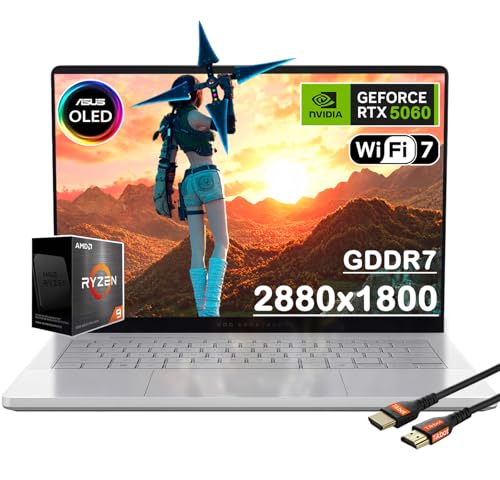
ASUS ROG Zephyrus G14 14" OLED Gaming Laptop
Best for: portable gaming with a premium OLED display
- Graphics Card
- NVIDIA GeForce RTX 5060
- Processor
- AMD Ryzen 9 270
- Memory
- 16GB
- Storage Capacity
- 1TB PCIe SSD
- Screen Size
- 14"
- Refresh Rate
- 120Hz
View on Amazon: ASUS ROG Zephyrus G14 14" OLED Gaming Laptop Affiliate link
The ASUS ROG Zephyrus G14 is a compact gaming laptop built into an aluminum chassis measuring 0.63 inches thin and weighing 3.31 pounds. It pairs an AMD Ryzen 9 270 processor with an NVIDIA GeForce RTX 5060 graphics card and a 14-inch 3K OLED 120Hz display. This configuration fits you if you want high-resolution visuals and daily portability for gaming without carrying heavy hardware.
Pros
- 14-inch 3K OLED display with 120Hz refresh rate and 0.2ms response time
- Compact aluminum chassis at 0.63 inches thin and 3.31 pounds
- NVIDIA GeForce RTX 5060 GPU with 8GB GDDR7 memory
- Six-speaker sound system with bass response down to 100Hz
Cons
- 120Hz refresh rate is lower than the 144Hz to 240Hz panels on alternative models
- 14-inch screen provides less viewing space than larger 16-inch options
Good fit if
- You need a portable build weighing 3.31 pounds with an aluminum body.
- You prefer a high-resolution 3K OLED screen with fast 0.2ms response times.
- You want an 8-core AMD Ryzen 9 270 processor paired with an RTX 5060.
Skip if
- You prefer a larger 16-inch or 18-inch display for your games.
- You require refresh rates above 120Hz for competitive gaming.
Verdict: ASUS ROG Zephyrus G14 OLED RTX 5060 delivers high-end portable performance with its 3K OLED panel and lightweight aluminum design. It balances solid RTX 5060 graphics with daily mobility for players on the move.

ASUS ROG Strix G18 RTX 5060 Gaming Laptop
Best for: Large screen gamers needing RTX 5060 power
- Graphics Card
- NVIDIA GeForce RTX 5060
- Processor
- Intel Core i7-14650HX
- Memory
- 16GB DDR5
- Storage Capacity
- 1TB SSD
- Screen Size
- 18"
- Refresh Rate
- 144Hz
View on Amazon: ASUS ROG Strix G18 RTX 5060 Gaming Laptop Affiliate link
This ASUS ROG Strix G18 features an 18-inch display with a 144Hz refresh rate, offering smooth visuals for gaming. It is powered by an Intel Core i7-14650HX processor and an NVIDIA GeForce RTX 5060 GPU with 8GB GDDR7 memory. You get 16GB DDR5 RAM and a 1TB SSD for fast storage. The laptop includes Wi-Fi 7 and advanced cooling. It suits gamers who want a large screen and solid performance.
Pros
- 18-inch FHD+ IPS display with 144Hz refresh rate
- Intel Core i7-14650HX processor with up to 5.2GHz boost
- NVIDIA GeForce RTX 5060 GPU with 8GB GDDR7 memory
- 1TB PCIe 4.0 NVMe SSD for fast loading
Cons
- 144Hz refresh rate is lower than the 165Hz or 240Hz displays on other list items
- 18-inch screen size is larger than the 14-inch or 16-inch models on the list
- 16GB RAM is less than the 32GB found in many other configurations
Good fit if
- You prefer a large 18-inch screen for immersive gaming
- You want an NVIDIA RTX 5060 GPU for ray tracing
- You need a 1TB SSD for ample game storage
Skip if
- You require a high refresh rate above 144Hz
- You need more than 16GB of RAM
- You prefer a portable 14-inch or 16-inch form factor
Verdict: ASUS ROG Strix G18 18-inch Gaming Laptop is a solid choice for gamers prioritizing screen size and RTX 5060 performance over higher refresh rates or portability. It fits those who want a desktop-replacement style machine with a 1TB SSD.

ASUS TUF A18 18-Inch RTX 5060 Gaming Laptop
Best for: large-screen desktop replacement gaming and multitasking
- Graphics Card
- NVIDIA GeForce RTX 5060
- Processor
- AMD Ryzen 7 260
- Memory
- 32GB
- Storage Capacity
- 1TB PCIe SSD
- Screen Size
- 18"
- Refresh Rate
- 144Hz
View on Amazon: ASUS TUF A18 18-Inch RTX 5060 Gaming Laptop Affiliate link
The ASUS TUF 18-Inch Ryzen 7 Gaming Laptop gives you a large desktop-replacement format with high-capacity memory. It pairs an AMD Ryzen 7 260 processor with an NVIDIA GeForce RTX 5060 graphics card and 32GB of RAM. The 18-inch WUXGA display runs at 144Hz with G-SYNC support for fluid visuals. This setup suits you if you prioritize expansive screen space and multitasking headroom over compact travel dimensions.
Pros
- Large 18-inch WUXGA IPS panel with 144Hz refresh rate and G-SYNC
- Generous 32GB RAM capacity for heavy multitasking
- AMD Ryzen 7 260 processor paired with NVIDIA GeForce RTX 5060 GPU
- Includes Thunderbolt 4, USB Type-C, and Wi-Fi 6E connectivity
Cons
- Large footprint measuring 15.7 by 11.1 inches at 5.19 pounds
- Display resolution is WUXGA rather than 1440p or 4K
- Original packaging seal is opened for professional hardware upgrade
Good fit if
- You want an expansive 18-inch display to replace a desktop monitor.
- You need 32GB of system memory out of the box for demanding workloads.
- You prioritize smooth 144Hz gameplay at 1080p-class resolution.
Skip if
- You require a compact, lightweight machine for frequent travel.
- You want a higher-resolution QHD, 3K, or OLED screen.
Verdict: ASUS TUF 18-Inch Ryzen 7 Gaming Laptop delivers a massive 18-inch canvas backed by an AMD Ryzen 7 processor and 32GB of RAM. It offers generous screen space and memory for gamers seeking a true desktop replacement.

ASUS ROG Strix G16 165Hz RTX 4060 Laptop
Best for: high-power 1080p esports and AAA gaming
- Graphics Card
- NVIDIA GeForce RTX 4060
- Processor
- Intel Core i7-13650HX
- Memory
- 16GB DDR5
- Storage Capacity
- 512GB PCIe SSD
- Screen Size
- 16"
- Refresh Rate
- 165Hz
View on Amazon: ASUS ROG Strix G16 165Hz RTX 4060 Laptop Affiliate link
The ASUS ROG Strix G16 is a 16-inch gaming laptop powered by an Intel Core i7-13650HX processor and an NVIDIA GeForce RTX 4060 GPU with a 140W maximum TGP. You get a 165Hz FHD display with full sRGB coverage, paired with 16GB of DDR5 memory and a 512GB PCIe 4.0 SSD. It suits you if you prioritize high GPU wattage, robust multi-fan cooling, and competitive frame rates for esports.
Pros
- NVIDIA GeForce RTX 4060 runs at maximum 140W TGP
- 16-inch 165Hz display covers 100% sRGB
- Built-in MUX Switch with Advanced Optimus
- Three-fan cooling setup with liquid metal CPU thermal compound
Cons
- Base storage limited to 512GB SSD
- Display resolution tops out at FHD
- Chassis weight reaches 5.51 pounds
Good fit if
- You want maximum graphic power from an RTX 4060 configuration.
- You play fast competitive titles that benefit from a 165Hz refresh rate.
- You prioritize sustained cooling with liquid metal and triple intake fans.
Skip if
- You want more than 512GB of internal storage immediately.
- You prefer a 1440p or 3K screen over standard FHD.
- You need a lightweight machine under five pounds for daily travel.
Verdict: ASUS ROG Strix G16 RTX 4060 Gaming Laptop delivers full graphics wattage and thermal headroom for demanding workloads. It provides dependable frame rates and high color coverage for competitive play.

ASUS ROG Strix Scar 15 RTX 3070 Ti
Best for: high-refresh esports and heavy multicore workloads
- Graphics Card
- NVIDIA GeForce RTX 3070 Ti
- Processor
- Intel Core i9 12900H
- Memory
- 16GB DDR5-4800
- Storage Capacity
- 1TB PCIe 4.0 SSD
- Screen Size
- 15.6"
- Refresh Rate
- 240Hz
View on Amazon: ASUS ROG Strix Scar 15 RTX 3070 Ti Affiliate link
This ASUS ROG Strix Scar 15 pairs a 14-core Intel Core i9-12900H processor with a 150W GeForce RTX 3070 Ti graphics card and a dedicated MUX switch. Its 15.6-inch QHD display runs at 240Hz with 100% DCI-P3 coverage for fluid, color-accurate output. With 16GB of DDR5 memory and 1TB of PCIe 4.0 storage, it suits high-refresh competitive gaming and demanding tasks needing sustained multicore CPU power.
Pros
- Intel Core i9-12900H CPU with 14 cores and up to 5.0GHz clock speed
- Fast 240Hz QHD display with 100% DCI-P3 color coverage
- GeForce RTX 3070 Ti GPU with 150W max TGP and MUX switch
- Comprehensive I/O including Thunderbolt 4, HDMI 2.1, and 2.5 Gbps LAN
Cons
- Weighs 5.07 pounds without the power adapter
- Base configuration includes 16GB of system memory
Good fit if
- You want high-framerate competitive gaming on a 240Hz QHD panel.
- You run multicore processing tasks that benefit from an Intel Core i9 processor.
- You want a hardware MUX switch to maximize GPU throughput.
Skip if
- You need a lightweight machine under five pounds for frequent commuting.
- You prefer a taller 16:10 aspect ratio screen.
Verdict: ASUS ROG Strix Scar 15 i9 RTX 3070 Ti delivers strong computational throughput and fast motion clarity via its 14-core CPU, 150W GPU, and 240Hz panel. It functions well as a focused workstation and esports system if mobility is secondary.
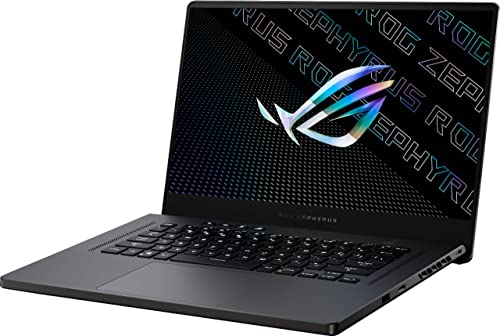
ASUS ROG Zephyrus 15.6" RTX 3070 Gaming Laptop
Best for: 15.6-inch QHD mobile gaming performance
- Graphics Card
- NVIDIA RTX 3070
- Processor
- Ryzen 9 5900HS
- Memory
- 16GB
- Storage Capacity
- 1TB PCIe SSD
- Screen Size
- 15.6"
- Display Resolution
- 2560x1440
View on Amazon: ASUS ROG Zephyrus 15.6" RTX 3070 Gaming Laptop Affiliate link
The ASUS ROG Zephyrus 15.6" QHD RTX 3070 provides a portable gaming build in Eclipse Grey. You get an AMD Ryzen 9 processor paired with an NVIDIA GeForce RTX 3070 graphics card and 16GB of memory. Its 15.6-inch QHD display delivers sharp resolution, while the 1TB SSD handles game storage. At 4.19 pounds, it suits you if you need dedicated gaming performance in a traditional 15.6-inch chassis.
Pros
- AMD Ryzen 9 processor
- NVIDIA GeForce RTX 3070 graphics card
- 15.6-inch QHD display
- 1TB SSD storage capacity
- Weighs 4.19 pounds
Cons
- Memory limited to 16GB in this configuration
- Display refresh rate not specified in official data
Good fit if
- You want a 15.6-inch QHD display powered by an RTX 3070 GPU.
- You need 1TB of SSD storage along with an AMD Ryzen 9 processor.
- You want a gaming chassis weighing under 4.5 pounds.
Skip if
- You need more than 16GB of memory included out of the box.
- You prefer a larger 16-inch or 18-inch screen format.
Verdict: ASUS ROG Zephyrus 15.6" QHD RTX 3070 delivers AMD Ryzen 9 processing and RTX 3070 graphics inside a 4.19-pound chassis. It offers a sharp QHD panel and 1TB of SSD storage for gaming.
Specifications side by side
| Spec | ASUS ROG Strix G16 16-inch Gaming Laptop | ASUS ROG Strix G16 RTX 5070 Gaming Laptop | ASUS ROG Strix G16 RTX 4060 Gaming Laptop | ASUS ROG Zephyrus G14 OLED RTX 5060 | ASUS TUF Gaming A14 14-Inch Laptop | ASUS Zenbook Duo Ultra 9 14" AI Laptop | ASUS ROG Strix G16 RTX 5070 Ti | ASUS ROG Zephyrus G14 14" OLED Gaming Laptop | ASUS ROG Strix G18 RTX 5060 Gaming Laptop | ASUS TUF A18 18-Inch RTX 5060 Gaming Laptop | ASUS ROG Strix G16 165Hz RTX 4060 Laptop | ASUS ROG Strix Scar 15 RTX 3070 Ti | ASUS ROG Zephyrus 15.6" RTX 3070 Gaming Laptop |
|---|---|---|---|---|---|---|---|---|---|---|---|---|---|
| Graphics Card | NVIDIA GeForce RTX 5060 | NVIDIA GeForce RTX 5070 | NVIDIA GeForce RTX 4060 | NVIDIA GeForce RTX 5060 | Radeon 8060S | Intel Arc Integrated Graphics | NVIDIA GeForce RTX 5070 Ti | NVIDIA GeForce RTX 5060 | NVIDIA GeForce RTX 5060 | NVIDIA GeForce RTX 5060 | NVIDIA GeForce RTX 4060 | NVIDIA GeForce RTX 3070 Ti | NVIDIA RTX 3070 |
| Processor | Intel Core i7 Processor 14650HX | AMD Ryzen 9 9955HX | Intel Core i7-13650HX | AMD Ryzen 9 270 | AMD Ryzen AI Max+ 392 | Ultra 9-285H | AMD Ryzen 9 8940HX | AMD Ryzen 9 270 | Intel Core i7-14650HX | AMD Ryzen 7 260 | Intel Core i7-13650HX | Intel Core i9 12900H | Ryzen 9 5900HS |
| Memory | 16GB DDR5 | 16GB DDR5-5600 | 16GB DDR5 | 16GB DDR5 | 32GB LPDDR5X | 32GB | 16GB DDR5-5600 RAM | 16GB | 16GB DDR5 | 32GB | 16GB DDR5 | 16GB DDR5-4800 | 16GB |
| Storage Capacity | 1TB PCIe Gen 4 SSD | 1TB PCIe Gen 4 SSD | 1TB PCIe Gen4 SSD | 512GB SSD | 1TB PCIe Gen 4.0 SSD | 1TB PCIe NVMe SSD | 1TB PCIe 4.0 NVMe SSD | 1TB PCIe SSD | 1TB SSD | 1TB PCIe SSD | 512GB PCIe SSD | 1TB PCIe 4.0 SSD | 1TB PCIe SSD |
| Screen Size | 16" | 16” | not stated | 14" | 14” | 14.0" | 16" | 14" | 18" | 18" | 16" | 15.6" | 15.6" |
| Refresh Rate | 165Hz | 165Hz | 165Hz | 120Hz | 165Hz | 120Hz | 165Hz | 120Hz | 144Hz | 144Hz | 165Hz | 240Hz | not stated |
| Display Resolution | FHD+ | FHD+ | FHD | 2880 x 1800 | WQXGA | 2880x1800 | 1920x1200 | 3K | 1920 x 1200 | WUXGA | FHD | QHD | 2560x1440 |
| Storage | not stated | not stated | not stated | 512GB SSD | not stated | 1TB SSD | 1TB SSD | 1TB SSD | 1TB SSD | 1TB SSD | 512GB SSD | 1TB SSD | 1TB SSD |
| Use | not stated | not stated | not stated | not stated | not stated | Business | not stated | not stated | not stated | not stated | not stated | not stated | not stated |
| Size | not stated | not stated | 16GB DDR5 | 1TB SSD | 16GB RAM | 512GB SSD | 2.80 | 32GB RAM|1TB SSD | 16GB RAM | 1TB PCIe SSD | 16GB RAM | 1TB PCIe SSD | 32GB RAM | 1TB SSD | 32GB RAM| 1TB SSD | 16GB DDR5 | 512GB SSD | Win 11 | 16GB | 1TB SSD | 16GB RAM | 1TB SSD |
| Dimensions | 13.9 × 0.9 × 10.6 inches | 13.9 × 10.6 × 0.9 inches | 13.9 × 0.89 × 10.4 inches | 12.2 × 8.66 × 0.64 inches | 12.2 × 0.87 × 8.94 inches | 8.63 × 12.4 × 0.95 inches | 13.9 × 10.4 × 0.89 inches | 12.3 × 0.63 × 8.66 inches | 15.7 × 11.8 × 0.93 inches | 15.7 × 11.1 × 0.92 inches | 13.9 × 0.89 × 10.4 inches | 13.9 × 0.89 × 10.2 inches | 19 × 12.6 × 4 inches |
| Weight | 5.84 pounds | 5.51 pounds | 5.51 pounds | 3.31 pounds | 3.22 pounds | 3.5 pounds | 5.51 pounds | 8.82 pounds | 7.9 pounds | 5.19 pounds | 5.51 pounds | 5.07 pounds | 4.19 pounds |
| Color | Eclipse Gray | Black | Eclipse Gray | White | Jaegar Gray | Inkwell Gray | Eclipse Grey | Platinum White | Eclipse Gray | Black | Eclipse Gray | Black | Eclipse Grey |
| Model | G615JMR-AS74 | G614FP-OS94 | G614JV-AS74 | not stated | FA401EA-DS96 | ux8406 | ROG Strix G16 | GA403UM-G14.R9HX4 | G815JMR-SS74 | ASUS TUF A18 | G614JV-AS73 | G533ZW-AS94Q | GA503QR-211.ZG15 |
If you prefer stationary hardware with higher thermal headroom, evaluate the best gaming desktops under 2000 for alternative component specifications.
How to choose the right one
-
Match GPU to screen
Your graphics card must handle the pixel load of your display. The ASUS ROG Strix G16 with an RTX 4060 pairs well with 1080p or 1440p panels for smooth esports. For larger 18-inch screens, the RTX 5050 or 5060 options provide enough visual power. Higher resolutions demand stronger chips, so check the GPU model against your preferred game settings and display size to avoid bottlenecks.
-
Prioritize RAM for multitasking
Memory determines how many applications run simultaneously without slowing down. The ASUS ROG Flow Z13 offers 32GB of RAM, which handles heavy creative workflows and gaming together. Most other models, like the Strix G16, include 16GB, which is standard for gaming. If you stream or edit video while playing, aim for 32GB. For pure gaming, 16GB is usually sufficient for current titles.
-
Check storage capacity
Modern games require significant space for installations and updates. The ASUS TUF Gaming A18 and ROG Flow Z13 both include 1TB SSDs, providing ample room for a large library. The ASUS Zephyrus G14 offers 512GB, which fills up faster. Ensure your chosen laptop has enough storage to avoid constant management. SSDs also load games faster than older hard drives, improving your overall experience.
-
Select refresh rate wisely
Refresh rate affects motion clarity in fast-paced games. The ASUS ROG Strix Scar 15 features a 240Hz panel, ideal for competitive shooters. Most gaming laptops listed here offer 144Hz or 165Hz, which is excellent for esports. OLED models like the Zephyrus G14 use 120Hz but prioritize color accuracy. Choose higher refresh rates for competitive play and lower rates for creative work where color fidelity matters more.
-
Consider portability needs
Weight and dimensions matter if you travel frequently. The ASUS ROG Flow Z13 weighs only 2.65 pounds, making it highly portable. The Zephyrus G14 is also lightweight at 3.31 pounds. Larger 18-inch models like the TUF A18 weigh over 5 pounds, acting as desktop replacements. If you carry your laptop daily, prioritize models under 3.5 pounds. Heavier laptops offer more power but less mobility.
Frequently asked questions
Which ASUS gaming laptop offers the best portability?
The ASUS TUF Gaming A14 is the most portable option on this list. It weighs only 3.22 pounds and measures 0.87 inches thick. This compact chassis makes it easy to carry for daily commutes or travel. You get a 14-inch display and 165Hz refresh rate in a lightweight package that balances gaming and productivity needs.
What is the highest refresh rate available on these ASUS models?
The ASUS ROG Strix Scar 15 features the highest refresh rate at 240Hz. This panel provides exceptional motion clarity for competitive esports titles. Most other models in this selection offer 165Hz or 144Hz screens. The 240Hz display ensures smooth visuals for fast-paced gaming where every frame counts for competitive advantage.
Does ASUS offer gaming laptops with 18-inch screens under $2000?
Yes, you can find 18-inch ASUS gaming laptops in this price range. The ASUS ROG Strix G18 and ASUS TUF A18 both provide large 18-inch displays. These models suit desktop replacement users who prioritize screen real estate over portability. They typically pair large screens with powerful graphics cards like the RTX 5060 for immersive gaming experiences.
Which model has the most RAM capacity?
The ASUS TUF A18 and ASUS ROG Strix G18 both come with 32GB of RAM. This high memory capacity supports heavy multitasking and demanding game titles without bottlenecking. Most other laptops on this list feature 16GB of RAM. The 32GB configurations provide extra headroom for streaming, editing, or running multiple applications simultaneously.
Is there an ASUS gaming laptop with an OLED display?
The ASUS ROG Zephyrus G14 OLED models feature premium OLED panels. These displays offer high color accuracy and deep contrast ratios for vivid visuals. The OLED option is available with both 120Hz refresh rates in 14-inch chassis. This screen technology enhances visual fidelity for games and media consumption, prioritizing image quality over ultra-high refresh rates.
Which ASUS laptop is best for users who prioritize CPU performance?
The ASUS Zenbook Duo Ultra 9 14" AI Laptop is designed for high CPU performance. It features an Intel Core Ultra 9 processor and 32GB of RAM. This model suits business users or creators who need desktop-class processing power. It prioritizes computational throughput and screen quality over dedicated graphics capabilities, making it ideal for productivity-focused workflows.