8 Best ASUS 32GB RAM | 1TB SSD Gaming Laptops, Compared
As an Amazon Associate we earn from qualifying purchases. Links on this page are affiliate links.
Finding the best ASUS 32gb RAM 1tb SSD gaming laptops requires matching your workflow to specific hardware tiers. We compared 8 models based strictly on published specifications to help you choose. The ASUS ROG Strix 18 RTX 5070 Gaming Laptop leads as the top pick. Its 240Hz display and Ryzen 9 processor support large-screen desktop replacement gaming setups effectively. This guide helps you decide which chassis and GPU combination fits your stationary or mobile needs without guessing.
Quick picks
The best fit for you
- You want the best overall gaming experience ASUS ROG Strix 18 RTX 5070 Gaming Laptop The Ryzen 9 processor and RTX 5070 deliver high processing power for stationary gaming.
- You need high-framerate gaming with ray tracing ASUS ROG Strix G16 RTX 5070 Ti Gaming Laptop The RTX 5070 Ti graphics card and 165Hz WUXGA panel support top-tier graphical performance.
- You prioritize competitive esports and multitasking ASUS ROG Strix G16 RTX 5070 Gaming Laptop The 300Hz screen and 16-core processor provide high motion clarity and multi-threaded performance.
- You want a balanced everyday machine ASUS TUF 16-Inch Ryzen 7 Gaming Laptop The RTX 4060 and 8-core Ryzen processor offer dependable baseline specs for productivity.
- You need a large screen for desktop use ASUS ROG Strix 18-Inch RTX 5070 Laptop The 18-inch display and Intel Core Ultra 9 processor support massive screen area.
Our 8 picks

ASUS ROG Strix 18 RTX 5070 Gaming Laptop
Best for: large-screen desktop replacement gaming setups
- Size
- 32GB RAM | 1TB SSD (what this guide is about)
- Graphics Card
- NVIDIA GeForce RTX 5070 Laptop GPU
- Processor
- AMD Ryzen 9 9955HX
- Memory
- 32GB DDR5-5600 SO-DIMM
- Storage Capacity
- 1TB PCIe 4.0 NVMe M.2 SSD
- Screen Size
- 18"
View on Amazon: ASUS ROG Strix 18 RTX 5070 Gaming Laptop Affiliate link
This ASUS ROG Strix gaming laptop combines an 18-inch 2560x1600 240Hz IPS display with an AMD Ryzen 9 9955HX processor and an NVIDIA GeForce RTX 5070 graphics card. You get 32GB of DDR5-5600 memory paired with a 1TB PCIe 4.0 NVMe SSD for fast storage access. The system suits you if you want a large desktop replacement display and high-refresh gameplay without connecting an external monitor.
Pros
- 18-inch 2560x1600 IPS display with 240Hz refresh rate and 100% DCI-P3
- AMD Ryzen 9 9955HX processor with 16 cores and 32 threads
- NVIDIA GeForce RTX 5070 GPU with 8GB GDDR7 memory
- Dual USB 4 Type-C ports and dedicated HDMI 2.1 output
Cons
- Weighs 6.61 pounds, making it heavy to transport
- Display peak brightness is limited to 300 nits
Good fit if
- You want an expansive 18-inch 240Hz screen for competitive desktop-style play.
- You need heavy multi-core processing power from a 16-core Ryzen 9 CPU.
Skip if
- You prioritize portability and light weight over large display area.
- You frequently play or work in brightly lit outdoor environments.
Verdict: ASUS ROG Strix 18 RTX 5070 Gaming Laptop delivers high CPU processing power and a fast 240Hz panel for stationary gaming setups. Its 6.61-pound weight and 300-nit brightness make it better suited for indoor desk duty than frequent travel.

ASUS ROG Strix G16 RTX 5070 Ti Gaming Laptop
Best for: high-framerate WUXGA gaming with ray tracing
- Size
- 32GB RAM | 1TB SSD (what this guide is about)
- Graphics Card
- NVIDIA GeForce RTX 5070 Ti
- Processor
- AMD Ryzen 9 8940HX
- Memory
- 32GB DDR5
- Storage Capacity
- 1TB SSD
- Screen Size
- 16"
View on Amazon: ASUS ROG Strix G16 RTX 5070 Ti Gaming Laptop Affiliate link
This ASUS ROG Strix G16 pairs an AMD Ryzen 9 8940HX processor with an NVIDIA GeForce RTX 5070 Ti graphics card running at a 140W TGP. With 32GB of DDR5 RAM and a 1TB SSD, you get quick load times and high multitasking capability. Its 16-inch 165Hz WUXGA display provides 100% sRGB coverage. This configuration suits you if you prioritize modern GPU performance over higher-resolution display panels.
Pros
- NVIDIA GeForce RTX 5070 Ti GPU with 12GB GDDR7 VRAM and 140W TGP
- 16-core AMD Ryzen 9 8940HX CPU reaches up to 5.3 GHz
- Includes MUX Switch with Advanced Optimus
- Dual USB4 ports and 2.5G Ethernet connectivity
Cons
- WUXGA resolution rather than 2.5K
- 165Hz refresh rate is lower than 240Hz alternatives
- Weighs 5.51 pounds, adding travel bulk
Good fit if
- You want an RTX 5070 Ti GPU with 12GB GDDR7 VRAM for graphics workloads.
- You need a high-thread-count processor like the 16-core Ryzen 9 8940HX.
- You plan to expand capacity later up to 64GB RAM or 4TB SSD.
Skip if
- You want a sharper 2.5K resolution panel on a 16-inch screen.
- You prefer a 240Hz or 300Hz refresh rate for competitive esports.
- You need a lightweight laptop under five pounds for daily travel.
Verdict: ASUS ROG Strix G16 RTX 5070 Ti Gaming Laptop delivers top-tier graphics power and multi-core processing in a 16-inch chassis. It trades higher screen resolution for sustained frame rates on its 165Hz WUXGA panel.
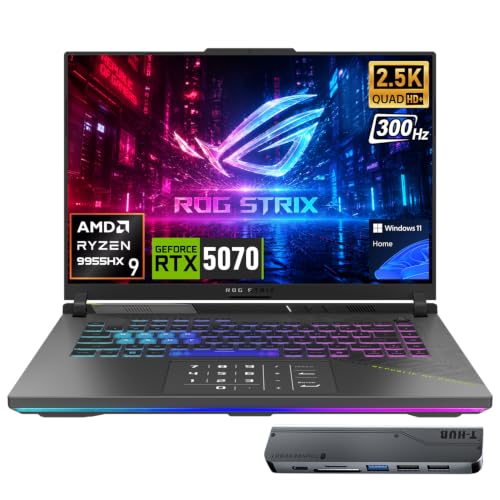
ASUS ROG Strix G16 RTX 5070 Gaming Laptop
Best for: competitive high-refresh esports and heavy multi-threaded workloads
- Size
- 32GB RAM | 1TB SSD (what this guide is about)
- Graphics Card
- GeForce RTX 5070
- Processor
- AMD Ryzen 9 9955HX
- Memory
- 32GB DDR5
- Storage Capacity
- 1TB SSD
- Screen Size
- 16
View on Amazon: ASUS ROG Strix G16 RTX 5070 Gaming Laptop Affiliate link
This ASUS ROG Strix G16 is a high-refresh gaming laptop configured with 32GB of DDR5 memory and a 1TB SSD. You get an AMD Ryzen 9 9955HX processor paired with an NVIDIA GeForce RTX 5070 graphics card, driving a 16-inch 2560x1600 IPS display at 300Hz. This setup suits you if you need fast frame rates for competitive esports alongside heavy multi-threaded productivity performance.
Pros
- Fast 300Hz refresh rate on a 2560x1600 display
- AMD Ryzen 9 9955HX processor with 16 cores and 32 threads
- Dual 40Gbps USB4 Type-C ports with DisplayPort support
- NVIDIA GeForce RTX 5070 with 8GB GDDR7 memory
Cons
- Heavy 5.51-pound chassis
- Thick profile measuring 1.2 inches
Good fit if
- You prioritize high frame rates and a 300Hz refresh rate for fast-paced gameplay.
- You require 16-core processing power for rendering, compiling, or multitasking.
- You need dual high-speed 40Gbps USB4 ports for external displays and accessories.
Skip if
- You want a slim, lightweight laptop for daily commuting.
- You prefer a larger 18-inch screen for a desktop replacement setup.
Verdict: ASUS ROG Strix G16 300Hz Gaming Laptop delivers high motion clarity and multi-threaded performance in a 16-inch form factor. It gives you top-tier esports display speeds backed by a capable 16-core processor.
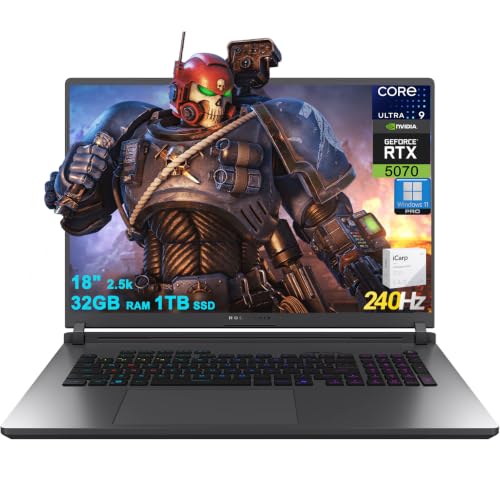
ASUS ROG Strix 18-Inch RTX 5070 Laptop
Best for: large-screen desktop replacement gaming and multitasking
- Size
- 32GB RAM | 1TB SSD (what this guide is about)
- Graphics Card
- NVIDIA GeForce RTX 5070 8GB GDDR7
- Processor
- Intel 24-core Ultra 9 275HX
- Memory
- 32GB RAM
- Storage Capacity
- 1TB SSD
- Screen Size
- 18"
View on Amazon: ASUS ROG Strix 18-Inch RTX 5070 Laptop Affiliate link
This ASUS ROG Strix G18 brings a massive 18-inch 2560x1600 display with a 240Hz refresh rate directly to your desk. Under the hood, you get an Intel Core Ultra 9 275HX 24-core processor paired with an NVIDIA GeForce RTX 5070 graphics card, 32GB RAM, and a 1TB SSD. It suits you if you want desktop-grade screen space and high-end processing power for heavy multitasking and gaming without hooking up an external monitor.
Pros
- 24-core Intel Core Ultra 9 275HX processor
- 18-inch 2560x1600 display with 240Hz refresh rate and 100% DCI-P3
- Fast connectivity including Wi-Fi 7 and Thunderbolt 4
- 32GB RAM paired with 1TB SSD storage
Cons
- Heavy chassis weighing 7.05 pounds
- RTX 5070 graphics card limited to 8GB GDDR7 VRAM
- Thick 1.26-inch profile limits everyday portability
Good fit if
- You want an expansive 18-inch 240Hz display for fast-paced gaming.
- You need 24 processor cores for intensive multitasking and compute tasks.
- You prefer high-speed wired and wireless connectivity like Thunderbolt 4 and Wi-Fi 7.
Skip if
- You need a lightweight laptop for frequent mobile use.
- You require more than 8GB of video memory for graphics-heavy workloads.
Verdict: ASUS ROG Strix G18 RTX 5070 Gaming Laptop delivers massive screen area and high core counts for desktop-replacement use. Its 7.05-pound build and 8GB VRAM limit make it best suited for a dedicated desk setup.

ASUS TUF 16-Inch Ryzen 7 Gaming Laptop
Best for: 16-inch esports gaming and productive multitasking
- Size
- 32GB RAM | 1TB SSD (what this guide is about)
- Graphics Card
- AMD Radeon RX 7700S
- Processor
- AMD Ryzen 7 7735HS
- Memory
- 32GB DDR5 RAM
- Storage Capacity
- 1TB PCIe M.2 SSD
- Screen Size
- 16"
View on Amazon: ASUS TUF 16-Inch Ryzen 7 Gaming Laptop Affiliate link
This ASUS TUF laptop pairs an AMD Ryzen 7 7735HS processor with 32GB of DDR5 RAM and a 1TB PCIe SSD. You get a 16-inch 1920 x 1200 anti-glare display running at a 165Hz refresh rate with a 16:10 aspect ratio. It includes Windows 11 Pro and weighs 4.85 pounds. This machine suits you if you need balanced multithreaded processing, high-bandwidth memory, and smooth 165Hz gameplay.
Pros
- 32GB high-bandwidth DDR5 RAM
- 16-inch FHD+ 165Hz display with 16:10 aspect ratio
- AMD Ryzen 7 7735HS 8-core processor
- Ships with Windows 11 Pro
Cons
- 1920 x 1200 resolution is lower than 2.5K alternatives
- 165Hz refresh rate trails 240Hz screens
- Weighs 4.85 pounds
Good fit if
- You want 32GB RAM and 1TB storage ready out of the box.
- You prefer a 16-inch 16:10 screen with a 165Hz refresh rate.
- You need Windows 11 Pro management features.
Skip if
- You require a 2.5K or higher display resolution.
- You want a faster 240Hz or 300Hz panel for competitive play.
Verdict: ASUS TUF 16-Inch Ryzen 7 Gaming Laptop combines an 8-core Ryzen processor, 32GB DDR5 RAM, and a 165Hz 16:10 screen into a balanced everyday machine. It provides dependable baseline specs for gaming and productivity without unnecessary extras.

ASUS ROG Strix 18 RTX 5060 Gaming Laptop
Best for: desktop replacement setups needing high refresh rates
- Size
- 32GB RAM | 1TB SSD (what this guide is about)
- Graphics Card
- NVIDIA GeForce RTX 5060 8GB GDDR7
- Processor
- Intel Core Ultra 9 275HX
- Memory
- 32GB DDR5
- Storage Capacity
- 1TB SSD
- Screen Size
- 18"
View on Amazon: ASUS ROG Strix 18 RTX 5060 Gaming Laptop Affiliate link
The ASUS ROG Strix 18 pairs an Intel Core Ultra 9 275HX processor with an NVIDIA GeForce RTX 5060 GPU. You get 32GB of DDR5 memory and a 1TB PCIe SSD inside an 18-inch chassis featuring a 2560 x 1600 240Hz display. This configuration suits you if you need a large screen and fast memory for competitive gaming without stepping up to higher-tier graphics hardware.
Pros
- 18-inch 2.5K (2560 x 1600) display with 240Hz refresh rate
- 24-core Intel Core Ultra 9 275HX processor
- Fast networking with Wi-Fi 7 and RJ-45 Ethernet
- Includes 7-in-1 docking station with 1TB storage
Cons
- GeForce RTX 5060 is limited to 8GB GDDR7 VRAM
- Heavy chassis weighing 7.54 pounds
Good fit if
- You want an 18-inch 240Hz screen paired with 32GB RAM.
- You prioritize high multi-core compute with a 24-core processor.
- You want bundled port expansion and extra external dock storage.
Skip if
- You need a lightweight laptop for frequent travel.
- You require more than 8GB of VRAM for heavy graphical workloads.
Verdict: ASUS ROG Strix 18 RTX 5060 Gaming Laptop delivers a massive 240Hz display and high-core processing backed by 32GB RAM. It works well as a stationary setup when entry-tier RTX 50-series graphics match your workload.

ASUS ROG Strix G18 18" RTX 5060 Laptop
Best for: desktop replacement gaming and heavy multitasking
- Size
- 32GB RAM | 1TB SSD (what this guide is about)
- Graphics Card
- NVIDIA GeForce RTX 5060 8GB GDDR7
- Processor
- Intel Core Ultra 9 275HX
- Memory
- 32GB DDR5
- Storage Capacity
- 1TB SSD
- Screen Size
- 18"
View on Amazon: ASUS ROG Strix G18 18" RTX 5060 Laptop Affiliate link
This ASUS ROG Strix G18 pairs a 24-core Intel Core Ultra 9 275HX processor with an NVIDIA GeForce RTX 5060 graphics chip, 32GB of DDR5 memory, and a 1TB SSD. Its 18-inch 2.5K Nebula display offers a 240Hz refresh rate and 500 nits brightness. It suits you if you want expansive screen space for desktop gaming.
Pros
- 240Hz 2.5K 18-inch display with 500 nits brightness and 100% DCI-P3 coverage
- 24-core Intel Core Ultra 9 275HX processor with dedicated AI Boost NPU
- Broad connectivity including Thunderbolt 4, Wi-Fi 7, and RJ45 Ethernet
- Preinstalled Windows 11 Pro operating system
Cons
- Weighs 7.05 pounds and measures 1.26 inches thick
- RTX 5060 graphics card is limited to 8GB of VRAM
Good fit if
- You want a massive 18-inch 240Hz display for desktop replacement gaming.
- You need 24 processor cores and 32GB of RAM for multi-threaded workloads.
- You require fast connectivity using Wi-Fi 7 and Thunderbolt 4 ports.
Skip if
- You travel frequently and need a lightweight chassis under seven pounds.
- You run graphics-heavy textures that require more than 8GB of video memory.
Verdict: ASUS ROG Strix G18 RTX 5060 Laptop brings an expansive 240Hz display and high-end 24-core processing power to your desk, though its 7.05-pound weight keeps it largely stationary.

ASUS ROG Strix G18 RTX 5060 Gaming Laptop
Best for: Large-screen esports gaming and heavy multitasking
- Size
- 32GB RAM | 1TB SSD (what this guide is about)
- Graphics Card
- NVIDIA GeForce RTX 5060
- Processor
- Intel Core i7-14650HX
- Memory
- 16GB DDR5-5600
- Storage Capacity
- 1TB SSD
- Screen Size
- 18"
View on Amazon: ASUS ROG Strix G18 RTX 5060 Gaming Laptop Affiliate link
This 18-inch ASUS gaming laptop pairs an Intel Core Ultra 9 275HX processor with an NVIDIA GeForce RTX 5060 graphics card. You get 32GB of DDR5 memory alongside a 1TB solid-state drive for demanding applications. Its 2.5K display runs at 240Hz with 500 nits brightness, making it suitable if you want a large, fast screen for esports, multitasking, and productivity without needing top-tier graphics hardware.
Pros
- 18-inch 2.5K display with 240Hz refresh rate and 500 nits brightness
- Intel Core Ultra 9 275HX processor with 32GB DDR5-5600 memory
- Wi-Fi 7 networking and Thunderbolt 4 connectivity
- 1080p FHD IR webcam supporting Windows Hello facial recognition
Cons
- GeForce RTX 5060 provides entry-tier graphics power relative to the high-end CPU
- Measures 1.1 inches thick and weighs 2.5 kilograms
- Keyboard uses 4-zone RGB lighting rather than per-key control
Good fit if
- You prioritize an expansive 18-inch 240Hz screen over maximum GPU tier.
- You need heavy CPU multi-threading performance with 32GB RAM for workloads.
- You want modern connectivity including Wi-Fi 7 and Thunderbolt 4.
Skip if
- You want a higher-tier GPU for playing demanding games at max settings.
- You require a slim, lightweight laptop for daily commuting.
Verdict: ASUS ROG Strix G18 18-Inch RTX 5060 Gaming Laptop pairs an expansive 240Hz display with a powerful CPU, balanced by midrange GPU capabilities. It fits setups where screen size and processing speed matter more than peak graphics power.
Specifications side by side
| Spec | ASUS ROG Strix 18 RTX 5070 Gaming Laptop | ASUS ROG Strix G16 RTX 5070 Ti Gaming Laptop | ASUS ROG Strix G16 RTX 5070 Gaming Laptop | ASUS ROG Strix 18-Inch RTX 5070 Laptop | ASUS TUF 16-Inch Ryzen 7 Gaming Laptop | ASUS ROG Strix 18 RTX 5060 Gaming Laptop | ASUS ROG Strix G18 18" RTX 5060 Laptop | ASUS ROG Strix G18 RTX 5060 Gaming Laptop |
|---|---|---|---|---|---|---|---|---|
| Graphics Card | NVIDIA GeForce RTX 5070 Laptop GPU | NVIDIA GeForce RTX 5070 Ti | GeForce RTX 5070 | NVIDIA GeForce RTX 5070 8GB GDDR7 | AMD Radeon RX 7700S | NVIDIA GeForce RTX 5060 8GB GDDR7 | NVIDIA GeForce RTX 5060 8GB GDDR7 | NVIDIA GeForce RTX 5060 |
| Processor | AMD Ryzen 9 9955HX | AMD Ryzen 9 8940HX | AMD Ryzen 9 9955HX | Intel 24-core Ultra 9 275HX | AMD Ryzen 7 7735HS | Intel Core Ultra 9 275HX | Intel Core Ultra 9 275HX | Intel Core i7-14650HX |
| Memory | 32GB DDR5-5600 SO-DIMM | 32GB DDR5 | 32GB DDR5 | 32GB RAM | 32GB DDR5 RAM | 32GB DDR5 | 32GB DDR5 | 16GB DDR5-5600 |
| Storage Capacity | 1TB PCIe 4.0 NVMe M.2 SSD | 1TB SSD | 1TB SSD | 1TB SSD | 1TB PCIe M.2 SSD | 1TB SSD | 1TB SSD | 1TB SSD |
| Screen Size | 18" | 16" | 16 | 18" | 16" | 18" | 18" | 18" |
| Refresh Rate | 240Hz | 165Hz | 300Hz | 240Hz | 165Hz | 240Hz | 240Hz | 144Hz |
| Display Resolution | 2560x1600 | WUXGA | 2560x1600 | 2560x1600 | 1920 x 1200 | 2560 x 1600 | 2560 x 1600 | 1920 x 1200 |
| Storage | 1TB SSD | 1TB SSD | 1TB SSD | 1TB SSD | 1TB SSD | 1TB SSD | 1TB SSD | 1TB SSD |
| Size | 32GB RAM | 1TB SSD | 32GB RAM | 1TB SSD | 32GB RAM | 1TB SSD | 32GB RAM | 1TB SSD | 32GB RAM | 1TB SSD | 32GB RAM | 1TB SSD | 32GB RAM | 1TB SSD | 32GB RAM | 1TB SSD |
| Dimensions | 15.7 × 0.91 × 11.6 inches | 13.9 × 10.4 × 0.89 inches | 13.9 × 10.4 × 1.2 inches | 11.7 × 15.7 × 1.26 inches | 14 × 9.92 × 0.87 inches | 19 × 14 × 4 inches | 15.7 × 11.7 × 1.26 inches | 15.7 × 11.8 × 0.93 inches |
| Weight | 6.61 pounds | 5.51 pounds | 5.51 pounds | 7.05 pounds | 4.85 pounds | 13 pounds | 7.05 pounds | 7.9 pounds |
| Color | Eclipse Gray | Gray | Black | Black | Black | Gray | Eclipse Gray | Eclipse Gray |
| Model | ROG Strix G18 | G614 | ASIS ROG Strix G16 | ASUS ROG Strix G18 G815 | FA617 | ASUS ROG Strix G18 | G815 | G815JMR-SS74 |
If you need stationary performance, compare the best gaming desktops with 32GB RAM for equivalent memory specifications.
How to choose the right one
-
Match GPU to resolution
You must align your graphics card tier with the screen resolution to avoid performance bottlenecks. The ASUS ROG Strix G16 RTX 5070 Ti Gaming Laptop delivers top-tier graphics power specifically for its 165Hz WUXGA panel. Higher resolution demands more processing from the GPU. If you choose an 18-inch model with a 240Hz display, an RTX 5070 or RTX 5060 may suffice for many titles. Check the specific GPU model against your target frame rate expectations.
-
Consider screen size for use
Screen size dictates whether a laptop serves as a desktop replacement or a portable machine. The ASUS ROG Strix 18 RTX 5070 Gaming Laptop offers a large 18-inch display ideal for stationary setups. Its 6.61-pound weight makes frequent travel difficult. Conversely, the ASUS TUF 16-Inch Ryzen 7 Gaming Laptop weighs only 4.85 pounds. You should select a 16-inch model if you need to move your device regularly between locations.
-
Check processor core count
The processor handles game logic and background tasks alongside the graphics card. The ASUS ROG Strix G18 RTX 5060 Laptop features a 24-core Intel Core Ultra 9 for heavy multitasking. The ASUS ROG Strix G16 RTX 5070 Gaming Laptop uses a Ryzen 9 for strong multi-threaded performance. You should verify the processor type if you stream gameplay or run multiple applications simultaneously. Higher core counts support demanding workloads more effectively.
-
Evaluate refresh rate needs
Refresh rate determines how smooth motion appears in fast-paced games. Many models in this list feature 240Hz panels, such as the ASUS ROG Strix 18 RTX 5060 Gaming Laptop. This high rate benefits competitive esports titles significantly. The ASUS TUF 16-Inch model offers a 165Hz screen, which remains smooth for most gaming scenarios. You should choose a higher refresh rate if you play competitive shooters where motion clarity is critical.
-
Assess weight for portability
Weight directly impacts how comfortable the laptop is to carry. The ASUS TUF 16-Inch Ryzen 7 Gaming Laptop is the lightest option at 4.85 pounds. The ASUS ROG Strix G18 RTX 5060 Laptop weighs 13 pounds, making it strictly a desktop replacement. You should avoid heavy models like the 7.05-pound ASUS ROG Strix G18 if you travel often. Check the weight specification before purchasing to ensure it fits your mobility requirements.
Frequently asked questions
Which ASUS laptop is best for stationary desktop gaming?
The ASUS ROG Strix 18 RTX 5070 Gaming Laptop is ideal for stationary setups. It features an 18-inch screen and an RTX 5070 graphics card. The Ryzen 9 processor provides high processing power. Its 6.61-pound weight and 300-nit brightness make it better for desk use than travel.
What is the best high-refresh rate option for esports?
The ASUS ROG Strix G16 RTX 5070 Gaming Laptop offers a 300Hz display for top-tier esports performance. It includes a 16-core Ryzen 9 processor for heavy multi-threaded workloads. The 16-inch form factor balances competitive speeds with capable hardware for demanding tasks.
Does any model offer an Intel processor with 32GB RAM?
Yes, several models use Intel Core Ultra 9 processors. The ASUS ROG Strix 18-Inch RTX 5070 Laptop and the ASUS ROG Strix G18 RTX 5060 Laptop both pair this CPU with 32GB of RAM. These options suit desktop-replacement gaming and heavy multitasking needs.
Which laptop is the lightest for a 16-inch screen?
The ASUS TUF 16-Inch Ryzen 7 Gaming Laptop is the lightest at 4.85 pounds. It features an RTX 4060 graphics card and a 165Hz 16:10 screen. This model provides dependable baseline specs for gaming and productivity without unnecessary extras.
Are there options with 240Hz displays?
Yes, multiple 18-inch models feature 240Hz panels. The ASUS ROG Strix 18 RTX 5070 Gaming Laptop and the ASUS ROG Strix G18 RTX 5060 Laptop both include this high refresh rate. These displays support high motion clarity for stationary gaming setups.
What is the best choice for ray tracing performance?
The ASUS ROG Strix G16 RTX 5070 Ti Gaming Laptop is best for ray tracing. It delivers top-tier graphics power on a 165Hz WUXGA panel. The Ryzen 9 processor ensures sustained frame rates for high-framerate gaming with advanced graphical features.