ASUS Zenbook 14 OLED Ryzen Alternatives: 6 Similar Picks Compared
As an Amazon Associate we earn from qualifying purchases. Links on this page are affiliate links.
You might be looking for asus zenbook 14 OLED laptop alternatives because your needs differ from the original model. The ASUS Zenbook 14 OLED Ryzen AI 9 excels in portability and screen quality. It features a 14-inch OLED display with 1920 x 1200 resolution and a Ryzen AI 9 465 processor. This setup supports sharp visuals and efficient multitasking for professionals. However, you may prefer a different size, a dedicated graphics card for gaming, or a distinct brand experience. Some users prioritize a 2-in-1 form factor or a larger 16-inch screen for gaming.
We selected 6 alternatives that share key specifications with the Zenbook 14. These picks overlap in memory, storage, or screen dimensions. For example, the Lenovo ThinkPad T14 also offers a 14-inch display with 16GB RAM. The Acer Nitro V 16 provides a larger 16-inch screen with 16GB RAM for gaming. Each option addresses specific needs, from business durability to graphical performance. You can compare these specs to find the device that best fits your workflow. This list helps you decide between productivity focus and gaming capability based on hardware details.
How each alternative compares
Microsoft Surface Laptop 13.8 Snapdragon X2 Elite
The Microsoft Surface Laptop 13.8 Snapdragon X2 Elite offers a premium build similar to the Zenbook but swaps the AMD Ryzen AI 9 for Qualcomm’s Snapdragon X2 chip. It retains 16GB of RAM and a 512GB SSD, matching the base storage and memory of the ASUS. However, the Surface is slightly heavier at 2.97 pounds and thicker at 2.15 inches, making it less portable than the 2.82-pound Zenbook. This model is ideal for users who prefer the Windows on Arm ecosystem and touch-first interactions. It gives up the OLED display’s high contrast for a more traditional LCD panel, which may matter less if you prioritize battery efficiency and platform integration over vivid media consumption.
Microsoft Surface Pro 13-Inch Snapdragon X2 Plus
The Microsoft Surface Pro 13-Inch Snapdragon X2 Plus is a 2-in-1 device that differs significantly from the Zenbook’s clamshell design. It uses the Snapdragon X2 Plus processor with 16GB RAM and 512GB SSD, sharing the same memory class but relying on a tablet form factor. Weighing less than the Zenbook, it offers superior portability for on-the-go use, though it lacks a built-in keyboard in the base configuration. This pick suits users who need a detachable tablet for drawing or note-taking alongside laptop productivity. You trade the Zenbook’s dedicated trackpad and backlit keyboard for versatility. The screen is smaller, and you must purchase accessories separately, which changes the total value proposition compared to the all-in-one Zenbook package.
Acer Nitro V 16 RTX 5050 Laptop
The Acer Nitro V 16 RTX 5050 Laptop shifts focus from productivity to gaming performance. It features an Intel Core 7 processor and an RTX 5050 graphics card, which the Zenbook lacks entirely. The 16-inch display offers a 165Hz refresh rate, far exceeding the Zenbook’s 60Hz OLED panel. While it matches the 16GB RAM and 512GB SSD capacity, the Nitro is much heavier at 4.63 pounds and significantly larger. This model is for gamers who need dedicated graphics for 1080p titles. You give up the Zenbook’s portability and OLED screen quality for raw gaming power and smoother motion. The trade-off is clear: choose this if gaming is your priority, not for travel or media viewing.
Alienware 16 Aurora RTX 4050 Gaming Laptop
The Alienware 16 Aurora RTX 4050 Gaming Laptop targets players who need robust thermal design and dedicated graphics. It pairs an Intel Core 7 processor with an RTX 4050 GPU, providing graphical capabilities the Zenbook does not have. The 16-inch screen runs at 120Hz, offering better motion clarity than the Zenbook’s 60Hz display. With 16GB RAM and 512GB SSD, it matches the base memory and storage specs. However, it is substantially heavier at 5.49 pounds and wider, reducing portability. This laptop is for users who prioritize gaming performance and screen size over thinness. You sacrifice the Zenbook’s lightweight design and premium OLED visuals for a chassis built to handle sustained gaming loads and higher frame rates.
Lenovo ThinkPad T14 Intel Core Ultra 5
The Lenovo ThinkPad T14 Intel Core Ultra 5 is a business-oriented alternative that matches the Zenbook’s 14-inch form factor. It features 16GB RAM and a 512GB SSD, aligning with the ASUS memory and storage specs. The ThinkPad uses an Intel Core Ultra processor instead of the AMD Ryzen AI 9, catering to enterprise environments with enhanced security features. It weighs 3.37 pounds, slightly more than the Zenbook’s 2.82 pounds. This model is for professionals who need durability and extensive port options over multimedia performance. You give up the OLED display’s vibrancy and the AI-centric Ryzen chip for a rugged, business-focused build. Choose this if your workflow demands reliability and security certifications rather than visual flair.
Microsoft Surface Laptop 13.8 Touchscreen
The Microsoft Surface Laptop 13.8 Touchscreen is a portable option for productivity and AI tasks, similar in intent to the Zenbook. It includes 16GB RAM and a 512GB SSD, matching the base configuration of the ASUS model. The Surface uses a different processor architecture and lacks the specific OLED panel found in the Zenbook. It is designed for users who need a long-lasting device for everyday work rather than high-end media consumption. The trade-off involves giving up the Zenbook’s AI-enhanced Ryzen chip and superior screen contrast for a simpler, touch-optimized experience. This pick is for those who prioritize a lightweight, touch-friendly interface for general tasks over the advanced visual and AI features of the Zenbook 14.
Quick picks
Our 7 picks

ASUS Zenbook 14 OLED Ryzen AI 9
Best for: portable productivity and media consumption
- Processor
- AMD Ryzen AI 9 465
- Memory
- 16GB LPDDR5X
- Storage Capacity
- 512GB PCIe Gen 4 SSD
- Screen Size
- 14"
- Refresh Rate
- 60Hz
- Display Resolution
- 1920 x 1200
View on Amazon: ASUS Zenbook 14 OLED Ryzen AI 9 Affiliate link
The ASUS Zenbook 14 OLED pairs an AMD Ryzen AI 9 465 processor with 16GB of fast LPDDR5X memory and a 14-inch OLED touchscreen. This Copilot+ PC offers 50 TOPS of NPU performance for efficient AI workflows. It includes a 75Wh battery and a 512GB SSD. The device weighs 2.82 pounds and measures 0.62 inches thick. It suits users who prioritize display quality and portability over high refresh rates.
Pros
- AMD Ryzen AI 9 465 processor with 10 cores and up to 5 GHz boost
- 14-inch WUXGA (1920 x 1200) OLED touchscreen with 500-nit brightness
- 16GB LPDDR5X memory at 7500MHz for smooth multitasking
- 50 TOPS NPU performance for on-device AI tasks
- 75Wh battery supports all-day usage
Cons
- 60Hz refresh rate limits motion smoothness for gaming
- 512GB SSD capacity is smaller than some competitors
- Non-gaming chassis lacks advanced thermal management for sustained loads
Good fit if
- You want a portable laptop with a high-quality OLED display
- You need strong AI performance for productivity tasks
- You prefer a lightweight device for travel
Skip if
- You require a high refresh rate for fast-paced gaming
- You need more than 512GB of storage for large files
- You prioritize dedicated graphics power for heavy rendering
Verdict: The ASUS Zenbook 14 OLED Ryzen AI 9 is a well-built ultrabook for professionals who value screen quality and AI efficiency. It fits users who need portability and sharp visuals but do not require gaming-grade performance.

Microsoft Surface Laptop 13.8 Snapdragon X2 Elite
Best for: portable productivity and media consumption
- Processor
- Qualcomm Snapdragon X2 Elite
- Memory
- 16GB RAM
- Storage Capacity
- 512GB SSD
- Screen Size
- 13.8"
- Refresh Rate
- 120Hz
- Dimensions
- 12.7 × 9.44 × 2.15 inches
View on Amazon: Microsoft Surface Laptop 13.8 Snapdragon X2 Elite Affiliate link
This 13.8-inch laptop uses the Qualcomm Snapdragon X2 Elite processor with 16GB RAM and a 512GB SSD. It features a 120Hz PixelSense touchscreen and weighs 2.97 pounds. You get up to 20 hours of battery life and two USB-C/USB4 ports. It runs Windows 11 Copilot+ PC. This machine suits users who prioritize portability and all-day battery over raw gaming power.
Pros
- Qualcomm Snapdragon X2 Elite processor for efficient multitasking
- 13.8-inch 120Hz PixelSense touchscreen with sharp colors
- Up to 20 hours of battery life for video playback
- Lightweight 2.97-pound aluminum chassis for easy carrying
Cons
- Snapdragon architecture limits compatibility with some x86 gaming titles
- Only two USB-C/USB4 ports restricts peripheral connections
- 13.8-inch screen is smaller than the 14-inch Zenbook alternative
Good fit if
- You need a lightweight laptop for all-day classes or travel
- You prefer a high-refresh touchscreen for smooth scrolling and touch input
- You want long battery life without carrying a charger
Skip if
- You require dedicated graphics for heavy gaming or 3D rendering
- You need multiple legacy ports like HDMI or USB-A
- You prefer Intel or AMD processors for maximum software compatibility
Verdict: Microsoft Surface Laptop 13.8" Snapdragon X2 is a premium portable choice for students and professionals who value battery life and touch interaction over gaming performance.

Microsoft Surface Pro 13-Inch Snapdragon X2 Plus
Best for: portable 2-in-1 productivity and media
- Processor
- Snapdragon X2 Plus
- Memory
- 16GB RAM
- Storage Capacity
- 512GB SSD
- Screen Size
- 13-inch
- Dimensions
- 12.1 × 8.98 × 1.97 inches
View on Amazon: Microsoft Surface Pro 13-Inch Snapdragon X2 Plus Affiliate link
This 13-inch 2-in-1 uses a Snapdragon X2 Plus processor with 16GB RAM and a 512GB SSD. It features a PixelSense LCD touchscreen and a built-in kickstand. The device offers up to 15.5 hours of battery life. It includes two USB-C ports for connectivity. You should consider it if you need a portable tablet-laptop hybrid for everyday tasks and creative work on the go.
Pros
- Snapdragon X2 Plus 10-core processor
- 13-inch PixelSense LCD touchscreen
- 16GB RAM and 512GB SSD
- Up to 15.5 hours battery life
- Built-in 165-degree kickstand
Cons
- LCD display instead of OLED
- Requires separate keyboard purchase
- Only two USB-C ports
Good fit if
- You want a lightweight tablet-laptop hybrid
- You need long battery life for travel
- You prefer a touchscreen interface
Skip if
- You require a dedicated gaming GPU
- You need a built-in keyboard
- You prefer an OLED screen
Verdict: Microsoft Surface Pro 2026 Snapdragon X2 is a versatile 2-in-1 for users who prioritize portability and all-day battery life over raw gaming power or a built-in keyboard.
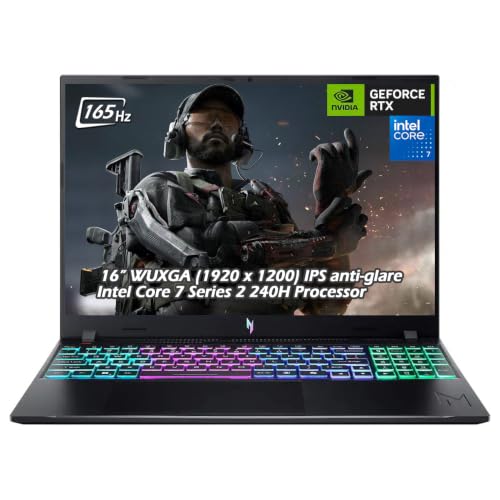
Acer Nitro V 16 RTX 5050 Laptop
Best for: 1080p gaming with a 16-inch 165Hz screen
- Graphics Card
- NVIDIA GeForce RTX 5050
- Processor
- Intel Core 7 Series 2 240H
- Memory
- 16GB DDR5
- Storage Capacity
- 512GB PCIe NVMe SSD
- Screen Size
- 16"
- Refresh Rate
- 165Hz
View on Amazon: Acer Nitro V 16 RTX 5050 Laptop Affiliate link
This 16-inch gaming laptop pairs an Intel Core 7 240H processor with an NVIDIA GeForce RTX 5050 GPU. You get a 165Hz WUXGA display for smooth visuals and 16GB of DDR5 RAM. It includes a 512GB SSD and Wi-Fi 6. This machine suits players who want solid 1080p performance without the bulk of larger chassis. It offers a practical balance of speed and screen real estate for everyday gaming.
Pros
- 165Hz refresh rate on 16-inch WUXGA display
- Intel Core 7 240H deca-core processor
- NVIDIA GeForce RTX 5050 with 8GB GDDR7
- 16GB DDR5 memory and 512GB SSD
Cons
- Heavier at 4.63 pounds compared to ultrabooks
- Standard 512GB storage limits large game libraries
- 1080p resolution is lower than 1440p alternatives
Good fit if
- You want a 16-inch screen for gaming
- You need RTX 5050 graphics for modern titles
- You prefer a standard laptop form factor
Skip if
- You require 1440p or higher display resolution
- You need more than 512GB of internal storage
- You want a lightweight ultrabook under 4 pounds
Verdict: Acer Nitro V 16" RTX 5050 delivers reliable 1080p gaming performance with a fast 165Hz screen. It fits users who prioritize visual smoothness and dedicated graphics in a portable 16-inch chassis.

Alienware 16 Aurora RTX 4050 Gaming Laptop
Best for: 16-inch gaming with RTX 4050
- Graphics Card
- NVIDIA GeForce RTX 4050
- Processor
- Intel Core 7 240H
- Memory
- 16GB DDR5
- Storage Capacity
- 512GB SSD
- Screen Size
- 16"
- Refresh Rate
- 120Hz
View on Amazon: Alienware 16 Aurora RTX 4050 Gaming Laptop Affiliate link
This 16-inch Alienware laptop pairs an Intel Core 7 240H processor with an NVIDIA GeForce RTX 4050 graphics card. It features a WQXGA 120Hz display and 16GB of DDR5 RAM. The Cryo-Chamber cooling system directs airflow to core components. It suits gamers who want solid 1080p performance in a sleek chassis without a rear thermal shelf.
Pros
- 16-inch WQXGA 120Hz display
- NVIDIA GeForce RTX 4050 GPU
- Intel Core 7 240H processor
- 16GB DDR5 memory
- Cryo-Chamber cooling structure
Cons
- 512GB SSD storage capacity
- 5.49-pound weight
- 120Hz refresh rate is lower than 165Hz competitors
Good fit if
- You want a 16-inch screen for gaming
- You prefer a sleek design without a rear thermal shelf
- You need RTX 4050 performance for modern titles
Skip if
- You require a higher 165Hz refresh rate
- You need more than 512GB of storage
- You prefer a lighter laptop under 5 pounds
Verdict: Alienware 16 RTX 4050 delivers reliable gaming performance with its RTX 4050 and 120Hz screen. It fits players who prioritize thermal design and screen size over maximum portability or higher refresh rates.

Lenovo ThinkPad T14 Intel Core Ultra 5
Best for: Business professionals needing durability
- Graphics Card
- Intel Arc Graphics 130V
- Processor
- Intel Core Ultra 5 226V
- Memory
- 16GB LPDDR5X
- Storage Capacity
- 512GB SSD
- Screen Size
- 14"
- Display Resolution
- FHD+ (1920 x 1200)
View on Amazon: Lenovo ThinkPad T14 Intel Core Ultra 5 Affiliate link
This 14-inch business laptop features an Intel Core Ultra 5 226V processor and 16GB of LPDDR5X RAM. It includes a 512GB SSD and an FHD+ IPS display. The device carries MIL-STD 810H certification for durability. It runs Windows 11 Pro and offers extensive connectivity via Thunderbolt 4 ports. This model suits professionals needing reliable multitasking and secure video conferencing capabilities.
Pros
- Intel Core Ultra 5 226V processor with AI acceleration
- 16GB LPDDR5X soldered RAM for fast processing
- MIL-STD 810H military-grade durability certification
- Windows 11 Pro with Copilot support
- 5MP webcam with privacy shutter
Cons
- Integrated Intel Arc Graphics limits gaming performance
- 14-inch screen is smaller than 16-inch alternatives
- RAM is soldered and cannot be upgraded
Good fit if
- You need a durable machine for business travel
- You require Thunderbolt 4 connectivity for peripherals
- You prefer Windows 11 Pro for work
Skip if
- You need dedicated graphics for gaming
- You want a larger 16-inch display
- You need to upgrade RAM later
Verdict: Lenovo ThinkPad T14 Gen 6 is a durable business laptop for professionals who need reliable multitasking and extensive port options. It fits users who prioritize security and build quality over graphical power.

Microsoft Surface Laptop 13.8 Touchscreen
Best for: portable productivity and AI tasks
- Processor
- Snapdragon X Elite (12 core)
- Memory
- 16GB RAM
- Storage Capacity
- 512GB SSD
- Screen Size
- 13.8"
View on Amazon: Microsoft Surface Laptop 13.8 Touchscreen Affiliate link
The Microsoft Surface Laptop (2024) is a 13.8-inch touchscreen device powered by the Snapdragon X Elite 12-core processor. It includes 16GB of RAM and a 512GB SSD. This Copilot+ PC offers up to 20 hours of battery life. It suits users who prioritize AI features and portability over raw gaming power or high refresh rates.
Pros
- Snapdragon X Elite 12-core processor for fast performance
- 13.8-inch touchscreen display
- Up to 20 hours of battery life
- 16GB RAM for multitasking
- Copilot+ PC AI capabilities
Cons
- 13.8-inch screen is smaller than 14-inch or 16-inch alternatives
- Snapdragon ARM architecture may limit native x86 game compatibility
- 512GB SSD storage is modest for large game libraries
Good fit if
- You need all-day battery life for mobile work
- You want a lightweight touchscreen laptop for everyday tasks
- You prefer Windows Copilot+ AI features
Skip if
- You require a high-refresh-rate display for competitive gaming
- You need dedicated NVIDIA graphics for heavy gaming
- You want a 16-inch or larger screen for productivity
Verdict: The Microsoft Surface Laptop 2024 fits users who need a portable, long-lasting device for productivity and AI tasks, rather than gamers seeking high-performance graphics or large screens.
Specifications side by side
| Spec | ASUS Zenbook 14 OLED Ryzen AI 9 | Microsoft Surface Laptop 13.8 Snapdragon X2 Elite | Microsoft Surface Pro 13-Inch Snapdragon X2 Plus | Acer Nitro V 16 RTX 5050 Laptop | Alienware 16 Aurora RTX 4050 Gaming Laptop | Lenovo ThinkPad T14 Intel Core Ultra 5 | Microsoft Surface Laptop 13.8 Touchscreen |
|---|---|---|---|---|---|---|---|
| Graphics Card | not stated | not stated | not stated | NVIDIA GeForce RTX 5050 | NVIDIA GeForce RTX 4050 | Intel Arc Graphics 130V | not stated |
| Processor | AMD Ryzen AI 9 465 | Qualcomm Snapdragon X2 Elite | Snapdragon X2 Plus | Intel Core 7 Series 2 240H | Intel Core 7 240H | Intel Core Ultra 5 226V | Snapdragon X Elite (12 core) |
| Memory | 16GB LPDDR5X | 16GB RAM | 16GB RAM | 16GB DDR5 | 16GB DDR5 | 16GB LPDDR5X | 16GB RAM |
| Storage Capacity | 512GB PCIe Gen 4 SSD | 512GB SSD | 512GB SSD | 512GB PCIe NVMe SSD | 512GB SSD | 512GB SSD | 512GB SSD |
| Screen Size | 14" | 13.8" | 13-inch | 16" | 16" | 14" | 13.8" |
| Refresh Rate | 60Hz | 120Hz | not stated | 165Hz | 120Hz | not stated | not stated |
| Display Resolution | 1920 x 1200 | not stated | not stated | 1920 x 1200 | WQXGA | FHD+ (1920 x 1200) | not stated |
| Storage | 512GB SSD | 512GB SSD | 512GB SSD | 512GB SSD | 512GB SSD | 512GB SSD | 512GB SSD |
| Use | not stated | not stated | not stated | not stated | not stated | Business | not stated |
| Size | not stated | 16GB/512GB | 16 GB RAM, 512 GB SSD | not stated | 15.3" Screen | 16GB RAM | 512GB SSD | 16GB/512GB |
| Dimensions | 12.3 × 8.66 × 0.62 inches | 12.7 × 9.44 × 2.15 inches | 12.1 × 8.98 × 1.97 inches | 22 × 14 × 4 inches | 10.5 × 14.1 × 0.6 inches | 12.4 × 8.81 × 0.63 inches | not stated |
| Weight | 2.82 pounds | 2.97 pounds | not stated | 4.63 pounds | 5.49 pounds | 3.37 pounds | not stated |
| Color | Gray | Black | Dune | Obsidian Black | Blue | Black | Platinum |
| Model | UM3405GA | EP2-59499 | EP2-73301 | not stated | LAC16250-7649BLU-PUS | ThinkPad T14 Gen 6 | 2024 |
Looking beyond this list? See apildella 14 dual laptop screen alternatives.
Frequently asked questions
Which alternative offers the best screen quality?
The ASUS Zenbook 14 OLED Ryzen AI 9 remains the top choice for visual fidelity. It features a 14-inch OLED display with 1920 x 1200 resolution. This setup delivers sharp, vibrant colors ideal for media consumption. The Microsoft Surface Laptop 13.8 also provides a premium screen, though it lacks the OLED panel found in the Zenbook.
Is there a 2-in-1 option in this list?
Yes, the Microsoft Surface Pro 13-Inch Snapdragon X2 Plus is a versatile 2-in-1 device. It is designed for users who prioritize portability and all-day battery life. This model fits those who need flexibility for productivity and media. It does not include a built-in keyboard, requiring you to attach one separately for typing tasks.
Which laptop is best for 1080p gaming?
The Acer Nitro V 16 RTX 5050 Laptop is built for reliable 1080p gaming. It features a fast 165Hz screen, which ensures visual smoothness in fast-paced titles. The dedicated RTX 5050 graphics card handles modern games well. This 16-inch chassis is portable but heavier, weighing 4.63 pounds compared to ultrabooks.
What is the lightest laptop on the list?
The ASUS Zenbook 14 OLED Ryzen AI 9 is the lightest option at 2.82 pounds. It measures 12.3 inches in length and 0.62 inches in height. This slim profile makes it ideal for professionals who value portability. The Lenovo ThinkPad T14 is slightly heavier at 3.37 pounds, while gaming models exceed 4 pounds.
Which device is best for business professionals?
The Lenovo ThinkPad T14 Intel Core Ultra 5 is tailored for business use. It offers extensive port options and durable build quality. This model prioritizes security and reliability over graphical power. It includes 16GB of RAM and a 512GB SSD, supporting multitasking needs for professionals who require a robust workhorse.
Does any alternative include a touchscreen?
The Microsoft Surface Laptop 13.8 Touchscreen supports interactive input for productivity and AI tasks. It is designed for users who need a portable, long-lasting device. This model is part of the Surface lineup, which typically emphasizes touch capabilities. The ASUS Zenbook 14 OLED does not list touchscreen functionality in its specifications.
Which laptop has the highest refresh rate?
The Acer Nitro V 16 RTX 5050 Laptop features a 165Hz refresh rate. This high rate ensures smooth visuals, particularly in gaming scenarios. The Alienware 16 Aurora RTX 4050 offers a 120Hz screen, which is also fast but slightly lower. Ultrabooks like the Zenbook typically focus on resolution and color accuracy rather than high refresh rates.