ASUS Zenbook 14 AI Business Review (2026): A Spec-Based Look
As an Amazon Associate we earn from qualifying purchases. Links on this page are affiliate links.
This asus zenbook 14 AI business review focuses on a laptop built for professional mobility. It pairs an AMD Ryzen AI 9 465 processor with 16GB of DDR5 memory. These two specs define its daily performance envelope. The device also features a 14-inch WUXGA OLED touchscreen. This combination offers sharp visuals and responsive multitasking. You get 1TB of SSD storage for ample files. The build weighs 2.82 pounds, making it easy to carry. This model targets users who need reliable power in a compact chassis.
What stands out
- AMD Ryzen AI 9 465 processor with up to 5GHz turbo speed
- 14-inch WUXGA OLED display with 500-nit peak brightness
- 16GB DDR5 RAM and 1TB SSD storage
- Thunderbolt 4 ports for fast data transfer
- Integrated AMD Radeon 880M graphics
Who it fits
Good fit for
This laptop suits business travelers and remote workers who need a lightweight machine. The 14-inch OLED screen is ideal for content creation and detailed spreadsheets. The Ryzen AI 9 465 handles multitasking without lag. You will appreciate the Thunderbolt 4 ports for connecting docks or external drives. The 1TB SSD ensures you have space for large project files. It is a solid choice for professionals who prioritize portability and screen quality over dedicated gaming graphics.
Who should skip it
You should look elsewhere if you require a dedicated graphics card for heavy gaming or 3D rendering. The integrated AMD Radeon 880M is sufficient for office tasks but not for high-end visual workloads. If you need more than 16GB of RAM for virtualization or large datasets, this configuration may limit you. Users who prefer a larger 15-inch or 16-inch display might find the 14-inch panel too small. Additionally, the lack of a numeric keypad may inconvenience those who input data frequently.
Verdict: The ASUS Zenbook 14 AI Business Laptop offers a balanced mix of performance and portability. Its OLED display and strong processor make it a reliable tool for daily business tasks.
ASUS Zenbook 14 Key Specs
AMD Ryzen AI 9 465
This 10-core processor offers a base frequency of 2GHz and can boost up to 5GHz. The 24MB L3 cache supports 20 threads for efficient multitasking. You will notice smooth performance when running multiple business applications simultaneously. This chip is designed to handle demanding workloads without significant lag. It is a strong choice for professionals who need reliable daily computing power for office tasks and light creative work.
16GB DDR5
DDR5 memory is the latest standard for speed and efficiency. With 16GB of capacity, you can keep many browser tabs and programs open at once. This amount of RAM ensures your system remains responsive during heavy multitasking. It prevents stuttering when switching between large documents or video calls. When shopping, this is a solid baseline for everyday productivity and moderate gaming on integrated graphics.
1TB SSD
A 1TB solid-state drive provides ample space for your operating system, applications, and personal files. SSDs are significantly faster than traditional hard drives, meaning your laptop boots quickly and programs launch almost instantly. You can store high-resolution photos, videos, and large datasets without worrying about space constraints. This capacity is ideal for users who manage large media libraries or extensive project files on the go.
14" WUXGA OLED
This 14-inch display offers a WUXGA resolution of 1920 x 1200 pixels in a 16:10 aspect ratio. The OLED technology delivers deep blacks and vibrant colors, covering 100% of the DCI-P3 color gamut. With a peak brightness of 500 nits, the screen remains visible in bright environments. This panel is excellent for content creation and media consumption, providing sharp text and rich visuals for professional presentations.
Design and Build Overview
The ASUS Zenbook 14 AI Business Laptop features a Jasper Gray finish. According to the listing, the chassis measures 12.3 inches in length, 8.66 inches in width, and 0.62 inches in height. This compact footprint allows you to fit the device easily into standard business bags. The weight is listed at 2.82 pounds, which supports frequent travel without adding excessive load to your daily carry.
The build prioritizes portability for professionals who move between offices and client sites. The slim profile suggests a focus on minimizing bulk. You will find a backlit keyboard on the top deck, which aids visibility in dimly lit environments like conference rooms or evening workspaces. The layout includes essential ports to reduce the need for dongles. You get two Thunderbolt 4 ports, one USB 3.2 Type-A port, and an HDMI 2.1 output. This variety helps you connect directly to projectors, external drives, or monitors without adapters.
The 14-inch WUXGA OLED touchscreen dominates the front, framed by relatively narrow bezels. The 16:10 aspect ratio provides more vertical space for documents and spreadsheets. The device runs Windows 11 Home and includes an FHD IR camera for clear video calls. Dolby Atmos technology is integrated into the audio system. These design choices create a tool optimized for mobile productivity and professional presentations.
Setup And Daily Workflow Use
Setting up this device begins with the pre-installed Windows 11 Home operating system. You will connect to networks via Wi-Fi 6E and Bluetooth, ensuring stable links to peripherals and internet services. The inclusion of an FHD IR camera allows for secure login and clear video calls, which is essential for remote work environments. For input, the backlit keyboard provides visibility in low-light office settings or evening home offices. The integrated Dolby Atmos technology enhances audio clarity for media consumption and conference calls without requiring external speakers. Daily productivity relies on the 16GB of DDR5 memory and the 1TB solid-state drive. This combination supports rapid boot times and quick file access, allowing you to switch between multiple business applications without lag. The AMD Radeon 880M graphics handle display duties efficiently, supporting the 14-inch WUXGA OLED touchscreen. This 1920 by 1200 resolution with a 16:10 aspect ratio offers vertical screen space for spreadsheets and documents. The 100% DCI-P3 color gamut ensures accurate visuals for design reviews or video editing tasks. Connectivity options include two Thunderbolt 4 ports, one USB 3.2 Type-A, and an HDMI 2.1 port. These interfaces let you connect monitors, storage drives, and presentation equipment directly. The laptop weighs 2.82 pounds, making it easy to carry between meetings. Overall, the specifications align with a workflow that demands responsiveness, portability, and reliable connectivity for professional tasks.
Before You Buy This Laptop
This laptop suits professionals who need portability without sacrificing screen quality. The 14-inch OLED display delivers vibrant colors, but you should check if your docking station supports its resolution. The included 1TB SSD provides ample space for large files, yet you may still want an external drive for heavy backups. Since it lacks dedicated graphics, avoid using it for intensive 3D rendering or high-end gaming. The integrated AMD Radeon 880M handles basic video editing and office tasks well. You will need to ensure your business software is compatible with Windows 11 Home. Regularly update drivers to maintain the Ryzen AI 9 465’s efficiency. This model fits well among 1 options for users prioritizing mobility and display clarity over raw graphical power. It is a solid choice for daily commuting and office work. Keep the battery healthy by avoiding full drains. This device balances performance and size effectively for modern business needs.
Check before you buy
- Verify docking station compatibility with the 14-inch OLED resolution
- Confirm your business apps work with Windows 11 Home
- Ensure the integrated graphics meet your basic video needs
- Check if you need extra storage beyond the 1TB SSD
The product at a glance
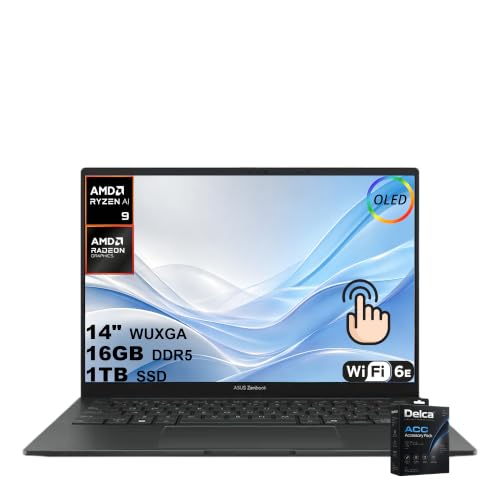
ASUS Zenbook 14 OLED Touch Laptop
Best for: business users needing OLED visuals
- Graphics Card
- AMD Radeon 880M
- Processor
- AMD Ryzen AI 9 465
- Memory
- 16GB DDR5
- Storage Capacity
- 1TB SSD
- Screen Size
- 14"
- Display Resolution
- 1920 x 1200
View on Amazon: ASUS Zenbook 14 OLED Touch Laptop Affiliate link
This 14-inch laptop pairs an AMD Ryzen AI 9 465 processor with 16GB of DDR5 RAM and a 1TB SSD. It features a 14-inch WUXGA OLED touchscreen with 500 nits peak brightness and 100% DCI-P3 color coverage. The device weighs 2.82 pounds and includes Thunderbolt 4 ports. It suits business users needing strong performance and a vibrant display for daily tasks.
Pros
- AMD Ryzen AI 9 465 with up to 5GHz turbo speed
- 14-inch WUXGA OLED touchscreen with 100% DCI-P3 coverage
- 16GB DDR5 RAM and 1TB SSD storage
- 2x Thunderbolt 4 and 1x USB 3.2 Type-A ports
Cons
- Integrated AMD Radeon 880M graphics limit heavy gaming
- Windows 11 Home lacks advanced enterprise security features
- 2.82-pound weight is heavier than some ultrabooks
Good fit if
- You need a bright, color-accurate screen for content creation
- You want fast SSD storage and ample RAM for multitasking
- You require Thunderbolt 4 connectivity for high-speed peripherals
Skip if
- You need dedicated graphics for professional 3D rendering
- You require Windows 11 Pro for domain joining
- You prioritize the lightest possible portable weight
Verdict: ASUS Zenbook 14 Ryzen AI 9 delivers strong CPU performance and a vivid OLED display for business professionals who value visual quality and connectivity over dedicated graphics power.
Specifications side by side
| Spec | ASUS Zenbook 14 OLED Touch Laptop |
|---|---|
| Graphics Card | AMD Radeon 880M |
| Processor | AMD Ryzen AI 9 465 |
| Memory | 16GB DDR5 |
| Storage Capacity | 1TB SSD |
| Screen Size | 14" |
| Display Resolution | 1920 x 1200 |
| Storage | 1TB SSD |
| Use | Business |
| Dimensions | 12.3 × 8.66 × 0.62 inches |
| Weight | 2.82 pounds |
| Color | Jasper Gray |
Frequently asked questions
Is the ASUS Zenbook 14 suitable for business travel?
Yes, its compact design makes it ideal for professionals on the move. The chassis weighs just 2.82 pounds and measures 0.62 inches thick. This lightweight profile ensures you can carry it comfortably in a briefcase or backpack without adding significant bulk to your daily load.
What kind of storage does the Zenbook 14 AI offer?
It comes equipped with a 1TB SSD for fast data access. This ample storage capacity allows you to keep large files, extensive spreadsheets, and multiple applications readily available. You will not need to rely heavily on external drives for your core business documents and media.
Does this laptop have dedicated graphics for gaming?
No, it is optimized for visual quality rather than gaming performance. The Ryzen AI 9 processor and OLED display prioritize sharp imagery for professional tasks. You should expect strong CPU performance and vivid visuals, but it is not designed for heavy graphical workloads or high-end gaming.
How much memory is included in the system?
The device features 16GB of RAM to handle multitasking efficiently. This amount of memory supports running multiple business applications simultaneously without significant slowdowns. You can switch between emails, web browsers, and productivity software smoothly during your daily workflow.
What is the screen size of this model?
It has a 14-inch display that balances portability with viewing space. This screen size fits well on smaller desks and in crowded coffee shops. The OLED technology ensures vibrant colors and deep blacks, making it excellent for presentations and detailed visual work.
Is the finish durable for daily office use?
The laptop features a Jasper Gray finish that provides a professional look. The specific dimensions of 12.3 inches by 8.66 inches create a sturdy footprint. This build quality helps it withstand the rigors of daily commuting and office environments while maintaining a sleek appearance.