Apple vs Microsoft Gaming Laptops: Which Brand Fits You?
As an Amazon Associate we earn from qualifying purchases. Links on this page are affiliate links.
When you compare an apple vs microsoft gaming laptop, you are looking at two very different machines. Both devices feature modern processors, high refresh rate displays, and long battery life. They share similar weight classes and recent connectivity standards like Wi-Fi 7. The main difference lies in their operating systems and memory configurations. One uses macOS with unified memory, while the other runs Windows with traditional RAM. These choices define their respective strengths for your daily tasks.
Key differences
| Aspect | Apple MacBook Air 13.6-inch M5 | Microsoft Surface Laptop 13.8 Snapdragon X2 Elite |
|---|---|---|
| Processor | Apple M5 | Qualcomm Snapdragon X2 Elite |
| Memory | 24GB Unified Memory | 16GB RAM |
| Screen Size | 13.6-inch | 13.8-inch |
| Refresh Rate | not listed | 120Hz |
| Storage | 1TB SSD | 512GB SSD |
| Ports | Two Thunderbolt 4, MagSafe, headphone jack | Two USB-C / USB4 |
Which one should you choose?
Choose Apple MacBook Air 13.6-inch M5 if
- You prefer macOS and need 24GB of unified memory for heavy multitasking.
- You require 1TB of local storage for large files.
- You want Thunderbolt 4 connectivity and a MagSafe charging port.
Choose Microsoft Surface Laptop 13.8 Snapdragon X2 Elite if
- You need a Windows system with a dedicated 120Hz touchscreen.
- You want a device that weighs just 2.97 pounds for portability.
- You prefer USB-C / USB4 ports for connecting multiple external monitors.
Verdict: Choose the Apple MacBook Air if you prioritize higher memory capacity, more storage, and macOS-specific features. Select the Microsoft Surface Laptop if you need a Windows environment, a high-refresh-rate touchscreen, and USB4 connectivity. Both are capable machines for everyday productivity and light creative work.
Apple vs Microsoft Laptop Specs
processor
The Apple MacBook Air 13.6-inch M5 uses the Apple M5 chip, which features a faster CPU and a next-generation GPU with Neural Accelerators. This design supports powerful AI tasks and fluid multitasking. In contrast, the Microsoft Surface Laptop 13.8-inch runs on the Qualcomm Snapdragon X2 Elite processor. This chip includes a dedicated AI component to help with Copilot+ features on Windows 11. Both laptops are built for heavy workloads, but the Apple model emphasizes a unified architecture for creative workflows, while the Microsoft device focuses on AI integration within the Windows ecosystem.
memory
Memory capacity is a key differentiator between these two machines. The Apple MacBook Air comes equipped with 24GB of Unified Memory, which allows the CPU and GPU to share resources efficiently. This higher amount of memory supports smoother performance when running multiple demanding applications simultaneously. The Microsoft Surface Laptop, however, is configured with 16GB of RAM. While sufficient for standard multitasking and browser tabs, it offers less headroom for intensive creative work or heavy virtualization tasks compared to the Apple option. If you need extra room for large datasets or complex projects, the Apple model provides more capacity.
storage
Storage capacity varies significantly between the two devices. The Apple MacBook Air includes 1TB of SSD storage, providing ample space for large files, video projects, and extensive application libraries. The Microsoft Surface Laptop is listed with 512GB of SSD storage in this specific configuration. While 512GB is adequate for many users, it is half the capacity of the Apple device. You may need to rely more on cloud storage or external drives with the Microsoft model to manage large files. For users who store significant amounts of data locally, the Apple option offers a clear advantage in internal space.
screen size
Display size is nearly identical, but with slight differences. The Apple MacBook Air features a 13.6-inch Liquid Retina display that supports 1 billion colors for sharp detail and rich contrast. The Microsoft Surface Laptop has a 13.8-inch PixelSense touchscreen LCD. Both screens are suitable for everyday tasks, media consumption, and light creative work. The Microsoft device offers a larger physical viewing area by 0.2 inches and includes touch functionality, which can be useful for navigation. The Apple display focuses on color accuracy and brightness. For most users, the difference in screen real estate is negligible, making this a close comparison.
refresh rate
Refresh rate affects how smooth scrolling and animations appear on the screen. The Microsoft Surface Laptop explicitly features a 120Hz refresh rate on its PixelSense display, allowing for smoother visual transitions when scrolling through web pages or editing photos. The Apple MacBook Air specifications do not list a specific refresh rate, though standard displays typically operate at 60Hz. A higher refresh rate can reduce motion blur and make the interface feel more responsive. If you prioritize fluid motion and quick visual feedback, the Microsoft device has a technical advantage. Otherwise, both displays provide clear and sharp images for daily use.
connectivity
Both laptops support modern connectivity standards, including Wi-Fi 7. The Apple MacBook Air offers two Thunderbolt 4 ports, a MagSafe charging port, a headphone jack, and supports up to two external displays. The Microsoft Surface Laptop provides two USB-C / USB4 ports and can connect to three 4K monitors. The Microsoft device allows for more external display connectivity, which is beneficial for multi-monitor setups. The Apple device includes MagSafe for convenient charging and a headphone jack for audio. Both offer robust port selection, but the Microsoft model provides greater flexibility for connecting multiple high-resolution screens.
Choose the right laptop for you
Students needing all-day battery and portability
The Microsoft Surface Laptop offers up to 20 hours of video playback. It weighs just 3 lbs, making it light enough to forget in your bag. The 13.8-inch PixelSense touchscreen with 120Hz scrolling provides smooth navigation for streaming and daily work tasks without frequent charging.
Users requiring maximum memory for creative workflows
The Apple MacBook Air features 24GB of unified memory and a 1TB SSD. This configuration supports fluid multitasking and powerful AI capabilities. The M5 chip delivers faster CPU performance and a next-generation GPU, ensuring smooth responsiveness for tough assignments and creative projects throughout the day.
Those wanting versatile connectivity and external displays
The Apple MacBook Air includes two Thunderbolt 4 ports, MagSafe charging, and a headphone jack. It supports up to two external displays. The Apple N1 wireless chip enables Wi-Fi 7 and Bluetooth 6. These features allow you to set up a comprehensive workstation with ease.
The products compared
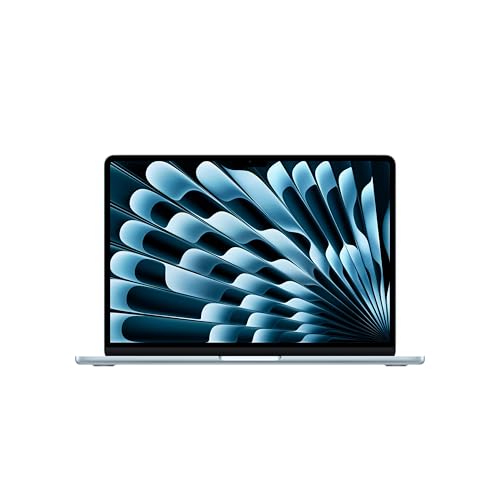
Apple MacBook Air 13.6-inch M5
Best for: students and mobile professionals
- Processor
- Apple M5
- Memory
- 24GB Unified Memory
- Storage Capacity
- 1TB SSD
- Screen Size
- 13.6-inch
- Dimensions
- 8.46 × 0.44 × 12 inches
- Weight
- 2.71 pounds
View on Amazon: Apple MacBook Air 13.6-inch M5 Affiliate link
This Apple MacBook Air pairs an M5 chip with 24GB of unified memory and a 1TB SSD. The 13.6-inch Liquid Retina display supports 1 billion colors. You get up to 18 hours of battery life in a 2.71-pound chassis. It suits students and professionals who need strong AI performance and long battery life for college or daily tasks.
Pros
- Apple M5 processor with Neural Engine
- 24GB unified memory for multitasking
- 1TB SSD storage capacity
- Up to 18 hours of battery life
- 13.6-inch Liquid Retina display
Cons
- 13.6-inch screen size limits workspace
- macOS restricts Windows-only software
- Only two Thunderbolt 4 ports
Good fit if
- You need strong AI processing power
- You prioritize all-day battery life
- You prefer a lightweight portable design
Skip if
- You require native Windows gaming
- You need more than two external displays
- You prefer a larger 15-inch screen
Verdict: Apple 13-inch M5 MacBook Air delivers efficient performance for mobile workflows. It fits students and professionals who value battery life and portability over desktop-grade gaming capabilities.

Microsoft Surface Laptop 13.8 Snapdragon X2 Elite
Best for: portable everyday productivity and media consumption
- Processor
- Qualcomm Snapdragon X2 Elite
- Memory
- 16GB RAM
- Storage Capacity
- 512GB SSD
- Screen Size
- 13.8"
- Refresh Rate
- 120Hz
- Dimensions
- 12.7 × 9.44 × 2.15 inches
View on Amazon: Microsoft Surface Laptop 13.8 Snapdragon X2 Elite Affiliate link
The Microsoft Surface Laptop 13.8-inch runs on the Qualcomm Snapdragon X2 Elite processor with 16GB of RAM. It features a 120Hz PixelSense touchscreen and 512GB of SSD storage. This Copilot+ PC targets students and professionals who need all-day battery life for multitasking. The 13.8-inch display offers sharp colors and smooth scrolling for daily work and media consumption.
Pros
- Qualcomm Snapdragon X2 Elite processor for efficient multitasking
- 120Hz refresh rate on the 13.8-inch PixelSense touchscreen
- Up to 20 hours of video playback battery life
- Wi-Fi 7 connectivity for fast wireless speeds
Cons
- 16GB RAM may limit heavy video editing or gaming
- Only two USB-C ports limit simultaneous peripheral connections
- 13.8-inch screen is smaller than the 15-inch alternative
Good fit if
- You need a lightweight laptop for school or office work
- You prioritize long battery life over desktop performance
- You prefer a touchscreen interface for navigation
Skip if
- You require dedicated graphics for high-end gaming
- You need more than two USB ports for peripherals
- You prefer a larger 15-inch display for spreadsheets
Verdict: Microsoft Surface Laptop 13.8" Snapdragon X2 is ideal for students and professionals who value portability and battery life. It suits users who need a responsive touchscreen for daily tasks rather than intensive creative work.
Specifications side by side
| Spec | Apple MacBook Air 13.6-inch M5 | Microsoft Surface Laptop 13.8 Snapdragon X2 Elite |
|---|---|---|
| Processor | Apple M5 | Qualcomm Snapdragon X2 Elite |
| Memory | 24GB Unified Memory | 16GB RAM |
| Storage Capacity | 1TB SSD | 512GB SSD |
| Screen Size | 13.6-inch | 13.8" |
| Refresh Rate | not stated | 120Hz |
| Storage | 1TB SSD | 512GB SSD |
| Dimensions | 8.46 × 0.44 × 12 inches | 12.7 × 9.44 × 2.15 inches |
| Weight | 2.71 pounds | 2.97 pounds |
| Size | 24GB Unified Memory | 1TB SSD Storage | 16GB/512GB |
| Color | Sky Blue | Black |
| Model | MDHK4LL/A | EP2-59499 |
Frequently asked questions
Can the Apple MacBook Air M5 handle heavy gaming?
No, it is not built for desktop-grade gaming. Apple positions this device for mobile workflows and students. It prioritizes battery life and portability over intensive graphics performance. You should look elsewhere if you need a dedicated GPU for high-end titles.
Does the Microsoft Surface Laptop support touch input?
Yes, the Microsoft Surface Laptop features a responsive touchscreen. This design suits users who prefer direct interaction for daily tasks and media consumption. It is ideal for students and professionals who want a versatile interface for everyday productivity rather than intensive creative work.
Which laptop is lighter to carry around?
The Apple MacBook Air M5 is lighter at 2.71 pounds. The Microsoft Surface Laptop weighs 2.97 pounds. Both are portable, but the Apple model offers a slight advantage for mobile professionals who value minimal weight in their daily carry setup.
How much storage does the Apple MacBook Air have?
The Apple MacBook Air M5 includes 1TB of SSD storage. This provides ample space for large files and applications. It is a significant upgrade for users who need extensive local storage for their mobile workflows and student projects.
What memory configuration does the Microsoft Surface Laptop use?
The Microsoft Surface Laptop comes with 16GB of RAM and 512GB of SSD storage. This configuration supports multitasking and media consumption. It is suitable for everyday productivity tasks and general use without requiring intensive creative software resources.
Is the Apple MacBook Air suitable for students?
Yes, it is designed for students and mobile professionals. The device delivers efficient performance for academic workflows. You benefit from long battery life and a compact 13.6-inch display, making it a practical choice for campus use and travel.
Does the Microsoft Surface Laptop have a high refresh rate screen?
Yes, it features a 120Hz PixelSense touchscreen. This high refresh rate ensures smooth visuals for media consumption and general use. It enhances the responsiveness of touch interactions, making daily tasks feel more fluid and engaging for students and professionals.
Which brand offers better AI capabilities in this comparison?
The Apple MacBook Air M5 features Neural Accelerators in its M5 chip. This design supports powerful AI tasks and fluid multitasking. While both laptops are modern, the Apple silicon is specifically highlighted for its efficiency in handling advanced computational workloads.