Apple MacBook Air 15-Inch M2 Review: Who It Fits and Who Should Skip It
As an Amazon Associate we earn from qualifying purchases. Links on this page are affiliate links.
This apple macbook air 15 inch m2 review covers the 2023 model that combines a large 15.3-inch Liquid Retina display with the efficient M2 chip. You get a spacious screen for multitasking, paired with an 8-core CPU and 10-core GPU for smooth performance. The device is remarkably thin and light, weighing just 3.3 pounds. It features a fanless design, ensuring silent operation during your daily tasks. With up to 18 hours of battery life, this laptop is built for mobility and all-day productivity without needing constant charging.
What stands out
- 15.3-inch Liquid Retina display with 500 nits brightness
- Apple M2 chip with 8-core CPU and 10-core GPU
- Fanless design for completely silent operation
- Up to 18 hours of battery life
- Durable 100 percent recycled aluminum enclosure
Who it fits
Good fit for
This laptop suits students, remote workers, and creatives who need a large screen for writing, coding, or editing photos. The 15.3-inch display offers ample space for split-screen workflows. The M2 chip handles everyday tasks and moderate creative work efficiently. Its lightweight design and long battery life make it ideal for carrying to libraries, cafes, or offices. If you prioritize portability and screen real estate over raw gaming power, this configuration fits your needs.
Who should skip it
You should look elsewhere if you need high-end gaming performance or heavy video rendering. The base model comes with only 8GB of RAM, which may limit multitasking with many browser tabs or large applications. The 256GB SSD storage fills up quickly if you store many large files locally. Users requiring dedicated graphics for 3D work or those who need more internal storage should consider higher-tier configurations with 16GB or 24GB RAM and larger SSDs.
Verdict: The MacBook Air 15-inch M2 delivers a compelling balance of screen size, efficiency, and portability for general users. It is a strong choice for those who value a large display and long battery life in a thin, silent chassis.
Key specs explained
Apple M2 Processor
This chip powers the laptop with an 8-core CPU and a 10-core GPU. You get fast performance for everyday tasks like web browsing and document editing. The efficient design helps the device run cool and silent without a fan. This makes it suitable for students or professionals who need reliable speed without the noise of traditional gaming laptops.
8GB RAM
Unified memory allows the CPU and GPU to share data quickly. Eight gigabytes is sufficient for multitasking with several browser tabs and standard apps. You can switch between programs smoothly without noticeable lag. However, if you plan to run heavy video editing software or many virtual machines, you might want to compare this against models with 16GB or more for better headroom.
256GB SSD Storage
Solid-state storage provides quick boot times and fast file access. Two hundred fifty-six gigabytes holds your operating system, applications, and a moderate amount of personal files. You may need to manage space carefully or use cloud storage for large media libraries. Compare this to larger SSD options if you store many high-resolution videos or large game libraries locally.
15.3-inch Screen Size
The large Liquid Retina display offers ample space for multitasking and media consumption. You can view more content on screen simultaneously, which is helpful for productivity work or watching movies. The high resolution ensures sharp text and vibrant images. This size is ideal if you prefer a desktop-like experience on a portable device, though it is larger than standard 13-inch ultrabooks.
Design and build quality
The 2023 Apple MacBook Air 15-Inch M2 features a durable enclosure made from 100 percent recycled aluminum. According to the listing, this material choice provides a strikingly thin and light profile. The finish is available in Silver, Starlight, Midnight, or Space Gray, allowing you to select a color that matches your personal style or professional environment. The chassis is fanless, which means the design runs completely silent during use. This silent operation ensures that your workspace remains quiet, whether you are in a library, a cafe, or a home office.
In terms of physical dimensions, the device measures 15.3 inches in length, 11 inches in width, and 1.26 inches in height. It weighs 3.3 pounds. The 15.3-inch Liquid Retina display has rounded corners at the top. When measured as a standard rectangle, the screen is 15.3 inches diagonally, though the actual viewable area is slightly less. The large footprint offers ample space for your hands and wrists, making it comfortable for extended typing sessions. However, the size and weight mean it is best suited for stationary use at a desk or for occasional transport in a sturdy bag. The compact height allows it to slide easily into most laptop sleeves, while the solid aluminum body protects the internal components from minor bumps and drops during travel.
Setup and everyday use
Setting up this device involves standard macOS initialization. You will configure your user profile, connect to Wi-Fi, and transfer data if you are upgrading from an older Mac. The system runs on macOS, which is optimized for the M2 chip. This integration ensures that apps launch quickly and interface smoothly with the hardware. You do not need to install separate drivers for the display or graphics, as Apple manages these components internally. The Liquid Retina display supports P3 wide color and one billion colors. This means images and text appear sharp and vibrant right out of the box. You can adjust brightness up to 500 nits for use in bright environments. The fanless design means the laptop runs silently. There are no moving parts to create noise during setup or daily use. This is beneficial for quiet workspaces or libraries. The 8GB of unified memory allows you to switch between apps efficiently. You can keep multiple browser tabs and documents open without noticeable lag. The 256GB SSD provides fast boot times and quick file access. Storage fills up quickly if you store large media files. You may need to manage files carefully or use external storage. The 15.3-inch screen offers ample space for multitasking. You can view two windows side by side comfortably. The keyboard and trackpad respond precisely to your inputs. Battery life claims up to 18 hours suggest you can work all day without charging. This depends on your specific tasks and screen brightness settings. The thin and light profile makes it easy to carry. You can move between rooms or offices without strain. The recycled aluminum body feels solid and durable. It resists fingerprints and minor scratches. Overall, the setup is straightforward. Daily use is smooth and responsive for most tasks.
Before You Buy This Laptop
This laptop offers a large 15.3-inch screen and silent operation, but its 8GB of RAM limits heavy multitasking. You should check if your workflow requires more than 256GB of storage, as the SSD is not expandable. Consider upgrading to the 16GB or 24GB RAM options if you edit video or run many apps at once. The fanless design means no dust filters to clean, simplifying upkeep. You will likely need a USB-C hub for extra ports, as the listing shows limited connectivity. This model fits users who prioritize screen real estate and portability over raw power. It sits alongside other everyday laptops by offering a premium build and long battery life. However, it lacks the thermal headroom for sustained gaming loads. Verify your app compatibility with macOS before purchasing. The thin profile makes it easy to carry, but the weight of 3.3 pounds is noticeable in a bag.
Check before you buy
- Confirm 8GB RAM meets your multitasking needs.
- Check if 256GB storage is sufficient for your files.
- Verify your software works on macOS.
- Plan for a USB-C hub for more ports.
The product at a glance
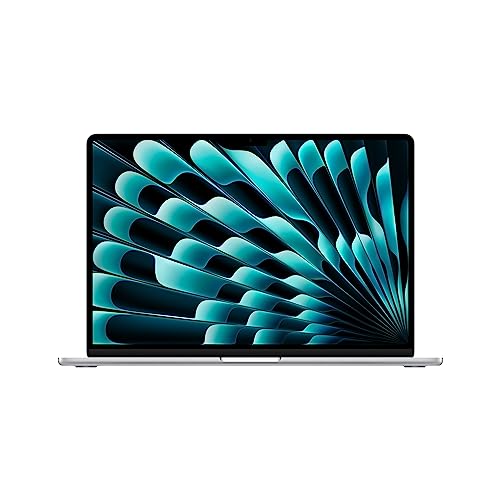
Apple MacBook Air 15-Inch M2
Best for: Users needing large screens and portability
- Graphics Card
- 10-Core GPU
- Processor
- Apple M2
- Memory
- 8GB RAM
- Storage Capacity
- 256GB SSD
- Screen Size
- 15.3"
- Dimensions
- 15.3 × 11 × 1.26 inches
View on Amazon: Apple MacBook Air 15-Inch M2 Affiliate link
This 15.3-inch laptop features an Apple M2 chip with an 8-core CPU and 10-core GPU. It includes 8GB of unified memory and 256GB of SSD storage. The device offers up to 18 hours of battery life and a fanless, silent design. Its Liquid Retina display supports one billion colors. This model suits users who need a large screen for productivity but prefer a lightweight, portable form factor for everyday tasks.
Pros
- 15.3-inch Liquid Retina display with 500 nits brightness
- Apple M2 chip with 8-core CPU and 10-core GPU
- Fanless design runs completely silent
- Up to 18 hours of battery life
- Durable 100 percent recycled aluminum enclosure
Cons
- Only 8GB of unified memory limits heavy multitasking
- 256GB SSD storage fills up quickly for large files
- No active cooling means potential thermal throttling under sustained load
Good fit if
- You need a large screen for detailed work
- You prioritize silent operation and portability
- You mainly use web browsing and office apps
Skip if
- You require more than 8GB of RAM for professional software
- You need extensive local storage for media libraries
- You run intensive gaming or rendering tasks regularly
Verdict: Apple MacBook Air 15-inch M2 delivers a spacious display and efficient performance for general use. It fits students and professionals who value screen real estate and battery life over raw power.
Specifications side by side
| Spec | Apple MacBook Air 15-Inch M2 |
|---|---|
| Graphics Card | 10-Core GPU |
| Processor | Apple M2 |
| Memory | 8GB RAM |
| Storage Capacity | 256GB SSD |
| Screen Size | 15.3" |
| Storage | 256GB SSD |
| Dimensions | 15.3 × 11 × 1.26 inches |
| Weight | 3.3 pounds |
| Size | 8GB RAM - 256GB SSD Storage |
| Color | Silver |
| Model | MQKR3LL/A |
Frequently asked questions
Is the Apple MacBook Air 15-inch M2 good for students?
Yes, it fits students who value screen real estate and battery life. The large 15.3-inch Liquid Retina display helps with multitasking and research. The efficient M2 chip provides smooth performance for web browsing and document editing without generating noise.
What are the dimensions of the MacBook Air 15-inch M2?
The device measures 15.3 inches in length and 11 inches in width. Its height is 1.26 inches, making it quite thin. These dimensions allow it to remain portable despite the larger screen size compared to standard laptops.
How much does the MacBook Air 15-inch M2 weigh?
It weighs 3.3 pounds. This lightweight profile makes it easy to carry in a backpack. The durable enclosure is made from 100 percent recycled aluminum, which contributes to its sturdy yet light build quality for daily transport.
Can I upgrade the RAM on the MacBook Air 15-inch M2?
No, the memory is not user-upgradeable. The base model comes with 8GB of RAM. If your workflow requires more power, you should consider the options with 16GB or 24GB RAM at the time of purchase, as the internal components are fixed.
Is the storage on the MacBook Air 15-inch M2 expandable?
No, the SSD is not expandable. The base configuration includes 256GB of storage. You should check if this amount suffices for your files, as you cannot add internal drives later. External storage or cloud solutions are your only expansion options.
What color options are available for the MacBook Air 15-inch M2?
The listing shows the Silver model. Other common finishes for this line include Starlight, Midnight, and Space Gray. These colors are part of the durable aluminum enclosure design, allowing you to choose a style that matches your personal preference.
Does the MacBook Air 15-inch M2 have a fan?
No, it operates silently without a fan. The efficient M2 chip design helps the device run cool. This means you will not hear any noise during general use, making it ideal for quiet environments like libraries or offices.