Apple MacBook Air 13.6-inch M5 or Apple MacBook Air 15-inch M5? Which Apple Model to Buy
As an Amazon Associate we earn from qualifying purchases. Links on this page are affiliate links.
When comparing the apple macbook air 13 inch vs macbook air 15 inch, you face a choice between portability and screen real estate. Both models feature the Apple M5 chip, 18 hours of battery life, and Wi-Fi 7 connectivity. They share identical cameras, ports, and macOS features. The main difference lies in the display size, physical dimensions, and base memory configurations. You need to decide which form factor best fits your daily workflow and carrying habits.
Key differences
| Aspect | Apple MacBook Air 13.6-inch M5 | Apple MacBook Air 15-inch M5 |
|---|---|---|
| Screen Size | 13.6-inch | 15.3-inch |
| Memory | 24GB Unified Memory | 16GB Unified Memory |
| Storage | 1TB SSD | 512GB SSD |
| Speakers | Four-speaker system | Six-speaker system |
| Weight | 2.71 pounds | 3.33 pounds |
Which one should you choose?
Choose Apple MacBook Air 13.6-inch M5 if
- You prioritize maximum portability and lighter weight for travel.
- You want more base memory and storage without upgrading.
- You prefer a compact screen for smaller desks or bags.
Choose Apple MacBook Air 15-inch M5 if
- You need a larger display for multitasking or media consumption.
- You want a premium six-speaker audio system.
- You are comfortable carrying a slightly heavier laptop for better screen size.
Verdict: Choose the 13-inch model if you value lightness and higher base specifications. The 15-inch version is better if you need more screen space and enhanced audio. Both offer identical performance from the M5 chip.
Screen Size and Memory Tradeoffs
Screen size
The 13.6-inch MacBook Air offers a compact footprint for tight spaces, while the 15.3-inch model provides a larger Liquid Retina display. Both screens support 1 billion colors for sharp detail. You get a more immersive experience for movies and games on the 15-inch version. The 13-inch version fits easier into small backpacks. If you need extra workspace for spreadsheets or editing, the larger screen helps. If you prioritize carrying your laptop all day, the smaller display is lighter and less obtrusive.
Memory
The 13-inch MacBook Air comes with 24GB of Unified Memory, which handles heavy multitasking and creative workflows smoothly. The 15-inch model has 16GB of Unified Memory. Both use the M5 chip for fast processing. The extra memory in the 13-inch version allows you to keep more apps open without slowdowns. This is useful for students running many browser tabs and design tools. The 15-inch version still performs well, but the 13-inch model has the advantage in raw memory capacity for demanding tasks.
Storage
Storage capacity differs between the two configurations. The 13-inch MacBook Air includes 1TB of SSD storage. The 15-inch MacBook Air includes 512GB of SSD storage. Both use fast solid-state drives for quick boot times and file access. The 13-inch model gives you double the space for photos, videos, and apps. If you store large media libraries locally, the 13-inch version is more practical. The 15-inch version may require external drives or cloud storage for large files.
Weight
Portability depends on weight. The 13-inch MacBook Air weighs 2.71 pounds. The 15-inch MacBook Air weighs 3.33 pounds. The difference is over half a pound. If you carry your laptop to classes or cafes daily, the lighter 13-inch model reduces strain. The 15-inch model is heavier due to its larger chassis. Both remain thin, but the 13-inch version is easier to slip into a bag. For maximum mobility, the lighter model is the better choice.
Speakers
Audio quality varies slightly between the models. The 13-inch MacBook Air features a four-speaker sound system with Spatial Audio. The 15-inch MacBook Air features a six-speaker sound system with Spatial Audio. Both support Dolby Atmos for immersive sound. The six-speaker setup on the 15-inch model provides richer audio and better volume. If you watch movies or listen to music without headphones, the larger model sounds better. The 13-inch model still delivers clear audio for calls and casual use.
Which MacBook Air model fits you
Students needing maximum portability
The 13.6-inch model weighs 2.71 pounds and measures 12 by 8.46 inches. This compact size fits easily into backpacks. You get 24GB of unified memory for smooth multitasking. The M5 chip handles college assignments efficiently. This configuration balances performance with a lightweight design for daily campus carry.
Users wanting a larger display
The 15.3-inch screen offers more viewing area for media and work. You get a six-speaker system instead of four, enhancing audio quality. The chassis measures 13.4 by 9.35 inches. This larger footprint supports better spatial audio and a more immersive experience for movies, games, and presentations while maintaining the M5 performance.
Buyers prioritizing high memory capacity
This specific configuration includes 24GB of unified memory and 1TB of SSD storage. You get double the memory of the base 15-inch model. This setup handles demanding creative workflows and heavy multitasking with ease. The larger storage capacity holds more files and applications. It is ideal for users who need extensive local resources.
The products compared
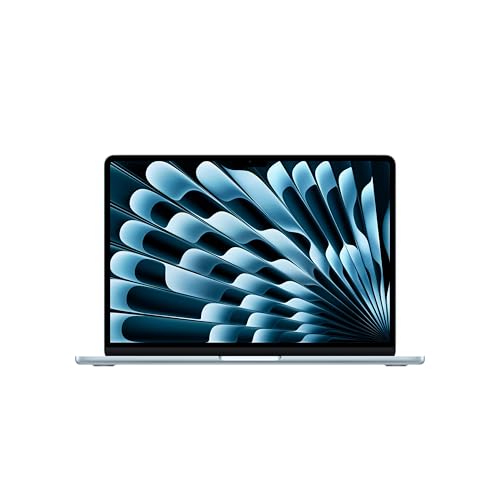
Apple MacBook Air 13.6-inch M5
Best for: portable productivity and AI tasks
- Processor
- Apple M5
- Memory
- 24GB Unified Memory
- Storage Capacity
- 1TB SSD
- Screen Size
- 13.6-inch
- Dimensions
- 8.46 × 0.44 × 12 inches
- Weight
- 2.71 pounds
View on Amazon: Apple MacBook Air 13.6-inch M5 Affiliate link
This 13.6-inch MacBook Air features the M5 chip and 24GB of unified memory. It includes 1TB of SSD storage and weighs 2.71 pounds. The Liquid Retina display supports 1 billion colors. You get up to 18 hours of battery life. It connects via Thunderbolt 4 ports and Wi-Fi 7. This model suits students and professionals who need a portable, powerful machine for daily tasks and AI workloads.
Pros
- 13.6-inch Liquid Retina display with 1 billion colors
- 24GB Unified Memory for smooth multitasking
- 1TB SSD storage capacity
- Up to 18 hours of battery life
- Wi-Fi 7 and Bluetooth 6 connectivity
Cons
- 13.6-inch screen is smaller than the 15-inch alternative
- Limited to two Thunderbolt 4 ports
- Only supports up to two external displays
Good fit if
- You prioritize portability and a lighter 2.71-pound build
- You need 24GB of unified memory for creative workflows
- You want a compact 13.6-inch screen for travel
Skip if
- You require a larger 15.3-inch display for more screen real estate
- You need more than two external monitor connections
- You prefer a device with more than two Thunderbolt ports
Verdict: Apple MacBook Air 13-inch M5 offers a compact, high-performance setup with 24GB of memory. It is ideal for users who value portability and a 13.6-inch display over the larger 15-inch screen size.

Apple MacBook Air 15-inch M5
Best for: multitasking and media consumption
- Processor
- Apple M5
- Memory
- 16GB Unified Memory
- Storage Capacity
- 512GB SSD
- Screen Size
- 15.3-inch
- Dimensions
- 9.35 × 0.45 × 13.4 inches
- Weight
- 3.33 pounds
View on Amazon: Apple MacBook Air 15-inch M5 Affiliate link
This 15.3-inch MacBook Air features the M5 chip and 16GB of unified memory. It includes a 512GB SSD and a Liquid Retina display. The device weighs 3.33 pounds and measures 0.45 inches thick. It offers up to 18 hours of battery life. You should choose this model if you need a larger screen for multitasking or media consumption while maintaining portability.
Pros
- 15.3-inch Liquid Retina display with 1 billion colors
- Apple M5 chip with faster CPU and unified memory
- Up to 18 hours of battery life
- Two Thunderbolt 4 ports and MagSafe charging
Cons
- Heavier at 3.33 pounds compared to the 13-inch model
- Thicker profile at 0.45 inches
- Only two Thunderbolt 4 ports available
Good fit if
- You need a larger screen for creative work
- You want longer battery life for all-day use
- You prefer a portable laptop with more screen real estate
Skip if
- You prioritize the lightest possible weight
- You need more than two Thunderbolt 4 ports
- You want a smaller 13.6-inch display
Verdict: Apple MacBook Air 15-inch M5 fits students and professionals who need a larger display for multitasking and media without sacrificing portability.
Specifications side by side
| Spec | Apple MacBook Air 13.6-inch M5 | Apple MacBook Air 15-inch M5 |
|---|---|---|
| Processor | Apple M5 | Apple M5 |
| Memory | 24GB Unified Memory | 16GB Unified Memory |
| Storage Capacity | 1TB SSD | 512GB SSD |
| Screen Size | 13.6-inch | 15.3-inch |
| Storage | 1TB SSD | 512GB SSD |
| Dimensions | 8.46 × 0.44 × 12 inches | 9.35 × 0.45 × 13.4 inches |
| Weight | 2.71 pounds | 3.33 pounds |
| Size | 24GB Unified Memory | 1TB SSD Storage | 16GB Unified Memory | 512GB SSD Storage |
| Color | Sky Blue | Midnight |
| Model | MDHK4LL/A | MDVH4LL/A |
Frequently asked questions
Which MacBook Air is better for students?
The 13.6-inch model suits students who prioritize portability. It weighs 2.71 pounds and measures 12 by 8.46 inches, fitting easily into backpacks. The 15-inch option is better for those needing more screen space for multitasking. It weighs 3.33 pounds and measures 13.4 by 9.35 inches.
Does the 15-inch MacBook Air have more memory?
No, the 13.6-inch model has more memory. It includes 24GB of unified memory. The 15-inch version comes with 16GB of unified memory. Both models use the M5 chip. The larger memory in the smaller model helps with smooth multitasking and handling demanding applications.
Which model has more storage space?
The 13.6-inch MacBook Air offers more storage. It includes a 1TB SSD. The 15-inch model comes with a 512GB SSD. If you need to store large files or many applications, the 13-inch model provides double the internal storage capacity of the larger screen version.
Is the 15-inch MacBook Air too heavy to carry?
The 15-inch model weighs 3.33 pounds. This is slightly heavier than the 13.6-inch version, which weighs 2.71 pounds. Both are considered portable laptops. The 15-inch model is designed for users who want a larger display for media and work without sacrificing too much mobility.
What colors are available for these MacBook Air models?
The 13.6-inch model is available in Sky Blue. The 15-inch model is available in Midnight. Both models share the same sleek design language. You can choose the color that best matches your personal style or professional needs while getting the same core performance features.
Can the MacBook Air handle AI tasks?
Yes, both models handle AI tasks well. The 13.6-inch model is specifically noted for portable productivity and AI tasks. Its 24GB of unified memory supports these workloads efficiently. The M5 chip in both devices ensures fast processing for modern software requirements and everyday computing needs.