Acer Nitro V 16S 16-Inch RTX 5060 Gaming Laptop or Acer Nitro V 15.6" Core? Which Acer Model to Buy
As an Amazon Associate we earn from qualifying purchases. Links on this page are affiliate links.
When choosing between the acer nitro v 16s AI gaming laptop vs nitro v gaming laptop, you are comparing two distinct Acer Nitro V models. Both offer fast DDR5 memory, 1TB SSDs, and dedicated NVIDIA graphics. The main difference lies in their generation and form factor. The Nitro V 16S features the newer RTX 5060 GPU and a larger 16-inch screen. The standard Nitro V uses the RTX 4050 and a 15.6-inch display. Your choice depends on whether you prioritize raw graphical power or a more traditional screen size.
Key differences
| Aspect | Acer Nitro V 16S 16-Inch RTX 5060 Gaming Laptop | Acer Nitro V 15.6" Core i7 RTX 4050 |
|---|---|---|
| Graphics Card | NVIDIA GeForce RTX 5060 | NVIDIA GeForce RTX 4050 |
| Processor | AMD Ryzen 7 260 | Intel Core i7-13620H |
| Memory | 32GB DDR5 | 16GB DDR5 |
| Screen Size | 16 inches | 15.6 inches |
| Refresh Rate | 180Hz | 165Hz |
| Weight | 4.63 pounds | 4.66 pounds |
Which one should you choose?
Choose Acer Nitro V 16S 16-Inch RTX 5060 Gaming Laptop if
- You want the latest RTX 5060 GPU for higher frame rates and AI features.
- You need 32GB of RAM for heavy multitasking or content creation.
- You prefer a larger 16-inch screen with a 180Hz refresh rate.
Choose Acer Nitro V 15.6" Core i7 RTX 4050 if
- You are comfortable with 16GB of RAM for standard gaming.
- You prefer the Intel Core i7 processor for specific compatibility.
- You want the classic 15.6-inch FHD display size.
Verdict: The Nitro V 16S is the better choice for users seeking maximum performance and modern AI capabilities. Its RTX 5060 and 32GB of RAM provide a significant edge for demanding tasks. Choose the standard Nitro V if you prefer a smaller screen and do not need the extra memory or newer graphics card.
Key Specs and Performance Comparison
Graphics card
The Acer Nitro V 16S features the NVIDIA GeForce RTX 5060 Laptop GPU, while the Acer Nitro V 15.6 uses the RTX 4050. The RTX 5060 is built on the newer Blackwell architecture and delivers 572 AI TOPS of horsepower. This supports fourth-generation RT Cores and fifth-generation Tensor Cores for advanced ray tracing and DLSS 4 with multi-frame generation. The RTX 4050 provides 194 AI TOPS and uses DLSS 3.5 for ray reconstruction. The newer GPU offers significantly higher computational power and modern rendering technologies for better visual fidelity in supported titles.
Processor
Product A is powered by the AMD Ryzen 7 260 Processor, which contributes to its high AI performance metrics. Product B uses the Intel Core i7-13620H Processor. The Intel chip is designed for heavy multitasking, allowing you to play, record, and stream simultaneously without lag. The AMD CPU focuses on delivering substantial AI TOPS for gaming and content creation tasks. Both processors are capable of handling demanding workloads, but they utilize different architectures and optimization strategies for AI-driven features versus general high-FPS gaming and streaming efficiency.
Memory
The Acer Nitro V 16S comes with 32GB of DDR5 5600MHz memory installed. It has two DDR5 slots with a maximum capacity of 32GB. The Acer Nitro V 15.6 includes 16GB of DDR5 memory. It also has two slots but can be upgraded to a maximum of 32GB. The 16S model arrives with double the system memory out of the box, which helps with multitasking and running memory-intensive applications. The 15.6 model offers a lower starting configuration but provides the same upgrade path for future expansion if needed.
Screen size
The Acer Nitro V 16S features a 16-inch WUXGA display with a 1920 x 1200 resolution. This 16:10 aspect ratio provides 100% sRGB color coverage for accurate colors. The Acer Nitro V 15.6 has a 15.6-inch FHD screen with a 16:9 aspect ratio and 82.64% screen-to-body ratio. The 16S offers a larger viewing area and more vertical screen space, which is beneficial for productivity and immersive gaming. The 15.6 model provides a standard widescreen format that is common for traditional gaming setups.
Refresh rate
The Acer Nitro V 16S display runs at a 180Hz refresh rate, ensuring ultra-smooth motion during fast-paced action. The Acer Nitro V 15.6 screen operates at a 165Hz refresh rate. Both rates are well above the standard 60Hz, providing fluid visuals for competitive gaming. The 16S model offers a slightly higher refresh rate, which can marginally improve frame delivery smoothness. However, both laptops deliver high refresh rates that minimize ghosting and provide responsive visuals for most gaming scenarios.
Storage
Both laptops include 1TB of storage capacity. The Acer Nitro V 16S uses a PCIe Gen 4 SSD with two M.2 slots, leaving one slot available for expansion. The Acer Nitro V 15.6 also features a 1TB PCIe Gen 4 SSD. Both models provide ample space for games and applications, along with fast data transfer speeds. The storage specifications are identical in capacity and generation, meaning neither model holds a clear advantage in terms of initial storage volume or upgrade flexibility for the primary drive.
Size
The Acer Nitro V 16S measures 14.1 inches in length, 10.4 inches in height, and weighs 4.63 pounds. The Acer Nitro V 15.6 is 14.3 inches long, 9.44 inches high, and weighs 4.66 pounds. The 16S is slightly narrower and taller, while the 15.6 is wider and thinner. The weight difference is minimal. The 16S has a more compact footprint in terms of width, which might fit better in smaller bags. The 15.6 offers a slightly slimmer profile, though the overall portability is very similar for both chassis designs.
Which Acer Nitro V fits you
You want the latest graphics tech
The Acer Nitro V 16S uses the newer RTX 5060 GPU with Blackwell architecture. It delivers 572 AI TOPS for superior ray tracing and DLSS 4. This model offers better graphical fidelity and future-proofing for demanding games compared to the older RTX 4050 found in the other option.
You prefer a larger 16-inch screen
The Nitro V 16S features a 16-inch WUXGA display with a 1920 x 1200 resolution. It covers 100% sRGB for accurate colors and runs at 180Hz. This taller aspect ratio and higher refresh rate provide more screen real estate and smoother visuals than the standard 15.6-inch 16:9 panel.
You need Thunderbolt 4 connectivity
The Acer Nitro V 15.6 includes a Thunderbolt 4 port for high-speed data transfer, video display, and charging. It also features Killer Ethernet and Wi-Fi 6. These connectivity options are not listed for the Nitro V 16S, making this model better for users needing versatile peripheral support.
You want a lighter Intel system
The Nitro V 15.6 weighs 4.66 pounds and uses an Intel Core i7-13620H processor. It includes 16GB of DDR5 memory, which is upgradeable to 32GB. This configuration offers a familiar Intel platform with slightly lower weight and a compact 15.6-inch form factor for easier portability.
The products compared

Acer Nitro V 16S 16-Inch RTX 5060 Gaming Laptop
Best for: High-refresh gaming and multitasking
- Graphics Card
- NVIDIA GeForce RTX 5060 Laptop GPU
- Processor
- AMD Ryzen 7 260 Processor
- Memory
- 32GB DDR5
- Storage Capacity
- 1TB Gen 4 SSD
- Screen Size
- 16"
- Refresh Rate
- 180Hz
View on Amazon: Acer Nitro V 16S 16-Inch RTX 5060 Gaming Laptop Affiliate link
This 16-inch laptop pairs an AMD Ryzen 7 260 processor with an NVIDIA GeForce RTX 5060 GPU. It includes 32GB of DDR5 memory and a 1TB Gen 4 SSD. The 180Hz WUXGA display offers 100% sRGB color coverage. It suits gamers who want high frame rates and AI-driven performance features like DLSS 4.
Pros
- 32GB DDR5 5600MHz memory for fast multitasking
- 1TB PCIe Gen 4 SSD with one slot available
- 180Hz refresh rate for smooth motion
- 100% sRGB color coverage on the 16-inch screen
- RTX 5060 GPU with 572 AI TOPS
Cons
- Maximum memory is limited to 32GB
- Weighs 4.63 pounds for portability
- Resolution is 1920 x 1200, not 4K
Good fit if
- You need 32GB of RAM for heavy workloads
- You want a high refresh rate display
- You prioritize AI performance features
Skip if
- You require more than 32GB of RAM
- You prefer a lighter laptop under 4 pounds
- You need a 4K display resolution
Verdict: Acer Nitro V 16S Ryzen 7 RTX 5060 is a strong option for gamers who value high frame rates and ample memory. It fits users who want a large, color-accurate screen without needing maximum upgradability.
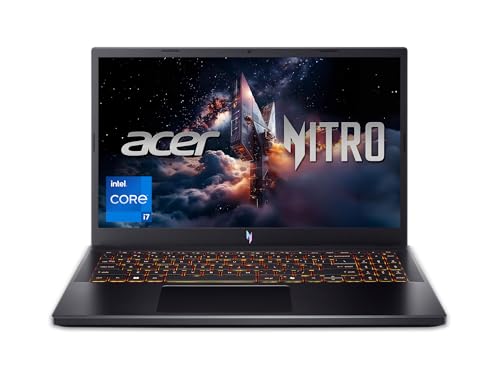
Acer Nitro V 15.6" Core i7 RTX 4050
Best for: 1080p gaming and multitasking
- Graphics Card
- NVIDIA GeForce RTX 4050
- Processor
- Intel Core i7-13620H
- Memory
- 16GB DDR5
- Storage Capacity
- 1TB PCIe Gen 4 SSD
- Screen Size
- 15.6"
- Refresh Rate
- 165Hz
View on Amazon: Acer Nitro V 15.6" Core i7 RTX 4050 Affiliate link
This Acer Nitro V 15.6 gaming laptop pairs an Intel Core i7-13620H processor with an NVIDIA GeForce RTX 4050 GPU. It features a 15.6-inch FHD display with a 165Hz refresh rate and 16GB of DDR5 memory. The system includes a 1TB PCIe Gen 4 SSD and Thunderbolt 4 support. It suits gamers who want solid 1080p performance with fast multitasking capabilities.
Pros
- Intel Core i7-13620H processor for heavy multitasking
- NVIDIA GeForce RTX 4050 with DLSS 3.5
- 15.6-inch FHD display with 165Hz refresh rate
- 16GB DDR5 memory expandable to 32GB
- Thunderbolt 4 port for data and video
Cons
- RTX 4050 GPU is less powerful than RTX 5060 options
- 15.6-inch screen is smaller than 16-inch alternatives
- 4.66-pound weight is heavier than ultrabooks
Good fit if
- You want strong 1080p gaming performance
- You need fast multitasking for editing
- You prefer a 15.6-inch display
Skip if
- You need the latest RTX 5060 graphics
- You want a larger 16-inch screen
- You prioritize ultra-lightweight portability
Verdict: Acer Nitro V 15.6 RTX 4050 delivers reliable 1080p gaming with its i7-13620H and RTX 4050 combo, making it a solid choice for players who do not need the latest RTX 5060 hardware or a larger screen.
Specifications side by side
| Spec | Acer Nitro V 16S 16-Inch RTX 5060 Gaming Laptop | Acer Nitro V 15.6" Core i7 RTX 4050 |
|---|---|---|
| Graphics Card | NVIDIA GeForce RTX 5060 Laptop GPU | NVIDIA GeForce RTX 4050 |
| Processor | AMD Ryzen 7 260 Processor | Intel Core i7-13620H |
| Memory | 32GB DDR5 | 16GB DDR5 |
| Storage Capacity | 1TB Gen 4 SSD | 1TB PCIe Gen 4 SSD |
| Screen Size | 16" | 15.6" |
| Refresh Rate | 180Hz | 165Hz |
| Display Resolution | 1920 x 1200 | FHD |
| Storage | not stated | 1TB SSD |
| Dimensions | 14.1 × 0.79 × 10.4 inches | 14.3 × 0.93 × 9.44 inches |
| Weight | 4.63 pounds | 4.66 pounds |
| Size | 32GB 1TB | 1TB PCIe SSD |
| Color | Black | Black |
| Model | ANV16S-41-R2AJ | ANV15-52-76NK |
Frequently asked questions
Is the Acer Nitro V 16S worth the upgrade over the 15.6 model?
The Acer Nitro V 16S is worth it if you prioritize screen real estate and raw graphical power. It features a larger 16-inch display and the newer RTX 5060 GPU, which offers superior ray tracing and DLSS 4 capabilities. You also get 32GB of RAM, which helps with heavy multitasking. The 15.6-inch model is better if you prefer a more compact form factor and do not need the latest graphics architecture.
Does the Acer Nitro V 16S have a better screen than the Nitro V 15.6?
The Acer Nitro V 16S provides a larger 16-inch viewing area compared to the 15.6-inch panel on the other model. While the 15.6-inch version explicitly lists a 165Hz refresh rate, the 16S is described as having a color-accurate screen suitable for high-refresh gaming. The larger size allows for better immersion in games and more workspace for productivity tasks without needing an external monitor.
Which laptop has more RAM for multitasking?
The Acer Nitro V 16S comes with 32GB of RAM, which is double the 16GB found in the Acer Nitro V 15.6. This extra memory allows you to run more applications simultaneously without slowing down. It is particularly useful for video editing, streaming, or running virtual machines. The 15.6-inch model is sufficient for standard gaming and general use but may bottleneck in heavier workloads.
Is the Acer Nitro V 16S heavier than the 15.6-inch version?
The two laptops have very similar weights, differing by only a few ounces. The Acer Nitro V 16S weighs 4.63 pounds, while the 15.6-inch model weighs 4.66 pounds. Both are relatively portable for gaming laptops, with thicknesses under one inch. The difference is negligible for daily transport, so you should choose based on performance needs rather than weight considerations.
Can I play modern games on the Acer Nitro V 15.6?
Yes, the Acer Nitro V 15.6 is designed for reliable 1080p gaming. It pairs an Intel Core i7 processor with an RTX 4050 graphics card. This combination handles most current titles at high settings. It is a solid choice if you do not require the absolute latest graphics technology or a larger screen. The 165Hz display also ensures smooth motion in fast-paced games.
What is the main difference between the RTX 5060 and RTX 4050?
The RTX 5060 in the 16S model uses the newer Blackwell architecture, delivering 572 AI TOPS. This enables advanced features like DLSS 4 and better ray tracing performance. The RTX 4050 in the 15.6-inch model is a capable previous-generation card but lacks these latest AI enhancements. The 5060 offers higher graphical fidelity and future-proofing for newer game titles.
Which model is better for content creation and streaming?
The Acer Nitro V 16S is the better choice for content creation due to its 32GB of RAM and larger 16-inch screen. The extra memory helps with rendering and running background applications like OBS. The color-accurate display also aids in video editing. The 15.6-inch model is adequate for light streaming but may struggle with heavy multitasking due to its 16GB RAM limit.