Acer Nitro V 16 RTX 5050 Gaming Laptop Review (2026): A Spec-Based Look
As an Amazon Associate we earn from qualifying purchases. Links on this page are affiliate links.
This acer nitro v 16 rtx 5050 gaming laptop review focuses on a balanced mid-range configuration. It pairs an Intel Core 7 240H processor with 32GB of DDR5 RAM. The display is a 16-inch WUXGA panel running at 165Hz. This combination targets users who need strong multitasking capabilities alongside solid 1080p gaming performance. The RTX 5050 GPU handles modern titles efficiently. You get a large screen and ample memory for productivity tasks. The specs suggest a reliable machine for both work and play. It delivers a clear visual experience with its high refresh rate. This setup is designed for efficiency and responsiveness in daily use.
What stands out
- 16-inch WUXGA display with 165Hz refresh rate and 400 nits brightness
- 32GB DDR5 RAM for smooth multitasking and heavy workloads
- Intel Core 7 240H deca-core processor with up to 5.20 GHz boost
- NVIDIA GeForce RTX 5050 with 8GB GDDR7 and DLSS 4 support
- 1TB PCIe NVMe SSD for fast storage and quick load times
Who it fits
Good fit for
This laptop suits gamers who play at 1080p or 1200p resolution. It is ideal for students or professionals who need 32GB of RAM for virtual machines or heavy editing. The 165Hz screen benefits competitive gamers who value smooth visuals. Users who prioritize processing power and memory capacity will find this configuration practical. It works well for those who want a single device for gaming and productivity without needing extreme hardware. The 1TB storage also helps those with large game libraries or project files.
Who should skip it
You should look elsewhere if you need a 4K display or high-end graphics. The RTX 5050 is an entry-level GPU and may struggle with ultra settings in demanding titles. If you require Thunderbolt 4 support, note that this model only lists USB-C 3.2. Users wanting a Ryzen processor should check other variations, as this specific model uses Intel Core. Those seeking a lighter, thinner device might find the 4.63-pound weight and 0.78-inch thickness too bulky for frequent travel. The 16:10 aspect ratio may not suit everyone who prefers traditional 16:9 screens.
Verdict: The Acer Nitro V 16 offers a solid mix of processing power and memory for its class. It is a practical choice for 1080p gaming and multitasking users.
Key specs explained
Intel Core 7 240H
This processor features ten cores with boost speeds up to 5.20 GHz. The high core count helps manage multitasking and background tasks efficiently. You will notice smoother performance when switching between applications or running heavy software. It serves as a solid foundation for gaming and productivity tasks that require sustained processing power without significant lag or stuttering during complex operations.
32GB DDR5 RAM
Thirty-two gigabytes of DDR5 memory provides ample space for modern gaming and creative work. This amount allows you to keep multiple browser tabs, communication apps, and games open simultaneously without slowing down the system. It future-proofs your laptop for upcoming software that demands more resources. You benefit from faster data access speeds compared to older DDR4 standards, ensuring smoother overall system responsiveness.
1TB PCIe NVMe SSD
This storage drive offers one terabyte of space for your games, files, and operating system. The PCIe NVMe interface ensures rapid data transfer rates, significantly reducing load times for games and large applications. You can store a substantial library of high-resolution games and media files without needing external drives. The speed contributes to quick boot times and fast file copying, enhancing your daily computing experience.
165Hz Refresh Rate
The display updates its image 165 times per second, which is faster than the standard 60Hz. This higher refresh rate makes motion appear smoother and more fluid, especially in fast-paced games. You will experience less motion blur and tearing during action sequences. It provides a more responsive feel when moving the mouse or navigating the interface, making it ideal for competitive gaming and general visual comfort.
NVIDIA GeForce RTX 5050
This graphics card features eight gigabytes of GDDR7 memory and supports DLSS 4 technology. It delivers the necessary graphical power for 1080p and 1200p gaming at high settings. The DLSS support helps maintain higher frame rates by intelligently upscaling lower-resolution images. You get better performance in demanding titles while managing heat and power consumption effectively. It is suitable for both gaming and light creative workloads like video editing.
Design and build overview
The Acer Nitro V 16 arrives in an Obsidian Black finish. According to the listing, the chassis measures 0.78 inches thick, 10.2 inches wide, and 14 inches long. It weighs 4.63 pounds. This thickness suggests a standard gaming profile rather than an ultrabook form factor. The dimensions indicate a substantial footprint that fits comfortably on most desks but requires dedicated space for port access. The weight is moderate for a 16-inch machine, balancing internal cooling components with portability needs. You can carry it, but it is not designed for constant travel.
The build prioritizes function over premium materials. The plastic construction keeps costs down while providing adequate durability for daily use. The 16-inch screen size with a 16:10 aspect ratio offers more vertical space for productivity tasks. This layout suits users who split time between gaming and work applications. The design does not feature exotic finishes or metal unibody elements. It relies on a straightforward, utilitarian aesthetic common in the mid-range segment. You get a reliable machine that focuses on performance specs rather than luxury feel. The physical dimensions ensure that cooling solutions can be integrated effectively without compromising the internal layout. This approach delivers a stable platform for sustained gaming sessions or heavy computational workloads.
Setup and everyday use
The laptop ships with Windows 11 preinstalled. You will not need to install an operating system before first use. The device connects to networks via Wi-Fi 6 and Bluetooth. This ensures stable wireless performance for streaming or peripheral pairing. Port selection includes one USB-C 3.2 and three USB-A 3.2 ports. You can connect multiple peripherals without needing a hub. The HDMI 2.1 output allows you to link an external monitor or TV. This is useful for expanding your workspace or sharing content. Audio input and output are handled by the built-in microphone and headphone jack. You can join calls or listen to media directly. The 16-inch WUXGA display offers a 16:10 aspect ratio. This provides extra vertical space for documents and code. The 165Hz refresh rate ensures smooth motion in games and general interface navigation. The anti-glare coating reduces reflections in bright environments. With 32GB of DDR5 RAM and a 1TB PCIe NVMe SSD, you have ample resources for multitasking. Large files load quickly, and you can keep many applications open simultaneously. The Intel Core 7 240H processor manages these tasks efficiently. Its ten cores handle background processes without slowing down your active work. This configuration supports a productive daily workflow for both gaming and professional tasks.
Ownership considerations and compatibility
Owning this laptop requires you to consider its portability and thermal needs. At 4.63 pounds, it is manageable for desk use but heavy for frequent travel. You should ensure your workspace has adequate ventilation, as gaming laptops generate significant heat during intensive tasks. The 16-inch screen with a 16:10 aspect ratio offers ample vertical space for productivity, making it suitable for both gaming and content creation. Since it runs on Windows 11, you will have access to the full Microsoft Store ecosystem. Check that your existing peripherals, such as USB-C docks or external monitors, are compatible with the available ports. This configuration sits alongside other mid-range options in our 1 product guide, offering a strong balance of memory and graphics power for its price tier. Regularly cleaning the vents will help maintain performance over time. You may also want to invest in a cooling pad if you plan to engage in long gaming sessions, as sustained high loads can impact component longevity.
Check before you buy
- Verify port compatibility for your existing peripherals and docks.
- Ensure your workspace allows for adequate airflow and ventilation.
- Check if the 4.63-pound weight fits your mobility needs.
- Confirm your external monitor supports the 165Hz refresh rate.
The product at a glance
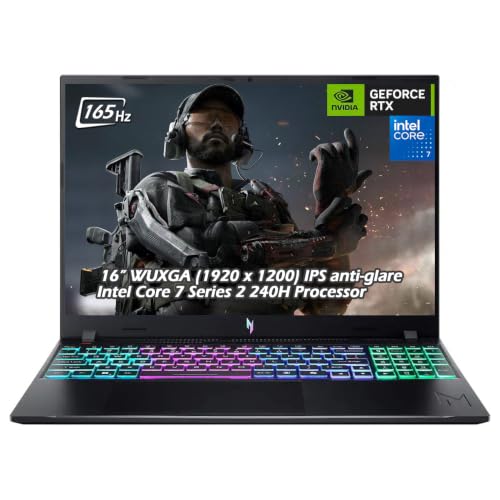
Acer Nitro V 16 RTX 5050 Gaming Laptop
Best for: 1080p gaming with high RAM capacity
- Graphics Card
- NVIDIA GeForce RTX 5050 Laptop GPU
- Processor
- Intel Core 7 240H
- Memory
- 32GB DDR5
- Storage Capacity
- 1TB SSD
- Screen Size
- 16"
- Refresh Rate
- 165Hz
View on Amazon: Acer Nitro V 16 RTX 5050 Gaming Laptop Affiliate link
The Acer Nitro V 16 pairs an Intel Core 7 240H processor with 32GB of DDR5 RAM and an NVIDIA GeForce RTX 5050 GPU. It features a 16-inch WUXGA display with a 165Hz refresh rate and 400 nits brightness. This configuration suits gamers who need high memory capacity and a fast refresh rate for smooth visuals in modern titles.
Pros
- 32GB DDR5 memory for heavy multitasking
- 165Hz refresh rate on 16-inch WUXGA screen
- RTX 5050 with DLSS 4 support
- 1TB PCIe NVMe SSD storage
Cons
- 4.63 pounds is heavier than many competitors
- WUXGA resolution on a 16-inch panel
- Wi-Fi 6 instead of newer Wi-Fi 6E
Good fit if
- You want 32GB of RAM preinstalled
- You prefer a 16:10 aspect ratio screen
- You play games that benefit from DLSS 4
Skip if
- You need 4K display resolution
- You require Wi-Fi 6E connectivity
- You prioritize a lightweight portable build
Verdict: Acer Nitro V 16 RTX 5050 offers solid 1080p gaming performance with ample memory. It fits players who value high refresh rates and large RAM capacity over portability or higher screen resolution.
Specifications side by side
| Spec | Acer Nitro V 16 RTX 5050 Gaming Laptop |
|---|---|
| Graphics Card | NVIDIA GeForce RTX 5050 Laptop GPU |
| Processor | Intel Core 7 240H |
| Memory | 32GB DDR5 |
| Storage Capacity | 1TB SSD |
| Screen Size | 16" |
| Refresh Rate | 165Hz |
| Display Resolution | 1920 x 1200 |
| Storage | 1TB SSD |
| Dimensions | 0.78 × 10.2 × 14 inches |
| Weight | 4.63 pounds |
| Color | Obsidian Black |
Frequently asked questions
Is the Acer Nitro V 16 good for 1080p gaming?
Yes, it is well-suited for 1080p gaming. The NVIDIA RTX 5050 graphics card handles modern titles at this resolution. You will benefit from the 165Hz refresh rate, which provides smoother visuals during fast-paced action. This setup prioritizes frame rate stability over ultra-high resolution rendering.
Does this laptop have enough RAM for multitasking?
It comes with 32GB of RAM, which is ample for heavy multitasking. You can run multiple applications, browser tabs, and games simultaneously without significant slowdowns. This high memory capacity ensures the system remains responsive even when background tasks are active alongside demanding software.
How powerful is the processor in this model?
The Intel Core 7 240H processor delivers strong performance. It features ten cores and can boost up to 5.20 GHz. This configuration helps manage complex workloads and background tasks efficiently. You will notice smoother performance when switching between heavy applications or running intensive software.
Is the storage capacity sufficient for most users?
Yes, it includes a 1TB SSD for storage. This provides ample space for your operating system, games, and large files. Solid-state drives offer faster load times compared to traditional hard drives. You will benefit from quick boot times and rapid access to your installed applications and media.
What is the screen size and refresh rate?
The laptop features a 16-inch display with a 165Hz refresh rate. This larger screen size offers more workspace and immersion for gaming. The high refresh rate ensures smoother motion and reduces visual tearing. You will enjoy a more fluid visual experience during fast-paced gaming sessions.
Is the Acer Nitro V 16 portable?
It weighs 4.63 pounds and measures 0.78 inches thick. This makes it manageable for desk use but heavy for frequent travel. You should consider this weight if you plan to carry it daily. It is better suited for stationary setups or occasional transport rather than constant commuting.