144Hz vs 120Hz Gaming Laptops in 2026: Key Differences
As an Amazon Associate we earn from qualifying purchases. Links on this page are affiliate links.
When choosing between a 144Hz vs 120Hz gaming laptop, you are balancing motion smoothness against display quality and portability. Both machines offer capable processing power for modern tasks. The main difference lies in the screen technology and refresh rate capabilities. One prioritizes fast, competitive gaming with a higher fixed rate, while the other offers a variable refresh rate for smoother everyday use and better battery efficiency. You need to decide which display behavior fits your workflow.
Key differences
| Aspect | MSI Cyborg 15 15.6" RTX 5060 Laptop | Dell XPS 14 3.2K OLED Touch Laptop |
|---|---|---|
| Refresh Rate | 144Hz | 48-120Hz variable |
| Graphics Card | NVIDIA GeForce RTX 5060 | Intel Arc Graphics |
| Processor | Intel Core 5-210H | Intel Core Ultra 7 255H |
| Memory | 16GB DDR5 | 32GB |
| Display Resolution | FHD | 3.2K OLED |
| Screen Size | 15.6” | 14.5-inch |
Which one should you choose?
Choose MSI Cyborg 15 15.6" RTX 5060 Laptop if
- You want a dedicated NVIDIA GPU for ray tracing and high frame rates in competitive shooters.
- You prefer a larger 15.6-inch screen for immersive gaming sessions.
- You need a fixed 144Hz refresh rate for consistent motion clarity.
Choose Dell XPS 14 3.2K OLED Touch Laptop if
- You value a high-resolution 3.2K OLED display for creative work and media consumption.
- You need more memory for multitasking and AI-enhanced workflows.
- You prioritize battery life through a variable refresh rate that lowers speed for static content.
Verdict: The MSI Cyborg 15 is the better choice for dedicated gaming due to its dedicated RTX graphics and higher fixed refresh rate. The Dell XPS 14 suits users who prioritize portability, display quality, and multitasking performance over raw gaming power. Your decision depends on whether you need a specialized gaming machine or a versatile premium laptop.
144Hz vs 120Hz Laptop Comparison
refresh rate
The MSI Cyborg 15 features a fixed 144Hz refresh rate on its 15.6-inch FHD display. This higher frame rate reduces motion blur, making fast-paced games feel more responsive and fluid. You get consistent high-speed updates for competitive titles. The Dell XPS 14 uses a variable refresh rate ranging from 48Hz to 120Hz on its 14.5-inch 3.2K OLED screen. This range allows the display to drop to 48Hz for static content, which saves battery life. While 120Hz is excellent, the MSI’s 144Hz provides a slight edge in pure gaming smoothness. The Dell’s variable rate is better for mixed media use.
graphics card
Gaming performance relies heavily on the GPU. The MSI Cyborg 15 includes a dedicated NVIDIA GeForce RTX 5060 graphics card. This discrete GPU handles ray tracing and DLSS 4, delivering high frame rates in demanding games. The Dell XPS 14 uses integrated Intel Arc Graphics. This shared memory solution is sufficient for light gaming and creative work but lacks the raw power for high-FPS gaming. If you plan to play modern AAA titles, the MSI’s dedicated graphics are essential. The Dell is better suited for casual play or productivity tasks where a dedicated GPU is not required.
display resolution
Image clarity differs significantly between these two laptops. The Dell XPS 14 boasts a 3.2K OLED display with a 14.5-inch screen. OLED technology offers deep blacks and vibrant colors, providing superior image quality for photos, videos, and creative work. The MSI Cyborg 15 has a standard FHD (1080p) IPS-level display on a larger 15.6-inch screen. While adequate for gaming, the pixel density is lower than the Dell’s 3.2K panel. For visual fidelity and sharpness, the Dell XPS 14 is the clear winner. The MSI prioritizes refresh rate over pixel count.
processor
Both laptops use modern Intel processors, but they target different needs. The Dell XPS 14 features an Intel Core Ultra 7 255H, designed for AI workloads and efficient multitasking. It includes a dedicated NPU for handling background tasks. The MSI Cyborg 15 uses an Intel Core 5-210H, which is a capable mid-range chip for gaming and general use. The Dell’s processor is more advanced in terms of architecture and AI integration. However, the MSI’s chip is optimized for gaming workloads alongside its dedicated GPU. For pure processing power and efficiency, the Dell takes the edge.
portability
Size and weight matter for mobility. The Dell XPS 14 is thinner at 0.71 inches and lighter at 3.79 pounds. Its 14.5-inch chassis is easy to carry in a bag for school or work. The MSI Cyborg 15 is thicker at 0.91 inches and heavier at 4.29 pounds. The 15.6-inch screen requires more space and adds bulk. If you need a laptop for daily commuting or travel, the Dell is more convenient. The MSI is better suited for a stationary setup or occasional transport where gaming performance outweighs portability.
memory and storage
Configuration options vary between the two models. The Dell XPS 14 comes with 32GB of memory and a 1TB SSD. This large amount of RAM supports heavy multitasking and professional applications, while the larger storage holds more files and games. The MSI Cyborg 15 has 16GB of DDR5 memory and a 512GB SSD. While DDR5 is fast, 16GB is standard for gaming. The Dell’s 32GB offers more headroom for future-proofing. For users who need more space and RAM for creative workflows, the Dell is superior. The MSI meets basic gaming needs.
Which Gaming Laptop Fits Your Needs
Competitive gamers seeking high frame rates
The MSI Cyborg 15 features a 144Hz refresh rate on its 15.6-inch FHD display. This higher frame rate reduces motion blur, making fast-paced games feel more responsive and fluid. You get consistent high-speed updates for competitive titles. The NVIDIA RTX 5060 graphics card further supports smooth gameplay at high settings, ensuring you do not miss critical visual cues during intense sessions.
Creators needing high-resolution OLED visuals
The Dell XPS 14 offers a stunning 3.2K OLED display with a variable 120Hz refresh rate. This combination delivers sharp, vibrant colors and smooth motion for creative work and media consumption. The OLED panel provides deep blacks and high contrast, enhancing visual fidelity for photo and video editing tasks, while the 120Hz rate ensures fluid scrolling and animations across all interfaces.
Users prioritizing portability and battery life
The Dell XPS 14 is significantly lighter at 3.79 pounds and thinner at 0.71 inches compared to the MSI. Its variable refresh rate improves battery life when viewing static content. The sleek aluminum design and lighter weight make it easier to carry for students or professionals who need a capable machine for travel without the bulk of a traditional gaming laptop.
Gamers wanting dedicated graphics performance
The MSI Cyborg 15 includes a dedicated NVIDIA GeForce RTX 5060 graphics card, which handles modern 3D titles and ray tracing effects much better than integrated solutions. This dedicated GPU ensures high frame rates in demanding games, whereas the Dell XPS 14 relies on Intel Arc Graphics, which is better suited for lighter gaming and creative applications rather than high-end gaming performance.
Quick picks
| # | Product | Best for | Price |
|---|---|---|---|
| 1 | MSI Cyborg 15 15.6" RTX 5060 Laptop | portable 144Hz gaming and mobility | Check price of MSI Cyborg 15 15.6" RTX 5060 Laptop on Amazon |
| 2 | Dell XPS 14 3.2K OLED Touch Laptop | portable content creation | Check price of Dell XPS 14 3.2K OLED Touch Laptop on Amazon |
The products compared
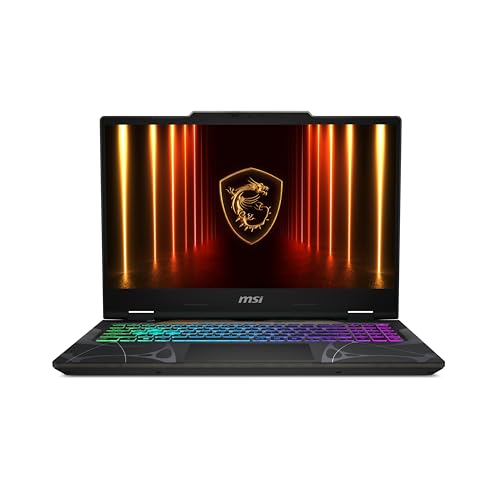
MSI Cyborg 15 15.6" RTX 5060 Laptop
Best for: portable 144Hz gaming and mobility
- Refresh Rate
- 144Hz (what this guide is about)
- Graphics Card
- NVIDIA GeForce RTX 5060
- Processor
- Intel Core 5-210H
- Memory
- 16GB DDR5
- Storage Capacity
- 512GB SSD
- Screen Size
- 15.6”
View on Amazon: MSI Cyborg 15 15.6" RTX 5060 Laptop Affiliate link
This 15.6-inch gaming laptop features a 144Hz FHD display, an Intel Core 5-210H processor, and an NVIDIA RTX 5060 graphics card. It includes 16GB of DDR5 memory and a 512GB SSD. The thin and light design weighs 4.29 pounds, making it portable for daily use. It suits gamers who want smooth visuals and decent performance without a bulky chassis.
Pros
- 144Hz FHD display for smooth motion
- RTX 5060 graphics for modern titles
- 16GB DDR5 memory for multitasking
- Lightweight 4.29-pound build for mobility
Cons
- 512GB SSD limits storage capacity
- FHD resolution is lower than WQXGA
- Intel Core 5 is entry-level performance
Good fit if
- You want a 144Hz refresh rate
- You need a lightweight gaming laptop
- You play competitive fast-action titles
Skip if
- You require a 120Hz display only
- You need high-resolution WQXGA screens
- You want maximum processing power
Verdict: MSI Cyborg 15 RTX 5060 144Hz is a solid option for gamers prioritizing a 144Hz screen and portability. It fits users who value smooth visuals and a lighter chassis over higher resolution or top-tier processing speed.
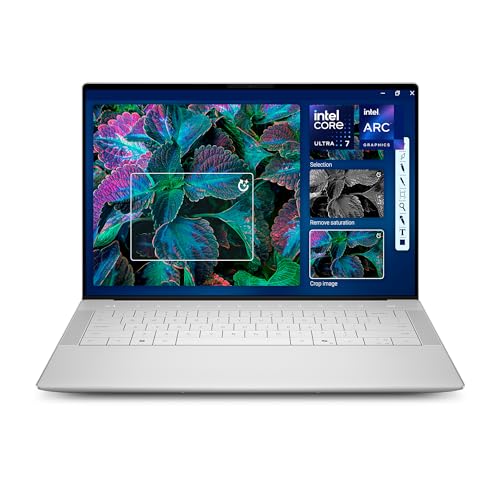
Dell XPS 14 3.2K OLED Touch Laptop
Best for: portable content creation
- Refresh Rate
- 120Hz (what this guide is about)
- Graphics Card
- Intel Arc Graphics
- Processor
- Intel Core Ultra 7 255H
- Memory
- 32GB
- Storage Capacity
- 1TB SSD
- Screen Size
- 14.5-inch
View on Amazon: Dell XPS 14 3.2K OLED Touch Laptop Affiliate link
This Dell XPS 14 features a 14.5-inch 3.2K OLED display with a variable 48-120Hz refresh rate. It uses an Intel Core Ultra 7 255H processor and 32GB of RAM. The machine weighs 3.79 pounds and includes a 1TB SSD. The 120Hz mode supports smoother motion for gaming or video. It suits users who prioritize screen quality and portability over high-end discrete graphics.
Pros
- 14.5-inch 3.2K OLED display
- Variable 48-120Hz refresh rate
- Intel Core Ultra 7 255H processor
- 32GB system memory
- 1TB SSD storage
Cons
- Integrated Intel Arc Graphics limits heavy gaming
- 120Hz refresh rate is lower than 144Hz competitors
- No dedicated GPU for advanced rendering
Good fit if
- You want a high-resolution OLED screen
- You need 32GB RAM for multitasking
- You prefer a lightweight portable design
Skip if
- You require a 144Hz display
- You need discrete graphics for gaming
- You want a budget-friendly option
Verdict: Dell XPS 14 OLED 120Hz is ideal for creators who need color accuracy and portability. It fits users who value display quality over raw gaming performance.
Specifications side by side
| Spec | MSI Cyborg 15 15.6" RTX 5060 Laptop | Dell XPS 14 3.2K OLED Touch Laptop |
|---|---|---|
| Graphics Card | NVIDIA GeForce RTX 5060 | Intel Arc Graphics |
| Processor | Intel Core 5-210H | Intel Core Ultra 7 255H |
| Memory | 16GB DDR5 | 32GB |
| Storage Capacity | 512GB SSD | 1TB SSD |
| Screen Size | 15.6” | 14.5-inch |
| Refresh Rate | 144Hz | 48-120Hz |
| Display Resolution | FHD | 3.2K |
| Storage | 512GB SSD | 1TB SSD |
| Dimensions | 14.2 × 0.91 × 9.66 inches | 8.5 × 12.6 × 0.71 inches |
| Weight | 4.29 pounds | 3.79 pounds |
| Size | Core 5-210H | XPS14|32GB|1TB |
| Color | Black | Platinum |
| Model | CYBORG15B2295 | LDA14250-7667SLV-PUS |
Frequently asked questions
Is 144Hz worth it over 120Hz for gaming?
Yes, if you play fast-paced competitive titles. The MSI Cyborg 15 offers a 144Hz refresh rate on its 15.6-inch display. This higher frame rate reduces motion blur and makes shooting games feel more responsive. You get smoother visuals during rapid movements compared to a 120Hz screen.
Can I use a 120Hz laptop for gaming?
Yes, but the experience differs from high-refresh models. The Dell XPS 14 features a 120Hz OLED touch display. It prioritizes color accuracy and visual fidelity over raw speed. It suits creators who value display quality more than the ultra-smooth motion required for competitive esports.
Which laptop has a better screen for mobility?
The Dell XPS 14 is lighter and thinner. It weighs 3.79 pounds and measures 0.71 inches thick. The MSI Cyborg 15 is heavier at 4.29 pounds and 0.91 inches thick. If you carry your device often, the XPS 14 offers better portability despite its lower refresh rate.
Does 144Hz require a powerful graphics card?
To fully utilize 144Hz, your GPU must output high frame rates. The MSI Cyborg 15 includes an RTX 5060 graphics card. This hardware helps drive the 144Hz refresh rate in supported games. Without sufficient GPU power, the screen may not reach its maximum smoothness potential.
Is OLED better than standard LCD for gaming?
OLED provides superior contrast and color accuracy. The Dell XPS 14 uses a 3.2K OLED panel. This enhances visual detail for content creation and single-player games. However, it runs at 120Hz. The MSI Cyborg 15 uses a standard display at 144Hz, favoring speed over color depth.
How much storage do these laptops have?
Storage capacity affects how many games you can install. The Dell XPS 14 includes a 1TB SSD. The MSI Cyborg 15 comes with a 512GB SSD. Both use solid-state drives for fast load times. You may need external storage for the Cyborg if you have a large library.